The mod has been updated - it hopefully should address the CTDs from those experiencing them. Still no solution for His Majesty because LSLib needs Version 7 support.
Just accept that His Majesty is a floating, talking cat head.
It's the Forgotten Realms!
Hi, I love this mod. This and white wyll mod just got me into modding. I’ve experimented with a few things in the past week and I thought my learning may help here. Especially if you want to prevent issues like headless cats and make a mod thats easy to manage with more and more patches incoming. For example if Larian, adds new characters your merged.lsf override will currently break them.
LSF files in the same file path after SharedDev, Shared, GustavDev, Gustav all merge together into one before the game is loaded. E.g.
Public / SharedDev /Content/[PAK]Character_visual/merged.lsf
Public / Shared /Content/[PAK]Character_visual merged.lsf
Public / GustavDev /Content/ [PAK]Character_visual /merged.lsf
Public / Gustav /Content/[PAK]Character_visual /merged.lsf
Public / yourmodname /Content/[PAK]Character_visual /merged.lsf.
Renaming your merged.lsf to random.lsf still works.
Multiple .lsf files can be dropped in the same Public/yourmodname/ folder and have the same effect as dropping Gustav/../merged.lsf and GustavDev /../merged.lsf separately.
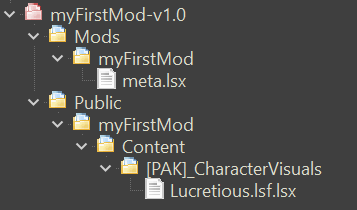
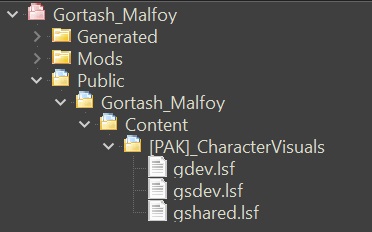
Your mod’s LSF file does NOT need to contain everything from the original file if you use this file convention:
This way you can avoid issues like headless cats! being changed in a new patch. And your mod size will be tiny because your .LSF file will only contain the code for the character you changed only. E.g. I have only included Wyll’s variables so instead of a 100000+ lines, I have 2500.
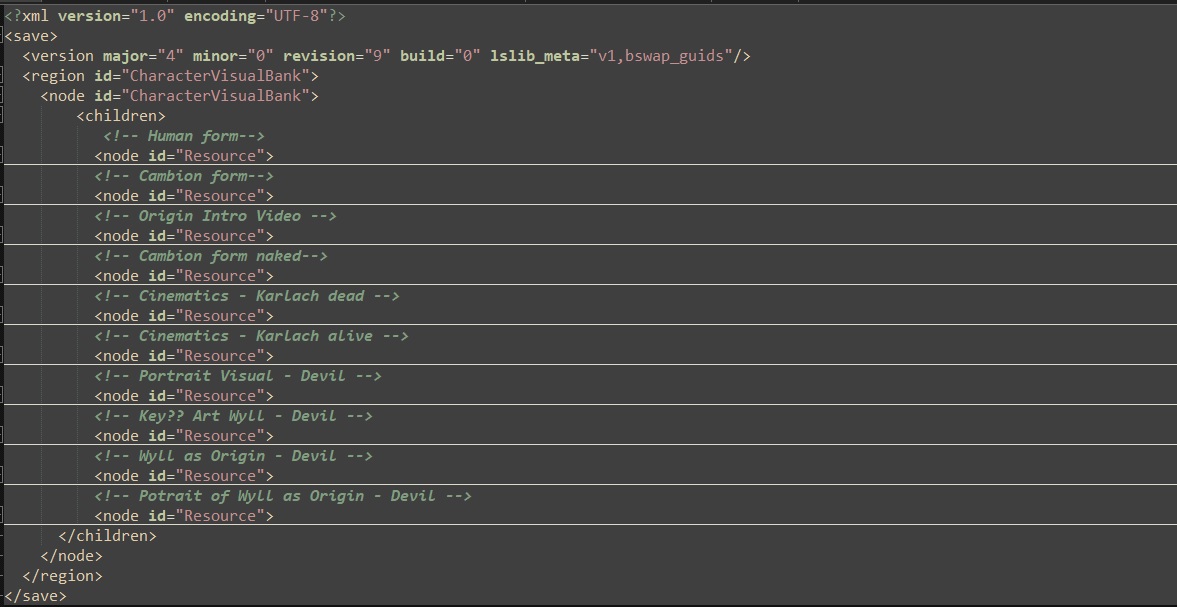
Note: EVERYTHING between a <node=”Resource”> and </node> has to be included otherwise if you change eye colour in the Resource and leave out the rest. You’ll just have floating eyes.
It's best to use the LSV from the latest PatchXHotfixY.pak file instead of the one from Gustav.pak or Shared.pak when you first build your mod.
Finally, you can pack your mod into a handy little zip file using bg3-modders-multitool, and we can easily import stuff into BG3 manager. This way we can decide which mod gets priority if two mods have some clashing character Resources.
I’m making a little R tool that lets you quickly find a character from all four [PAK]Character_visual /merged.lsf in one go using the latest patch and export the file. I’ll post a noob friendly non command line version once it’s done.
@rusty_shackleford Do we have a modding tutorial section? I'd like to leave this there for reference.
Last edited by orinEsque on April 4th, 2024, 22:26, edited 17 times in total.
Victors clap when others succeed; Losers feel every spotlight as a personal bleed.
The mod has been updated - it hopefully should address the CTDs from those experiencing them. Still no solution for His Majesty because LSLib needs Version 7 support.
Just accept that His Majesty is a floating, talking cat head.
It's the Forgotten Realms!
Hi, I love this mod. This and white wyll mod just got me into modding. I’ve experimented with a few things in the past week and I thought my learning may help here. Especially if you want to prevent issues like headless cats and make a mod thats easy to manage with more and more patches incoming. For example if Larian, adds new characters your merged.lsf override will currently break them.
LSF files in the same file path after SharedDev, Shared, GustavDev, Gustav all merge together into one before the game is loaded. E.g.
Public / SharedDev /Content/[PAK]Character_visual/merged.lsf
Public / Shared /Content/[PAK]Character_visual merged.lsf
Public / GustavDev /Content/ [PAK]Character_visual /merged.lsf
Public / Gustav /Content/[PAK]Character_visual /merged.lsf
Public / yourmodname /Content/[PAK]Character_visual /merged.lsf.
All the LSF files from above get merged into one big xml file. With yourmodname/merged.lsf getting priority.
Renaming your merged.lsf to random.lsf still works.
Multiple .lsf files can be dropped in the same Public/yourmodname/ folder and have the same effect as dropping Gustav/../merged.lsf and GustavDev /../merged.lsf separately. E.g.
Your mod’s LSF file does NOT need to contain everything from the original file if you use this file convention:
This way you can avoid issues like headless cats! being changed in a new patch. And your mod size will be tiny because your .LSF file will only contain the code for the character you changed only. E.g. I have only included Wyll’s variables so instead of a 100000+ lines, I have 2500.
Note: EVERYTHING between a <node=”Resource”> and </node> has to be included otherwise if you change eye colour in the Resource and leave out the rest. You’ll just have floating eyes.
It's best to use the LSV from the latest PatchXHotfixY.pak file instead of the one from Gustav.pak or Shared.pak when you first build your mod.
Finally, you can pack your mod into a handy little zip file using bg3-modders-multitool, and we can easily import stuff into BG3 manager. This way we can decide which mod gets priority if two mods have some clashing character Resources.
I’m making a little R tool that lets you quickly find a character from all four [PAK]Character_visual /merged.lsf in one go using the latest patch and export the file. I’ll post a noob friendly non command line version once it’s done.
@rusty_shackleford Do we have a modding tutorial section? I'd like to leave this there for reference.
This is awesome! Thank you so much!
Last edited by SniperChris on October 18th, 2023, 20:11, edited 1 time in total.
The mod has been updated - it hopefully should address the CTDs from those experiencing them. Still no solution for His Majesty because LSLib needs Version 7 support.
Just accept that His Majesty is a floating, talking cat head.
It's the Forgotten Realms!
Hi, I love this mod. This and white wyll mod just got me into modding. I’ve experimented with a few things in the past week and I thought my learning may help here. Especially if you want to prevent issues like headless cats and make a mod thats easy to manage with more and more patches incoming. For example if Larian, adds new characters your merged.lsf override will currently break them.
LSF files in the same file path after SharedDev, Shared, GustavDev, Gustav all merge together into one before the game is loaded. E.g.
Public / SharedDev /Content/[PAK]Character_visual/merged.lsf
Public / Shared /Content/[PAK]Character_visual merged.lsf
Public / GustavDev /Content/ [PAK]Character_visual /merged.lsf
Public / Gustav /Content/[PAK]Character_visual /merged.lsf
Public / yourmodname /Content/[PAK]Character_visual /merged.lsf.
All the LSF files from above get merged into one big xml file. With yourmodname/merged.lsf getting priority.
Renaming your merged.lsf to random.lsf still works.
Multiple .lsf files can be dropped in the same Public/yourmodname/ folder and have the same effect as dropping Gustav/../merged.lsf and GustavDev /../merged.lsf separately. E.g.
Your mod’s LSF file does NOT need to contain everything from the original file if you use this file convention:
This way you can avoid issues like headless cats! being changed in a new patch. And your mod size will be tiny because your .LSF file will only contain the code for the character you changed only. E.g. I have only included Wyll’s variables so instead of a 100000+ lines, I have 2500.
Note: EVERYTHING between a <node=”Resource”> and </node> has to be included otherwise if you change eye colour in the Resource and leave out the rest. You’ll just have floating eyes.
It's best to use the LSV from the latest PatchXHotfixY.pak file instead of the one from Gustav.pak or Shared.pak when you first build your mod.
Finally, you can pack your mod into a handy little zip file using bg3-modders-multitool, and we can easily import stuff into BG3 manager. This way we can decide which mod gets priority if two mods have some clashing character Resources.
I’m making a little R tool that lets you quickly find a character from all four [PAK]Character_visual /merged.lsf in one go using the latest patch and export the file. I’ll post a noob friendly non command line version once it’s done.
@rusty_shackleford Do we have a modding tutorial section? I'd like to leave this there for reference.
This is awesome! Thank you so much!
I assume you'll be updating your mod to this method in the near future?
You may as well not bother replying to my posts if it's to argue anything except concrete facts or your personal opinion. I still probably won't see it.
Reject your retarded-wing political programming and learn to think.
If you can.
Hi, I love this mod. This and white wyll mod just got me into modding. I’ve experimented with a few things in the past week and I thought my learning may help here. Especially if you want to prevent issues like headless cats and make a mod thats easy to manage with more and more patches incoming. For example if Larian, adds new characters your merged.lsf override will currently break them.
LSF files in the same file path after SharedDev, Shared, GustavDev, Gustav all merge together into one before the game is loaded. E.g.
Public / SharedDev /Content/[PAK]Character_visual/merged.lsf
Public / Shared /Content/[PAK]Character_visual merged.lsf
Public / GustavDev /Content/ [PAK]Character_visual /merged.lsf
Public / Gustav /Content/[PAK]Character_visual /merged.lsf
Public / yourmodname /Content/[PAK]Character_visual /merged.lsf.
All the LSF files from above get merged into one big xml file. With yourmodname/merged.lsf getting priority.
Renaming your merged.lsf to random.lsf still works.
Multiple .lsf files can be dropped in the same Public/yourmodname/ folder and have the same effect as dropping Gustav/../merged.lsf and GustavDev /../merged.lsf separately. E.g.
Your mod’s LSF file does NOT need to contain everything from the original file if you use this file convention:
This way you can avoid issues like headless cats! being changed in a new patch. And your mod size will be tiny because your .LSF file will only contain the code for the character you changed only. E.g. I have only included Wyll’s variables so instead of a 100000+ lines, I have 2500.
Note: EVERYTHING between a <node=”Resource”> and </node> has to be included otherwise if you change eye colour in the Resource and leave out the rest. You’ll just have floating eyes.
It's best to use the LSV from the latest PatchXHotfixY.pak file instead of the one from Gustav.pak or Shared.pak when you first build your mod.
Finally, you can pack your mod into a handy little zip file using bg3-modders-multitool, and we can easily import stuff into BG3 manager. This way we can decide which mod gets priority if two mods have some clashing character Resources.
I’m making a little R tool that lets you quickly find a character from all four [PAK]Character_visual /merged.lsf in one go using the latest patch and export the file. I’ll post a noob friendly non command line version once it’s done.
@rusty_shackleford Do we have a modding tutorial section? I'd like to leave this there for reference.
This is awesome! Thank you so much!
I assume you'll be updating your mod to this method in the near future?
I’m going to be busy over the next few days, so it’s unlikely. I also never kept a list of all of the NPCs I changed, so it would be a crapshoot. I’ve been hoping Larian releases modding tools like they said they would!
Last edited by SniperChris on October 19th, 2023, 20:51, edited 1 time in total.
Yep, had to remove the overwriting version altogether - which basically meant reinstalling. All good now, except I am left with extremely nasty cats again. Ah well. Hopefully someone that identifies as a cat cries out in outrage of cats in this game being so ugly, and Larian developers rushing to fix the problem lest they be accused of cat-transphobia or some such... ;-)
I gotta concur with Orin. @SniperChris please save yourself some pain and turn this mod into a pak file, brother. It'll pretty much future-proof the mod forever and it's easier to update as you only need the NPCs that you're updating in your lsx file.
Last edited by loregamer on March 10th, 2024, 08:37, edited 3 times in total.
I gotta concur with Orin. @SniperChris please save yourself some pain and turn this mod into a pak file, brother. It'll pretty much future-proof the mod forever and it's easier to update as you only need the NPCs that you're updating in your lsx file.
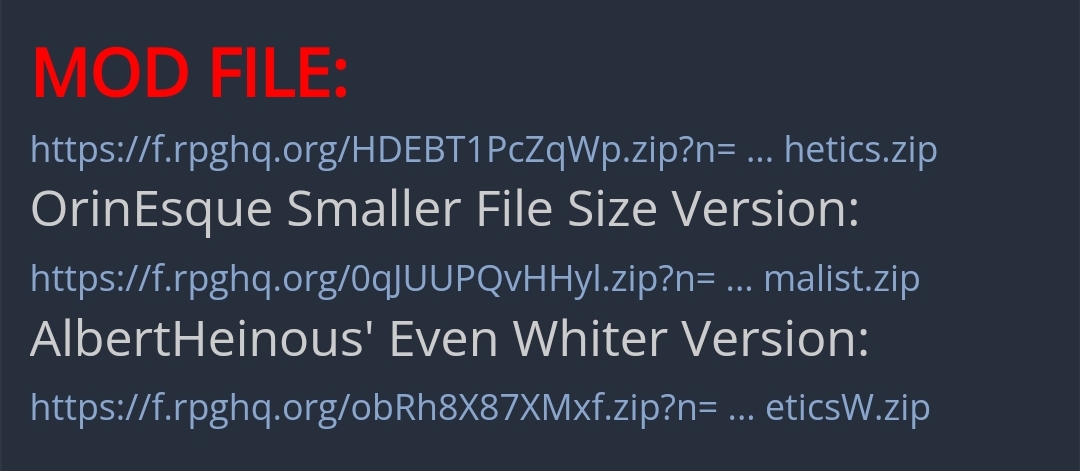
No, @loregamer not you, you can't be so stupid to not see this in the description:
No, @loregamer not you, you can't be so stupid to not see this in the description:
I think the problem is that Orin's version is called the "Smaller File" version when it's really the... working version?
I guess y'all know how I feel about improper file handling haha. I think what I'd do in Chris's shoes is pack the mod or just work off of Orin's fixed version if he wants to work on it in the future. Mods become super easy to maintain and add to when you pack em up.
Last edited by loregamer on March 10th, 2024, 09:29, edited 3 times in total.