


@Greybeard
Hmm, You may need to install script extender:
https://github.com/Norbyte/bg3se/releas ... r-20231028
We have a Steam curator now. You should be following it. https://store.steampowered.com/curator/44994899-RPGHQ/
Alternate Wyll Revamped 2.4 — Baldur's Gate 3
Looking for the download?
This mod's files are on ModHQ.
Go to mod page
Moderator: Mod Janitor
-
orinEsque

- Posts: 4918
- Joined: Oct 9, '23
- Location: Dubai
- Gender: Potato
-
Geolocation
Last edited by orinEsque on December 2nd, 2023, 04:44, edited 1 time in total.
Victors clap when others succeed; Losers feel every spotlight as a personal bleed.
-
Greybeard

- Posts: 27
- Joined: Dec 2, '23
-
Geolocation
Ah okay, does it work with GOG version too??orinEsque wrote: ↑ December 2nd, 2023, 04:43@Greybeard
Hmm, You may need to install script extender:
https://github.com/Norbyte/bg3se/releas ... r-20231028
-
Cretin

- Posts: 36
- Joined: Sep 18, '23
-
Geolocation
I tried with script extender, with your version of BBA with alberts version, different priorities, no change. Wyll has the different face but his skin tone is dark still and he still has ****** hair cut
-
orinEsque
- Posts: 4918
- Joined: Oct 9, '23
- Location: Dubai
- Gender: Potato
-
Geolocation
I'll test it out just a moment, maybe patch 5 broke it.Cretin wrote: ↑ December 2nd, 2023, 04:58I tried with script extender, with your version of BBA with alberts version, different priorities, no change. Wyll has the different face but his skin tone is dark still and he still has ****** hair cut
Victors clap when others succeed; Losers feel every spotlight as a personal bleed.
-
Greybeard
- Posts: 27
- Joined: Dec 2, '23
-
Geolocation
This must be some kind of curse and black Wyll is forced upon us like a plague!!Cretin wrote: ↑ December 2nd, 2023, 04:58I tried with script extender, with your version of BBA with alberts version, different priorities, no change. Wyll has the different face but his skin tone is dark still and he still has ****** hair cut

-
orinEsque
- Posts: 4918
- Joined: Oct 9, '23
- Location: Dubai
- Gender: Potato
-
Geolocation
Have you reinstalled script extender? (They recommend overwriting it after each big patch).Cretin wrote: ↑ December 2nd, 2023, 04:58I tried with script extender, with your version of BBA with alberts version, different priorities, no change. Wyll has the different face but his skin tone is dark still and he still has ****** hair cut
Working fine for me. At what point are you, ingame?
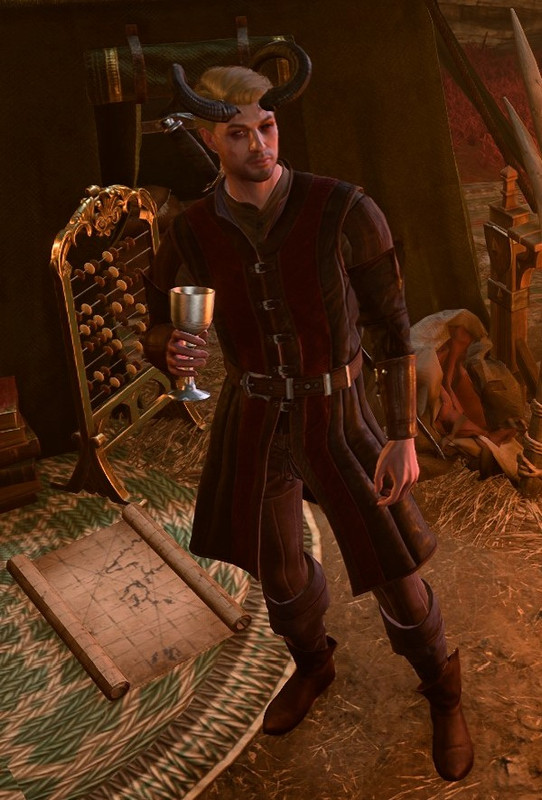
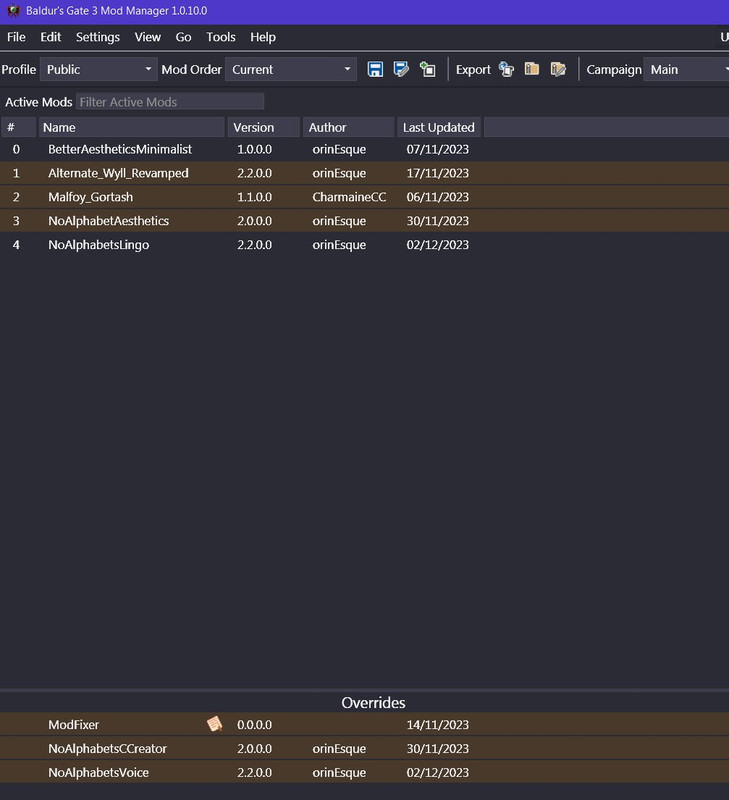
This is my load order. Maybe you need Mod Fixer?
Victors clap when others succeed; Losers feel every spotlight as a personal bleed.
-
Cretin
- Posts: 36
- Joined: Sep 18, '23
-
Geolocation
Just installed script extender after your most recent comment so its definitely up to dateorinEsque wrote: ↑ December 2nd, 2023, 05:07Have you reinstalled script extender? (They recommend overwriting it after each big patch).Cretin wrote: ↑ December 2nd, 2023, 04:58I tried with script extender, with your version of BBA with alberts version, different priorities, no change. Wyll has the different face but his skin tone is dark still and he still has ****** hair cut
Working fine for me. At what point are you, ingame?
This is my load order. Maybe you need Mod Fixer?
Ingame I'm just in chargen.
I will try with mod fixer now
-
Cretin
- Posts: 36
- Joined: Sep 18, '23
-
Geolocation
nope, even with modfixer it doesnt work
I'm on GOG version fwiw
I'm on GOG version fwiw
Last edited by Cretin on December 2nd, 2023, 05:15, edited 1 time in total.
-
orinEsque
- Posts: 4918
- Joined: Oct 9, '23
- Location: Dubai
- Gender: Potato
-
Geolocation
Hmm Its working for me on character select, non devil wyll and devil wyll. I'm on steam version. I'm not sure what the difference between the two is.Cretin wrote: ↑ December 2nd, 2023, 05:14nope, even with modfixer it doesnt work
I'm on GOG version fwiw
Victors clap when others succeed; Losers feel every spotlight as a personal bleed.
-
orinEsque
- Posts: 4918
- Joined: Oct 9, '23
- Location: Dubai
- Gender: Potato
-
Geolocation
There seem to be differences in folder locations for GOG and steam versions. Could you have a look to make sure the .pak are in the right place, and bg3 manager is pointed to the correct bg3.exe location?Cretin wrote: ↑ December 2nd, 2023, 05:14nope, even with modfixer it doesnt work
I'm on GOG version fwiw
Last edited by orinEsque on December 2nd, 2023, 05:24, edited 1 time in total.
Victors clap when others succeed; Losers feel every spotlight as a personal bleed.
-
orinEsque
- Posts: 4918
- Joined: Oct 9, '23
- Location: Dubai
- Gender: Potato
-
Geolocation
Right so there IS a path issue. I believe in steam our game profiles (in windows) are in
%LOCALAPPDATA%\Larian Studios\Baldur's Gate 3\PlayerProfiles\Public
In GOG this is in Documents\Larian Studios\Baldur's Gate 3
In bg3 mod manager, go to Settings > Preferences > AppData path override >
In that box paste in the path to your My Documents\Larian Studios\Baldur's Gate 3 etc. Make sure it actually exists there.
You probably didn't need Mod Fixer of Script Extender. But oh well.
%LOCALAPPDATA%\Larian Studios\Baldur's Gate 3\PlayerProfiles\Public
In GOG this is in Documents\Larian Studios\Baldur's Gate 3
In bg3 mod manager, go to Settings > Preferences > AppData path override >
In that box paste in the path to your My Documents\Larian Studios\Baldur's Gate 3 etc. Make sure it actually exists there.
You probably didn't need Mod Fixer of Script Extender. But oh well.
Last edited by orinEsque on December 2nd, 2023, 05:47, edited 1 time in total.
Victors clap when others succeed; Losers feel every spotlight as a personal bleed.
-
Cretin
- Posts: 36
- Joined: Sep 18, '23
-
Geolocation
yeah still not working. can you check your chargen screen on a new game?
-
Greybeard
- Posts: 27
- Joined: Dec 2, '23
-
Geolocation
Yeah, not working... Script extender and Wyll, nothing else modded... Shows only portrait but the man himself is still black. Tried some other mods too (no alpha and Better Aest) without Wyll, they work. So! There is something rotten in that dude right now or my name is not Greybeard (tm)
-
Cretin
- Posts: 36
- Joined: Sep 18, '23
-
Geolocation
btw just for clarity, my files are in the appdata same as a steam version. Gog didnt make any folders in documents.
Even so, adding the appdata override did not change anything. I installed removed all mods from the bg3 mods folder and instead manually imported them one by one in mod manager. This too, did not make any functional difference. Wyll in chargen still has the different face and portrait, but is dark skinned with nog hair.
Even so, adding the appdata override did not change anything. I installed removed all mods from the bg3 mods folder and instead manually imported them one by one in mod manager. This too, did not make any functional difference. Wyll in chargen still has the different face and portrait, but is dark skinned with nog hair.
-
Greybeard
- Posts: 27
- Joined: Dec 2, '23
-
Geolocation
Same here in my game. Game uses appdata as it should be i think.Cretin wrote: ↑ December 2nd, 2023, 07:13btw just for clarity, my files are in the appdata same as a steam version. Gog didnt make any folders in documents.
Even so, adding the appdata override did not change anything. I installed removed all mods from the bg3 mods folder and instead manually imported them one by one in mod manager. This too, did not make any functional difference. Wyll in chargen still has the different face and portrait, but is dark skinned with nog hair.
-
orinEsque
- Posts: 4918
- Joined: Oct 9, '23
- Location: Dubai
- Gender: Potato
-
Geolocation
Greybeard wrote: ↑ December 2nd, 2023, 08:05Same here in my game. Game uses appdata as it should be i think.Cretin wrote: ↑ December 2nd, 2023, 07:13btw just for clarity, my files are in the appdata same as a steam version. Gog didnt make any folders in documents.
Even so, adding the appdata override did not change anything. I installed removed all mods from the bg3 mods folder and instead manually imported them one by one in mod manager. This too, did not make any functional difference. Wyll in chargen still has the different face and portrait, but is dark skinned with nog hair.
Could you screenshot your AppData\Local\Larian Studios\Baldur's Gate 3\PlayerProfiles\Public\modsettings.lsxCretin wrote: ↑ December 2nd, 2023, 07:13btw just for clarity, my files are in the appdata same as a steam version. Gog didnt make any folders in documents.
Even so, adding the appdata override did not change anything. I installed removed all mods from the bg3 mods folder and instead manually imported them one by one in mod manager. This too, did not make any functional difference. Wyll in chargen still has the different face and portrait, but is dark skinned with nog hair.
Victors clap when others succeed; Losers feel every spotlight as a personal bleed.
-
Greybeard
- Posts: 27
- Joined: Dec 2, '23
-
Geolocation
orinEsque wrote: ↑ December 2nd, 2023, 14:42Greybeard wrote: ↑ December 2nd, 2023, 08:05Same here in my game. Game uses appdata as it should be i think.Cretin wrote: ↑ December 2nd, 2023, 07:13btw just for clarity, my files are in the appdata same as a steam version. Gog didnt make any folders in documents.
Even so, adding the appdata override did not change anything. I installed removed all mods from the bg3 mods folder and instead manually imported them one by one in mod manager. This too, did not make any functional difference. Wyll in chargen still has the different face and portrait, but is dark skinned with nog hair.Could you screenshot your AppData\Local\Larian Studios\Baldur's Gate 3\PlayerProfiles\Public\modsettings.lsxCretin wrote: ↑ December 2nd, 2023, 07:13btw just for clarity, my files are in the appdata same as a steam version. Gog didnt make any folders in documents.
Even so, adding the appdata override did not change anything. I installed removed all mods from the bg3 mods folder and instead manually imported them one by one in mod manager. This too, did not make any functional difference. Wyll in chargen still has the different face and portrait, but is dark skinned with nog hair.
This is my modsettings.lsx
<?xml version="1.0" encoding="UTF-8"?>
<save>
<version major="4" minor="5" revision="0" build="0"/>
<region id="ModuleSettings">
<node id="root">
<children>
<node id="ModOrder"/>
<node id="Mods">
<children>
<node id="ModuleShortDesc">
<attribute id="Folder" type="LSString" value="GustavDev"/>
<attribute id="MD5" type="LSString" value=""/>
<attribute id="Name" type="LSString" value="GustavDev"/>
<attribute id="UUID" type="FixedString" value="28ac9ce2-2aba-8cda-b3b5-6e922f71b6b8"/>
<attribute id="Version64" type="int64" value="36028797018963968"/>
</node>
</children>
</node>
</children>
</node>
</region>
</save>
-
orinEsque
- Posts: 4918
- Joined: Oct 9, '23
- Location: Dubai
- Gender: Potato
-
Geolocation
There's your problem, you need to manually edit this file or have a mod manager do it correctly (Remember to EXPORT mod order in bg3 mod manager). Here's how it should look like if you ONLY have Wyll revamped installed. The node for mod UUID is added After GustavDev for both ModOrder and ModuleShortDesc. FYI: You can find mod UUID inside the zip file of each mod. It's a file called info.jsonGreybeard wrote: ↑ December 2nd, 2023, 15:08orinEsque wrote: ↑ December 2nd, 2023, 14:42Greybeard wrote: ↑ December 2nd, 2023, 08:05
Same here in my game. Game uses appdata as it should be i think.Could you screenshot your AppData\Local\Larian Studios\Baldur's Gate 3\PlayerProfiles\Public\modsettings.lsxCretin wrote: ↑ December 2nd, 2023, 07:13btw just for clarity, my files are in the appdata same as a steam version. Gog didnt make any folders in documents.
Even so, adding the appdata override did not change anything. I installed removed all mods from the bg3 mods folder and instead manually imported them one by one in mod manager. This too, did not make any functional difference. Wyll in chargen still has the different face and portrait, but is dark skinned with nog hair.
This is my modsettings.lsx
<?xml version="1.0" encoding="UTF-8"?>
<save>
<version major="4" minor="5" revision="0" build="0"/>
<region id="ModuleSettings">
<node id="root">
<children>
<node id="ModOrder"/>
<node id="Mods">
<children>
<node id="ModuleShortDesc">
<attribute id="Folder" type="LSString" value="GustavDev"/>
<attribute id="MD5" type="LSString" value=""/>
<attribute id="Name" type="LSString" value="GustavDev"/>
<attribute id="UUID" type="FixedString" value="28ac9ce2-2aba-8cda-b3b5-6e922f71b6b8"/>
<attribute id="Version64" type="int64" value="36028797018963968"/>
</node>
</children>
</node>
</children>
</node>
</region>
</save>
► Show Spoiler
Last edited by orinEsque on December 2nd, 2023, 15:20, edited 2 times in total.
Victors clap when others succeed; Losers feel every spotlight as a personal bleed.
-
Greybeard
- Posts: 27
- Joined: Dec 2, '23
-
Geolocation
Yeah, i tried it earlier with mod manager,, exported and so on... it did not work...
-
orinEsque
- Posts: 4918
- Joined: Oct 9, '23
- Location: Dubai
- Gender: Potato
-
Geolocation
Might be a bg3mod manager compatibility issue with GOG. Try editing that manually.Greybeard wrote: ↑ December 2nd, 2023, 15:20Yeah, i tried it earlier with mod manager,, exported and so on... it did not work...
Last edited by orinEsque on December 2nd, 2023, 15:21, edited 1 time in total.
Victors clap when others succeed; Losers feel every spotlight as a personal bleed.
-
Greybeard
- Posts: 27
- Joined: Dec 2, '23
-
Geolocation
But hey! At the moment i'm too drunk to care and one mod not working does not destroy my world! Thanks for your help.
-
orinEsque
- Posts: 4918
- Joined: Oct 9, '23
- Location: Dubai
- Gender: Potato
-
Geolocation
Unfortunately you'll encounter similar issues with NoAlphabets if your mod order isn't working right.Greybeard wrote: ↑ December 2nd, 2023, 15:22But hey! At the moment i'm too drunk to care and one mod not working does not destroy my world! Thanks for your help.
When you aren't drunk, could you try pasting my contents into your modsettings.lsx. I'm curious if this fixes your issue, in case other GOG users come to me with the same issue. thanks!
Victors clap when others succeed; Losers feel every spotlight as a personal bleed.
-
Greybeard
- Posts: 27
- Joined: Dec 2, '23
-
Geolocation
-
orinEsque
- Posts: 4918
- Joined: Oct 9, '23
- Location: Dubai
- Gender: Potato
-
Geolocation
Nope, you'll have exact same issue. These are mods that target the same file.
In b3 mod manager I would check Settings > Open Preferences
And see the Data Path and Executable Path are pointed to the right place.
Last edited by orinEsque on December 2nd, 2023, 15:42, edited 1 time in total.
Victors clap when others succeed; Losers feel every spotlight as a personal bleed.
-
Greybeard
- Posts: 27
- Joined: Dec 2, '23
-
Geolocation
****... My brains are too tired and old for this ****... 40 years of computers.. I think i just play it how it was meant to.
-
rusty_shackleford

- Site Admin
- Posts: 45449
- Joined: Feb 2, '23
- Gender: Watermelon
-
Geolocation
Adventurer's Guild


You're going to catch the gay, rip.Greybeard wrote: ↑ December 2nd, 2023, 15:42****... My brains are too tired and old for this ****... 40 years of computers.. I think i just play it how it was meant to.
Thank you for your attention to this matter!
Steam friend code: 40552640 https://steamcommunity.com/friends/add | email: [email protected]
Having trouble running an old Windows game?
Rusty's Stuff Collection
Steam friend code: 40552640 https://steamcommunity.com/friends/add | email: [email protected]
Having trouble running an old Windows game?
Rusty's Stuff Collection
-
orinEsque
- Posts: 4918
- Joined: Oct 9, '23
- Location: Dubai
- Gender: Potato
-
Geolocation
Nonsense. Just download the link below and overwrite your modsettings.lsxGreybeard wrote: ↑ December 2nd, 2023, 15:42****... My brains are too tired and old for this ****... 40 years of computers.. I think i just play it how it was meant to.
https://f.rpghq.org/KhYM6pyyjQrj.lsx?n=modsettings.lsx
Victors clap when others succeed; Losers feel every spotlight as a personal bleed.
-
Cretin
- Posts: 36
- Joined: Sep 18, '23
-
Geolocation
With wyll mod enabled im getting a bugged out chargen - bunch of naked people standing around in the middle of nowhereorinEsque wrote: ↑ December 2nd, 2023, 14:42Greybeard wrote: ↑ December 2nd, 2023, 08:05Same here in my game. Game uses appdata as it should be i think.Cretin wrote: ↑ December 2nd, 2023, 07:13btw just for clarity, my files are in the appdata same as a steam version. Gog didnt make any folders in documents.
Even so, adding the appdata override did not change anything. I installed removed all mods from the bg3 mods folder and instead manually imported them one by one in mod manager. This too, did not make any functional difference. Wyll in chargen still has the different face and portrait, but is dark skinned with nog hair.Could you screenshot your AppData\Local\Larian Studios\Baldur's Gate 3\PlayerProfiles\Public\modsettings.lsxCretin wrote: ↑ December 2nd, 2023, 07:13btw just for clarity, my files are in the appdata same as a steam version. Gog didnt make any folders in documents.
Even so, adding the appdata override did not change anything. I installed removed all mods from the bg3 mods folder and instead manually imported them one by one in mod manager. This too, did not make any functional difference. Wyll in chargen still has the different face and portrait, but is dark skinned with nog hair.
here's my modsettings.ltx
<?xml version="1.0" encoding="UTF-8"?>
<save>
<version major="4" minor="0" revision="9" build="331" />
<region id="ModuleSettings">
<node id="root">
<children>
<node id="ModOrder">
<children>
<node id="Module">
<attribute id="UUID" value="28ac9ce2-2aba-8cda-b3b5-6e922f71b6b8" type="FixedString" />
</node>
<node id="Module">
<attribute id="UUID" value="511652a6-384e-41a5-8c45-ceac7c506e62" type="FixedString" />
</node>
<node id="Module">
<attribute id="UUID" value="498390f1-0f48-4e78-9e91-b6f7a458cde7" type="FixedString" />
</node>
<node id="Module">
<attribute id="UUID" value="7884d24c-5107-4792-a2d5-e4151ffe9a94" type="FixedString" />
</node>
<node id="Module">
<attribute id="UUID" value="a66efb8e-646e-4f3d-8ef3-9245d4fa7151" type="FixedString" />
</node>
<node id="Module">
<attribute id="UUID" value="1ef0198a-1348-4945-864b-e7a39f025602" type="FixedString" />
</node>
</children>
</node>
<node id="Mods">
<children>
<node id="ModuleShortDesc">
<attribute id="Folder" value="GustavDev" type="LSString" />
<attribute id="MD5" value="0d3811a755b96192b9aff8635128f4b5" type="LSString" />
<attribute id="Name" value="GustavDev" type="LSString" />
<attribute id="UUID" value="28ac9ce2-2aba-8cda-b3b5-6e922f71b6b8" type="FixedString" />
<attribute id="Version64" value="144818875521682802" type="int64" />
</node>
<node id="ModuleShortDesc">
<attribute id="Folder" value="BetterAestheticsMinimalist" type="LSString" />
<attribute id="MD5" value="" type="LSString" />
<attribute id="Name" value="BetterAestheticsMinimalist" type="LSString" />
<attribute id="UUID" value="511652a6-384e-41a5-8c45-ceac7c506e62" type="FixedString" />
<attribute id="Version64" value="36028797018963968" type="int64" />
</node>
<node id="ModuleShortDesc">
<attribute id="Folder" value="Alternate_Wyll_Revamped" type="LSString" />
<attribute id="MD5" value="" type="LSString" />
<attribute id="Name" value="Alternate_Wyll_Revamped" type="LSString" />
<attribute id="UUID" value="498390f1-0f48-4e78-9e91-b6f7a458cde7" type="FixedString" />
<attribute id="Version64" value="72339069014638592" type="int64" />
</node>
<node id="ModuleShortDesc">
<attribute id="Folder" value="NoAlphabetAesthetics" type="LSString" />
<attribute id="MD5" value="" type="LSString" />
<attribute id="Name" value="NoAlphabetAesthetics" type="LSString" />
<attribute id="UUID" value="7884d24c-5107-4792-a2d5-e4151ffe9a94" type="FixedString" />
<attribute id="Version64" value="72198331526283264" type="int64" />
</node>
<node id="ModuleShortDesc">
<attribute id="Folder" value="NoAlphabetsLingo" type="LSString" />
<attribute id="MD5" value="" type="LSString" />
<attribute id="Name" value="NoAlphabetsLingo" type="LSString" />
<attribute id="UUID" value="a66efb8e-646e-4f3d-8ef3-9245d4fa7151" type="FixedString" />
<attribute id="Version64" value="72198331526283264" type="int64" />
</node>
<node id="ModuleShortDesc">
<attribute id="Folder" value="NoAlphabetsVoice" type="LSString" />
<attribute id="MD5" value="" type="LSString" />
<attribute id="Name" value="NoAlphabetsVoice" type="LSString" />
<attribute id="UUID" value="1ef0198a-1348-4945-864b-e7a39f025602" type="FixedString" />
<attribute id="Version64" value="72198331526283264" type="int64" />
</node>
</children>
</node>
</children>
</node>
</region>
</save>
-
Tipfy

- Posts: 374
- Joined: Nov 16, '23
-
Geolocation
@Cretin @Greybeard
I too have a GOG version. here is my mod folder and .lsx, including the mods;
Alternate Wyll Revamped
Better Aesthetic W
NoAlphabet Aesthetic-Voice-Lingo-CCreator
ModFixer
Let me know if it work.
Edit; here is the correct link, the previous one had the french lingo, english this time ; https://f.rpghq.org/7NloQ8Xqi9qa.rar?n= ... l work.rar
I too have a GOG version. here is my mod folder and .lsx, including the mods;
Alternate Wyll Revamped
Better Aesthetic W
NoAlphabet Aesthetic-Voice-Lingo-CCreator
ModFixer
Let me know if it work.
Edit; here is the correct link, the previous one had the french lingo, english this time ; https://f.rpghq.org/7NloQ8Xqi9qa.rar?n= ... l work.rar
Last edited by Tipfy on December 2nd, 2023, 22:01, edited 2 times in total.
We are the servants of ModHQ, weilders of the modding tools, the woke mind virus will not avail you, HR fodders !
-
orinEsque
- Posts: 4918
- Joined: Oct 9, '23
- Location: Dubai
- Gender: Potato
-
Geolocation
Hi @Tipfy out of curiosity, can you tell me how you set your mods up? Did you use mod manager? Did you edit the files manually? I'd like to write up installation instructions or GOG users.Tipfy wrote: ↑ December 2nd, 2023, 21:51@Cretin @Greybeard
I too have a GOG version. here is my mod folder and .lsx, including the mods; https://f.rpghq.org/oWtyJ4DZMajs.rar?n= ... l work.rar
Alternate Wyll Revamped
Better Aesthetic W
NoAlphabet Aesthetic-Voice-Lingo-CCreator
ModFixer
Let me know if it work.
Victors clap when others succeed; Losers feel every spotlight as a personal bleed.