We have a Steam curator now. You should be following it. https://store.steampowered.com/curator/44994899-RPGHQ/

MeoW translator with smart overlay for any game/emulator

No RPG elements? It probably goes here!
Ignore Topic
User avatar
gerey
Turtle
Turtle
Posts: 3200
Joined: Feb 2, '23

Geolocation

Adventurer's Guild

MeoW translator with smart overlay for any game/emulator

Post by gerey »

Some of you might remember me bemoaning that despite the existence of advanced OCR tools and powerful LLMs that can do a reasonable job of parsing context from languages such as Chinese or Japanese (that oftentimes lack such information within the sentence itself) no one had yet attempted to combine these technologies, along with a smart overlay, to enable (near) seamless translation of games from one language to another.

Well, turns out the wait is over. A madlad Nip actually went through and did it, just releasing the first public beta release of the application on trannycord yesterday.

Here's a list of current and planned features (updated as of 06.02.2025):
Core Features:
• Pick target game window
• Select languages (default: JP → EN)
• Select screen region for scanning
• Instant overlay translation (Google Translate for now)
• Auto copy text to clipboard (Yomitan-ready!)
• Convenient hotkeys for UI & translation

Beta Limitations:
• Single monitor support only (multi-screen coming later)
• Single scan region (multiple regions planned)
• No auto-scan feature yet
• AI translation may come in later updates

What's Next?

Fixed Issues:
• Regional access: App now works in EU, UK and other previously restricted regions
• Window behavior: Fixed auto-hiding issues when losing focus
• Overlay display: Fixed overlapping translations when scanning same area multiple times

Improvements:
• Enhanced fullscreen support
• Better compatibility with fullscreen mode - Try borderless mode if issues persist

• Improved window mode handling - Better overlay positioning when switching between fullscreen/windowed/maximized modes

• Performance optimizations

• Added OCR resize ratio option for 4K/large monitors
Lower ratio = reduced lag & faster OCR (trade-off: lower image quality)
Tip: Hide app UI when possible to reduce lag

• Overlay stability
New "Overlay Stability" setting
Increase value to make translations stay longer
Helpful for games/cutscenes with dynamic backgrounds
And a short video from the developer showcasing the program in action:


I've tested the application myself with a few emulated games and it worked as advertised, barring a few kinks that will need to be worked out. But for a first, untested release the experience was very smooth, and Google Translate was surprisingly capable, certainly far better at translating than I expected it to be. I expect that with the ability to add your own API key for LLMs like ChatGPT, the translation quality will only improve.

Below is the link to the version 0.3, which got released today (06.02.2025):

Hidden Content
This board requires you to be registered and logged-in to view hidden content.
Last edited by gerey on February 6th, 2025, 21:46, edited 4 times in total.
User avatar
Lord of Riva
Posts: 1326
Joined: Feb 22, '24

Geolocation

Adventurer's Guild

Post by Lord of Riva »

I wonder if it will work with PC-98 translation software there has issues with the resolution.
Resident Anti-feminist MRA, Race-mixer and no I'm not woke and not gay. Married with children, My writing style is shit, live with it or ignore me.
User avatar
gerey
Turtle
Turtle
Posts: 3200
Joined: Feb 2, '23

Geolocation

Adventurer's Guild

Post by gerey »

Lord of Riva wrote: January 20th, 2025, 08:56
I wonder if it will work with PC-98 translation software there has issues with the resolution.
I tested it out on Marcoss Triangle Frontier on the PPSSPP, which is a game with a fairly cluttered menu interface in certain parts, without increasing the resolution and without resizing the window to fullscreen, and it worked well, barring the application struggling to keep the text the same size for certain aspects of the interface, which I imagine would work out better if I gave the program more "room" by increasing the window size.
Last edited by gerey on January 20th, 2025, 09:03, edited 1 time in total.
User avatar
logincrash
The Music Man
Posts: 6174
Joined: Sep 3, '23
Location: Niger

Geolocation

Adventurer's Guild

Post by logincrash »

Where'd you get it? There's no download link on discord.
"Oh, it all makes sense now, brother."
User avatar
gerey
Turtle
Turtle
Posts: 3200
Joined: Feb 2, '23

Geolocation

Adventurer's Guild

Post by gerey »

logincrash wrote: January 20th, 2025, 09:04
Where'd you get it? There's no download link on discord.
Should I put a link to the trannycord?

Here's the Google Drive link for anyone that wants to test it out:
Hidden Content
This board requires you to be registered and logged-in to view hidden content.
Last edited by gerey on January 20th, 2025, 09:07, edited 1 time in total.
User avatar
Rand
Posts: 6779
Joined: Sep 4, '23
Location: On my last legs

Geolocation

Adventurer's Guild

Post by Rand »

gerey wrote: January 20th, 2025, 08:53
I've tested the application myself with a few emulated games and it worked as advertised, barring a few kinks that will need to be worked out. But for a first, untested release the experience was very smooth, and Google Translate was surprisingly capable, certainly far better at translating than I expected it to be.
He should use DeepL, not Google's crap.
But I dunno if it has support for all the oriental languages.
You may as well not bother replying to my posts if it's to argue anything except concrete facts or your personal opinion. I still probably won't see it.
Reject your retarded-wing political programming and learn to think.
If you can.
User avatar
1998
Posts: 2949
Joined: Jun 23, '23
Location: Beregost

Geolocation

Adventurer's Guild

Post by 1998 »

I am sure that will cause some butthurt at certain western publisher, good.
My Reviews
Somnus [Not Recommended]
New Arc Line [Early Access] [Informational]
Passageway of the Ancients [Not Recommended]
Beyond Galaxyland [Recommended]
Old School RPG [Informational]
SKALD: The Black Priory [Recommended]

My Steam
38123774
User avatar
gerey
Turtle
Turtle
Posts: 3200
Joined: Feb 2, '23

Geolocation

Adventurer's Guild

Post by gerey »

Rand wrote: January 20th, 2025, 14:59
He should use DeepL, not Google's crap.
The plan is to implement additional options in future versions. The ideal would be ChatGPT via an API key for the best quality, or a local model (Nemain had good results with Phi-4) if you can run it.

For Unity games there's a fork of the AutoTranslator that lets you use ChatGPT for the translations in case someone is interested.
Last edited by gerey on January 20th, 2025, 15:24, edited 1 time in total.
User avatar
Thor Kaufman
Turtle
Turtle
Posts: 2485
Joined: Feb 6, '23
Location: Antisymmetrical ¯\_(ツ)_/¯

Geolocation

Post by Thor Kaufman »

Ephesians 6:12 KJV. For we wrestle not against flesh and blood, but against principalities, against powers, against the rulers of the darkness of this world, against spiritual wickedness in high places

Cui bono? QUI?
User avatar
Vergil
Posts: 15670
Joined: Sep 6, '23

Geolocation

Post by Vergil »

Untranslated bl visual novel bros...
I'm just stating the facts.
Question is are you going to gargle the truth or swallow?
User avatar
gerey
Turtle
Turtle
Posts: 3200
Joined: Feb 2, '23

Geolocation

Adventurer's Guild

Post by gerey »

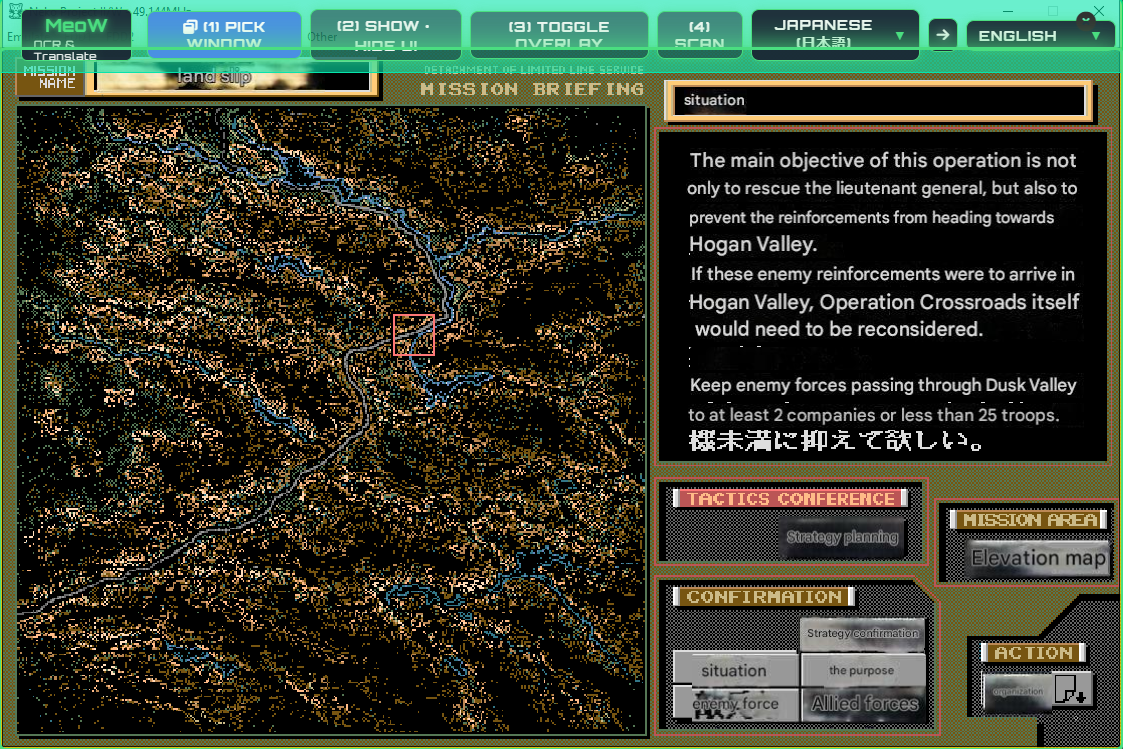
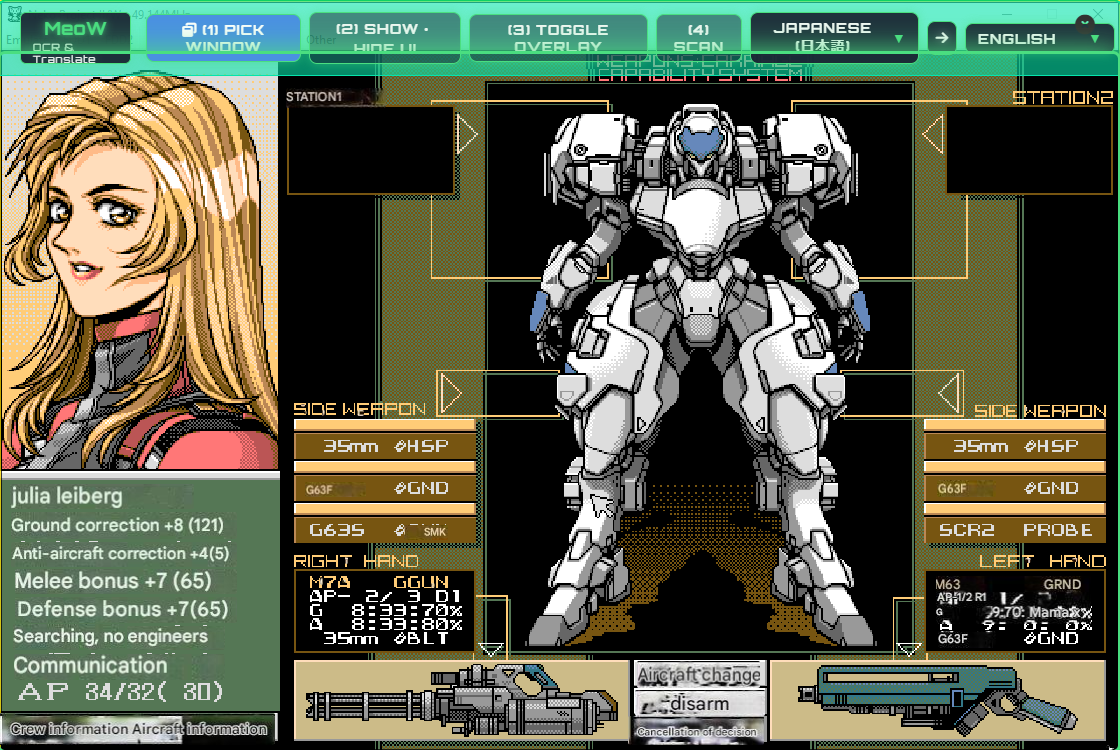
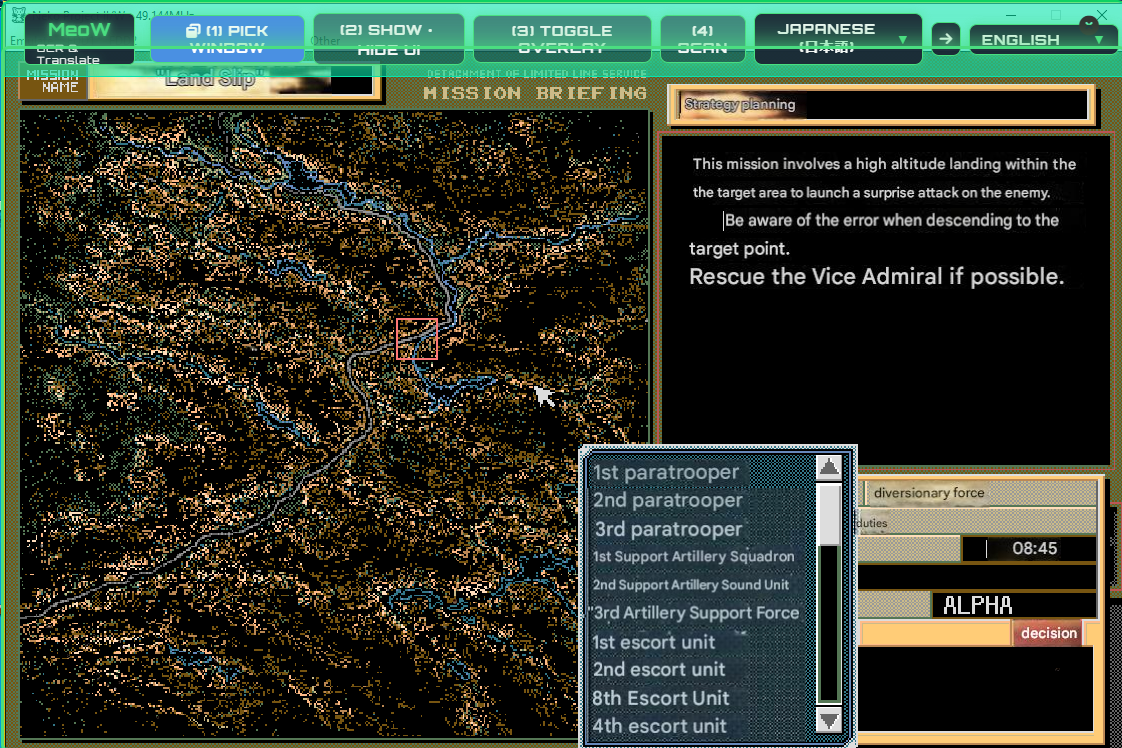
@Lord of Riva, I did a quick test with Advanced Power Dolls 2 and took a few screenshots.

Very janky since you constantly need to wrangle the program by activating the interface and then scanning, and the scan box gets in the way of using the mouse. Still, it works... sorta.

Image
Image
Image
User avatar
Lord of Riva
Posts: 1326
Joined: Feb 22, '24

Geolocation

Adventurer's Guild

Post by Lord of Riva »

gerey wrote: January 20th, 2025, 21:05
@Lord of Riva, I did a quick test with Advanced Power Dolls 2 and took a few screenshots.

Very janky since you constantly need to wrangle the program by activating the interface and then scanning, and the scan box gets in the way of using the mouse. Still, it works... sorta.

Image
Image
Image
Leagues better than what I got otherwise still.
Resident Anti-feminist MRA, Race-mixer and no I'm not woke and not gay. Married with children, My writing style is shit, live with it or ignore me.
User avatar
SpellSword
Posts: 1371
Joined: Jun 15, '23

Geolocation

Adventurer's Guild

Post by SpellSword »

This is pretty cool. The future is looking bright.
Holo-ception.gif
You do not have the required permissions to view the files attached to this post.
The three evils that humanity faces:
Censorship
Telemetry
DRM
User avatar
gerey
Turtle
Turtle
Posts: 3200
Joined: Feb 2, '23

Geolocation

Adventurer's Guild

Post by gerey »

Version 0.3 just dropped, adding a few new great additions to the program, of which the first is more granular control of how the overlay behaves, since you can now pick between Auto, Maximized, Borderless and Windowed, and the other great new addition is the introduction of an Auto feature for the scan command, which basically means the program will translate everything on the window you have selected every 1 second.

I have added the link to v3 in the OP.
Last edited by gerey on February 6th, 2025, 23:17, edited 1 time in total.
User avatar
gerey
Turtle
Turtle
Posts: 3200
Joined: Feb 2, '23

Geolocation

Adventurer's Guild

Post by gerey »

@Tweed

Latest version of Meow:

https://drive.google.com/file/d/1EVjJVI ... view?pli=1
🎮 MeoW Beta v4 🐱
https://meow.uen.app/betav4
If the above link does not work : 👉 https://bit.ly/meowbetav4

✨ NEW FEATURES
Finally, a proper Meow Icon! 🐱 (yes, this counts as a feature uwu)
App context menu - Right-click to toggle hidden settings (more options coming soon!)
User settings file coming SOON™ ( with JSON format, for hotkey customization and more)

🛠️ FIXED ISSUES
Monitor Display Scaling Support!⭐️


MeoW now works with display scales other than 100%
Note: Currently supports single monitor only (multi-monitor support in future updates)
Translation Error Loop Fix
: If you still encounter this issue, try disabling "Auto Recover" from the app context menu 🙏
RPG Maker Games Detection
: a small fix that might help with the infinite "please-pick" loop for some titleless RPG Maker games

UI layer order issue : translation overlay is displayed over app UI
User avatar
Vergil
Posts: 15670
Joined: Sep 6, '23

Geolocation

Post by Vergil »

Fate/Extra CCC fan translation took so long sci fi AI translation overlays came out around the same time it did. Incredible.
I'm just stating the facts.
Question is are you going to gargle the truth or swallow?