We have a Steam curator now. You should be following it. https://store.steampowered.com/curator/44994899-RPGHQ/

Stealthy Mod Organizer 2 Plugin 0.4 β€” Baldur's Gate 3

Looking for the download?
This mod's files are on ModHQ.
Go to mod page
Share things you've made or found for games here.

Moderator: Mod Janitor

Ignore Topic
User avatar
Crazed Weevil
Posts: 39
Joined: Feb 28, '24

Geolocation

Post by Crazed Weevil »

loregamer wrote: ↑ May 17th, 2025, 18:29
I built a WIP version of Mod Organizer that has multi-path VFS. Works great with this plugin

Unfortunately, I can only distribute verbatim copies of Mod Organizer 2 per its license

But if you guys would like to try it, I can teach you how to patch your instances!
Crazed Weevil wrote: ↑ April 30th, 2025, 19:25
Got a problem with Script Extender now though, but it might not be the plugin, as of course Script Extender just decided to an update to v24. Now idea what updates it has and I can't find anything about it, but none of the SE_CONFIG files are being copied to the AppData folder anymore it seems. It keeps acting like it's the first time I'm running MCM. I can see it create the files, and I can see MO2 copying them into the overwrite folder when I shut the game down, but it doesn't seem to want to put them back anymore.
This beta version will allow you to manage script extender configs from MO2 again
I've given this a try and it sort of works.
  1. Still need Root Builder to get the Script Extender and MCM to install correctly
  2. The SE_CONFIG files are being copied once more though you need to delete what Script Extender files are in the AppData folder first so they are created in the VFS when you run the game via MO2, otherwise it doesn't copy them into the SE_CONFIG folder if they were already there.
  3. I have mods crashing the game at startup again. Same ones as before; anything using GustavX as a dependency.
User avatar
rusty_shackleford
Site Admin
Posts: 46259
Joined: Feb 2, '23
Gender: Watermelon

Geolocation

Adventurer's Guild

Post by rusty_shackleford »

loregamer wrote: ↑ May 17th, 2025, 18:29
Unfortunately, I can only distribute verbatim copies of Mod Organizer 2 per its license
huh? It's GPLv3

if you need to know anything about code licensing, just ask, I used to spend a lot of time in FOSS circles
Last edited by rusty_shackleford on May 18th, 2025, 06:03, edited 1 time in total.
Thank you for your attention to this matter!
Steam friend code: 40552640 https://steamcommunity.com/friends/add | email: [email protected]
Having trouble running an old Windows game?
Rusty's Stuff Collection
User avatar
loregamer
Site Moderator
Posts: 5187
Joined: Dec 3, '23

Geolocation

Post by loregamer »

rusty_shackleford wrote: ↑ May 18th, 2025, 06:02
loregamer wrote: ↑ May 17th, 2025, 18:29
Unfortunately, I can only distribute verbatim copies of Mod Organizer 2 per its license
huh? It's GPLv3

if you need to know anything about code licensing, just ask, I used to spend a lot of time in FOSS circles
I can fork it, modify it, build it, and share the entire output?
Jingle Jangle Jingle
User avatar
rusty_shackleford
Site Admin
Posts: 46259
Joined: Feb 2, '23
Gender: Watermelon

Geolocation

Adventurer's Guild

Post by rusty_shackleford »

loregamer wrote: ↑ May 18th, 2025, 06:21
rusty_shackleford wrote: ↑ May 18th, 2025, 06:02
loregamer wrote: ↑ May 17th, 2025, 18:29
Unfortunately, I can only distribute verbatim copies of Mod Organizer 2 per its license
huh? It's GPLv3

if you need to know anything about code licensing, just ask, I used to spend a lot of time in FOSS circles
I can fork it, modify it, build it, and share the entire output?
If you're referring to https://github.com/ModOrganizer2/modorganizer
then, yes.
You just need to disclose the sourcecode + also license your changes under GPLv3.

You're not required to distribute the sourcecode with it, just disclose it.
Thank you for your attention to this matter!
Steam friend code: 40552640 https://steamcommunity.com/friends/add | email: [email protected]
Having trouble running an old Windows game?
Rusty's Stuff Collection
User avatar
loregamer
Site Moderator
Posts: 5187
Joined: Dec 3, '23

Geolocation

Post by loregamer »

Ok this is epic
Jingle Jangle Jingle
User avatar
indefiance
Posts: 7
Joined: Jul 11, '25

Geolocation

Post by indefiance »

loregamer wrote: ↑ May 18th, 2025, 14:08
Ok this is epic
I would love to see this if its done? I literally created an account just to say that. If you've finished this please share. Thanks for your attention to this matter.
User avatar
Trickster
Posts: 970
Joined: Oct 5, '24
Gender: Watermelon

Geolocation

Adventurer's Guild

Post by Trickster »

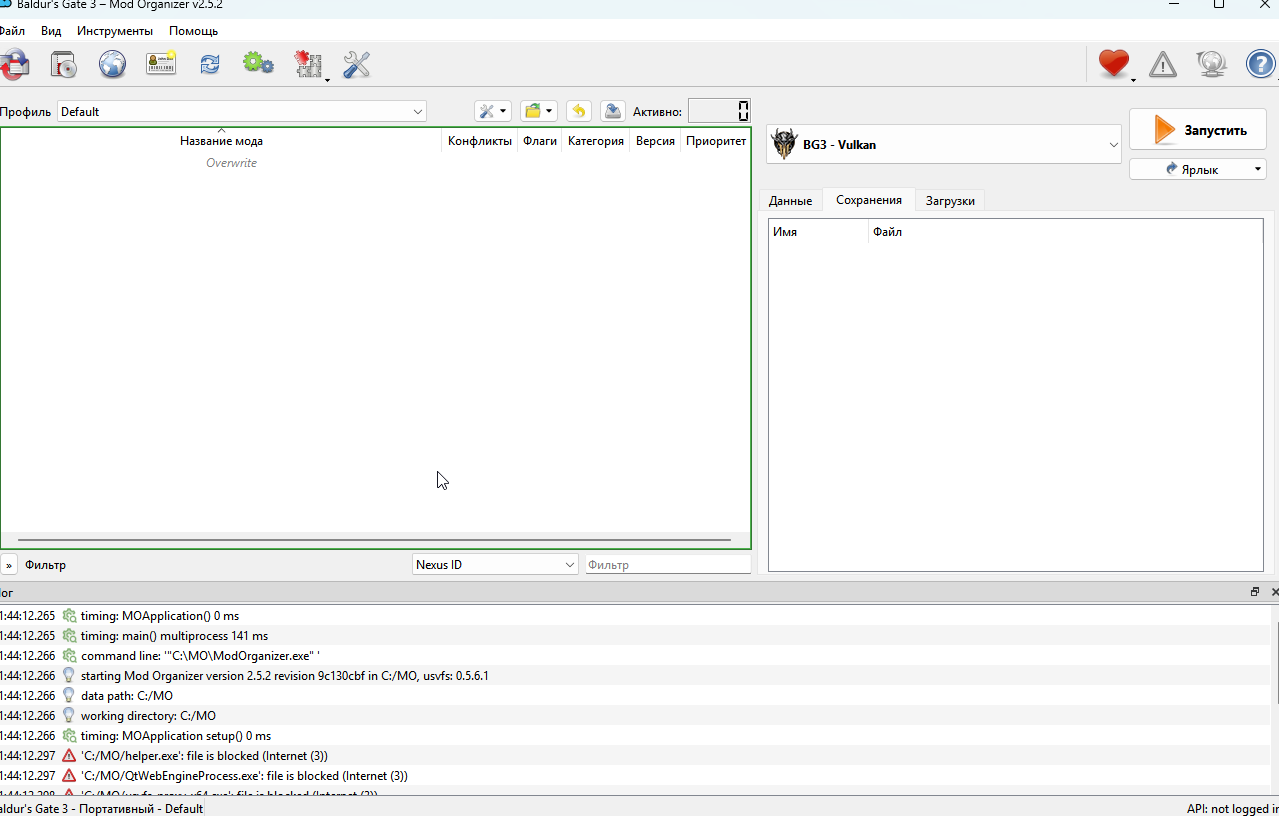
Image

And how i suppose to use this ****? Where are all of my mods?
User avatar
Auld_SnawBeard
Posts: 136
Joined: Apr 23, '25
Gender: Dinosaur

Geolocation

Post by Auld_SnawBeard »

Trickster wrote: ↑ July 11th, 2025, 18:46
And how i suppose to use this ****? Where are all of my mods?
I'm sure I found some instructions somewhere, although I can't remember where or what. Here is the gist of it:

You start with a clean install of BG3. If you've previously used cancerous mod installers make sure to purge every last shred of them before installing BG3 or they will reinfect.
You put the mods into the download-folder for MO2 (raw zip-archives, still encrypted).
In the interface you're showing, set the launcher on the right side from Vulcan to DX11 even if you're using AMD.
Under the launcher you have 3 tabs, you click the "downloads" tab and you'll see your mods listed. Right-click the ones you wish to use and choose install. Those will now get an entry on the left side of the UI. You enabled them by clicking the checkmark-box besides them, or right-click enable. You can drag and drop them into the desired load-order. You can also put in spacers to help sort them if needed.

Once you have the mods set up you click the run button on the right side of the UI. It's best to not have steam running I find (if you use that), MO2 will bypass it. Don't install anything through the in-game mod interface.

Note: BG3SE and at least one other mod requires a special procedure to install unless that's been improved since I downloaded Stealthy MO2. Read about that and the rest in this thread. I advice following the install and setup-procedures proposed earlier in it.

PS: Stealthy MO2 is brilliant for BG3! Just brilliant :heart:
Last edited by Auld_SnawBeard on July 11th, 2025, 22:02, edited 5 times in total.
User avatar
loregamer
Site Moderator
Posts: 5187
Joined: Dec 3, '23

Geolocation

Post by loregamer »

I think Osiris Scripts might not work via Stealthy MO2's method. I will have to investigate :broken:
Jingle Jangle Jingle
User avatar
Lemonsquiz
Posts: 1
Joined: Sep 27, '25

Geolocation

Post by Lemonsquiz »

What is the problem of this log?
[2025-09-28 14:16:27.982 E] [bg3_log.py:36] [BG3Game] CRITICAL: Error updating meta.lsx [error='ascii' codec can't encode characters in position 202-204: ordinal not in range(128), error_type=UnicodeEncodeError]
[2025-09-28 14:16:27.983 W] [bg3_log.py:30] [BG3Game] WARNING: Failed to update meta.lsx after mod order change

NVM. Solved
Last edited by Lemonsquiz on September 28th, 2025, 15:03, edited 1 time in total.