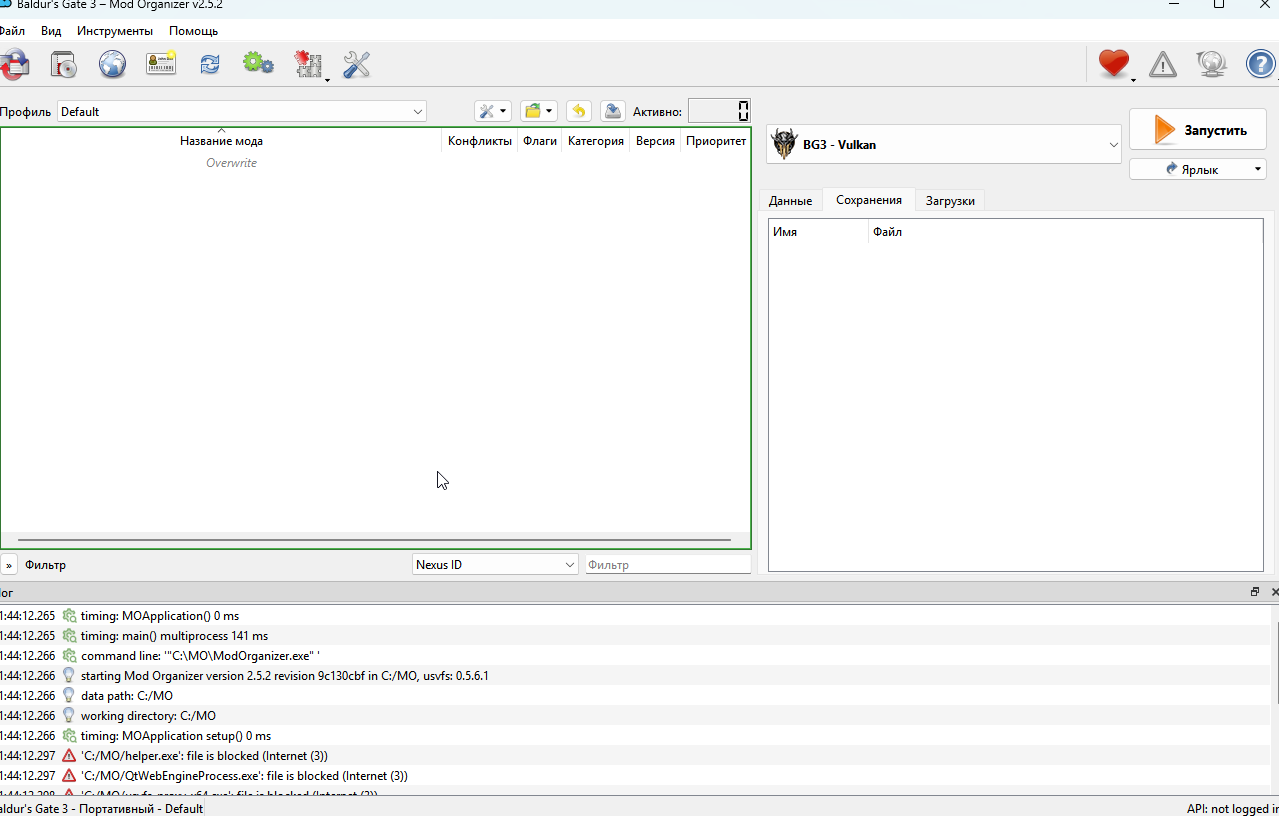
I'm sure I found some instructions somewhere, although I can't remember where or what. Here is the gist of it:
You start with a clean install of BG3. If you've previously used cancerous mod installers make sure to purge every last shred of them before installing BG3 or they will reinfect.
You put the mods into the download-folder for MO2 (raw zip-archives, still encrypted).
In the interface you're showing, set the launcher on the right side from Vulcan to DX11 even if you're using AMD.
Under the launcher you have 3 tabs, you click the "downloads" tab and you'll see your mods listed. Right-click the ones you wish to use and choose install. Those will now get an entry on the left side of the UI. You enabled them by clicking the checkmark-box besides them, or right-click enable. You can drag and drop them into the desired load-order. You can also put in spacers to help sort them if needed.
Once you have the mods set up you click the run button on the right side of the UI. It's best to not have steam running I find (if you use that), MO2 will bypass it. Don't install anything through the in-game mod interface.
Note: BG3SE and at least one other mod requires a special procedure to install unless that's been improved since I downloaded Stealthy MO2. Read about that and the rest in this thread. I advice following the install and setup-procedures proposed earlier in it.
PS: Stealthy MO2 is brilliant for BG3! Just brilliant