We have a Steam curator now. You should be following it. https://store.steampowered.com/curator/44994899-RPGHQ/

Stealthy Mod Organizer 2 Plugin 0.4 — Baldur's Gate 3

Looking for the download?
This mod's files are on ModHQ.
Go to mod page
Share things you've made or found for games here.

Moderator: Mod Janitor

Ignore Topic
User avatar
loregamer
Site Moderator
Posts: 5187
Joined: Dec 3, '23

Geolocation

Stealthy Mod Organizer 2 Plugin 0.4 — Baldur's Gate 3

Post by loregamer »

MO2 plugin for BG3 but with a new, external mod loading method.

Image


Downloads
FilesVersion
📥 Stealthy MO2 Plugin 0.4


Installation
  1. Download Mod.Organizer-2.5.2.7z (The portable version)
  2. Extract the contents anywhere
  3. Download the plugin
  4. Drop the "plugins" folder into your MO2 folder
  5. Start ModOrganizer2.exe


How It Works
This implements a new 3rd party mod method to integrate mods completely externally of the game. Instead of overriding the game's modsettings.lsx file, this plugin is setting the base game's dependencies to include your mod PAK files. You won't need to toggle the mods on since they are essentially being loaded as base game DLCs.

You'll be able to join each other in multiplayer or join lobbies with mods the host doesn't have installed, for the same reason you can connect to lobbies without everyone having the Dice DLC.


Usage
I don't feel like doing a full tutorial of how MO2 works right now tbh. If you've used it before, all you need to know is your MO2 order will be what's exported as your game's load order. Move things around so they are correct there.


NOTE: Do not merge multiple PAK files into one mod. Make each row for one PAK file each!


Drawbacks
Mods that utilize Osiris Scripting will not work. They will need to be enabled normally in BG3 Mod Manager.


To Do
  • Make big modlist and upload
  • Recruit some Pythonfag who finds this to improve the plugin since I don't wanna


Known Issues
  • If a mod had GustavX.pak as a dependency, then your game will crash. This is because it causes a circular dependency issue, as it's GustavX.pak that we're overriding FIXED IN v0.2


Credits
Stole code from some guy's unofficial plugin on github. Thank you kind stranger
https://github.com/Alvadus/BG3-MO2-Unofficial-Plugin
Last edited by loregamer on October 25th, 2025, 15:30, edited 12 times in total.
Jingle Jangle Jingle
User avatar
Reichspepe
Posts: 1186
Joined: Sep 2, '23
Location: Prussia

Geolocation

Adventurer's Guild

Post by Reichspepe »

You're a wizard, Lorey!
:knight-cross:
User avatar
loregamer
Site Moderator
Posts: 5187
Joined: Dec 3, '23

Geolocation

Post by loregamer »

Reichspepe wrote: April 26th, 2025, 15:39
You're a wizard, Lorey!
To be fair I thought of this because Mint Mod Loader for DRG does something similar to circumvent the ingame mod management
https://github.com/trumank/mint
Jingle Jangle Jingle
User avatar
loregamer
Site Moderator
Posts: 5187
Joined: Dec 3, '23

Geolocation

Post by loregamer »

It would be funny if you guys joined random libtard lobbies and then disrupted them with mods installed
Last edited by loregamer on April 26th, 2025, 15:41, edited 1 time in total.
Jingle Jangle Jingle
User avatar
Crazed Weevil
Posts: 39
Joined: Feb 28, '24

Geolocation

Post by Crazed Weevil »

OK done a quick test...Realms Restored still doesn't load correctly. The json file created for Aesthetics, Heads, Drows & Swaps all look like this:
► Show Spoiler
If you look at the IGMM they are shown there as normal mods and if you turn them on they work but of course load order is buggered. I would assume it has something to do with ******* in text format :scratch:
Oh and your PlusUI mod still won't load either.

Quick question though, is using Root Builder to install the Script Extender, non PAK mods, etc going to cause issues?
User avatar
loregamer
Site Moderator
Posts: 5187
Joined: Dec 3, '23

Geolocation

Post by loregamer »

Crazed Weevil wrote: April 26th, 2025, 17:00
OK done a quick test...Realms Restored still doesn't load correctly. The json file created for Aesthetics, Heads, Drows & Swaps all look like this:
► Show Spoiler
If you look at the IGMM they are shown there as normal mods and if you turn them on they work but of course load order is buggered. I would assume it has something to do with ******* in text format :scratch:
Oh and your PlusUI mod still won't load either.
What the sigma... I'm gonna redownload the files we released and try it out

V2 won't have le foony ****** text so it won't have this issue


Crazed Weevil wrote: April 26th, 2025, 17:00
Quick question though, is using Root Builder to install the Script Extender, non PAK mods, etc going to cause issues?
I think this comes baked in with Root Builder logic so you don't need to downlead the plugin
Last edited by loregamer on April 26th, 2025, 17:13, edited 2 times in total.
Jingle Jangle Jingle
User avatar
Crazed Weevil
Posts: 39
Joined: Feb 28, '24

Geolocation

Post by Crazed Weevil »

loregamer wrote: April 26th, 2025, 17:12
I think this comes baked in with Root Builder logic so you don't need to downlead the plugin
It seems to set the Root directory OK when adding mods, but it doesn't actually load them correctly. Script Extender didn't load properly. I installed Root Builder and it started working.
User avatar
Auld_SnawBeard
Posts: 136
Joined: Apr 23, '25
Gender: Dinosaur

Geolocation

Post by Auld_SnawBeard »

While I'm waiting for an updated plugin I was going to test some things that don't regard the issues Weevil uncovered. So I'm installing the plugin as is for now. It's my first time using MO2 without doing it blindly so I've encountered my first hurdle. I asked Grok and he gave me the following answer:
► Show Spoiler
Please let me know if it's wrong

-----------------------------------------------------------------------

An unrelated question @LoreMaster : How do i have MO2 recognize and install an uncompressed mod-file? Better Companions deliver two compressed files which MO2 picks up on just fine. But the last file (a voice-file), the [VC]Karlax.pak for instance, is delivered uncompressed and MO2 appears to refuse to recognize or let me install it. My first inclination would be to compress it myself, but then I suppose there is a reason why it's delivered uncompressed, so I've held off on that.. How do I get the uncompressed file installed?
.
.
Edit: I did some experimenting with putting the pak-file in the folder overwrite -> PAK_FILES. This made the virtual folder recognize the VCKarl.pak file and put it together with the other mods present there. However it's still absent from the left box in MO2.

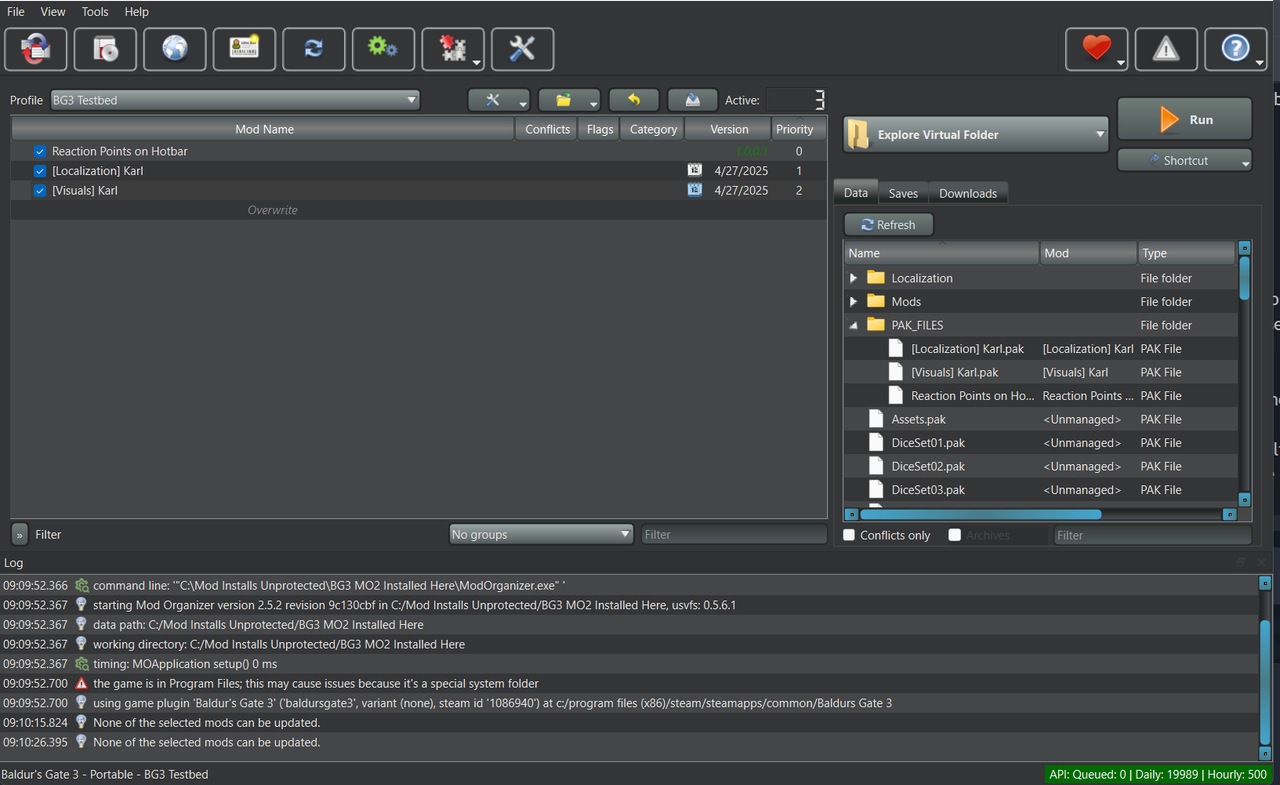
But testing whether or not the voice.pak works right now can't be done properly by me because the mod as a whole is unfunctional in MO2 for me. Visuals aren't changed with [VC] Karlax.pak and [Localization] Karl.pak installed with MO2, just like the voice is not (whether the voice-file is in the overwrite folder of MO2, or not). I tried with another mod, "Reaction Points on Hotbar", and that one worked fine. So I don't know if the Better Companions mods are just outdated in leu of patch 8, or if it's something about them that doesn't play well with MO2. Regardless I thought you aught to know.

This is what it looks like in MO2 for me (without overwrite):
► Show Spoiler
Last edited by Auld_SnawBeard on April 27th, 2025, 07:20, edited 6 times in total.
User avatar
Crazed Weevil
Posts: 39
Joined: Feb 28, '24

Geolocation

Post by Crazed Weevil »

SlickRick wrote: April 27th, 2025, 04:03
An unrelated question @LoreMaster : How do i have MO2 recognize and install an uncompressed mod-file? Better Companions deliver two compressed files which MO2 picks up on just fine. But the last file (a voice-file), the [VC]Karlax.pak for instance, is delivered uncompressed and MO2 appears to refuse to recognize or let me install it. My first inclination would be to compress it myself, but then I suppose there is a reason why it's delivered uncompressed, so I've held off on that.. How do I get the uncompressed file installed?
.
.
Edit: I did some experimenting with putting the pak-file in the folder overwrite -> PAK_FILES. This made the virtual folder recognize the VCKarl.pak file and put it together with the other mods present there. However it's still absent from the left box in MO2.

But testing whether or not the voice.pak works right now can't be done properly by me because the mod as a whole is unfunctional in MO2 for me. Visuals aren't changed with [VC] Karlax.pak and [Localization] Karl.pak installed with MO2, just like the voice is not (whether the voice-file is in the overwrite folder of MO2, or not). I tried with another mod, "Reaction Points on Hotbar", and that one worked fine. So I don't know if the Better Companions mods are just outdated in leu of patch 8, or if it's something about them that doesn't play well with MO2. Regardless I thought you aught to know.

This is what it looks like in MO2 for me (without overwrite):
► Show Spoiler
The best way to install a PAK file in this case is create a new mod folder for it live in.

Right click on the left pane of MO2 and selected 'Create empty mod'. Give it a name, and should appear in the left pane (if not press F5 to refresh the view). Right click on this new mod and select 'Open in Explorer'. In the explorer view create a new folder called 'PAK_FILES' and drop the voice PAK file inside that folder. Back in MO2 refresh the left pane again and then start BG3 through MO2. The plugin should do it's thing and load the PAK file correctly.
User avatar
Auld_SnawBeard
Posts: 136
Joined: Apr 23, '25
Gender: Dinosaur

Geolocation

Post by Auld_SnawBeard »

Crazed Weevil wrote: April 27th, 2025, 08:02
SlickRick wrote: April 27th, 2025, 04:03
An unrelated question @LoreMaster : How do i have MO2 recognize and install an uncompressed mod-file? Better Companions deliver two compressed files which MO2 picks up on just fine. But the last file (a voice-file), the [VC]Karlax.pak for instance, is delivered uncompressed and MO2 appears to refuse to recognize or let me install it. My first inclination would be to compress it myself, but then I suppose there is a reason why it's delivered uncompressed, so I've held off on that.. How do I get the uncompressed file installed?
.
.
Edit: I did some experimenting with putting the pak-file in the folder overwrite -> PAK_FILES. This made the virtual folder recognize the VCKarl.pak file and put it together with the other mods present there. However it's still absent from the left box in MO2.

But testing whether or not the voice.pak works right now can't be done properly by me because the mod as a whole is unfunctional in MO2 for me. Visuals aren't changed with [VC] Karlax.pak and [Localization] Karl.pak installed with MO2, just like the voice is not (whether the voice-file is in the overwrite folder of MO2, or not). I tried with another mod, "Reaction Points on Hotbar", and that one worked fine. So I don't know if the Better Companions mods are just outdated in leu of patch 8, or if it's something about them that doesn't play well with MO2. Regardless I thought you aught to know.

This is what it looks like in MO2 for me (without overwrite):
► Show Spoiler
The best way to install a PAK file in this case is create a new mod folder for it live in.

Right click on the left pane of MO2 and selected 'Create empty mod'. Give it a name, and should appear in the left pane (if not press F5 to refresh the view). Right click on this new mod and select 'Open in Explorer'. In the explorer view create a new folder called 'PAK_FILES' and drop the voice PAK file inside that folder. Back in MO2 refresh the left pane again and then start BG3 through MO2. The plugin should do it's thing and load the PAK file correctly.
Thank you for the explanation, I appreciate that!

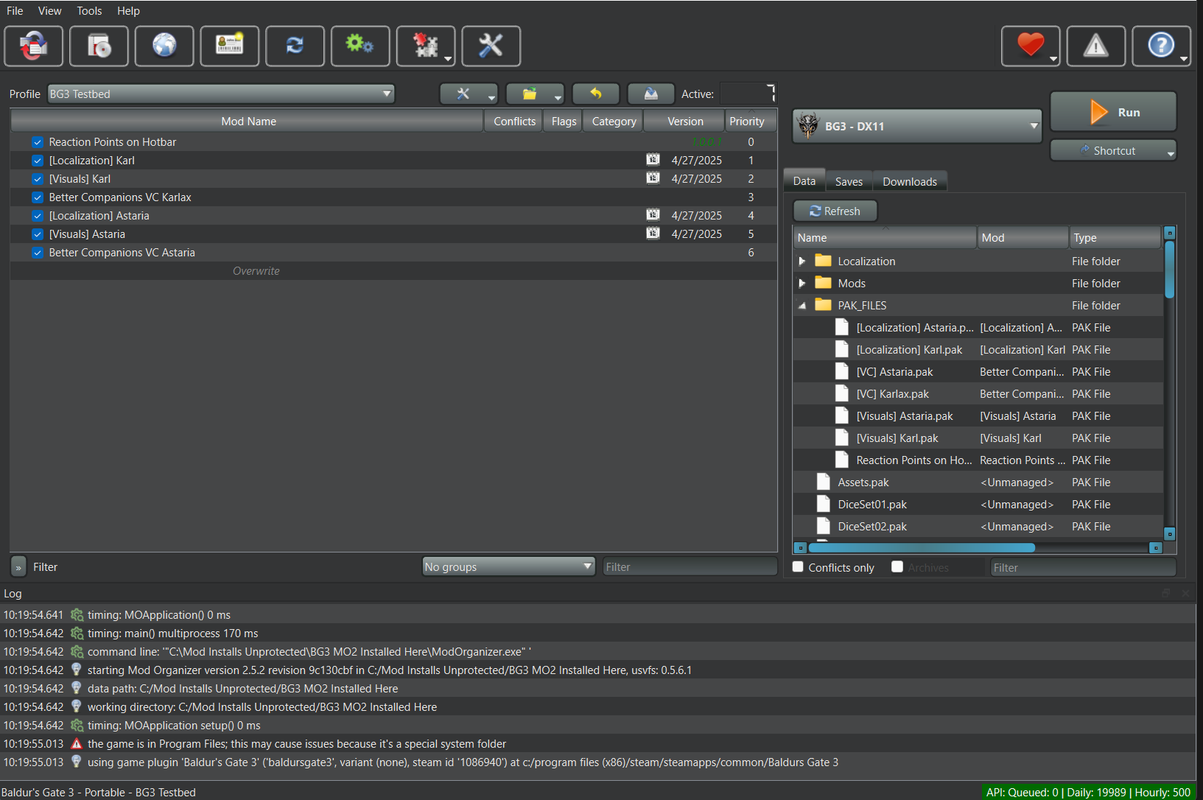
It still won't work after following your instructions however. Although that was a neat solution for the pak-files :weeb:

This is what it looks like currently in MO2:
► Show Spoiler
Note, I had the Astaria files working with Vortex/BG3MM yesterday.
Also, MO2 was installed with a completely fresh and clean BG3. Spent an hour using two different guides to make sure I'd gotten it all. So that should not be a source of error.
Last edited by Auld_SnawBeard on April 27th, 2025, 08:35, edited 2 times in total.
User avatar
Crazed Weevil
Posts: 39
Joined: Feb 28, '24

Geolocation

Post by Crazed Weevil »

SlickRick wrote: April 27th, 2025, 08:27
Thank you for the explanation, I appreciate that!

It still won't work after following your instructions however. Although that was a neat solution for the pak-files :weeb:

This is what it looks like currently in MO2:
► Show Spoiler
Note, I had the Astaria files working with Vortex/BG3MM yesterday.
Also, MO2 was installed with a completely fresh and clean BG3. Spent an hour using two different guides to make sure I'd gotten it all. So that should not be a source of error.
First thing to check is to make sure that each mod has a json file that the plugin should create when you install and/or run the game through MO2. I've just install the Karl mods and they work for me, so you should have:

info_[Visuals] Karl.json
info_[Localization] Karl.json
info_[VC] Karlax.json

These should also appear the in the Data view on the right hand pane.

If they aren't there, you may need to clear your load order and reinstall the plugin (delete the old one first to make sure it's clean before reinstalling) and try again.
User avatar
Auld_SnawBeard
Posts: 136
Joined: Apr 23, '25
Gender: Dinosaur

Geolocation

Post by Auld_SnawBeard »

Crazed Weevil wrote: April 27th, 2025, 08:52
SlickRick wrote: April 27th, 2025, 08:27
Thank you for the explanation, I appreciate that!

It still won't work after following your instructions however. Although that was a neat solution for the pak-files :weeb:

This is what it looks like currently in MO2:
► Show Spoiler
Note, I had the Astaria files working with Vortex/BG3MM yesterday.
Also, MO2 was installed with a completely fresh and clean BG3. Spent an hour using two different guides to make sure I'd gotten it all. So that should not be a source of error.
First thing to check is to make sure that each mod has a json file that the plugin should create when you install and/or run the game through MO2. I've just install the Karl mods and they work for me, so you should have:

info_[Visuals] Karl.json
info_[Localization] Karl.json
info_[VC] Karlax.json

These should also appear the in the Data view on the right hand pane.

If they aren't there, you may need to clear your load order and reinstall the plugin (delete the old one first to make sure it's clean before reinstalling) and try again.
The .json files are all there. Both in the mod-folder in explorer and in the virtual folder in MO2.
User avatar
Crazed Weevil
Posts: 39
Joined: Feb 28, '24

Geolocation

Post by Crazed Weevil »

SlickRick wrote: April 27th, 2025, 10:10
The .json files are all there. Both in the mod-folder in explorer and in the virtual folder in MO2.
Do they have the something like the following in them?
► Show Spoiler
User avatar
Auld_SnawBeard
Posts: 136
Joined: Apr 23, '25
Gender: Dinosaur

Geolocation

Post by Auld_SnawBeard »

Crazed Weevil wrote: April 27th, 2025, 10:13
SlickRick wrote: April 27th, 2025, 10:10
The .json files are all there. Both in the mod-folder in explorer and in the virtual folder in MO2.
Do they have the something like the following in them?
► Show Spoiler
The very same
User avatar
Auld_SnawBeard
Posts: 136
Joined: Apr 23, '25
Gender: Dinosaur

Geolocation

Post by Auld_SnawBeard »

I found an inconsistensy between the two of the info visual .json files. I can't imagine they would mean anything since we both downloaded them from the same place, but I'll show them anyway just in case.

info_[Visuals] Astaria.json has the value:
"MD5": "eb22107e23c76a61cfd073ab45a9c3bb",

info_[Visuals] Karl.json has the value:
"MD5": "",


Another difference from my system from yours could possibly be that I have my MO2's download, mods, overwrite, profiles, and webcache folder on another HD than my MO2 installation. But if that were to make a difference somehow I'd have thought it would affect the other mod which does work.
User avatar
Crazed Weevil
Posts: 39
Joined: Feb 28, '24

Geolocation

Post by Crazed Weevil »

Weapon of last resort then I'm afraid. Reinstall a clean version of Mod Organizer 2 (2.5.2 is the one I'm using)...don't forget to clear out anything in the Mods folder in AppData (C:\Users\[you]\AppData\Local\Larian Studios\Baldur's Gate 3\Mods) and I'd delete the modSettings.xml file (C:\Users\[you]\AppData\Local\Larian Studios\Baldur's Gate 3\PlayerProfiles\Public) as well to make sure it's completely clean.

This is what / how I installed MO2.
  1. Don't run Mod Organizer until you have added the BG3 plugin
  2. Install Root Builder (5.0.5) (https://github.com/Kezyma/ModOrganizer- ... ootbuilder) inside the plugin's folder of MO2.
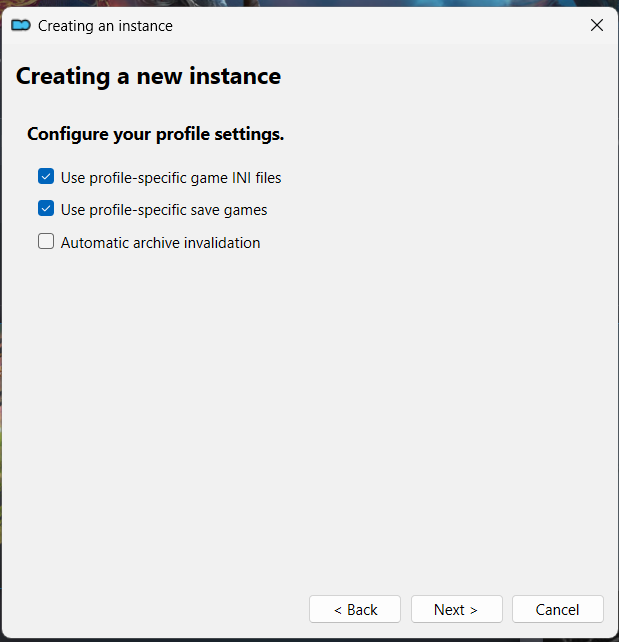
  3. When you create your Portable instance leave the settings as default (i.e. make sure ini per profile is unchecked).
  4. Setup your theme, Nexus login (which should be automatic if you have MO2 installed before), etc.
  5. Setup Root Builder exclusions.
    1. From the menu 'Tools' select 'Tool Plugins' then 'Root Builder' and 'Root Builder' again.
    2. On the new dialog box select 'Exclusions' and add the following lines:
      • DigitalDeluxe
      • DotNetCore
      • Launcher
      • InstallScript.vdf
  6. Click on the 'Build' button. It should take only a second to do and the 'Sync' & 'Clear' should light up.
  7. Run the game at least once through MO2 to make it starts (and any files MO2 needs will be created as well).
  8. Install just the 3 Karl mods as before. The json files should be created as you add them.
  9. Run BG3, start a new game and see if Karlach is now Karl
User avatar
Auld_SnawBeard
Posts: 136
Joined: Apr 23, '25
Gender: Dinosaur

Geolocation

Post by Auld_SnawBeard »

Crazed Weevil wrote: April 27th, 2025, 10:45
Weapon of last resort then I'm afraid. Reinstall a clean version of Mod Organizer 2 (2.5.2 is the one I'm using)...don't forget to clear out anything in the Mods folder in AppData (C:\Users\[you]\AppData\Local\Larian Studios\Baldur's Gate 3\Mods) and I'd delete the modSettings.xml file (C:\Users\[you]\AppData\Local\Larian Studios\Baldur's Gate 3\PlayerProfiles\Public) as well to make sure it's completely clean.

This is what / how I installed MO2.
  1. Don't run Mod Organizer until you have added the BG3 plugin
  2. Install Root Builder (5.0.5) (https://github.com/Kezyma/ModOrganizer- ... ootbuilder) inside the plugin's folder of MO2.
  3. When you create your Portable instance leave the settings as default (i.e. make sure ini per profile is unchecked).
  4. Setup your theme, Nexus login (which should be automatic if you have MO2 installed before), etc.
  5. Setup Root Builder exclusions.
    1. From the menu 'Tools' select 'Tool Plugins' then 'Root Builder' and 'Root Builder' again.
    2. On the new dialog box select 'Exclusions' and add the following lines:
      • DigitalDeluxe
      • DotNetCore
      • Launcher
      • InstallScript.vdf
  6. Click on the 'Build' button. It should take only a second to do and the 'Sync' & 'Clear' should light up.
  7. Run the game at least once through MO2 to make it starts (and any files MO2 needs will be created as well).
  8. Install just the 3 Karl mods as before. The json files should be created as you add them.
  9. Run BG3, start a new game and see if Karlach is now Karl
It worked! You're a gem Ser and I appreciate you :heart:

Karl's voice worked in the introduction play in the character creator, but switched to Karlah's once in game. That is, the quipps were hers. He didn't talk in a cinematic fashion before the first fight, and I don't know if that is normal. I'll have to check again if Karlah does the same. In the meanwhile, does Karl's voice work for you when it comes to those click-quipps he makes, or do you also get Karlah's voice there?

Edit: I double-checked with Karlah and she talks to herself when she stands up at the start in the Nautilus. Karl got the text overhead, but he was mute instead.
Last edited by Auld_SnawBeard on April 27th, 2025, 12:31, edited 1 time in total.
User avatar
Crazed Weevil
Posts: 39
Joined: Feb 28, '24

Geolocation

Post by Crazed Weevil »

SlickRick wrote: April 27th, 2025, 12:25

It worked! You're a gem Ser and I appreciate you :heart:

Karl's voice worked in the introduction play in the character creator, but switched to Karlah's once in game. That is, the quipps were hers. He didn't talk in a cinematic fashion before the first fight, and I don't know if that is normal. I'll have to check again if Karlah does the same. In the meanwhile, does Karl's voice work for you when it comes to those click-quipps he makes, or do you also get Karlah's voice there?

Edit: I double-checked with Karlah and she talks to herself when she stands up at the start in the Nautilus. Karl got the text overhead, but he was mute instead.
He is mute for me with the over head lines, though he does speak with his voice when you move him about. I don't know if the mod was made with playing him in mind so it might not have any voice lines for the over head stuff. He does sound OK when you talk to him as Tav though. You'll need to ask the mod author for more info.
User avatar
Auld_SnawBeard
Posts: 136
Joined: Apr 23, '25
Gender: Dinosaur

Geolocation

Post by Auld_SnawBeard »

Crazed Weevil wrote: April 27th, 2025, 13:16
SlickRick wrote: April 27th, 2025, 12:25

It worked! You're a gem Ser and I appreciate you :heart:

Karl's voice worked in the introduction play in the character creator, but switched to Karlah's once in game. That is, the quipps were hers. He didn't talk in a cinematic fashion before the first fight, and I don't know if that is normal. I'll have to check again if Karlah does the same. In the meanwhile, does Karl's voice work for you when it comes to those click-quipps he makes, or do you also get Karlah's voice there?

Edit: I double-checked with Karlah and she talks to herself when she stands up at the start in the Nautilus. Karl got the text overhead, but he was mute instead.
He is mute for me with the over head lines, though he does speak with his voice when you move him about. I don't know if the mod was made with playing him in mind so it might not have any voice lines for the over head stuff. He does sound OK when you talk to him as Tav though. You'll need to ask the mod author for more info.
He has a bug-report section, so I'll post it there. If Karl is working when installed by other means I'll just remove the report later. :scratch-pipe:
Last edited by Auld_SnawBeard on April 27th, 2025, 18:33, edited 1 time in total.
User avatar
Auld_SnawBeard
Posts: 136
Joined: Apr 23, '25
Gender: Dinosaur

Geolocation

Post by Auld_SnawBeard »

@Crazed Weevil if I may bother you for one more thing? :oops: How do you install Script Extender the right way with MO2 loregamer's edition + Root Builder?
The download-site sais "Extract DWrite.dll to the Baldurs Gate 3\bin directory (eg. C:\Program Files (x86)\Steam\steamapps\common\Baldurs Gate 3\bin)", but I see many have an entry in their BG3MM for SE which the instructions don't mention (or maybe it's just the achevement addon..). Regardless, do I have to deviate from the instructions when using our setup?


Also, is there a way to import a load-order list that I have previously exported from BG3MM?
Last edited by Auld_SnawBeard on April 27th, 2025, 19:05, edited 2 times in total.
User avatar
Crazed Weevil
Posts: 39
Joined: Feb 28, '24

Geolocation

Post by Crazed Weevil »

SlickRick wrote: April 27th, 2025, 19:02
@Crazed Weevil if I may bother you for one more thing? :oops: How do you install Script Extender the right way with MO2 loregamer's edition + Root Builder?
The download-site sais "Extract DWrite.dll to the Baldurs Gate 3\bin directory (eg. C:\Program Files (x86)\Steam\steamapps\common\Baldurs Gate 3\bin)", but I see many have an entry in their BG3MM for SE which the instructions don't mention (or maybe it's just the achevement addon..). Regardless, do I have to deviate from the instructions when using our setup?


Also, is there a way to import a load-order list that I have previously exported from BG3MM?
For Script Extender you should be able to simply install like a regular mod when you have Root Builder. However you can still do it manually if it doesn't do it for you (it can be a bit twitchy sometimes) by doing the following:
  1. Select 'Install Mod' from the '...' menu above the left hand pane.
  2. Point it @ the Script Extender zip file (BG3SE-Updater-20240430.zip)
  3. Select 'Manual' on the dialog box that pops up. MO2 will try to show you a tutorial, click through it.
  4. Name the mod whatever you want (Baldur's Gate 3 Script Extender).
  5. Right click on '<data>' and select 'Create directory'. Name it 'Root'.
  6. RIght click on 'Root' and select 'Create directory' again. Name this one 'bin'.
  7. Now drag the file 'DWrite.dll' onto the 'bin' directory. The dialog box should have 'The content of <data> looks valid.' in green.
  8. Click OK, and put the mod at the top of the load order (it doesn't really matter, but it keeps it out of the way).
As for load order importing, I don't believe you can import BG3MM lists. Afraid you just gonna have to do it the hard way.
User avatar
Auld_SnawBeard
Posts: 136
Joined: Apr 23, '25
Gender: Dinosaur

Geolocation

Post by Auld_SnawBeard »

I swear this is the best modding forum I've ever been to. You're awesome Weevil! :heart:
User avatar
loregamer
Site Moderator
Posts: 5187
Joined: Dec 3, '23

Geolocation

Post by loregamer »

Got the flu or something so am just catching up

You're the goat @Crazed Weevil


Any suggestions on what I should change so far? I was having issues getting PlusUI to load I guess
Jingle Jangle Jingle
User avatar
Crazed Weevil
Posts: 39
Joined: Feb 28, '24

Geolocation

Post by Crazed Weevil »

loregamer wrote: April 27th, 2025, 21:40
Got the flu or something so am just catching up

You're the goat @Crazed Weevil


Any suggestions on what I should change so far? I was having issues getting PlusUI to load I guess
Thank you. I like Mod Organizer 2, so I try to use it as a mod manager for any game I mod if I can, and this version of the plugin has given me the least amount of trouble with Patch 8.

As for suggestions one would be a sanity check on GustavX dependencies, if possible have MO2 spot/list problematic mods before starting the game with them. Would help work out which one just crashed the game without having to go through each one manually. I've got a list of mods that I can't run with this, not many, and nothing I can't live without, but there are a few and honestly looking at some of them I can't work out why they would need dependency on GustavX/GustavDev. Is removing a dependency as easy as deleting the entry in the mods meta file and repacking it? Or have I got to use the Toolkit to do it?

Another suggestion would be to put a note/warning not to even touch the IGMM if you can avoid it. It sometimes tries to download PAK files for mods it knows you have running (Improved UI being the big main one it seems to like) and will likely do strange things to the load order or outright crash the game. I had to delete the PAK file, and unsubscribe from the mod on Mod.io's website to get it stop doing it. Pity there isn't a way to disable the thing entirely, it's a bloody menace.
User avatar
Vergil
Posts: 15670
Joined: Sep 6, '23

Geolocation

Post by Vergil »

loregamer wrote: April 26th, 2025, 15:38
You'll be able to join each other in multiplayer or join lobbies with mods the host doesn't have installed, for the same reason you can connect to lobbies without everyone having the Dice DLC.
Does this not horrendously **** things up if you don't have the same mods though? What happens if I put on a modded outfit someone else doesn't have installed?
I'm just stating the facts.
Question is are you going to gargle the truth or swallow?
User avatar
Auld_SnawBeard
Posts: 136
Joined: Apr 23, '25
Gender: Dinosaur

Geolocation

Post by Auld_SnawBeard »

@Crazed Weevil I'm pondering if I can install Native Mod Loader https://www.nexusmods.com/baldursgate3/mods/944 (or alternatively replace it's functionality completely) using our MO2(loregamer)+RootBuilder? The normal procedure when using Vortex/BG3MM is to:
- "Extract both bink2w64.dll and bink2w64_original.dll from archive file into your game's bin folder e.g steam path (this may vary): "D:\Program Files (x86)\Steam\steamapps\common\Baldurs Gate 3\bin""
Of course I should teoretically be good as long as I make backups of the original gamefiles. Still, it would be much better if I could make it part of the virtual mod-loading of our amazing MO2. Do you know of a way? Can I for example set it up as an empty mod and just set up the folder-strukture in MO2's downloadfolder and set some parameter to have it replace files instead of looking for a .json file? (wishful thinking I suspect). :scratch-pipe:

I'm actually looking to use Native Camera Tweaks https://www.nexusmods.com/baldursgate3/mods/945 which has Native Mod Loader as a dependency. As far as I can gather NCT should work out fine as a normal mod in MO2 as long as I get NML up and running.

Hope I'm not being too much of a bother. Feel free to ignore my mewling, Master :oops:
User avatar
loregamer
Site Moderator
Posts: 5187
Joined: Dec 3, '23

Geolocation

Post by loregamer »

I wish I had good experiences with Root Builder like you guys seem to. It just causes my **** to freeze, but I'm likely doing it wrong.

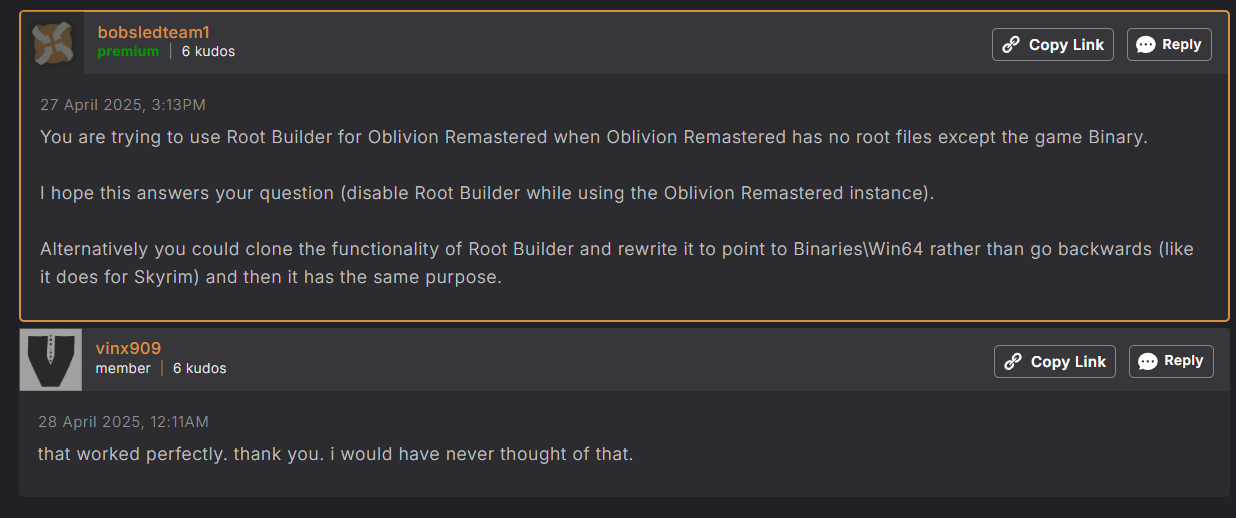
I did see this tip for Oblivion Remastered but personally I've just given up on Mod Organizer handling binary stuff
https://www.nexusmods.com/oblivionremastered/mods/366
Image
Jingle Jangle Jingle
User avatar
Crazed Weevil
Posts: 39
Joined: Feb 28, '24

Geolocation

Post by Crazed Weevil »

SlickRick wrote: April 29th, 2025, 06:39
@Crazed Weevil I'm pondering if I can install Native Mod Loader https://www.nexusmods.com/baldursgate3/mods/944 (or alternatively replace it's functionality completely) using our MO2(loregamer)+RootBuilder? The normal procedure when using Vortex/BG3MM is to:
- "Extract both bink2w64.dll and bink2w64_original.dll from archive file into your game's bin folder e.g steam path (this may vary): "D:\Program Files (x86)\Steam\steamapps\common\Baldurs Gate 3\bin""
Of course I should teoretically be good as long as I make backups of the original gamefiles. Still, it would be much better if I could make it part of the virtual mod-loading of our amazing MO2. Do you know of a way? Can I for example set it up as an empty mod and just set up the folder-strukture in MO2's downloadfolder and set some parameter to have it replace files instead of looking for a .json file? (wishful thinking I suspect). :scratch-pipe:

I'm actually looking to use Native Camera Tweaks https://www.nexusmods.com/baldursgate3/mods/945 which has Native Mod Loader as a dependency. As far as I can gather NCT should work out fine as a normal mod in MO2 as long as I get NML up and running.

Hope I'm not being too much of a bother. Feel free to ignore my mewling, Master :oops:
I have it running in my load order, so it'll work. With Root Builder, MO2 should just install it like a regular mod and automatically put it in a 'Root' folder for you. If not just do it manually, like with Script Extender. Same with any of the 'Native Mod Loader' mods.

You don't have to backup any files as Root Builder does this for you. When you initially setup Root Builder you 'Build' an image of what the BG3 game folder looks like in its virigin state. By default, Root Builder makes a copy of the game when you run it through MO2, stores that image in a safe place and then reverts it back once you've closed the game. But since we don't want to copy the whole 155 GB of game files we added some exclusions when we setup Root Builder (like ignoring the Data folder) so it'll only copy the 'bin' folder. Everything else gets handled by the virtual file system that MO2 uses and the BG3 specific plugin. If you're curious, have a look at your MO2 installation folder (in my case F:\Tools\MO2 - BG3\plugins\data\RootBuilder) and you'll see what it copied.
User avatar
Crazed Weevil
Posts: 39
Joined: Feb 28, '24

Geolocation

Post by Crazed Weevil »

loregamer wrote: April 29th, 2025, 06:59
I wish I had good experiences with Root Builder like you guys seem to. It just causes my **** to freeze, but I'm likely doing it wrong.

I did see this tip for Oblivion Remastered but personally I've just given up on Mod Organizer handling binary stuff
https://www.nexusmods.com/oblivionremastered/mods/366
Image
I bet I know what is causing the freeze to happen for you; the Toolkit files. I assume you have the Toolkit installed and this adds a DLC called 'BG3 Toolkit Data' to your BG3 installation. The DLC adds an 'Editor' folder to the main 'Data' folder as well as a few other directories that look like over-rides. For some reason this confuses Root Builder (which should ignore everything under the 'Data' folder) and it copies the files (about 10Gb of them), but becasue there are so many small files in takes about 5 minutes or so for it to do so, hence the freeze. I've not yet found a way to make it ignore them. Adding 'Editor' to the exclustion list doesn't work so I'd probably have to edit the actual code to make it do so.

The solution I did find though was to make a mod of the Toolkit files themselves and only have it activate when I wanted to use the Toolkit. Just make a blank mod, cut & paste everything but the PAK files and 'Localization' folder from the 'Data' folder of your BG3 installation into that blank mod and leave it unchecked when you run the game. Should find that it now loads nice and quick. Of course if you want to use the Toolkit, turn it on (if you want to run through MO2) or copy the files back otherwise.
User avatar
Auld_SnawBeard
Posts: 136
Joined: Apr 23, '25
Gender: Dinosaur

Geolocation

Post by Auld_SnawBeard »

Crazed Weevil wrote: April 29th, 2025, 07:09
SlickRick wrote: April 29th, 2025, 06:39
@Crazed Weevil I'm pondering if I can install Native Mod Loader https://www.nexusmods.com/baldursgate3/mods/944 (or alternatively replace it's functionality completely) using our MO2(loregamer)+RootBuilder? The normal procedure when using Vortex/BG3MM is to:
- "Extract both bink2w64.dll and bink2w64_original.dll from archive file into your game's bin folder e.g steam path (this may vary): "D:\Program Files (x86)\Steam\steamapps\common\Baldurs Gate 3\bin""
Of course I should teoretically be good as long as I make backups of the original gamefiles. Still, it would be much better if I could make it part of the virtual mod-loading of our amazing MO2. Do you know of a way? Can I for example set it up as an empty mod and just set up the folder-strukture in MO2's downloadfolder and set some parameter to have it replace files instead of looking for a .json file? (wishful thinking I suspect). :scratch-pipe:

I'm actually looking to use Native Camera Tweaks https://www.nexusmods.com/baldursgate3/mods/945 which has Native Mod Loader as a dependency. As far as I can gather NCT should work out fine as a normal mod in MO2 as long as I get NML up and running.

Hope I'm not being too much of a bother. Feel free to ignore my mewling, Master :oops:
I have it running in my load order, so it'll work. With Root Builder, MO2 should just install it like a regular mod and automatically put it in a 'Root' folder for you. If not just do it manually, like with Script Extender. Same with any of the 'Native Mod Loader' mods.

You don't have to backup any files as Root Builder does this for you. When you initially setup Root Builder you 'Build' an image of what the BG3 game folder looks like in its virigin state. By default, Root Builder makes a copy of the game when you run it through MO2, stores that image in a safe place and then reverts it back once you've closed the game. But since we don't want to copy the whole 155 GB of game files we added some exclusions when we setup Root Builder (like ignoring the Data folder) so it'll only copy the 'bin' folder. Everything else gets handled by the virtual file system that MO2 uses and the BG3 specific plugin. If you're curious, have a look at your MO2 installation folder (in my case F:\Tools\MO2 - BG3\plugins\data\RootBuilder) and you'll see what it copied.
Fckn awesome! Thanks :heart: