
We have a Steam curator now. You should be following it. https://store.steampowered.com/curator/44994899-RPGHQ/

Final Fantasy XI
-
rusty_shackleford

- Site Admin
- Posts: 45453
- Joined: Feb 2, '23
- Gender: Watermelon
-
Geolocation
Adventurer's Guild


If you use wine, you'll need to `winetricks gdiplus` to fix the jagged font issue in some addons.
Thank you for your attention to this matter!
Steam friend code: 40552640 https://steamcommunity.com/friends/add | email: [email protected]
Having trouble running an old Windows game?
Rusty's Stuff Collection
Steam friend code: 40552640 https://steamcommunity.com/friends/add | email: [email protected]
Having trouble running an old Windows game?
Rusty's Stuff Collection
-
Finarfin

- Connoisseur of Slop
- Posts: 5020
- Joined: May 20, '24
- Location: Tirion upon Túna
-
Geolocation
Adventurer's Guild


Gotta say, the first map really works well as a wallpaper.Val the Moofia Boss wrote: ↑ September 7th, 2024, 00:36Welcome. Here are some maps:WhiteShark wrote: ↑ September 7th, 2024, 00:21I also got to hear a little lore about San D'Oria; it seems we're a pious and chivalric bunch, which pleases me.
Of the three nations, I prefer Bastok, since it's a bit more original (for high fantasy) being a mining colony of the kingdom that broke away and is a republic with senators and a president, and I like the uplifting military music in headquarters, and the rugged desert canyon environment. President Karst is also an interesting character, being somewhat abrasive but also someone you are confident in and want to work for. Unfortunately it only has a minority of believers left, with one small altar to the goddess hidden in an alcove of Cid's workshop, while San D'Oria and Jeuno at least have Church buildings. At least they aren't straight up pagans like Windurst.
I liked San D'Oria's wartime music when you go to the past in Retail.



Steam code: 10514930
My Reviews:
El Matador RECOMMENDED
Dungeons of Sundaria NOT RECOMMENDED
VLADiK BRUTAL RECOMMENDED
Ultimate Zombie Defense 2 INFORMATIONAL
Deathless: The Hero Quest RECOMMENDED
Door Kickers 2 RECOMMENDED
Folklands INFORMATIONAL
My Reviews:
El Matador RECOMMENDED
Dungeons of Sundaria NOT RECOMMENDED
VLADiK BRUTAL RECOMMENDED
Ultimate Zombie Defense 2 INFORMATIONAL
Deathless: The Hero Quest RECOMMENDED
Door Kickers 2 RECOMMENDED
Folklands INFORMATIONAL
-
Shillitron

- Posts: 3707
- Joined: Feb 6, '23
- Location: ADL Head Office
-
Geolocation
Under the Keyboard Selection menu (Config > Misc 2.) there's "Key Assignment" for "Movement" and "Commands" you can rebind keys there.rusty_shackleford wrote: ↑ September 13th, 2024, 08:32Then I can't use wsadWhiteShark wrote: ↑ September 13th, 2024, 08:21Try going into Config in game and changing the controls to 'full-size'. The manual lists those controls here.rusty_shackleford wrote: ↑ September 13th, 2024, 08:06Does anyone know how to remap the numpad buttons so I can move the camera controls to it?
Last edited by Shillitron on September 13th, 2024, 12:55, edited 1 time in total.
---
-
Shillitron
- Posts: 3707
- Joined: Feb 6, '23
- Location: ADL Head Office
-
Geolocation
Be very careful with this because AHK repetitions will cause a consistent stream of packets to the server that looks like botting.WhiteShark wrote: ↑ September 13th, 2024, 08:52@rusty_shackleford, I'm not seeing an easy fix. It seems like you'd have to make an Autohotkey script or reassign the numpad keys at the OS level.
EDIT: I can confirm that running an ahk script as administrator to rebind numpad keys to arrow keys for camera control works on Windows. I hadn't realized, though, that Autohotkey doesn't officially exist on Linux. I see a reimplementation for Linux exists on github, so maybe you can try that.
Horizon has banned a lot of people for botting especially around Fishing. If possible you should replace AHK with addons / macros.
I know some people are scripting their macros though for gear swaps ect. So not sure if I am concern trolling or not.
Last edited by Shillitron on September 13th, 2024, 13:02, edited 1 time in total.
---
-
WhiteShark

- Site Moderator
- Posts: 5056
- Joined: Feb 2, '23
-
Geolocation
Adventurer's Guild


Wouldn't that only be the case if it were automating a series of actions? In this case, it's just 1:1 making some numpad keys do arrow key inputs.Shillitron wrote: ↑ September 13th, 2024, 12:58Be very careful with this because AHK repetitions will cause a consistent stream of packets to the server that looks like botting.
Horizon has banned a lot of people for botting especially around Fishing.
-
Shillitron
- Posts: 3707
- Joined: Feb 6, '23
- Location: ADL Head Office
-
Geolocation
If it's 1:1 rebinding I think that probably is ok...? I wouldn't risk it until I was bored with the game personally but I can't see why that would be an issue.WhiteShark wrote: ↑ September 13th, 2024, 13:02Wouldn't that only be the case if it were automating a series of actions? In this case, it's just 1:1 making some numpad keys do arrow key inputs.Shillitron wrote: ↑ September 13th, 2024, 12:58Be very careful with this because AHK repetitions will cause a consistent stream of packets to the server that looks like botting.
Horizon has banned a lot of people for botting especially around Fishing.
I am 95% sure their client is not process scanning so it's only what packets you send back to the server.
EDIT
Even if they are process scanning - AHK is a totally legitimate tool - if they banned for running it alone that would be pretty lame.
I'm probably being overly cautious.. The things I've been banned for in the past

Last edited by Shillitron on September 13th, 2024, 13:06, edited 1 time in total.
---
-
Shillitron
- Posts: 3707
- Joined: Feb 6, '23
- Location: ADL Head Office
-
Geolocation
Rusty's posts made me go looking at the approved addon list. 
Uhm... World of Warcraft Sisters.. are we gonna be okay?
https://github.com/Technyze/XIVHotbar2

Uhm... World of Warcraft Sisters.. are we gonna be okay?
https://github.com/Technyze/XIVHotbar2
---
-
Finarfin
- Connoisseur of Slop
- Posts: 5020
- Joined: May 20, '24
- Location: Tirion upon Túna
-
Geolocation
Adventurer's Guild
Not sure if that would be adviseable but perhaps asking on the discord would shed some light on it.Shillitron wrote: ↑ September 13th, 2024, 13:04If it's 1:1 rebinding I think that probably is ok...? I wouldn't risk it until I was bored with the game personally but I can't see why that would be an issue.WhiteShark wrote: ↑ September 13th, 2024, 13:02Wouldn't that only be the case if it were automating a series of actions? In this case, it's just 1:1 making some numpad keys do arrow key inputs.Shillitron wrote: ↑ September 13th, 2024, 12:58Be very careful with this because AHK repetitions will cause a consistent stream of packets to the server that looks like botting.
Horizon has banned a lot of people for botting especially around Fishing.
I am 95% sure their client is not process scanning so it's only what packets you send back to the server.
EDIT
Even if they are process scanning - AHK is a totally legitimate tool - if they banned for running it alone that would be pretty lame.
I'm probably being overly cautious.. The things I've been banned for in the past
Steam code: 10514930
My Reviews:
El Matador RECOMMENDED
Dungeons of Sundaria NOT RECOMMENDED
VLADiK BRUTAL RECOMMENDED
Ultimate Zombie Defense 2 INFORMATIONAL
Deathless: The Hero Quest RECOMMENDED
Door Kickers 2 RECOMMENDED
Folklands INFORMATIONAL
My Reviews:
El Matador RECOMMENDED
Dungeons of Sundaria NOT RECOMMENDED
VLADiK BRUTAL RECOMMENDED
Ultimate Zombie Defense 2 INFORMATIONAL
Deathless: The Hero Quest RECOMMENDED
Door Kickers 2 RECOMMENDED
Folklands INFORMATIONAL
-
Finarfin
- Connoisseur of Slop
- Posts: 5020
- Joined: May 20, '24
- Location: Tirion upon Túna
-
Geolocation
Adventurer's Guild
Oh btw, Vergils Character Name is written wrong in the OP. It's not "Vergeil" it is "Vergiel"
Steam code: 10514930
My Reviews:
El Matador RECOMMENDED
Dungeons of Sundaria NOT RECOMMENDED
VLADiK BRUTAL RECOMMENDED
Ultimate Zombie Defense 2 INFORMATIONAL
Deathless: The Hero Quest RECOMMENDED
Door Kickers 2 RECOMMENDED
Folklands INFORMATIONAL
My Reviews:
El Matador RECOMMENDED
Dungeons of Sundaria NOT RECOMMENDED
VLADiK BRUTAL RECOMMENDED
Ultimate Zombie Defense 2 INFORMATIONAL
Deathless: The Hero Quest RECOMMENDED
Door Kickers 2 RECOMMENDED
Folklands INFORMATIONAL
-
rusty_shackleford
- Site Admin
- Posts: 45453
- Joined: Feb 2, '23
- Gender: Watermelon
-
Geolocation
Adventurer's Guild
Seems like it does the same thing as thotbar, not sure what the difference is.Shillitron wrote: ↑ September 13th, 2024, 13:13Rusty's posts made me go looking at the approved addon list.
Uhm... World of Warcraft Sisters.. are we gonna be okay?
https://github.com/Technyze/XIVHotbar2
Thank you for your attention to this matter!
Steam friend code: 40552640 https://steamcommunity.com/friends/add | email: [email protected]
Having trouble running an old Windows game?
Rusty's Stuff Collection
Steam friend code: 40552640 https://steamcommunity.com/friends/add | email: [email protected]
Having trouble running an old Windows game?
Rusty's Stuff Collection
-
J1M

- Turtle

- Posts: 5068
- Joined: Feb 15, '23
-
Geolocation
Adventurer's Guild


I have an issue where every ~1 second the game hitches/rubberbands my character. I assume this is because the client and server are disagreeing about exactly where my character is. I tried changing /fps 1 as Rusty mentioned. And various combinations of turning off addons and playing in different zones.
Does anyone else have this issue? Is it a server problem? Additional things to try?
Does anyone else have this issue? Is it a server problem? Additional things to try?
-
rusty_shackleford
- Site Admin
- Posts: 45453
- Joined: Feb 2, '23
- Gender: Watermelon
-
Geolocation
Adventurer's Guild
ashitacast does this automatically afaik, it's encouraged.Shillitron wrote: ↑ September 13th, 2024, 12:58I know some people are scripting their macros though for gear swaps ect. So not sure if I am concern trolling or not.
Anyone know if any of the addons prevent the camera from moving down when combat starts? XICamera lets you adjust the distance, but it still pans.
Thank you for your attention to this matter!
Steam friend code: 40552640 https://steamcommunity.com/friends/add | email: [email protected]
Having trouble running an old Windows game?
Rusty's Stuff Collection
Steam friend code: 40552640 https://steamcommunity.com/friends/add | email: [email protected]
Having trouble running an old Windows game?
Rusty's Stuff Collection
-
rusty_shackleford
- Site Admin
- Posts: 45453
- Joined: Feb 2, '23
- Gender: Watermelon
-
Geolocation
Adventurer's Guild
Do you use linux?J1M wrote: ↑ September 13th, 2024, 13:37I have an issue where every ~1 second the game hitches/rubberbands my character. I assume this is because the client and server are disagreeing about exactly where my character is. I tried changing /fps 1 as Rusty mentioned. And various combinations of turning off addons and playing in different zones.
Does anyone else have this issue? Is it a server problem? Additional things to try?
Thank you for your attention to this matter!
Steam friend code: 40552640 https://steamcommunity.com/friends/add | email: [email protected]
Having trouble running an old Windows game?
Rusty's Stuff Collection
Steam friend code: 40552640 https://steamcommunity.com/friends/add | email: [email protected]
Having trouble running an old Windows game?
Rusty's Stuff Collection
-
J1M
- Turtle
- Posts: 5068
- Joined: Feb 15, '23
-
Geolocation
Adventurer's Guild
Windows 10.rusty_shackleford wrote: ↑ September 13th, 2024, 13:38Do you use linux?J1M wrote: ↑ September 13th, 2024, 13:37I have an issue where every ~1 second the game hitches/rubberbands my character. I assume this is because the client and server are disagreeing about exactly where my character is. I tried changing /fps 1 as Rusty mentioned. And various combinations of turning off addons and playing in different zones.
Does anyone else have this issue? Is it a server problem? Additional things to try?
-
Vergil

- Posts: 15670
- Joined: Sep 6, '23
-
Geolocation

What are you talking about? I don't have a character.Finarfin wrote: ↑ September 13th, 2024, 13:17Oh btw, Vergils Character Name is written wrong in the OP. It's not "Vergeil" it is "Vergiel"
I'm just stating the facts.
Question is are you going to gargle the truth or swallow?
Question is are you going to gargle the truth or swallow?
-
Shillitron
- Posts: 3707
- Joined: Feb 6, '23
- Location: ADL Head Office
-
Geolocation
I'll have to experiment with both but the way I read your post for thotbar it could only use CTRL # bindings?rusty_shackleford wrote: ↑ September 13th, 2024, 13:23Seems like it does the same thing as thotbar, not sure what the difference is.Shillitron wrote: ↑ September 13th, 2024, 13:13Rusty's posts made me go looking at the approved addon list.
Uhm... World of Warcraft Sisters.. are we gonna be okay?
https://github.com/Technyze/XIVHotbar2
Last edited by Shillitron on September 13th, 2024, 14:46, edited 1 time in total.
---
-
J1M
- Turtle
- Posts: 5068
- Joined: Feb 15, '23
-
Geolocation
Adventurer's Guild
-
Shillitron
- Posts: 3707
- Joined: Feb 6, '23
- Location: ADL Head Office
-
Geolocation
Rusty's addon or the one I posted?J1M wrote: ↑ September 13th, 2024, 14:54Looks like it supports Shift/Ctrl/Alt or just numbers from the icons.
I might be ******** but that was the difference between the two as far as I could tell.
Last edited by Shillitron on September 13th, 2024, 15:13, edited 1 time in total.
---
-
rusty_shackleford
- Site Admin
- Posts: 45453
- Joined: Feb 2, '23
- Gender: Watermelon
-
Geolocation
Adventurer's Guild
no, you just hold ctrl and click a button to set it.Shillitron wrote: ↑ September 13th, 2024, 14:46I'll have to experiment with both but the way I read your post for thotbar it could only use CTRL # bindings?
Thank you for your attention to this matter!
Steam friend code: 40552640 https://steamcommunity.com/friends/add | email: [email protected]
Having trouble running an old Windows game?
Rusty's Stuff Collection
Steam friend code: 40552640 https://steamcommunity.com/friends/add | email: [email protected]
Having trouble running an old Windows game?
Rusty's Stuff Collection
-
rusty_shackleford
- Site Admin
- Posts: 45453
- Joined: Feb 2, '23
- Gender: Watermelon
-
Geolocation
Adventurer's Guild
The horizon site lets you search for items and view their sale history
https://horizonxi.com/items
https://horizonxi.com/items
Thank you for your attention to this matter!
Steam friend code: 40552640 https://steamcommunity.com/friends/add | email: [email protected]
Having trouble running an old Windows game?
Rusty's Stuff Collection
Steam friend code: 40552640 https://steamcommunity.com/friends/add | email: [email protected]
Having trouble running an old Windows game?
Rusty's Stuff Collection
-
Val the Moofia Boss

- Turtle
- Posts: 4198
- Joined: Jun 3, '23
-
Geolocation
Adventurer's Guild
My bad! I got mixed up with WhiteShark.

-
WhiteShark
- Site Moderator
- Posts: 5056
- Joined: Feb 2, '23
-
Geolocation
Adventurer's Guild
I haven't had this issue, but perhaps you could try turning on/off the PacketFlow plugin to see if it does anything.J1M wrote: ↑ September 13th, 2024, 13:37I have an issue where every ~1 second the game hitches/rubberbands my character. I assume this is because the client and server are disagreeing about exactly where my character is. I tried changing /fps 1 as Rusty mentioned. And various combinations of turning off addons and playing in different zones.
Does anyone else have this issue? Is it a server problem? Additional things to try?
-
J1M
- Turtle
- Posts: 5068
- Joined: Feb 15, '23
-
Geolocation
Adventurer's Guild
I've tried disabling all addons/plugins. The only thing I haven't tried is dropping down to windowed mode.WhiteShark wrote: ↑ September 13th, 2024, 18:23I haven't had this issue, but perhaps you could try turning on/off the PacketFlow plugin to see if it does anything.J1M wrote: ↑ September 13th, 2024, 13:37I have an issue where every ~1 second the game hitches/rubberbands my character. I assume this is because the client and server are disagreeing about exactly where my character is. I tried changing /fps 1 as Rusty mentioned. And various combinations of turning off addons and playing in different zones.
Does anyone else have this issue? Is it a server problem? Additional things to try?
-
WhiteShark
- Site Moderator
- Posts: 5056
- Joined: Feb 2, '23
-
Geolocation
Adventurer's Guild
I searched the Horizon Discord for 'rubberbanding' and came on two more things you might try:J1M wrote: ↑ September 13th, 2024, 18:28I've tried disabling all addons/plugins. The only thing I haven't tried is dropping down to windowed mode.
So, I found something interesting: https://github.com/elishacloud/dxwrapper for me, on Fedora 40 on Lutris, it seems to help performance. Usually, if I was on /fps 1, it would stay at 60 but it would rubberband. Now, I have yet to notice any rubberbanding.
I do not recommend normal users using this yet, I'm still running tests, but for those feeling adventurous, I simply dumped the whole dxwrapper zip file in the bootloader folder, and edited the dxwrapper.ini to enable the d3d8 to 9 wrapper. I haven't played with any other settings, but it's pretty nice at this point.
>Anyone in san d'oria experiencing any sort of hitching/slight rubberbanding when moving? I can't tell if it's server side or just my client acting up.
while in the game open the ashita console and toggle "DIsable Gamepad Enumeration" ON and see if that helps
Last edited by WhiteShark on September 13th, 2024, 19:33, edited 1 time in total.
-
J1M
- Turtle
- Posts: 5068
- Joined: Feb 15, '23
-
Geolocation
Adventurer's Guild
WhiteShark for linkshell president!WhiteShark wrote: ↑ September 13th, 2024, 18:53I searched the Horizon DIscord for 'rubberbanding' and came on two more things you might try:J1M wrote: ↑ September 13th, 2024, 18:28I've tried disabling all addons/plugins. The only thing I haven't tried is dropping down to windowed mode.So, I found something interesting: https://github.com/elishacloud/dxwrapper for me, on Fedora 40 on Lutris, it seems to help performance. Usually, if I was on /fps 1, it would stay at 60 but it would rubberband. Now, I have yet to notice any rubberbanding.
I do not recommend normal users using this yet, I'm still running tests, but for those feeling adventurous, I simply dumped the whole dxwrapper zip file in the bootloader folder, and edited the dxwrapper.ini to enable the d3d8 to 9 wrapper. I haven't played with any other settings, but it's pretty nice at this point.>Anyone in san d'oria experiencing any sort of hitching/slight rubberbanding when moving? I can't tell if it's server side or just my client acting up.
while in the game open the ashita console and toggle "DIsable Gamepad Enumeration" ON and see if that helps

Solution was to disable the gamepad in the launcher. Recommend adding this to the OP.
Launcher > Settings > Open Gamepad Config > Enable Game: OFF
Last edited by J1M on September 13th, 2024, 19:31, edited 1 time in total.
-
WhiteShark
- Site Moderator
- Posts: 5056
- Joined: Feb 2, '23
-
Geolocation
Adventurer's Guild
So this version of hideparty mostly works. There's still no way to hide the default target status bar that appears at the bottom right from the target cursor, but you can hide the ones for yourself and party members. Download that lua file and put it in \HorizonXI\Game\addons\hideparty if you want to use it.
Add this under 'Custom user plugins and addons' in default.txt:
And this under 'Custom user settings':
The addon's help function doesn't work, so here are the commands (taken from the lua file):
Add this under 'Custom user plugins and addons' in default.txt:
Code: Select all
/addon load hidepartyCode: Select all
/hideparty show targetCode: Select all
{ '/hideparty', 'Toggles the party frames visibility.' },
{ '/hideparty help', 'Displays the addons help information.' },
{ '/hideparty (hide | h)', 'Sets the party frames to be hidden.' },
{ '/hideparty (hide | h) (target | party0 | party1 | party2)', 'Sets the chosen element to be hidden'},
{ '/hideparty (show | s)', 'Sets the party frames to be visible.' },
{ '/hideparty (show | s) (target | party0 | party1 | party2)', 'Sets the chosen element to be visible'}
Last edited by WhiteShark on September 13th, 2024, 21:20, edited 2 times in total.
-
rusty_shackleford
- Site Admin
- Posts: 45453
- Joined: Feb 2, '23
- Gender: Watermelon
-
Geolocation
Adventurer's Guild
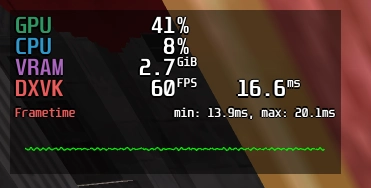
Gamepad enumeration definitely causes hitching, it's what was causing my issue earlier that I was just working around.WhiteShark wrote: ↑ September 13th, 2024, 18:53I searched the Horizon Discord for 'rubberbanding' and came on two more things you might try:J1M wrote: ↑ September 13th, 2024, 18:28I've tried disabling all addons/plugins. The only thing I haven't tried is dropping down to windowed mode.So, I found something interesting: https://github.com/elishacloud/dxwrapper for me, on Fedora 40 on Lutris, it seems to help performance. Usually, if I was on /fps 1, it would stay at 60 but it would rubberband. Now, I have yet to notice any rubberbanding.
I do not recommend normal users using this yet, I'm still running tests, but for those feeling adventurous, I simply dumped the whole dxwrapper zip file in the bootloader folder, and edited the dxwrapper.ini to enable the d3d8 to 9 wrapper. I haven't played with any other settings, but it's pretty nice at this point.>Anyone in san d'oria experiencing any sort of hitching/slight rubberbanding when moving? I can't tell if it's server side or just my client acting up.
while in the game open the ashita console and toggle "DIsable Gamepad Enumeration" ON and see if that helps
Enabled:
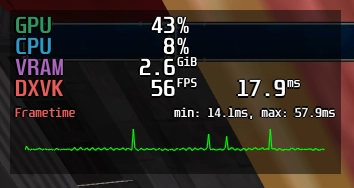
Disabled:
Press 'insert' in game to open the config menu, tick 'Disable Enumeration' under 'Input Manager':
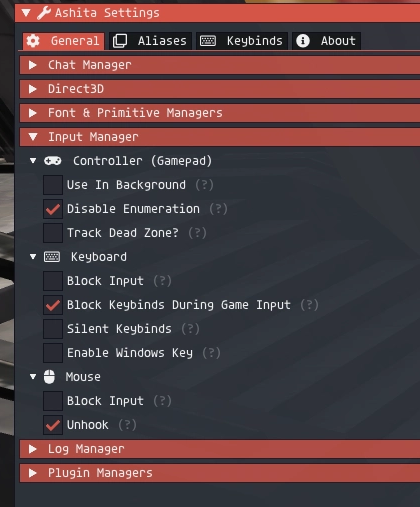
I don't know if this saves between restarts, so, check again after restarting the game.
Last edited by rusty_shackleford on September 13th, 2024, 20:25, edited 1 time in total.
Thank you for your attention to this matter!
Steam friend code: 40552640 https://steamcommunity.com/friends/add | email: [email protected]
Having trouble running an old Windows game?
Rusty's Stuff Collection
Steam friend code: 40552640 https://steamcommunity.com/friends/add | email: [email protected]
Having trouble running an old Windows game?
Rusty's Stuff Collection
-
rusty_shackleford
- Site Admin
- Posts: 45453
- Joined: Feb 2, '23
- Gender: Watermelon
-
Geolocation
Adventurer's Guild
You can download HD maps for many of the zones here: https://remapster.com/downloads/
It also adds more information to the maps.
Scroll down to 'DAT Packs', "Download (2048 x 2048 px)"
Go to `/HorizonXI/Game/polplugins/DATs/`, create a directory called 'remapster', extract the contents of the archive you downloaded. It should show up in the launcher under settings -> Pivot, make sure it's enabled.
It also adds more information to the maps.
Scroll down to 'DAT Packs', "Download (2048 x 2048 px)"
Go to `/HorizonXI/Game/polplugins/DATs/`, create a directory called 'remapster', extract the contents of the archive you downloaded. It should show up in the launcher under settings -> Pivot, make sure it's enabled.
Thank you for your attention to this matter!
Steam friend code: 40552640 https://steamcommunity.com/friends/add | email: [email protected]
Having trouble running an old Windows game?
Rusty's Stuff Collection
Steam friend code: 40552640 https://steamcommunity.com/friends/add | email: [email protected]
Having trouble running an old Windows game?
Rusty's Stuff Collection
-
Val the Moofia Boss
- Turtle
- Posts: 4198
- Joined: Jun 3, '23
-
Geolocation
Adventurer's Guild
-
WhiteShark
- Site Moderator
- Posts: 5056
- Joined: Feb 2, '23
-
Geolocation
Adventurer's Guild
Added a bunch more stuff to the OP: a few more addon recs/unrecs, notes on some of the issues we've solved, @Shillitron's setup recommendations, and the various tool/info pages @rusty_shackleford has been posting. Now maybe I can start playing...
Last edited by WhiteShark on September 13th, 2024, 21:00, edited 1 time in total.