

It is not too late to join us! FFXI has a job system and a level sync system that enables both veteran players and new players to play with each other!
Hidden Content
This board requires you to be registered and logged-in to view hidden content.

Link to the FF11 Horizon website
Quick start guide:
► Show Spoiler
If you create a new character, beware that most of us have started/transferred to the Kingdom of San d'Oria. If you start in the other two countries of Bastok or Windurst, you will be very far away from us and it will not be practical for us to play together during the early game (as in levels 1-30, nation ranks 1-3). During that time you have to constantly return to your home city on foot to refresh your nation's signet buff and start the next part of your nation's storyline. The three starting experiences do not converge at the central city of Jeuno until around level 30+/nation rank 4, at which point you go to Jeuno set your home point there and start doing levelling and nation stories around Jeuno, and by that point you will start unlocking Chocobo rentals and airship travel that will make getting around the world much easier.
What job you play does not matter. The game is easy enough that you do not need to minmax. I have seen people playing samurai tanks and greatsword wielding paladins. However, this is a game about levelling and it takes a very long time, so you are unlikely to be able to have enough time to level more than two or maybe three jobs. You can theoretically level the job you started out as (ie, monk) all the way to level cap, but in this game you can equip a subjob that goes up to half the level of your main job. The usual way FF11 is played is that you start out levelling up a job that you intend to be used as a subjob (ie, starting out as a warrior with the intention of subbing warrior), and then at around level 30 you switch to the real job you really wanted to main (ie, dragoon), and then level that job all the way up to the cap of 75. You could level warrior all the way up to 75 if you really wanted to, though the order will become unusual as you would be levelling a warrior up, then switching to another job and levelling that up to 30 with the intention of using that as a sub for warrior, and then switching back to maining warrior.
What job you play does not matter. The game is easy enough that you do not need to minmax. I have seen people playing samurai tanks and greatsword wielding paladins. However, this is a game about levelling and it takes a very long time, so you are unlikely to be able to have enough time to level more than two or maybe three jobs. You can theoretically level the job you started out as (ie, monk) all the way to level cap, but in this game you can equip a subjob that goes up to half the level of your main job. The usual way FF11 is played is that you start out levelling up a job that you intend to be used as a subjob (ie, starting out as a warrior with the intention of subbing warrior), and then at around level 30 you switch to the real job you really wanted to main (ie, dragoon), and then level that job all the way up to the cap of 75. You could level warrior all the way up to 75 if you really wanted to, though the order will become unusual as you would be levelling a warrior up, then switching to another job and levelling that up to 30 with the intention of using that as a sub for warrior, and then switching back to maining warrior.
Setup
► Show Spoiler
I would strongly recommend playing this game with a controller plugged in, and using the keyboard only for chat. In the Horizon launcher, you can try out different controller presets. If you use an Xbox controller, one of the last presets should work for your controller.
Once ingame, the first thing you will need to do is to adjust your game's aspect ratio, as it is likely stretched. Press X to open the top right menu, the press right on the D-pad to get to the next menu, then scroll down to config, press A, then go to misc 2. In there is an aspect ratio slider you can move until your game looks correct.
After that, you will likely want to adjust your game's chat windows. Open the top right menu > config > windows > shared. I would click on "vertical" to stack your windows on top of each other. Then back out of shared and go to window 1 and window 2, and make them big enough so you can see multiple lines of text in the window. Here is an example of how I have my window size set up:

Next, I would recommend going to the top right menu > config > gameplay, and setting "inventory sort" to "on".
In the other config options, you can do stuff like invert your camera controls, etc.
Once ingame, the first thing you will need to do is to adjust your game's aspect ratio, as it is likely stretched. Press X to open the top right menu, the press right on the D-pad to get to the next menu, then scroll down to config, press A, then go to misc 2. In there is an aspect ratio slider you can move until your game looks correct.
After that, you will likely want to adjust your game's chat windows. Open the top right menu > config > windows > shared. I would click on "vertical" to stack your windows on top of each other. Then back out of shared and go to window 1 and window 2, and make them big enough so you can see multiple lines of text in the window. Here is an example of how I have my window size set up:
Next, I would recommend going to the top right menu > config > gameplay, and setting "inventory sort" to "on".
In the other config options, you can do stuff like invert your camera controls, etc.
Progression
► Show Spoiler
Your first 10 levels will be spent grinding on critters outside of your city's gates by yourself. The reason for this is that levelling parties levelsync down to the lowest level party member so that everyone gets relevant EXP, but you cannot sync down below level 10. Once you hit level 10, stop soloing and start levelling in a party. You will get far more EXP. If no one in the linkshell is online, then you can type "/sea all 10-15" to see all players online who are between levels 10 and 15, and PM people with yellow names (party leaders) asking if you can get into their levelling party. Or you can PM people who have white names (not a member of a party) and ask if they want to join your levelling party. Ofcourse, be mindful of what zone they are in how far away they are from you and how long it would take for everyone to get together.
Every time you leave your nation's city or Jeuno, talk to the guard by the gate and ask him to cast the signet buff on you. While you have Signet active, you will accumulate conquest points whenever you kill a mob. These conquest points add up, and you can use spend them to buy gear (either to be worn or to be sold for money on the auction house) or items such as warp scrolls. I would advise always having a warp scroll so that you can always teleport back to your starting city or Jeuno and not have to walk away the back on foot. As soon as you can, buy a Chariot Ring, and equip it and use it to double your EXP gain. When the Chariot Ring runs out of uses it, you can recharge for conquest points by trading it to a guard (the one who can cast signet on you).
At level 20, you can undertake a quest to unlock your subjob. Two of the items can be acquired while levelling in a party in Vakurm Dunes or Buburimu Peninsula. The third item, the magicked skull, has to be acquired from a dungeon that is rather dangerous for a party of level 20 characters, so you may have to wait until you a little higher level or form an alliance with other parties to take on the skeletons and bandersnatches in there.
At level 20, you farm (or buy off of the auction house) 4x gausebit grass and turn them in to a quest NPC in Jeuno to unlock Chocobo rentals. Chocobo rentals have been patched to be very affordable now, you can just sell the stacks of crystals you earn from levelling on the AH to pay for the rentals. You should rent a chocobo whenever you leave a city to go somewhere, and then when you are done at that place you can use your warp scroll to teleport back to the city.
At level 30 you can unlock an advanced job like beastmaster, dragoon, samurai, etc.
Once you reach level 50, you will have to go to Jeuno and talk to Maat every 5 levels and do a level uncap quest (called a "Limit Break" quest, but you're not getting a cool ability like the limit breaks in the singleplayer FF games).
Every time you leave your nation's city or Jeuno, talk to the guard by the gate and ask him to cast the signet buff on you. While you have Signet active, you will accumulate conquest points whenever you kill a mob. These conquest points add up, and you can use spend them to buy gear (either to be worn or to be sold for money on the auction house) or items such as warp scrolls. I would advise always having a warp scroll so that you can always teleport back to your starting city or Jeuno and not have to walk away the back on foot. As soon as you can, buy a Chariot Ring, and equip it and use it to double your EXP gain. When the Chariot Ring runs out of uses it, you can recharge for conquest points by trading it to a guard (the one who can cast signet on you).
At level 20, you can undertake a quest to unlock your subjob. Two of the items can be acquired while levelling in a party in Vakurm Dunes or Buburimu Peninsula. The third item, the magicked skull, has to be acquired from a dungeon that is rather dangerous for a party of level 20 characters, so you may have to wait until you a little higher level or form an alliance with other parties to take on the skeletons and bandersnatches in there.
At level 20, you farm (or buy off of the auction house) 4x gausebit grass and turn them in to a quest NPC in Jeuno to unlock Chocobo rentals. Chocobo rentals have been patched to be very affordable now, you can just sell the stacks of crystals you earn from levelling on the AH to pay for the rentals. You should rent a chocobo whenever you leave a city to go somewhere, and then when you are done at that place you can use your warp scroll to teleport back to the city.
At level 30 you can unlock an advanced job like beastmaster, dragoon, samurai, etc.
Once you reach level 50, you will have to go to Jeuno and talk to Maat every 5 levels and do a level uncap quest (called a "Limit Break" quest, but you're not getting a cool ability like the limit breaks in the singleplayer FF games).
===========
Tips by @WhiteShark
FINAL FANTASY XI GAME MANUAL
I highly recommend having a look at the manual if you're new. Though there's a tutorial miniquest you can take right after character creation, it's also easy to miss it (as I did), and it barely touches some very important game elements. The expectation seems to be that the player will have read the manual beforehand. It also contains an exhaustive list of the game's text commands, which is very useful when creating macros.
► Basic Controls
| Actions summary | Xbox 360 Controller | Analog Controller(DUALSHOCK 2) | Keyboard |
|---|---|---|---|
| Move your character | Left stick | Left analog stick | [8], [2], [4], and [6] on the numeric keypad |
| Continuously run (or walk) | LB | L1 button | [7] on the numeric keypad while moving |
| Switch between running and walking | - | - | [/] on the numeric keypad |
| Start healing | Left stick button | L3 button | [*] on the numeric keypad |
| Perform an action | A button | 〇 button | [Enter] key |
| Cancel an action | B button | ✖ button | [ESC] key |
| Move the camera | Right stick | Right analog stick | Directional keys |
| Switch the camera point of view between first-person and third-person | Right stick button | R3 button | [5] on the numeric keypad |
| Return the camera to its original position | - | - | [Home] key |
| Zoom in with the camera | - | - | [Page Up] key or [9] on the numeric keypad |
| Zoom out with the camera | - | - | [Page Down] key or [3] on the numeric keypad |
| Open the main menu | X button | ▢ button | [-] Key |
| Select an item on the menu | Directional pad | Directional buttons | Directional keys |
| Open the action command window | A button | 〇 button | [Enter] key |
| Select the active window | Y button | △ button | [+] key |
| Switch between targets | Directional pad | Directional buttons | [Tab] key or [0] on the numeric keypad |
| Target your character | Directional pad | Directional buttons | [F7] |
| Target an NPC | Directional pad | Directional buttons | [F8] |
| Target a PC | Directional pad | Directional buttons | [F9] |
| Lock your target | Left stick button | L3 button | [*] on the numeric keyboard while targetting |
| Chat using the software keyboard | RB | R1 button | - |
| Start chat entry | - | - | [Space] key |
| Talk using the auto-translator | Select [Tab] key on software keyboard | - | [Tab] key |
| Call up the macro window | Left trigger, right trigger | L2 button, R2 button | [Ctrl] key or [Alt] key |
| Display/hide the window | BACK button | SELECT button | [Scroll Lock] key |
| Take a screenshot | RB (with windows hidden) | R1 button (with windows hidden) | [Print Screen] key (with windows hidden) |
| Log out of the game | START button | START button | Press [Pause] key or Type /logout |
| Wave to another character | Select [/wave] from the [text commands] in the software keyboard after selecting [complete] | Type /wave | |
| Bow to another character | Select [/bow] from the [text commands] in the software keyboard after selecting [complete] | Type /bow |
CLIENT ENHANCEMENTS
► Enhancements
Settings
- Set both dimensions of Background Resolution to twice the Y value of your Window Resolution. Ex: if your Window Resolution is 1920x1080, set your Background Resolution to 2160x2160.
- Enable Hardware Mouse (the Setting, not the Plugin). It fixes the cursor not always aligning with your mouse movement.
Enhancements
The following is what I'm using and why. Preinstalled Addons and Plugins are activated from the Horizon XI Launcher.Some of these may end up cut, but I doubt any more will be added from the pool of existing approved addons. WIP.
It turns out there are many more approved addons available that don't come preinstalled with the client, so this list will grow.
Addons
Addons in italics don't come preinstalled. You can find links to their project pages here. Many of them will require manually downloading a raw lua file, creating a folder in \HorizonXI\Game\addons with the name of the addon, and placing the lua file there. Most of them can be toggled on or off in game with /<addonname> if already loaded. See the default.txt section below for how to manually load addons.USING
- aspect: necesary to display the game at 16:9.
- autofps: requires fps addon. Automatically adjusts the FPS divisor between 1 and 2 to keep the game from slowing down. Very useful.
- Balloon: gives NPC dialogue nice looking speech bubbles with portraits. Doesn't work half the time.
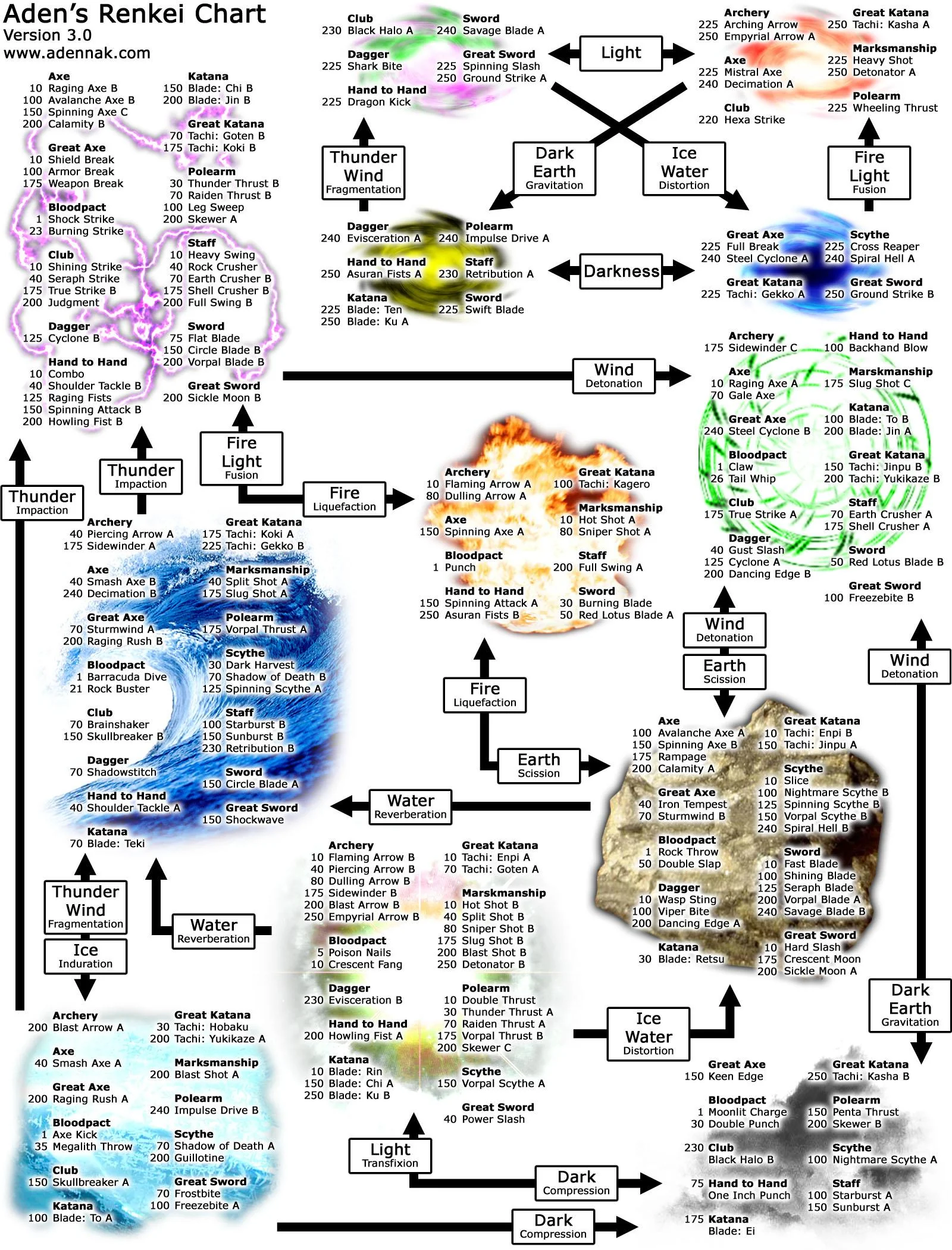
- Chains: displays an alert when a skill chain is possible and for how long. Very useful.
- chatmon: plays sound effects for certain chat messages, such as when someone writes your name or your inventory is full. Very useful.
- Checker: shows target's exact level on check and colorizes message for visual clarity. Useful.
- CleanCS: hides UI elements from addons during cutscenes. Doesn't work for all of them.
- clock: displays the day of the week and current time below the radar. May also be able to set timers. Useful.
- config:
- craftmon: lets you know the success of a synthesis attempt immediately, giving you time to rearrange your inventory based on the result. Mildly useful.
- crosshair: turns the cursor into a highly visible crosshair. Useful for clicking inside addon windows that obscure the normal crosshair.
- drawdistance: lets you set the drawdistance for the world and mobs, though the one for mobs seems to have a hard cap. The world looks very expansive with it.
- equipmon: displays your equipment on screen. Maybe mildly useful later.
- filterlesss: removes the language filter. Prevents messages from being oddly censored.
- filters: "Allows players to save and load chat filter settings with ease." Haven't used it yet, but probably nice for something.
- findall: search all your storage containers for an item. Useful.
- fps: displays FPS and allows it to be raised to 60. I prefer the higher FPS even if it makes animations a bit faster.
- gearfinder: lets you find gear per slot across all inventory spaces. Autoequip function doesn't work. Useful.
- hticks: shows how long until the next tick of healing. Mildly useful, though it doesn't usually sync perfectly with the server's timing.
- hideconsole: hides the bootloader, saving you from having an extra window open when alt tabbing. Mildly useful.
- hideparty: hides the default status bars of you and party members. Very useful if you're using another addon, like HXUI, that makes them redundant.
- HXUI: adds a number of handy UI elements. Some are replicas of existing ones, but they're much easier to see.
- HXUI-bluemana: changes MP to blue and TP to yellow, and, more importantly, changes the ambiguous job icons to classic FFI, FFIV, and FFV sprites. Very useful.
- instantah: "Get the results from your auction house purchase attempts instantly." Useful.
- Logs: saves your chat logs externally. Nice.
- luashitacast: helps manage equipment swaps. Probably useful later.
- macrofix: makes macro bar appear immediately when activated. I don't think I tested without, but a delay sounds as though it would be awful.
- meteorologist: prints the weather whenever it changes or you zone, which is relevant to some casters. Mildly useful.
- metrics: tracks stuff like DPS, % of party damage, XP/hour, and other interesting things. Very useful.
- Minimap: not a very 'classic experience' plugin, but helpful for keeping track of allies and where you're going. Useful.
- minimap-helper: lets you save Minimap zoom settings per area. Requires Minimap. Useful.
- MobDB: shows the target monster's level range, resists/weaknesses, and traits. Very useful.
- NoLock: "Allows you to engage/disengage without animation lock from effects such as spells being cast on you or mob TP moves." Probably very useful.
- petinfo: I have no pets yet.
- statustimers: customizable and clearer status icons. Very useful.
- stfu: filters some common system messages and all <call>s. Mildly useful, though I commented out the calls part.
- TargetLines: "FFXII style combat lines for FFXI," which lets you clearly see who is targeting whom. Very useful.
- timestamp: adds a timestamp to chat messages. I like it.
- tTimers: displays buff, debuff, recast, and custom timers. Can be set to show buffs and debuffs cast by others, also letting you track debuffs on enemies. Very useful. DO NOT CONTROL+CLICK ANY TIMERS. Doing so block that timer from ever appearing again unless you manually go into \HorizonXI\Game\config\addons\tTimers\<charname>\settings.lua and undo the block.
- xicamera: lets you adjust zoom and, more important, camera pan speed. Very useful.
- xitools: a collection modular display panels, most notably one that displays the contents of your inventory in a grid format with tabs for your other containres. Very useful.
- ZoneName: briefly displays the name of the area you've entered when you zone into a new area. Useful for getting your bearings.
NOT USING
- allmaps: no doubt very useful, but it feels like cheating.
- calc: simple in game calculator. I found it faster to alt tab to a calculator that accepts keyboard input.
- chaintimer: shows timer for XP chaining. Doesn't work on Ashita v4. Obsoleted by metrics.
- crosshair: very visible, but lines stretch across the entire screen, and enabling the Hardware Mouse setting makes the cursor visible over imgui frames already. Unnecessary.
- debuffed: only works with Ashita v3 and is made obsolete by tTimers.
- distance: shows distance to nearest(?) enemy. Made obsolete by HXUI.
- gearlock: prevents character blinking during equipment swaps. Doesn't work on Ashita v4. Made obsolete by stylist.
- lschat: ugly and doesn't capture multiple instances of the same message. Useless.
- me: broken. Has requirements that don't exist.
- recast: shows recast timers, but not very well. Made redundant by tTimers.
- timers: shows recast (cooldown) timers of your abilities. Very useful, but made redundant by tTimers.
- tparty: Redundant with HXUI.
Plugins
USING- Nameplate: "Corrects rendering issues in the nameplate." You can see what default nameplates look like in Val's screenshots.
- PacketFlow: "Sends update requests the to server at a higher rate," presumably maintaining better synchronization. Very useful.
- Shorthand: "A plugin to allow more flexible typed commands." Parses various abbreviated versions of chat commands. Useful.
- Toon: looks ridiculous.
External
In-game content replacing mods can be toggled in Launcher > Settings > Pivot.- Fireworks Disabler: disables the incessant fireworks explosions from the ongoing summer event. Saves your sanity!
- XI Combined Maps: a very nice looking set of remastered maps with additional info. Very useful.
- Launcher Gay Flag Remover: replaces the gay flag in the launcher with an HQ logo and a link to this thread. Surprisingly useful!
default.txt
If you're using fps and drawdistance, add the following to the very end of the default.txt file in \HorizonXI\Game\scripts:Code: Select all
/fps 1
/drawdistance sete 20
/drawdistance setw 20
Addons and plugins you've installed manually will not be loaded by default when you start the game. To fix that, add the following to default.txt under 'Custom user plugins and addons' for each addon or plugin:
Code: Select all
/addon load name
► Addon Commands
| Addon | Command | Function |
|---|---|---|
| hideparty | /hideparty | Toggles visibility of target and party frames. |
| /hideparty help | Displays help information. | |
| /hideparty (hide | h) | Hides all frames. | |
| /hideparty (hide | h) (target | party0 | party1 | party2) | Hides specified frame. | |
| /hideparty (show | s) | Makes all frames visible. | |
| /hideparty (show | s) (target | party0 | party1 | party2) | Makes specified frame visible. | |
| (note) | Due to engine limitations, hiding the target frame will also hide the target cursor, and hiding the party0 frame will also hide the fishing stamina bar. | |
| imguistyle | /imguistyle | /imguistyle show | Displays imgui editor. |
| /imguistyle save | Saves current settings. | |
| (note) | Saving doesn't work for me. | |
| minimap-helper | /mmh [scale] | Sets minimap scale and saves it to your config. |
| (note) | Scale defaults to 0.5. | |
| ttimers | /tt | Opens config menu. |
| /tt reposition | Makes all timer panels visible and creates handles for repositioning. Bottom-justified panels have a red handle and top-justified panels have a red handle. Clicking on the overlapping area allows you to move multiple panels simultaneously. | |
| /tt lock | Ends reposition mode. | |
| /tt custom [label] [duration[s/m/h]] | Sets a timer named [label] for [duration]; defaults to s(econds) if m(inutes) or h(ours) is not specified. | |
| xitools | /xitools | /xit | Displays config menu. |
| /xitools | /xit (treas | t) | Toggles the treas window. | |
| /xitools | /xit (week | w | enm | e) | Toggles the week window. | |
| /xitools | /xit (crafty | c) | Toggles the crafty window. | |
| /xitools | /xit (fishe | e) | Toggles the fishe window. | |
| /xitools | /xit (inv | i) | Toggles the inv window. | |
| (note) | Each window must be enabled in config before it can be displayed. | |
ASHITA SCRIPT DOCUMENTATION
Horizon XI comes bundled with Ashita, "a free feature-rich third-party enhancement/modification for the MMORPG, Final Fantasy XI." It does many things, but what is immediately relevant is that it adds a chat command to run macros from external .txt files. If you prefer to edit your macros outside of the game, build them as scripts following the documentation above and then create simple /exec macros to run them in game.
INFORMATION
► Tips
- @Shillitron's keyboard and setup recommendations
- Register your character on Horizon's Discord server in #discord-setup to gain access to a 30-slot Mog Satchel that can be accessed from anywhere via View House in the menu.
- If you later make alts, you can get Mog Satchels on them, too, by going to the same channel and clicking 'Refresh My Account Link'.
- When you have a storage container open, you can use alt+arrrow keys to switch to other storage containers.
- Once you've done the Mog House exit quest, you'll have an option when leaving your Mog House to go to a different floor of your house. NEVER DO THIS. You'll get stuck on a black loading screen and you'll be forced to log off and wait for ~10 minutes for the server to decide you're no longer connected before you can log back in (see Troubleshooting below).
- Job Abilities, Spells, and (probably) Weapon Skills reset your swing timer (the time until your next autoattack), so if you must use one in the middle of autoattacking, try to do so immediately after making an attack.
► Troubleshooting
My character keeps rubberbanding/hitching every second or so.
If you're playing on keyboard and you have a controller plugged in, try disabling it: Launcher > Settings > Open Gamepad Config > Enable Game: OFF
My wireless PS4 controller isn't working properly.
Turn off ds4windows, connect via bluetooth, and enable XInput: Launcher > Settings > Open Gamepad Config > Enable XInput
I can't assign camera keys to the numpad.
If you're on Windows, an AutoHotkey script run as administrator works, and I've obtained explicit permission from Horizon staff to use it for key remapping. Key2Joy also claims to be able to remap keyboard inputs. If you're on Linux, use input-remapper. Suggestions for other solutions are welcome.
Addon UI fonts are jagged. I'm using WINE.
You'll need to `winetricks gdiplus` to fix the jagged font issue in some addons.
I pulled a ranged mob but I can't attack it.
Ranged mobs exhibit very strange behavior. The only solution I've found is to keep pulling it farther until it reaches a position at which the game will let you attack it.
I'm stuck on a black loading screen (and then I was disconnected and can't reconnect).
This happens sometimes. You won't be able to reconnect until the server recognizes that you are no longer connected, which takes 5-10 minutes. If you try to reconnect before this, the timer will reset. You can see if the server thinks you're still connected by going to https://horizonxi.com/players and looking up your character name. It won't autorefresh, so you'll have to keep checking until it says you're not online.
If you're playing on keyboard and you have a controller plugged in, try disabling it: Launcher > Settings > Open Gamepad Config > Enable Game: OFF
My wireless PS4 controller isn't working properly.
Turn off ds4windows, connect via bluetooth, and enable XInput: Launcher > Settings > Open Gamepad Config > Enable XInput
I can't assign camera keys to the numpad.
If you're on Windows, an AutoHotkey script run as administrator works, and I've obtained explicit permission from Horizon staff to use it for key remapping. Key2Joy also claims to be able to remap keyboard inputs. If you're on Linux, use input-remapper. Suggestions for other solutions are welcome.
Addon UI fonts are jagged. I'm using WINE.
You'll need to `winetricks gdiplus` to fix the jagged font issue in some addons.
I pulled a ranged mob but I can't attack it.
Ranged mobs exhibit very strange behavior. The only solution I've found is to keep pulling it farther until it reaches a position at which the game will let you attack it.
I'm stuck on a black loading screen (and then I was disconnected and can't reconnect).
This happens sometimes. You won't be able to reconnect until the server recognizes that you are no longer connected, which takes 5-10 minutes. If you try to reconnect before this, the timer will reset. You can see if the server thinks you're still connected by going to https://horizonxi.com/players and looking up your character name. It won't autorefresh, so you'll have to keep checking until it says you're not online.