Overview
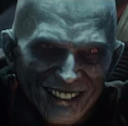
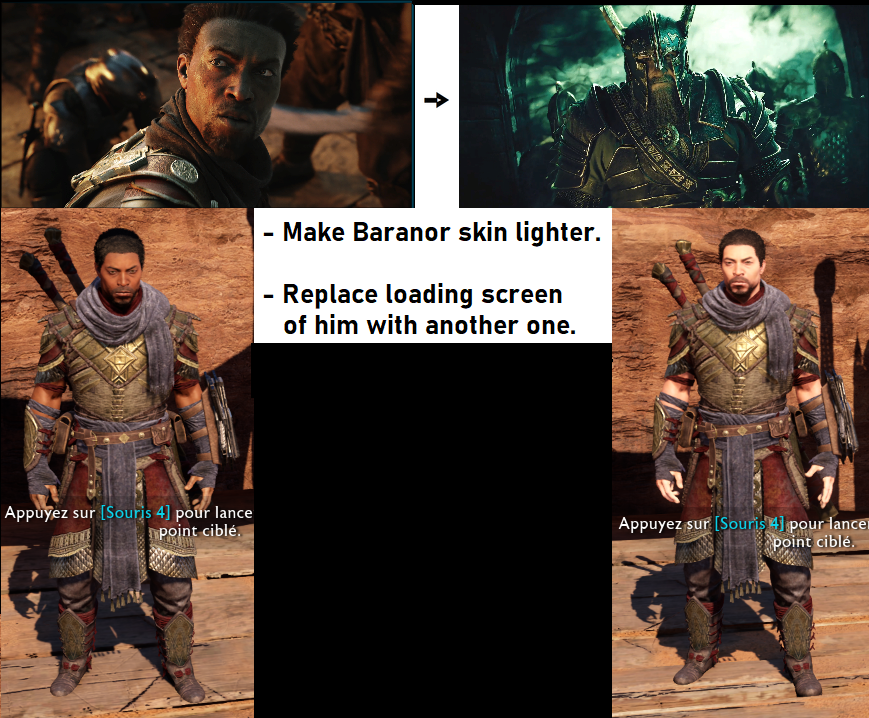
Give light skin to Baranor's NPC and replaces his loading/splash screen images.
Downloads
Quality of Life
You can skip ahead to the install section if you want.
► Show Spoiler
So here are a few quality of life thing that are useful;
I recommend launching the game, setting your UI, Audio and Graphic settings as you want them.
If you plan on doing a new game from scratch, start a new game now before modding.
FYI your save can be located in one of those location depending on the version you use;
Steam -> <Steam-folder>\userdata\<user-id>\356190\remote\<user-id>_ShadowOfWar.sav (You may want to disable steam cloud sync for this game wile swapping saves.)
GOG.com -> %LOCALAPPDATA%\WB Games\Shadow of War\<Device Name>_ShadowOfWar.sav
If you have trouble with the pathing above,
i heard it can be located easily by typing 356190 in the search bar from the AppData folder.
/!\ Be careful with what you are moving around if you are on an on going game.
Do not delete or replace files before you have make back up and tested in game if everything have been done properly.
It is useful for starting a new game with mod enable, but also in the vanilla game since it automatically save and you can't roll back unless you "manually save" through backups.
So, make a game save point, load in and quit once you are free of your movement.
Backup this save.
You should now have a possibility to "restart" a new game (or from whenever the backup is made) if you wish, without having to mess around with the moding tool files.
Installation
- install the
 Middle-Earth Mod Loader
- Requires the latest Microsoft Visual C++ Redistributables.
- Make a backup of the bink2w64.dll file in your game's x64 folder that the mod loader will replace.
- Place both the modloader folder and the new bink2w64.dll in the x64 game folder.
- Install the
 Shadow of War Packet Loader
- Place the PacketLoader folder into the plugins folder inside the x64 folder
- Finally, place the PacketLoader folder of my mod into the plugins folder inside the x64 game folder, merging it with the other one.
- Pathing should be: x64\plugins\PacketLoader\ etc
That's it, you're done.
To uninstall, simply remove all that. Don't forget to give back the
bink2w64_.dll it's original name.
Things To Avoid
Modding of this game is fairly new and so are it's tools. The
bink2w64.dll from the Middle-Earth Mod Loader (as of the latest version at the time of the making of this) can crash the game if you are;
- Changing you'r UI, audio or graphic settings
- Taking picture with Photo mode
- starting a new game from scratch
I only made the texture; I took no part in the tools creation and have no idea how it work, so I can't help fix it.
But here is a very easy way around the problem:
- Remove the problematic bink2w64.dll
- Re-rename the original bink2w64._dll to it's normal name.
- Launch the game and get you'r setting as you want them, start a new game if you want and leave once you are loaded in.
- Quit the game and re-re-rename accordingly to what you did before the original .dll, and place back the no longer problematic one in it's place.
If the mod is still not working
If even after all this foreplay you do not see changes in the game, with it installed properly, you are going to have to re-generate the signature folder.
► Re-generating the signature folder
- Remove the Signatures folder. Located in x64\plugins\PacketLoader\Internal
- open the PacketLoader.ini and set cache to = 0 (to generate).
- Launch the game. The loading time may be a little longer with the cache set to = 0 (to generate).
- Check if the mod is working
- Load in your game and visit Baranor.
- Another quicker way is to go as if you was going to start a new game, if you have the dlc “The Desolation of Mordor Story Expansion". But do not start it (remember, starting a new game from scratch will crash). Hover above with the mouse and look the image of it, if the image you see is not him than it is now working.
- Close the game, you should now have a new Signature folder.
- Open the PacketLoader.ini and set the cache back to to = 1 (to read).
- Done
Note that You may or may not have to re-generate the signature folder again after you do modification, i.e., I had to do it when I was doing some testing after I had swapped the .dll to change settings. You probably will need to do it if you add another mod.
Browse For Other Mods Here 
Feel free to reupload - edit - do whatever you want with it. Enjoy.




 Baranor Fix