


I was playing Seven: Days Long Gone recently and rather enjoyed the controls after getting used to them. Mouse rotates the camera, WASD moves the character, character is very responsive. Just running around and climbing on things can be fun. I feel like I'd prefer this over typical click-to-move in IE-style games for everything except combat.
One downside is, however, there's no easy way to mouse over things and see what they are or get more information, context menu, etc.,
Any other games with a similar camera view that you think have good controls?
We have a Steam curator now. You should be following it. https://store.steampowered.com/curator/44994899-RPGHQ/
"Isometric"/Bird's-eye-view games with good controls
-
rusty_shackleford

- Site Admin
- Posts: 46456
- Joined: Feb 2, '23
- Gender: Watermelon
-
Geolocation
Adventurer's Guild
"Isometric"/Bird's-eye-view games with good controls
Thank you for your attention to this matter!
Steam friend code: 40552640 https://steamcommunity.com/friends/add | email: [email protected]
Having trouble running an old Windows game?
Rusty's Stuff Collection
Steam friend code: 40552640 https://steamcommunity.com/friends/add | email: [email protected]
Having trouble running an old Windows game?
Rusty's Stuff Collection
-
aweigh

- Turtle

- Posts: 3080
- Joined: Feb 2, '23
-
Geolocation
I tolerate point-and-click for movement because it's the only option for most Western computer RPGs, but there's no reason one should need to use it outside of combat.
I greatly enjoyed being able to use WASD for direct control of my character in Dragon Age: Origins, to freely run around each area. I used reWASD to make it so that whenever I held down the W key it would also automatically depress the RMB, but when I let go of the W key it would immediately stop depressing the RMB.
The RMB was for enabling mouse-look when depressed, and when let go the mouse pointer would appear for clicking on objects. I found that I mainly used mouse-look when I was in movement, so I thought about it and realized tying it to automatically enabling when moving foward was the best solution, since you could mouse-look your turning as well. When standing still I could always just quickly press RMB myself and have a look.
I remember one of my first-ever posts on the Codex was about wishing PS:T had direct character control with WASD for movement outside of combat... people thought I was crazy.
DOS1 had direct character control with WASD but it needed to be enabled via a small mod, you needed to edit a file to make the game think it was in controller mode while it was still in keyboard and mouse mode (direct character control only being accessible if the game is in controller mode). They removed this hidden functionality in DOS2, however.
I believe part of KOTOR's success was because it allowed direct character control. NWN attempted it but it more tank-controls than anything else.
EDIT:
Extra random tip for some of you, I found that I started enjoying point-and-click much more once I remapped LMB to a keyboard key. I bind it to 'E' or 'F' now, and I find it's much better for playing games. I have various reasons for this but mainly:
1) I get finger pain in my right hand's left-clicking finger. Dunno why, but it can get bad enough to make me not want to click anything at all and/or have to use my middle finger for clicking.
2) I found that my mouse will move subtly when I left-click, due to the force of the finger coming down on the LMB. Sometimes this would cause mis-clicks.
Both of these things are permanently solved by moving the LMB to a keyboard key. It really is a LOT more enjoyable. Can use a program like reWASD or AutoHotkey to do it.
I greatly enjoyed being able to use WASD for direct control of my character in Dragon Age: Origins, to freely run around each area. I used reWASD to make it so that whenever I held down the W key it would also automatically depress the RMB, but when I let go of the W key it would immediately stop depressing the RMB.
The RMB was for enabling mouse-look when depressed, and when let go the mouse pointer would appear for clicking on objects. I found that I mainly used mouse-look when I was in movement, so I thought about it and realized tying it to automatically enabling when moving foward was the best solution, since you could mouse-look your turning as well. When standing still I could always just quickly press RMB myself and have a look.
I remember one of my first-ever posts on the Codex was about wishing PS:T had direct character control with WASD for movement outside of combat... people thought I was crazy.
DOS1 had direct character control with WASD but it needed to be enabled via a small mod, you needed to edit a file to make the game think it was in controller mode while it was still in keyboard and mouse mode (direct character control only being accessible if the game is in controller mode). They removed this hidden functionality in DOS2, however.
I believe part of KOTOR's success was because it allowed direct character control. NWN attempted it but it more tank-controls than anything else.
EDIT:
Extra random tip for some of you, I found that I started enjoying point-and-click much more once I remapped LMB to a keyboard key. I bind it to 'E' or 'F' now, and I find it's much better for playing games. I have various reasons for this but mainly:
1) I get finger pain in my right hand's left-clicking finger. Dunno why, but it can get bad enough to make me not want to click anything at all and/or have to use my middle finger for clicking.
2) I found that my mouse will move subtly when I left-click, due to the force of the finger coming down on the LMB. Sometimes this would cause mis-clicks.
Both of these things are permanently solved by moving the LMB to a keyboard key. It really is a LOT more enjoyable. Can use a program like reWASD or AutoHotkey to do it.
Last edited by aweigh on August 1st, 2023, 22:21, edited 1 time in total.
-
J1M

- Turtle
- Posts: 5216
- Joined: Feb 15, '23
-
Geolocation
Adventurer's Guild


Camera rotation is a cancer on isometric games.
-
rusty_shackleford
- Site Admin
- Posts: 46456
- Joined: Feb 2, '23
- Gender: Watermelon
-
Geolocation
Adventurer's Guild
There's no way the same level of verticality and exploration could be implemented without camera rotation.
Thank you for your attention to this matter!
Steam friend code: 40552640 https://steamcommunity.com/friends/add | email: [email protected]
Having trouble running an old Windows game?
Rusty's Stuff Collection
Steam friend code: 40552640 https://steamcommunity.com/friends/add | email: [email protected]
Having trouble running an old Windows game?
Rusty's Stuff Collection

-
J1M
- Turtle
- Posts: 5216
- Joined: Feb 15, '23
-
Geolocation
Adventurer's Guild
That's an easy trade for me to accept. The level of exploration and hidden rooms in Exile 3 is fine with me. Also fine with verticality being a finite set of 'layers'.rusty_shackleford wrote: ↑ August 1st, 2023, 22:22There's no way the same level of verticality and exploration could be implemented without camera rotation.
-
rusty_shackleford
- Site Admin
- Posts: 46456
- Joined: Feb 2, '23
- Gender: Watermelon
-
Geolocation
Adventurer's Guild
I'd prefer having an RPG with Tomb Raider like exploration over IE-style point and click cancer that has led to this sort of design:J1M wrote: ↑ August 1st, 2023, 22:30That's an easy trade for me to accept. The level of exploration and hidden rooms in Exile 3 is fine with me. Also fine with verticality being a finite set of 'layers'.rusty_shackleford wrote: ↑ August 1st, 2023, 22:22There's no way the same level of verticality and exploration could be implemented without camera rotation.
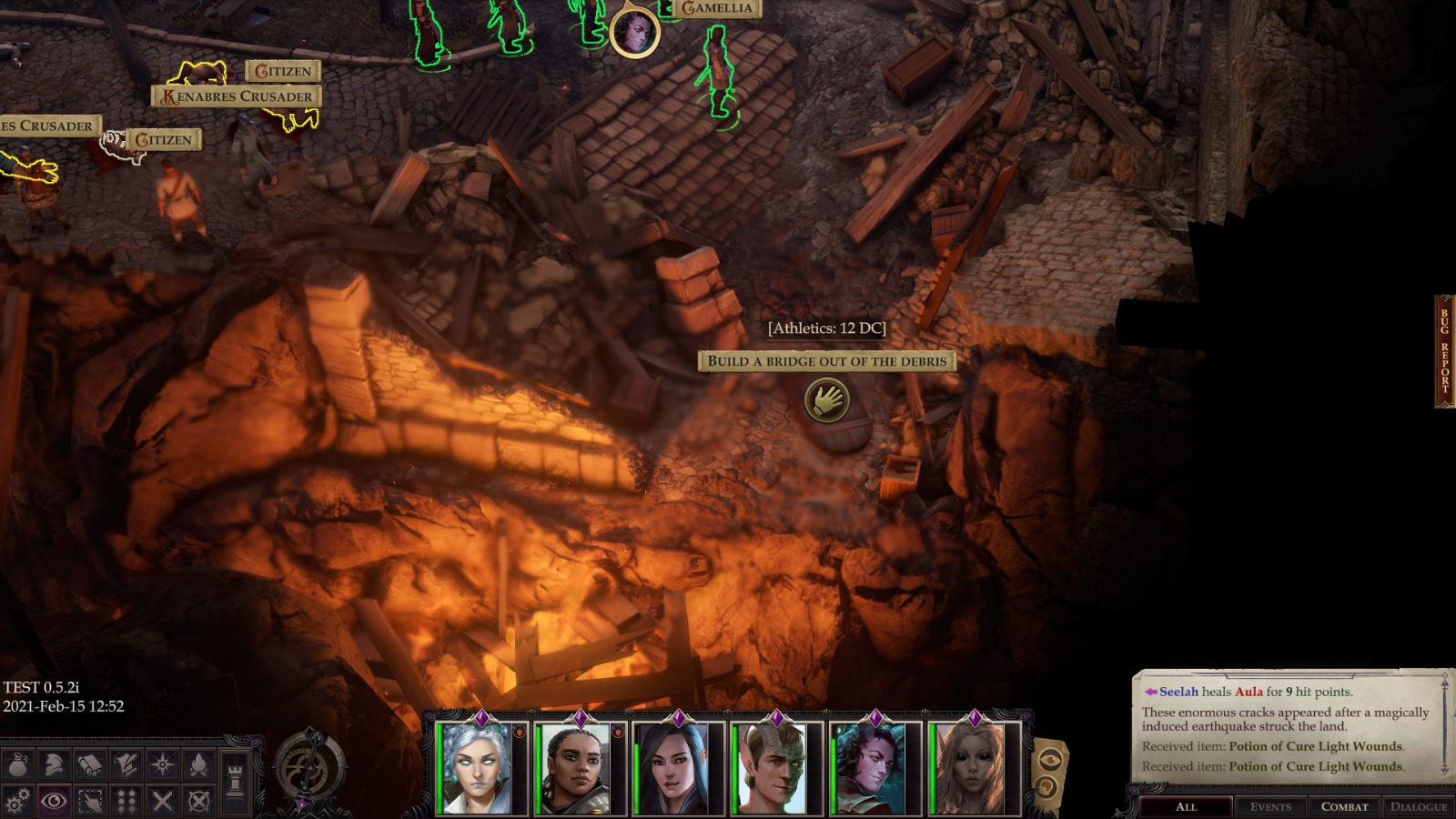
Modern IE derivatives are combat interspersed with point and click adventure games designed for toddlers.
Thank you for your attention to this matter!
Steam friend code: 40552640 https://steamcommunity.com/friends/add | email: [email protected]
Having trouble running an old Windows game?
Rusty's Stuff Collection
Steam friend code: 40552640 https://steamcommunity.com/friends/add | email: [email protected]
Having trouble running an old Windows game?
Rusty's Stuff Collection
-
aweigh
- Turtle
- Posts: 3080
- Joined: Feb 2, '23
-
Geolocation
Still want direct control for moving around even if the game does not use a 3D camera.
-
rusty_shackleford
- Site Admin
- Posts: 46456
- Joined: Feb 2, '23
- Gender: Watermelon
-
Geolocation
Adventurer's Guild
Ironically, this game does have a rotatable camera for ... whatever ... reason. Imagine it was using action movement and you were expected to manually jump the gap, being unable to move the camera would make aligning the jump extremely difficult because you can not or can barely see the area you're jumping to.
The freedom in Seven is very fun, I'm constantly trying to see what I can climb or where I can get to. I don't need the game designer to plop a big button down to show me areas where I'm allowed to climb.
I'll fully agree that the rotatable camera added nothing to WotR beyond a headache because the game doesn't make use of it whatsoever. Besides that one area that everyone absolutely hated.
Thank you for your attention to this matter!
Steam friend code: 40552640 https://steamcommunity.com/friends/add | email: [email protected]
Having trouble running an old Windows game?
Rusty's Stuff Collection
Steam friend code: 40552640 https://steamcommunity.com/friends/add | email: [email protected]
Having trouble running an old Windows game?
Rusty's Stuff Collection
-
Oyster Sauce

- Site Moderator
- Posts: 11600
- Joined: Jun 2, '23
-
Geolocation
Adventurer's Guild
Last bumped by rusty_shackleford on April 17th, 2025, 13:41.