

Hey, thanks for the nice mod! You created some really cool NPCs there.
Just one question: I've come across a few minor NPCs where I prefer their old appearance. Is there an easy way to delete a NPC from this mod manually, on my own?
We have a Steam curator now. You should be following it. https://store.steampowered.com/curator/44994899-RPGHQ/
[Solved] Reverting Specific NPCs
Moderator: Mod Janitor
-
Cheo

- Posts: 7
- Joined: May 10, '26
-
Geolocation
 [Solved] Reverting Specific NPCs
Last edited by loregamer on May 15th, 2026, 21:59, edited 1 time in total.
-
loregamer
- Site Moderator
- Posts: 5760
- Joined: Dec 3, '23
-
Geolocation


I split this to a support thread @Cheo
It'd honestly be easier if I just make you a patch, but I can maybe make a tool. Which NPCs do you want to revert? Depending on the NPC, it'd require just a Character Visual removal/patch, or it'd need a Template revert as well
It'd honestly be easier if I just make you a patch, but I can maybe make a tool. Which NPCs do you want to revert? Depending on the NPC, it'd require just a Character Visual removal/patch, or it'd need a Template revert as well
Jingle Jangle Jingle
-
Cheo
- Posts: 7
- Joined: May 10, '26
-
Geolocation
Hey mate, thanks for the offer, that's very kind, so far as I said it was only minor NPCs, nothing worth the effort, I was rather curious if it generally possible in case I encounter a NPC that really bothers me. So far like 90%+ I like your changes better than the vanilla game.
-
loregamer
- Site Moderator
- Posts: 5760
- Joined: Dec 3, '23
-
Geolocation
I'll write up a guide on this tomorrow @Cheo. Let's do this as a patch approach so you don't have to repeat re-packing Aesthetics/Swaps entirely and your revert-to-vanilla patches work for ALL mods just incase. It's also easier and future-proof
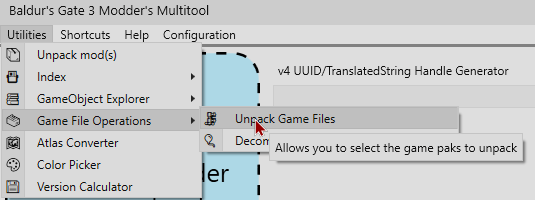
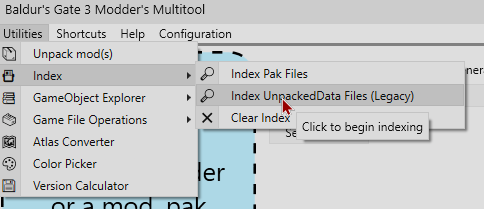
Install BG3 Toolkit and BG3 Modders Multitool. In BG3MM, unpack your game's PAK files and index them
Unpack option is here
Index option is here, use the Legacy one
Install BG3 Toolkit and BG3 Modders Multitool. In BG3MM, unpack your game's PAK files and index them
Unpack option is here
Index option is here, use the Legacy one
Last edited by loregamer on May 12th, 2026, 02:38, edited 5 times in total.
Jingle Jangle Jingle
-
orinEsque

- Posts: 5241
- Joined: Oct 9, '23
- Location: Dubai
- Gender: Potato
-
Geolocation
I have it all covered here:
viewtopic.php?p=58094-bg3-modding-bg3-g ... ted#p58094
instructions for actual change isn't updated for modding tools though.
viewtopic.php?p=58094-bg3-modding-bg3-g ... ted#p58094
instructions for actual change isn't updated for modding tools though.
Last edited by orinEsque on May 12th, 2026, 03:48, edited 1 time in total.
Like my mods? Buy me a beer at ㅤPayPalㅤ or Subscribe at ㅤSUBSCRIBESTAR ㅤ
-
Cheo
- Posts: 7
- Joined: May 10, '26
-
Geolocation
Cool, thanks for guides, I''ll check them out once I have a bit of time and try to revert a few NPCs that I liked better in vanilla
-
loregamer
- Site Moderator
- Posts: 5760
- Joined: Dec 3, '23
-
Geolocation
Alright here's my suggested workflow @Cheo. We'll be doing this as a patch since it'll be update-resistant, easier, and it's better than just repacking RR
Let's say you want to revert the Aelar, for some reason
Identifying the Character Visual
Reverting the Character Visual
All we'll be doing is opening toolkit, searching the character visual, then overriding it as vanilla. Here's how you do that:
Reverting Race Tag Update (optional)
If you want to revert the racial tag update if they were in Swaps, we'll have to override the Template. That's a bit more convoluted. You will need BG3 Toolkit Helper and LSF LSX Converter
I'll type out how to do this, but I would suggest just leaving it be and ignoring the ingame race tag and settling with just the character visual override.
I hope that made sense. I think it's the easiest cleanest way I've found to do template overrides since toolkit template overriding is borked.
Gonna mark this as solved, but feel free to post if you need any help
Let's say you want to revert the Aelar, for some reason
Identifying the Character Visual
- Open BG3 Modders Multitool
ㅤ - Click Search Index
ㅤ - Look up the character's ingame text name wrapped in ><, and then hover over english.loca.xml, and copy the contentuid. Like this:
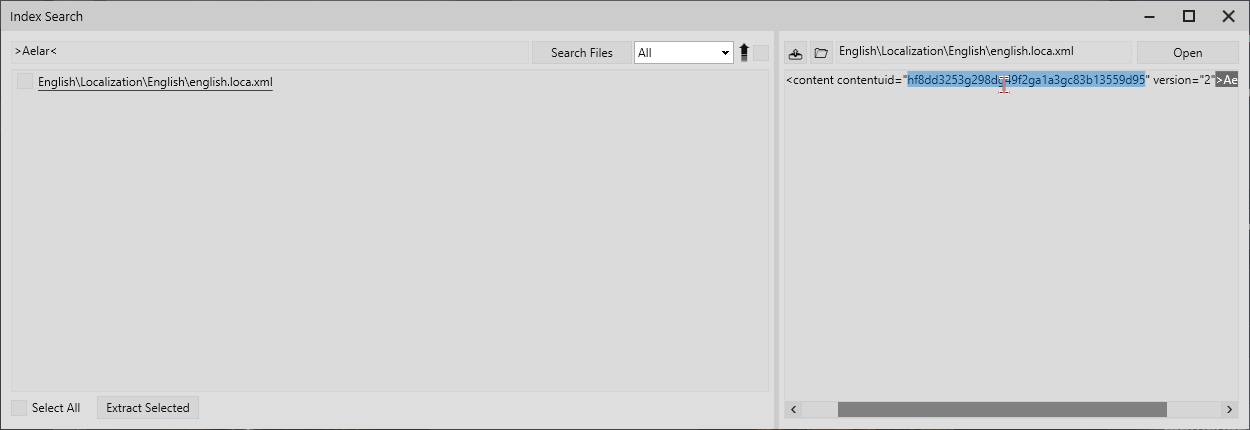
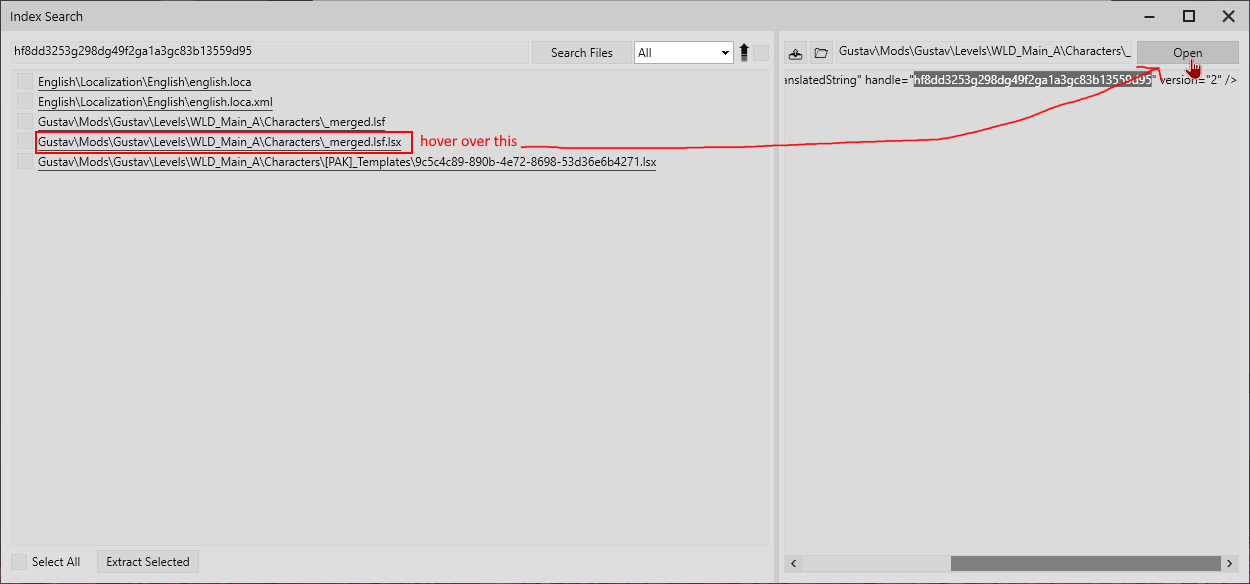
ㅤ - Search the contentuid, hover over the _.merged.lsf.lsx, and click Open
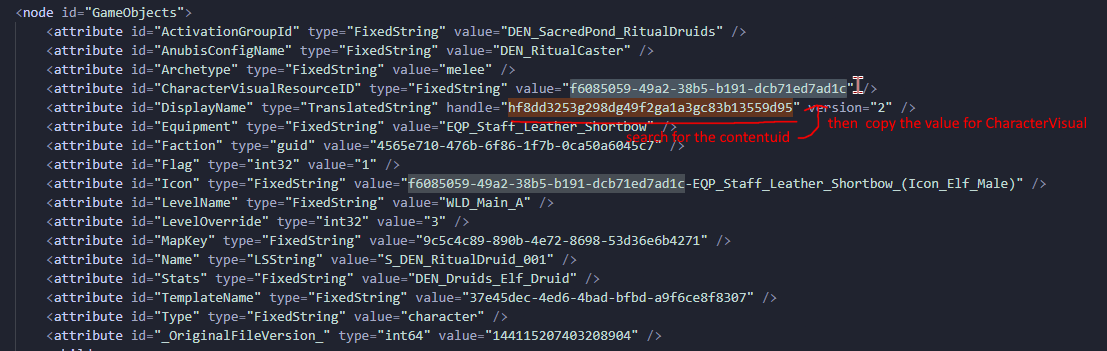
ㅤ - Search the contentuid in the file, and copy the CharacterVisualResourceID UUID
ㅤ
This is the ID you need for toolkit
Reverting the Character Visual
All we'll be doing is opening toolkit, searching the character visual, then overriding it as vanilla. Here's how you do that:
- Open BG3 Toolkit
ㅤ - Click Create for a new project
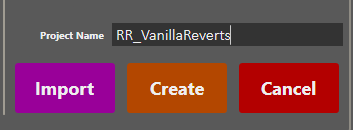
ㅤ - Name it something like RR_VanillaReverts and create the project
ㅤ - Close the level selector, you don't need to load a level
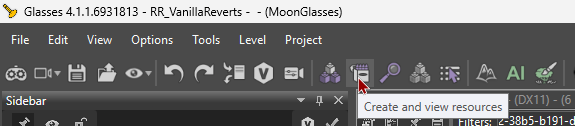
ㅤ - Open Resource Manager (it's in the purple button section and looks like a box)
ㅤ - Search by the CharacterVisualResourceID that we copied earlier
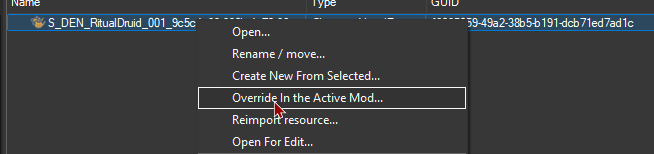
ㅤ - Right click on it and select Override In Active Mod
ㅤ - Close Toolkit
ㅤ - Open BG3 Mod Manager
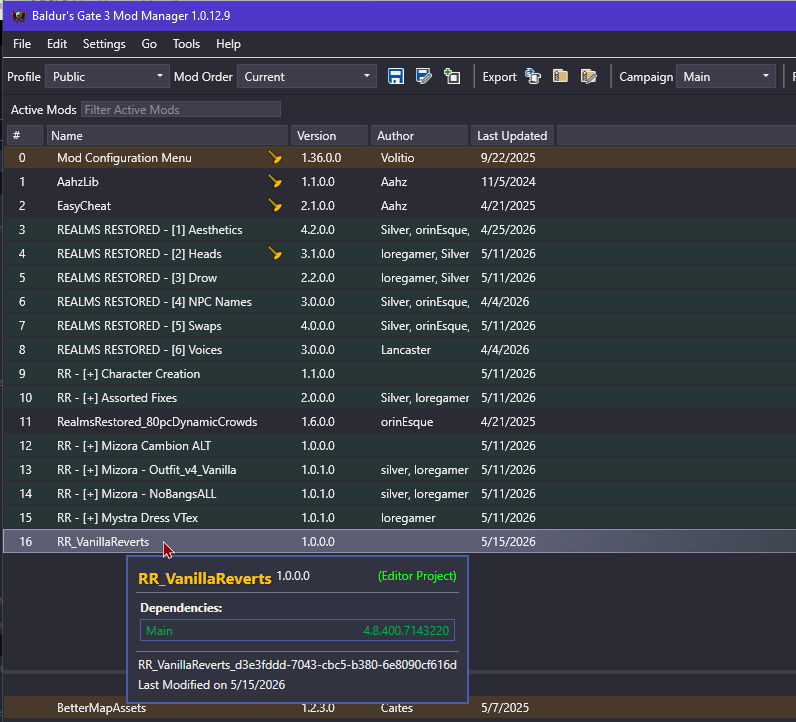
- In the right panel, you should see your Project listed as a mod
- Move it to your load order below Realms Restored
Done!
Reverting Race Tag Update (optional)
If you want to revert the racial tag update if they were in Swaps, we'll have to override the Template. That's a bit more convoluted. You will need BG3 Toolkit Helper and LSF LSX Converter
I'll type out how to do this, but I would suggest just leaving it be and ignoring the ingame race tag and settling with just the character visual override.
- Open BG3 Modders Multitool
ㅤ - Click Search Index
ㅤ - Look up the character's ingame text name wrapped in ><, and then hover over english.loca.xml, and copy the contentuid. Like this:
ㅤ - Search the contentuid, hover over the _.merged.lsf.lsx, and click Open
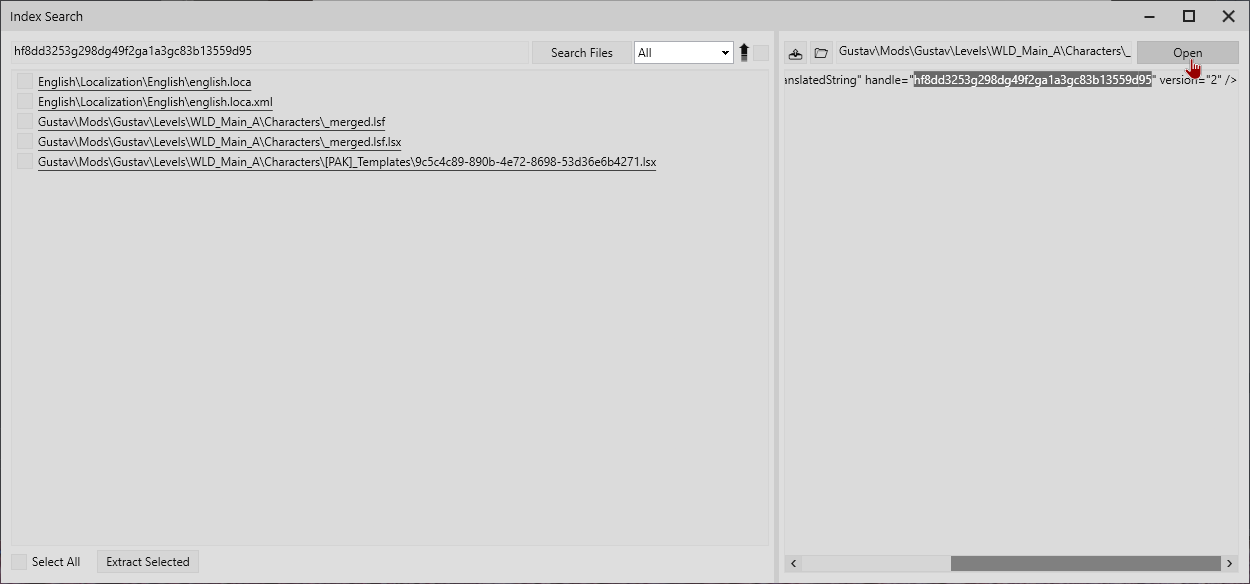
ㅤ - Search the contentuid in the file, and copy the MapKey UUID and save it somewhere
- Go back to BG3 Modders Multitool, and click the button to open the folder location
- Copy the folder location
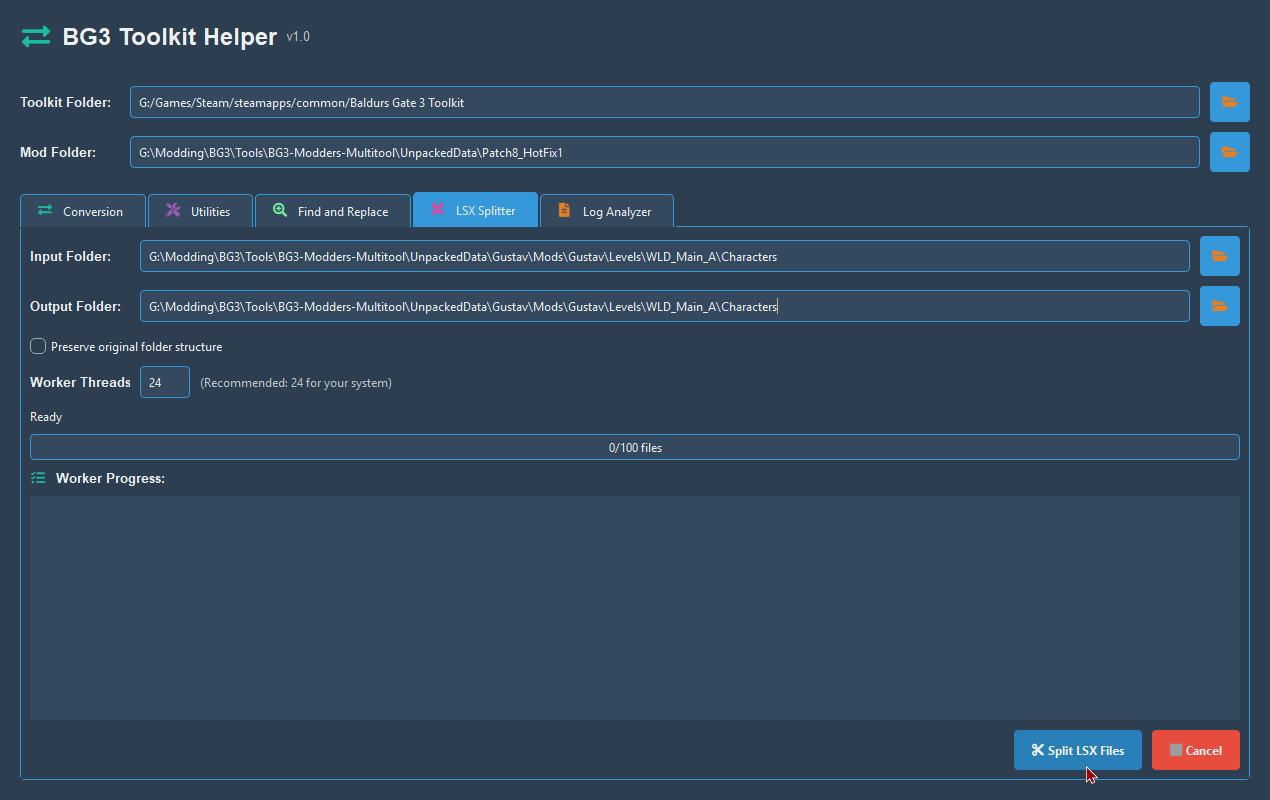
- Open BG3 Toolkit Helper
- Go to LSX Splitter, and input the folder location in both fields, then click Split LSX Files
- Go back to file explorer
- Pause for a moment, and take note of the file structure. We need the file structure from UnpackedData\[PakFileName] onward. So since this instance it's
UnpackedData\Gustav\Mods\Gustav\Levels\WLD_Main_A\Characters, we need to take note ofMods\Gustav\Levels\WLD_Main_A\Characters. The second folder from that, we will be changing later. - Search the file explorer [PAK]_Templates folder for the MapKey UUID
- Now, you'll need to go where your game folder location is installed
- Go into the Data folder
- From here, you will take that folder path we copied earlier:
Mods\Gustav\Levels\WLD_Main_A\Characters<- We will see what the second folder name is, and change it - For this particular one, it's in Mods, so we will select the Mods folder in the Data directory
- Now, here you will see a folder prefixed with your mod name, like: RR_VanillaReverts_d3e3fddd-7043-cbc5-b380-6e8090cf616d
- We will consider this our "second" folder, skipping "Gustav" folder, as we aren't overriding this in the "Gustav" mod, but in RR_VanillaReverts_d3e3fddd-7043-cbc5-b380-6e8090cf616d instead
- From there on, recreate the file path: Levels\WLD_Main_A\Characters
- Now, copy the LSX file we split earlier with the MapKey UUID
- Paste it into the folder. If correct, it would be something like:
[Game Directory]\Data\Mods\RR_VanillaReverts_d3e3fddd-7043-cbc5-b380-6e8090cf616d\Levels\WLD_Main_A\Characters\9c5c4c89-890b-4e72-8698-53d36e6b4271.lsx - FINALLY, open BG3 LSF LSX Converter
- Drag and drop your lsx file onto the app
- Done, if done correctly, your final template override file is something like:
[Game Directory]\Data\Mods\RR_VanillaReverts_d3e3fddd-7043-cbc5-b380-6e8090cf616d\Levels\WLD_Main_A\Characters\9c5c4c89-890b-4e72-8698-53d36e6b4271.lsf
I hope that made sense. I think it's the easiest cleanest way I've found to do template overrides since toolkit template overriding is borked.
Gonna mark this as solved, but feel free to post if you need any help
Last edited by loregamer on May 15th, 2026, 21:43, edited 4 times in total.
Jingle Jangle Jingle
-
Cheo
- Posts: 7
- Joined: May 10, '26
-
Geolocation
Awesome, thanks for the guide, looks very helpful, great to have it step by step, I'll give it a try and come back if I have questions 
-
Cheo
- Posts: 7
- Joined: May 10, '26
-
Geolocation
Hi there, I finally had some time to start working on this.
I could prepare most of what you explained. However, I'm stuck here:
Trying to test the workflow on Damays and Nymessa:
Going "Seacrh Index"
Searching both >Damays< or >Nymessa< --> nothing found. When I search without >< the result doesn't seem to make sense, probably because it isn't an exact search?
Even if I find a character, I tested it also with >Shadowheart<, it looks like this for me, not like your screenshot. Maybe I my unpacked game files or index are corrupted?
You do not have the required permissions to view the files attached to this post.
Last edited by Cheo on June 17th, 2026, 21:20, edited 1 time in total.