We have a Steam curator now. You should be following it. https://store.steampowered.com/curator/44994899-RPGHQ/

Export Load Order for Multiplayer 1.1 — Project Zomboid

Looking for the download?
This mod's files are on ModHQ.
Go to mod page
Share things you've made or found for games here.

Moderator: Mod Janitor

Ignore Topic
User avatar
loregamer
Site Moderator
Posts: 5186
Joined: Dec 3, '23

Geolocation

Export Load Order for Multiplayer 1.1 — Project Zomboid

Post by loregamer »

Image

Overview
Fork of Mod Manger: Export/Import Load Order that also exports your mod load order formatted correctly for your multiplayer server ini.

Requires Mod Manager.

Image


Downloads
FilesVersionTypeDescription
📥 Mod Manger: Export/Import Load Order HQ 1.1MainDrag and drop into your %USERPROFILE%\Zomboid\Mods folder
► Old Versions


Installation Instructions
  1. Unsubscribe from the original mod from Steam Workshop if you have it installed.
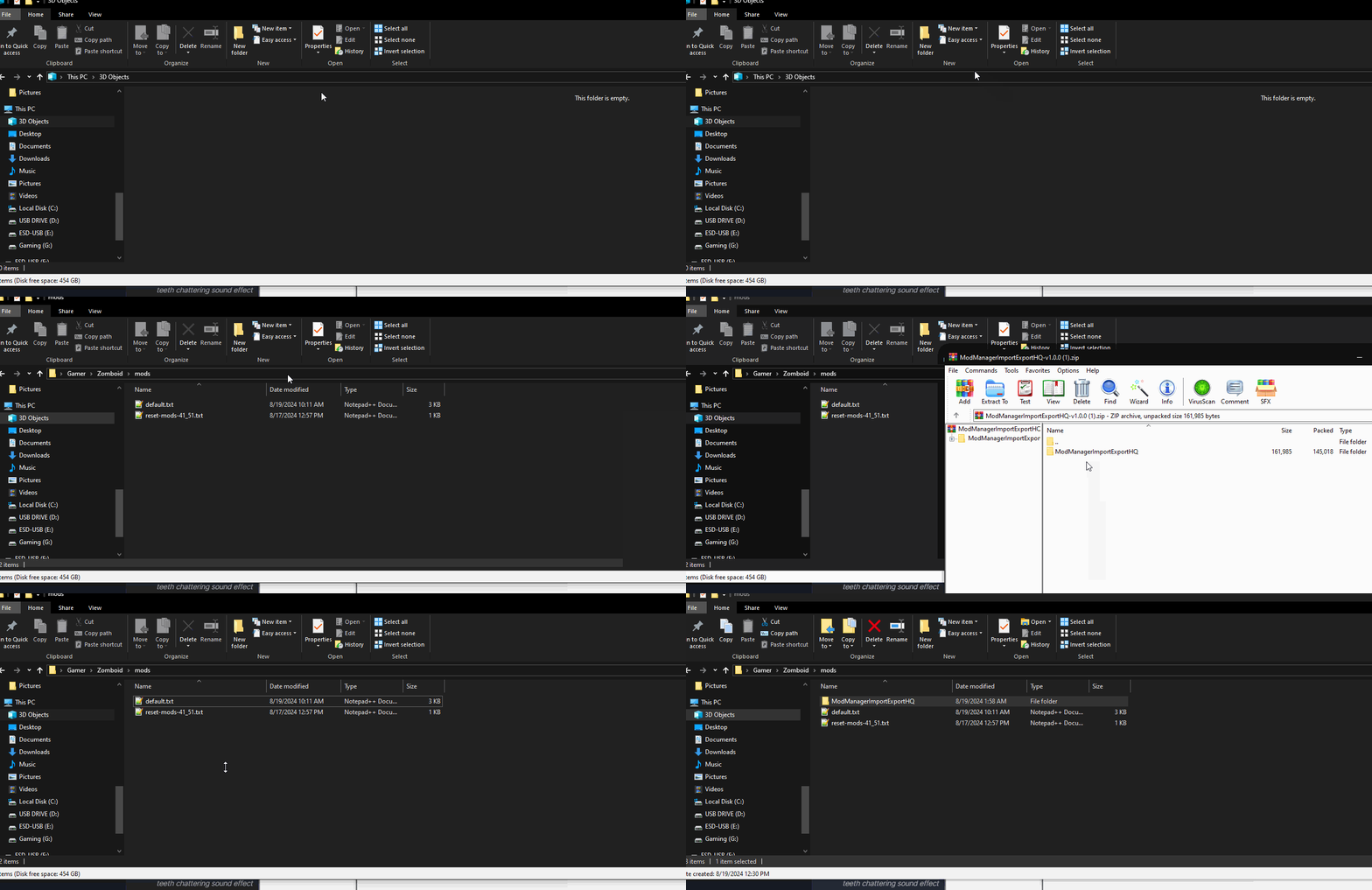
  2. Drag and drop the folder from the zip file into this directory: %USERPROFILE%\Zomboid\Mods
Image


Usage
  • Export your mod load order
    • Tip: You should use the "Sort" feature before exporting
  • Navigate to %USERPROFILE\Zomboid\Lua\ModManagerList in your file explorer
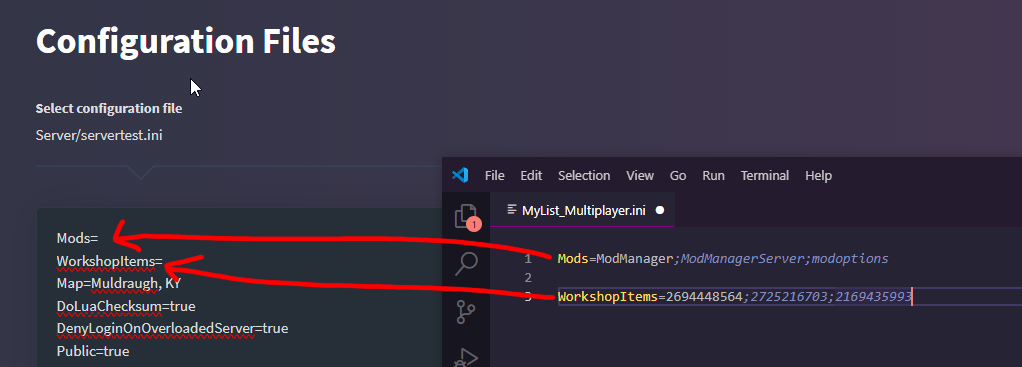
  • Open MyList_Multiplayer.ini
  • Copy the lines and paste them into your server's ini
    Image


Reporting Bugs
To report any bugs, please submit a post in the Mod Support section and mention my username.


Credits
  • Some Korean guy named GIK for the original mod.


Last edited by loregamer on August 27th, 2024, 06:00, edited 11 times in total.
Jingle Jangle Jingle
User avatar
loregamer
Site Moderator
Posts: 5186
Joined: Dec 3, '23

Geolocation

Post by loregamer »

Shocked this didn't exist already tbh. I think server hosters have been doing this manually this whole time LOL
Jingle Jangle Jingle
User avatar
loregamer
Site Moderator
Posts: 5186
Joined: Dec 3, '23

Geolocation

Post by loregamer »

📥v1.1
  • Excluded this mod from the multiplayer export ini
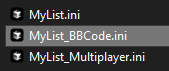
  • Made it also export the list bbcode formatted
    Image
Last edited by loregamer on August 23rd, 2024, 06:31, edited 1 time in total.
Jingle Jangle Jingle
User avatar
maxcapgaming
Posts: 2
Joined: Apr 16, '25

Geolocation

Post by maxcapgaming »

I just wanted to take a moment to say a massive thank you for creating the Export Load Order for Multiplayer 1.1 mod! This tool has saved me an incredible amount of time setting up my Project Zomboid multiplayer server. Manually managing mod lists and load orders was becoming a nightmare, especially with multiple mods and ensuring consistency across clients. Your mod streamlined the process perfectly, and I’m now up and running with a stable server thanks to the exported config. It’s been a game-changer for me!

On another note, I noticed this mod isn’t available on Steam Workshop. I was curious—any particular reason you chose not to post it there? I’d love to hear your thoughts, as it might be helpful for others to access it more easily alongside other Workshop mods.
Thanks again for your hard work and contribution to the community—I really appreciate it!

User avatar
Vergil
Posts: 15670
Joined: Sep 6, '23

Geolocation

Post by Vergil »

Set up a server for us
I'm just stating the facts.
Question is are you going to gargle the truth or swallow?
User avatar
loregamer
Site Moderator
Posts: 5186
Joined: Dec 3, '23

Geolocation

Post by loregamer »

maxcapgaming wrote: April 16th, 2025, 18:40
I just wanted to take a moment to say a massive thank you for creating the Export Load Order for Multiplayer 1.1 mod! This tool has saved me an incredible amount of time setting up my Project Zomboid multiplayer server. Manually managing mod lists and load orders was becoming a nightmare, especially with multiple mods and ensuring consistency across clients. Your mod streamlined the process perfectly, and I’m now up and running with a stable server thanks to the exported config. It’s been a game-changer for me!

On another note, I noticed this mod isn’t available on Steam Workshop. I was curious—any particular reason you chose not to post it there? I’d love to hear your thoughts, as it might be helpful for others to access it more easily alongside other Workshop mods.
Thanks again for your hard work and contribution to the community—I really appreciate it!
No prob bro

And I didn’t post on Workshop because I’m racist
Jingle Jangle Jingle
User avatar
Vergil
Posts: 15670
Joined: Sep 6, '23

Geolocation

Post by Vergil »

loregamer wrote: April 16th, 2025, 19:01
And I didn’t post on Workshop because I’m racist

I'm just stating the facts.
Question is are you going to gargle the truth or swallow?
User avatar
maxcapgaming
Posts: 2
Joined: Apr 16, '25

Geolocation

Post by maxcapgaming »

loregamer wrote: April 16th, 2025, 19:01
maxcapgaming wrote: April 16th, 2025, 18:40
I just wanted to take a moment to say a massive thank you for creating the Export Load Order for Multiplayer 1.1 mod! This tool has saved me an incredible amount of time setting up my Project Zomboid multiplayer server. Manually managing mod lists and load orders was becoming a nightmare, especially with multiple mods and ensuring consistency across clients. Your mod streamlined the process perfectly, and I’m now up and running with a stable server thanks to the exported config. It’s been a game-changer for me!

On another note, I noticed this mod isn’t available on Steam Workshop. I was curious—any particular reason you chose not to post it there? I’d love to hear your thoughts, as it might be helpful for others to access it more easily alongside other Workshop mods.
Thanks again for your hard work and contribution to the community—I really appreciate it!

No prob bro

And I didn’t post on Workshop because I’m racist
You're my people
User avatar
schplib
Posts: 1
Joined: Jan 20, '26

Geolocation

Post by schplib »

Hi! I'm trying to figure out where the export button is. I have the mod installed to the correct place along with mod load sorter and mod manager.