We have a Steam curator now. You should be following it. https://store.steampowered.com/curator/44994899-RPGHQ/

Stealthy Mod Organizer 2 Plugin 0.4 — Baldur's Gate 3

Looking for the download?
This mod's files are on ModHQ.
Go to mod page
Share things you've made or found for games here.

Moderator: Mod Janitor

Ignore Topic
User avatar
Auld_SnawBeard
Posts: 136
Joined: Apr 23, '25
Gender: Dinosaur

Geolocation

Post by Auld_SnawBeard »

So, this is new..
► Show Spoiler
I suppose there is a lot of stuff that has gotten updated since the hotfix. Does Native Mod Loader work for you guys?
I think I've set it up right..
► Show Spoiler
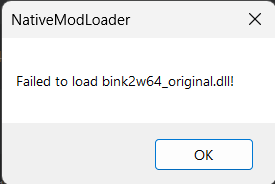
This is the error report in MO:
► Show Spoiler
I guess I just have to wait for more updates, but I thought I should post it here in case it was related to the plugin somehow :old2:

Edit: I still get the error after disabling all other mods except the two native. Wonder if I've set up something wrong after all
Edit 2: I tried running BG3 with the Stealthy 0.1 setup that worked yesterday. It now throws the same error. I'm going to verify my files and do a reboot just in case it's the ol' gremlin having a laugh
Edit 3: After verify and restart BG3 still won't run with Native Mod Loader. As far as I can gather that leaves either me having corrupted system files, or that hotfix was a little unkind towards our favourite camera mod (enabler).
Last edited by Auld_SnawBeard on May 2nd, 2025, 04:32, edited 4 times in total.
User avatar
Crazed Weevil
Posts: 39
Joined: Feb 28, '24

Geolocation

Post by Crazed Weevil »

Auld_SnawBeard wrote: May 1st, 2025, 21:38
So, this is new..
► Show Spoiler
I suppose there is a lot of stuff that has gotten updated since the hotfix. Does Native Mod Loader work for you guys?
I think I've set it up right..
► Show Spoiler
This is the error report in MO:
► Show Spoiler
I guess I just have to wait for more updates, but I thought I should post it here in case it was related to the plugin somehow :old2:

Edit: I still get the error after disabling all other mods except the two native. Wonder if I've set up something wrong after all
Edit 2: I tried running BG3 with the Stealthy 0.1 setup that worked yesterday. It now throws the same error. I'm going to verify my files and do a reboot just in case it's the ol' gremlin having a laugh
Edit 3: After verify and restart BG3 still won't run with Native Mod Loader. As far as I can gather that leaves either me having corrupted system files, or that hotfix was a little unkind towards our favourite camera mod (enabler).
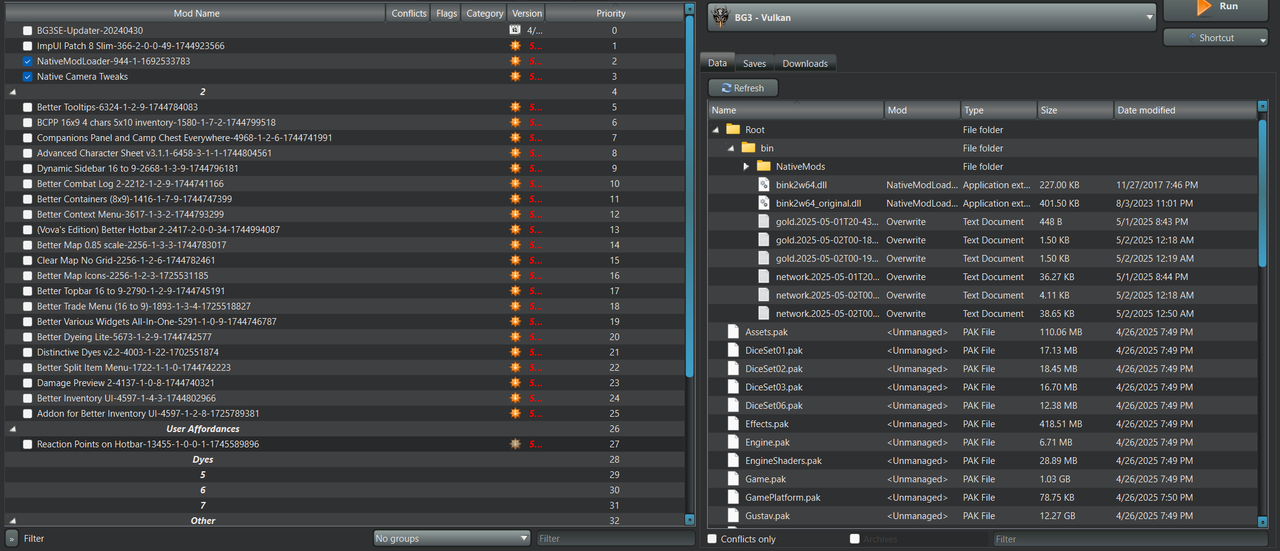
Native Mod Loader works for me. Can you confirm that both 'bink2w64.dll' & 'bink2w64_original.dll' are appearing the 'Data' section in the right pane?

A couple of other things to check:
  • Try running Native Mod Loader by itself without MO2, see if it as least works.
  • I remember you had a very long installation directory for your MO2 installation. In the past I had trouble with going over Windows' limit on path names and it stopped some mods from loading because it couldn't copy them to the right place. Try changing the mod folder name to just 'Native Mod Loader' or even smaller and see if that works.
User avatar
Auld_SnawBeard
Posts: 136
Joined: Apr 23, '25
Gender: Dinosaur

Geolocation

Post by Auld_SnawBeard »

The files seem to appear:
► Show Spoiler
I'll try your other tips

Edit: BG3 starts and the mods work when I install them manually and run the game from steam.
I'm wondering if it may be Vortex interfering somehow. I noticed some vortex files were generated in the game's bin folder when I started the game up from MO2 just now. I'm going to uninstall vortex and see if that makes a difference.

Edit 2: I reinstalled Vortex. Had it delete it's download folder (which I was using as a mod backup archive). Purged mods. Sat Vortex to not handle something something I can no longer remember. Uninstalled Vortex again. Now Native Mod Loader works through MO2 again. Funny that an uninstalled app could do all that. I was using Vortex to download mods from a collection without installing and enabling them (at least that's what I told it to in the settings). It seemed to install them automatically regardless. Anyway the method worked for downloading and organize a large number of pre-vetted mods for easier manual import into MO2 (except for the tiny hiccup). MO2 will be perfect for checking mod-compatibility between a large number of collection-mods with our ModHQ-mods.

Thanks for the help Weevil, once again you help me back to my feet. I feel like a right toddler :weeb:
Last edited by Auld_SnawBeard on May 2nd, 2025, 09:48, edited 3 times in total.
User avatar
Crazed Weevil
Posts: 39
Joined: Feb 28, '24

Geolocation

Post by Crazed Weevil »

Auld_SnawBeard wrote: May 2nd, 2025, 09:02
The files seem to appear:
► Show Spoiler
I'll try your other tips

Edit: BG3 starts and the mods work when I install them manually and run the game from steam.
I'm wondering if it may be Vortex interfering somehow. I noticed some vortex files were generated in the game's bin folder when I started the game up from MO2 just now. I'm going to uninstall vortex and see if that makes a difference.

Edit 2: I reinstalled Vortex. Had it delete it's download folder (which I was using as a mod backup archive). Purged mods. Sat Vortex to not handle something something I can no longer remember. Uninstalled Vortex again. Now Native Mod Loader works through MO2 again. Funny that an uninstalled app could do all that. I was using Vortex to download mods from a collection without installing and enabling them (at least that's what I told it to in the settings). It seemed to install them automatically regardless. Anyway the method worked for downloading and organize a large number of pre-vetted mods for easier manual import into MO2 (except for the tiny hiccup). MO2 will be perfect for checking mod-compatibility between a large number of collection-mods with our ModHQ-mods.

Thanks for the help Weevil, once again you help me back to my feet. I feel like a right toddler :weeb:
Ah, Vortex. If there is one thing I hate more than in game Mod Managers, it's Vortex. That ***** does not play nice with others, especially MO2. It likes to steal download links and often overrides the Virtual File System that MO2 uses. Honestly if you really need Collections, your better off find a Wabbajack version of it if avaliable.
User avatar
Auld_SnawBeard
Posts: 136
Joined: Apr 23, '25
Gender: Dinosaur

Geolocation

Post by Auld_SnawBeard »

I find that collections are a tidy way of finding mods that I want while the curator have already gone through the process of vetting his combination for incompatibilities. It easily beats digging through the nexus for stuff I didn't know I wanted.

What I do is I rip out the parts I want from a single collection, then test it towards our HQ-mods. If they're not compatile I just throw them out of course, but it's much easier this way. For example I ditch all race/class/overhaul mods. UI-mods I don't need and which aren't dependencies. I sit left with a good vanilla experience which is likely to work out of the box before the test up against HQ. We'll see how it works once the collections are updated for patch 8.

If you know of a Wabbajack solution that can use the collection-function for BG3 on Nexus I'd love to try it.
Last edited by Auld_SnawBeard on May 2nd, 2025, 10:35, edited 1 time in total.
User avatar
Auld_SnawBeard
Posts: 136
Joined: Apr 23, '25
Gender: Dinosaur

Geolocation

Post by Auld_SnawBeard »

@loregamer I'm trying to install Realms Restored. MO2 doesn't make the meta.lsx for RealmsRestored_Aesthetics-v2.0 nor RealmsRestored_NameChanges-v2.0. MO2 makes the file for the other RR mods and all the NA mods.
MO2 fails to start the game.
I tried reinstalling the mods to see if it would generate the files on a second try. No such luck
Last edited by Auld_SnawBeard on May 2nd, 2025, 13:47, edited 1 time in total.
User avatar
loregamer
Site Moderator
Posts: 5186
Joined: Dec 3, '23

Geolocation

Post by loregamer »

Auld_SnawBeard wrote: May 2nd, 2025, 13:47
@loregamer I'm trying to install Realms Restored. MO2 doesn't make the meta.lsx for RealmsRestored_Aesthetics-v2.0 nor RealmsRestored_NameChanges-v2.0. MO2 makes the file for the other RR mods and all the NA mods.
MO2 fails to start the game.
I tried reinstalling the mods to see if it would generate the files on a second try. No such luck
Jingle Jangle Jingle
User avatar
loregamer
Site Moderator
Posts: 5186
Joined: Dec 3, '23

Geolocation

Post by loregamer »

@Auld_SnawBeard Do you get an error in your logs? The meta.lsx files are creating for me
Jingle Jangle Jingle
User avatar
loregamer
Site Moderator
Posts: 5186
Joined: Dec 3, '23

Geolocation

Post by loregamer »

Wait, I see why a lot of these issues are happening. Will update
Jingle Jangle Jingle
User avatar
loregamer
Site Moderator
Posts: 5186
Joined: Dec 3, '23

Geolocation

Post by loregamer »

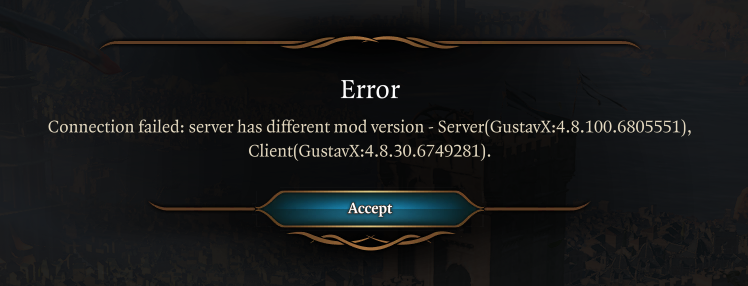
📥v0.3.1

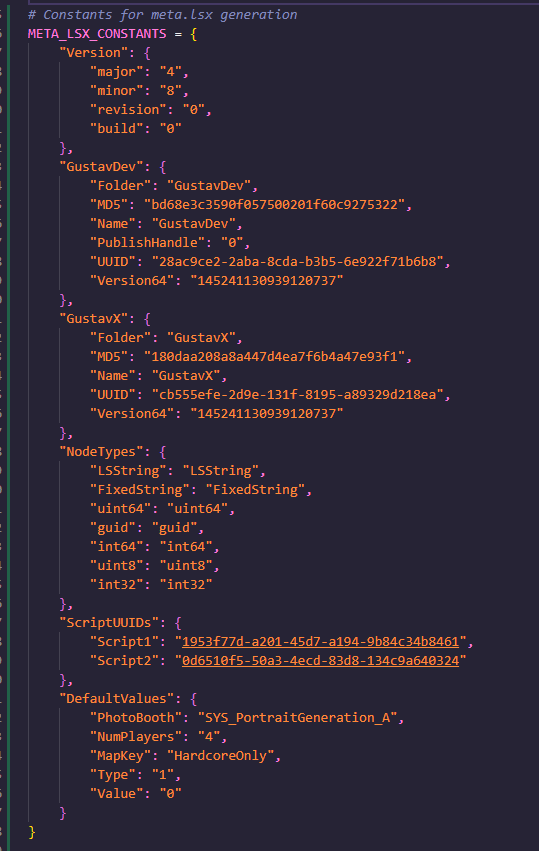
Bumped the Version of GustavX to the latest hotfix, so you won't run into this error when connecting to multiplayer anymore:
Image


► For devfags


Will now look at the SE_CONFIG issue and remove the plugin's jank Root Builder emulated logic
Last edited by loregamer on May 2nd, 2025, 18:41, edited 1 time in total.
Jingle Jangle Jingle
User avatar
Auld_SnawBeard
Posts: 136
Joined: Apr 23, '25
Gender: Dinosaur

Geolocation

Post by Auld_SnawBeard »

I installed Stealthy 0.3.1 over 0.3.0, then removed any files that came with the old one but not the new. Restarted MO2, Reinstalled the quarrelsome mods. The issue persists.

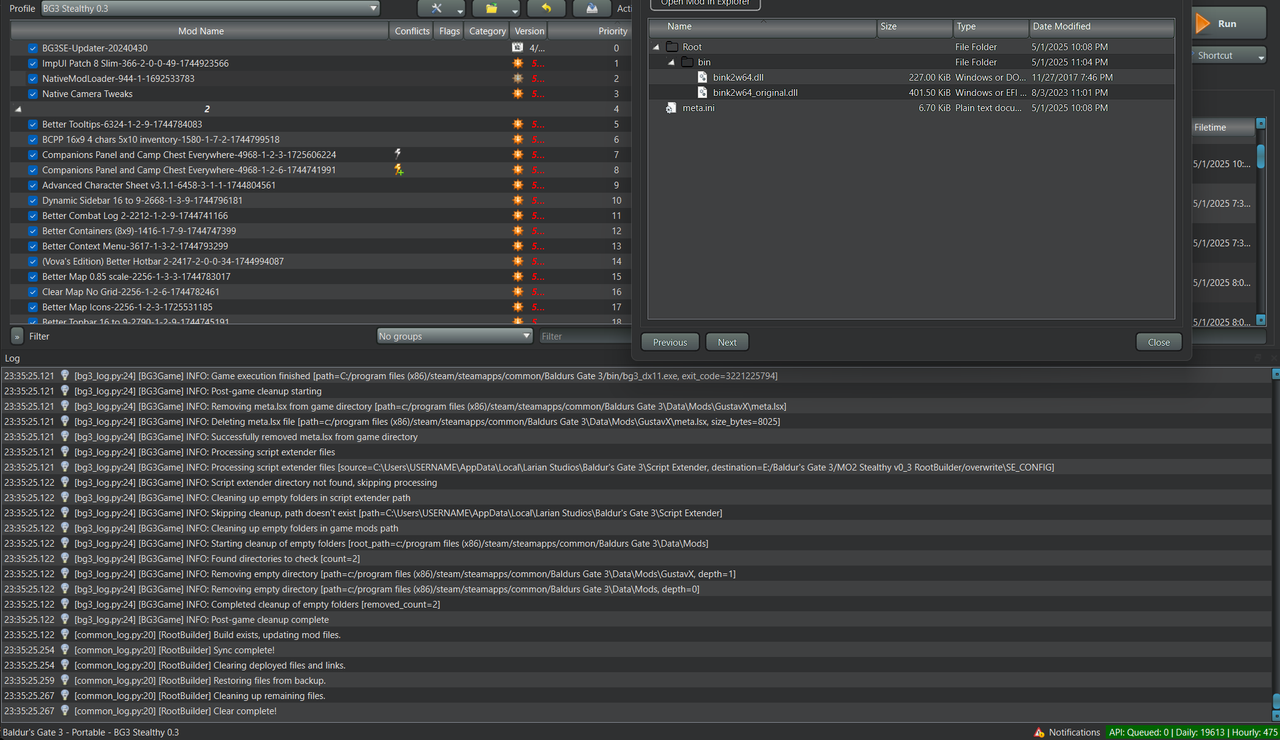
Log:
Image


Maybe I need to reinstall MO2 clean..

Edit: Meta.lsx was not generated btw
Edit2: 0.3.1 containes fewer files than 0.3.0, but I'm assuming that's intentional.
Last edited by Auld_SnawBeard on May 2nd, 2025, 22:57, edited 2 times in total.
User avatar
loregamer
Site Moderator
Posts: 5186
Joined: Dec 3, '23

Geolocation

Post by loregamer »

Any chance you could send me your mods and profiles folder?
Jingle Jangle Jingle
User avatar
Auld_SnawBeard
Posts: 136
Joined: Apr 23, '25
Gender: Dinosaur

Geolocation

Post by Auld_SnawBeard »

I did a clean MO2 Stealthy 0.3.1 install and now Aesthetics works there.

I assume there were some kind of scrap-code left over from 0.3.0 when I just installed over it :old:


Edit: I reinstalled again and on this clean install RealmsRestored Aesthetic once again didn't work. So I installed a fourth time, and now it works again. The only difference I can discern is that I made the file-paths and folder-names much shorter on the successful ones. I tend to have long names when I need to keep things tidy amongst a lot of similar files and structures across two drives, but I used a very short one for my first successful test. I again used a short one for my fourth install to see if that could in fact be the reason, because Weevil mentioned that MO2 was sensitive to long file-paths. Something sure is finicky, but it least is seems to work now. :pipe-thinking:
Last edited by Auld_SnawBeard on May 3rd, 2025, 08:25, edited 2 times in total.
User avatar
loregamer
Site Moderator
Posts: 5186
Joined: Dec 3, '23

Geolocation

Post by loregamer »

📥v0.4
Removed Script Extender config handling (It's not worth it)
Jingle Jangle Jingle
User avatar
Auld_SnawBeard
Posts: 136
Joined: Apr 23, '25
Gender: Dinosaur

Geolocation

Post by Auld_SnawBeard »

Are any of you in contact with the author of MO2? We really need a way to make an importable loadlist.. :pipe-thinking:
► Show Spoiler
Last edited by Auld_SnawBeard on May 3rd, 2025, 14:28, edited 4 times in total.
User avatar
daobacai
Posts: 6
Joined: Sep 27, '24

Geolocation

Post by daobacai »

Version 0.4 still exhibits the following errors when renaming MODs with special characters, while Versions 0.2 and 0.1 remain unaffected:
[2025-05-03 18:32:39.556 E] failed to update mod list: UnicodeEncodeError: 'ascii' codec can't encode character '\U0001fa71' in position 61: ordinal not in range(128)
[2025-05-03 18:32:39.556 E]
[2025-05-03 18:32:39.556 E] At:
[2025-05-03 18:32:39.556 E] X:\Steam/steamapps/common/Baldurs Gate 3/Mod.Organizer-2.5.2/plugins\basic_games\games\baldursgate3\bg3_log.py(24): info
[2025-05-03 18:32:39.556 E] X:\Steam/steamapps/common/Baldurs Gate 3/Mod.Organizer-2.5.2/plugins\basic_games\games\game_baldursgate3.py(247): onModStateChanged
[2025-05-03 18:32:39.556 E]
[2025-05-03 18:33:00.446 E] failed to update mod list: UnicodeEncodeError: 'ascii' codec can't encode characters in position 61-62: ordinal not in range(128)
[2025-05-03 18:33:00.446 E]
[2025-05-03 18:33:00.446 E] At:
[2025-05-03 18:33:00.446 E] X:\Steam/steamapps/common/Baldurs Gate 3/Mod.Organizer-2.5.2/plugins\basic_games\games\baldursgate3\bg3_log.py(24): info
[2025-05-03 18:33:00.446 E] X:\Steam/steamapps/common/Baldurs Gate 3/Mod.Organizer-2.5.2/plugins\basic_games\games\game_baldursgate3.py(247): onModStateChanged
[2025-05-03 18:33:00.446 E]
User avatar
loregamer
Site Moderator
Posts: 5186
Joined: Dec 3, '23

Geolocation

Post by loregamer »

Auld_SnawBeard wrote: May 3rd, 2025, 10:47
Are any of you in contact with the author of MO2? We really need a way to make an importable loadlist.. :pipe-thinking:
► Show Spoiler
I would fork it but unfortunately the tool is only source available, not open source :sad: I can't redistribute it with changes made
Jingle Jangle Jingle
User avatar
loregamer
Site Moderator
Posts: 5186
Joined: Dec 3, '23

Geolocation

Post by loregamer »

daobacai wrote: May 3rd, 2025, 18:33
Version 0.4 still exhibits the following errors when renaming MODs with special characters, while Versions 0.2 and 0.1 remain unaffected:
[2025-05-03 18:32:39.556 E] failed to update mod list: UnicodeEncodeError: 'ascii' codec can't encode character '\U0001fa71' in position 61: ordinal not in range(128)
[2025-05-03 18:32:39.556 E]
[2025-05-03 18:32:39.556 E] At:
[2025-05-03 18:32:39.556 E] X:\Steam/steamapps/common/Baldurs Gate 3/Mod.Organizer-2.5.2/plugins\basic_games\games\baldursgate3\bg3_log.py(24): info
[2025-05-03 18:32:39.556 E] X:\Steam/steamapps/common/Baldurs Gate 3/Mod.Organizer-2.5.2/plugins\basic_games\games\game_baldursgate3.py(247): onModStateChanged
[2025-05-03 18:32:39.556 E]
[2025-05-03 18:33:00.446 E] failed to update mod list: UnicodeEncodeError: 'ascii' codec can't encode characters in position 61-62: ordinal not in range(128)
[2025-05-03 18:33:00.446 E]
[2025-05-03 18:33:00.446 E] At:
[2025-05-03 18:33:00.446 E] X:\Steam/steamapps/common/Baldurs Gate 3/Mod.Organizer-2.5.2/plugins\basic_games\games\baldursgate3\bg3_log.py(24): info
[2025-05-03 18:33:00.446 E] X:\Steam/steamapps/common/Baldurs Gate 3/Mod.Organizer-2.5.2/plugins\basic_games\games\game_baldursgate3.py(247): onModStateChanged
[2025-05-03 18:33:00.446 E]
Will fix mod renaming sometime this weekend
Jingle Jangle Jingle
User avatar
Auld_SnawBeard
Posts: 136
Joined: Apr 23, '25
Gender: Dinosaur

Geolocation

Post by Auld_SnawBeard »

I've come to appreciate you guy's disdain for Vortex.
► Show Spoiler
Nvm this, it worked out after a restart :toot:
Last edited by Auld_SnawBeard on May 5th, 2025, 12:49, edited 1 time in total.
User avatar
loregamer
Site Moderator
Posts: 5186
Joined: Dec 3, '23

Geolocation

Post by loregamer »

Working well in multiplayer

Having armors and weapons installed that others don't crashes for everyone, though
Last edited by loregamer on May 10th, 2025, 19:18, edited 1 time in total.
Jingle Jangle Jingle
User avatar
loregamer
Site Moderator
Posts: 5186
Joined: Dec 3, '23

Geolocation

Post by loregamer »

An idea I am too lazy to follow up on is making this a game_bg3.dll plugin instead of basic_game plugin

This would let us do more stuff like load order and multi-path VFS. And I know it's possible since there's this other plugin that is a DLL
Bethesda Plugin Manager

I just am feeling exceptionally lazy right now
Jingle Jangle Jingle
User avatar
loregamer
Site Moderator
Posts: 5186
Joined: Dec 3, '23

Geolocation

Post by loregamer »

This is gonna be really good
https://github.com/ModOrganizer2/modorganizer/pull/2241
Note that the primary changes for this, other than the game plugin, involve adding a new game plugin function that allows defining custom VFS mappings in the mod directories.

This is a map of directory names to an array of locations that should be mapped by the VFS.

For example, Oblivion Remastered maps "Data" to the internal Data directory, "Paks" to the internal Paks~mods directory, "Movies" to Movies, an "OBSE" files to the OBSE directory.

This does default to routing the root mod directory to the game data directory, as it functioned previously, and will add any 'secondary data directories' (see Starfield) to this default map.

Due to this, there are additional changes to how 'Overwrite' is managed. These directories will automatically be created in Overwrite and the logic has been updated to prevent deleting or removing these within MO2. (Files will be copied and then cleared from these directories if you send data to a new mod etc.)
Jingle Jangle Jingle
User avatar
Crazed Weevil
Posts: 39
Joined: Feb 28, '24

Geolocation

Post by Crazed Weevil »

So far so good. Version 0.4 is working nicely and I now have a good sized mod list working correctly without much hassle other than load order. For anyone who needs it, this the rough load order I made that works well in the form of MO2 separators:
► Show Spoiler
One final note; if you want to make 'Realms Restored' work with 'More Makeup Tattoos And Scars' or 'Unique TAV' you will have to make a patch for 'Realms Restored Heads' and 'Realms Restored Drow' so they all show up the new heads without problems. It's not that difficult to do if you read the articles on the respective mod pages on Nexus and repack the two Realms Restored mods with the changes.
User avatar
loregamer
Site Moderator
Posts: 5186
Joined: Dec 3, '23

Geolocation

Post by loregamer »

You would be an absolute king if you uploaded your MO2 instance to Vault @Crazed Weevil

Perhaps leaving the large mod folders empty, so they just show up in MO2 but so the download isn't too large
Last edited by loregamer on May 17th, 2025, 16:37, edited 1 time in total.
Jingle Jangle Jingle
User avatar
loregamer
Site Moderator
Posts: 5186
Joined: Dec 3, '23

Geolocation

Post by loregamer »

I built a WIP version of Mod Organizer that has multi-path VFS. Works great with this plugin

Unfortunately, I can only distribute verbatim copies of Mod Organizer 2 per its license

But if you guys would like to try it, I can teach you how to patch your instances!


  1. Delete the following files and folders in your MO2 folder
    • plugins\basic_games\games\baldursgate3
    • plugins\basic_games\games\game_baldursgate3.py
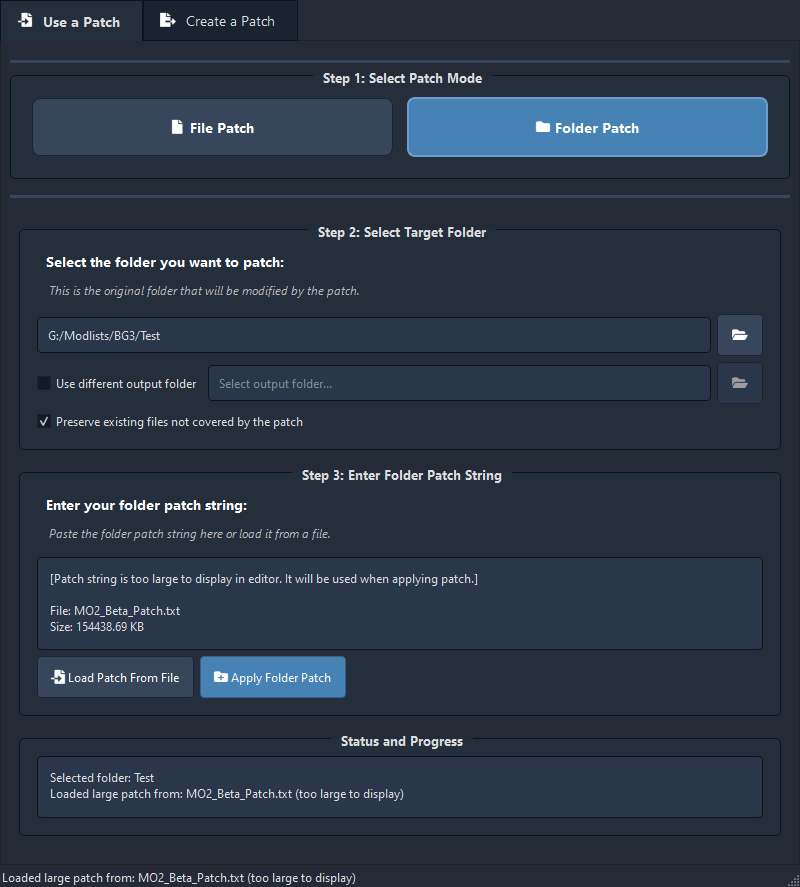
  2. Download this: 📥 MO2_Beta_BG3_Plugin_Patch.zip
  3. Open Universal File Patcher 2.0 — Modding Tools
  4. Patch your MO2 folder like this
    Image

Crazed Weevil wrote: April 30th, 2025, 19:25
Got a problem with Script Extender now though, but it might not be the plugin, as of course Script Extender just decided to an update to v24. Now idea what updates it has and I can't find anything about it, but none of the SE_CONFIG files are being copied to the AppData folder anymore it seems. It keeps acting like it's the first time I'm running MCM. I can see it create the files, and I can see MO2 copying them into the overwrite folder when I shut the game down, but it doesn't seem to want to put them back anymore.
This beta version will allow you to manage script extender configs from MO2 again
Last edited by loregamer on May 17th, 2025, 18:29, edited 1 time in total.
Jingle Jangle Jingle
User avatar
loregamer
Site Moderator
Posts: 5186
Joined: Dec 3, '23

Geolocation

Post by loregamer »

Theoretically, whenever the MO2 devs hurry the hell up and release this, Root Builder will be entirely unnecessary
Jingle Jangle Jingle
User avatar
Crazed Weevil
Posts: 39
Joined: Feb 28, '24

Geolocation

Post by Crazed Weevil »

loregamer wrote: May 17th, 2025, 16:37
You would be an absolute king if you uploaded your MO2 instance to Vault @Crazed Weevil

Perhaps leaving the large mod folders empty, so they just show up in MO2 but so the download isn't too large
I will need Vault access, so have asked.

This list I have is over 9 Gb installed, so I'll have to trim it quite a bit. Is there a simple way to export a modlist with the download links in MO2? I could just upload some screenshots of my MO2 list with the Nexus IDs being displayed.
User avatar
loregamer
Site Moderator
Posts: 5186
Joined: Dec 3, '23

Geolocation

Post by loregamer »

Crazed Weevil wrote: May 17th, 2025, 18:42
Is there a simple way to export a modlist with the download links in MO2? I could just upload some screenshots of my MO2 list with the Nexus IDs being displayed.
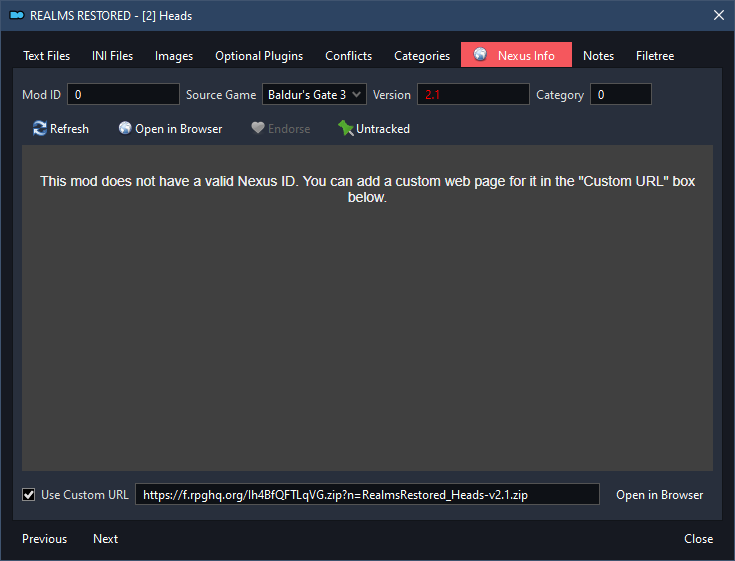
You can clean up the mods folder to only contain meta.ini files, so we'd have your MO2 instance but we'd be downloading the mods needing manual resolution


For the download links, you can set them manually
Image

That way, they show like this and indicate that they need to be manually downloaded perhaps?
Image
Jingle Jangle Jingle
User avatar
Crazed Weevil
Posts: 39
Joined: Feb 28, '24

Geolocation

Post by Crazed Weevil »

loregamer wrote: May 17th, 2025, 18:55
You can clean up the mods folder to only contain meta.ini files, so we'd have your MO2 instance but we'd be downloading the mods needing manual resolution
For the download links, you can set them manually
Image

That way, they show like this and indicate that they need to be manually downloaded perhaps?
Image
OK, I'll go through my list and add all the extra info. Should be about 120mb still as I'll leave all the 'Root' stuff alone. I'll try your new version of the plugin as well and I might try and do an installation guide for it all later on.

For now though I've made a simple load order list with just the separators:

Downloads
FilesVersionTypeDescription
📥 Baldur's Gate 3 Load Order Separators 1.0MainSimply adds a set of Separators to use as the base of load order

Installation Instructions
  1. Open the .zip file and copy the contents to your MO2 folder
  2. I recommend only using this on a fresh installation of MO2 otherwise it will likely not have the correct load order for the separators
User avatar
Crazed Weevil
Posts: 39
Joined: Feb 28, '24

Geolocation

Post by Crazed Weevil »

OK, here is my instance stripped to the bone:

📥 Crazed Weevil's Mod List

Installation is as before, just open the .zip file and copy everything to a fresh installation of MO2 setup for BG3.

It includes anything that would live in the 'Root' directory (Script Extender, Reshade, Native Mods, etc.) and my modifications for 'More Makeup Tattoos and Scars' just so you have something to work with. You can always make your own and there is a good article on the Nexus page that tells you how. You'll need to download the other mods yourself. I don't think there is anything that isn't obvious what you should download, I try to name the mod folders so I don't have to guess if I need to redo them. If you can't tell, just ask.

One other thing, I've made a edited version of 'Realms Restored - Heads' and 'Realms Restored - Drows' so they work with 'More Makeup Tattoos and Scars'. However I had to unpack the orignal mods, make my changes and then repack them and of course this means they are still 2Gb in size so I haven't included them in the instance. I'm sure there is a better way to do this, but I'm afraid I don't know enough about BG3 modding to make a simple patch version of this mod.

If you want to make your own though here are the files that need to be changed with the changes already applied:

📥 Realms Restored + MMTAS Files