We have a Steam curator now. You should be following it. https://store.steampowered.com/curator/44994899-RPGHQ/
Chat client updated, if you have issues using chat press CTRL + SHIFT + R to force a hard refresh.

4th Age

Game development hub. Projects, modding, and resources.

Moderator: Mod Janitor

Ignore Topic
User avatar
WhiteShark
Site Moderator
Posts: 5056
Joined: Feb 2, '23

Geolocation

Adventurer's Guild

Post by WhiteShark »

J1M wrote: June 2nd, 2024, 23:05
Last time I was working on this I lost momentum implementing magic items. This time I will work more on the tactics part first.
I think this is a great idea. Get the vertical slice done first.
J1M wrote: June 2nd, 2024, 23:05
Still deciding how to handle certain player options because it's not great that in a tactics game with a melee focus that elves have 40% more movement speed than dwarves.
Eh, Dwarves have Encumbered Speed, so a plate armor dwarf moves as fast as a plate armor human. I don't think it's that bad. There are far worse balance problems in 4e.
J1M wrote: June 2nd, 2024, 23:05
though I may take some creative liberty like introducing a martial controller class.
Yes please.
User avatar
J1M
Turtle
Turtle
Posts: 5068
Joined: Feb 15, '23

Geolocation

Adventurer's Guild

Post by J1M »

WhiteShark wrote: June 3rd, 2024, 01:58
J1M wrote: June 2nd, 2024, 23:05
Last time I was working on this I lost momentum implementing magic items. This time I will work more on the tactics part first.
I think this is a great idea. Get the vertical slice done first.
J1M wrote: June 2nd, 2024, 23:05
Still deciding how to handle certain player options because it's not great that in a tactics game with a melee focus that elves have 40% more movement speed than dwarves.
Eh, Dwarves have Encumbered Speed, so a plate armor dwarf moves as fast as a plate armor human. I don't think it's that bad. There are far worse balance problems in 4e.
J1M wrote: June 2nd, 2024, 23:05
though I may take some creative liberty like introducing a martial controller class.
Yes please.
The elven extra movement racial doesn't have any similar restriction, such as being lost for not wearing light armor.
User avatar
J1M
Turtle
Turtle
Posts: 5068
Joined: Feb 15, '23

Geolocation

Adventurer's Guild

Post by J1M »

It's a little overwhelming how many stats this ruleset has. A basic creature has ~35 stats defined plus another ~20 per ability. Characters have over a hundred implied stats when you start adding in skills, resistances, movement, and so on.

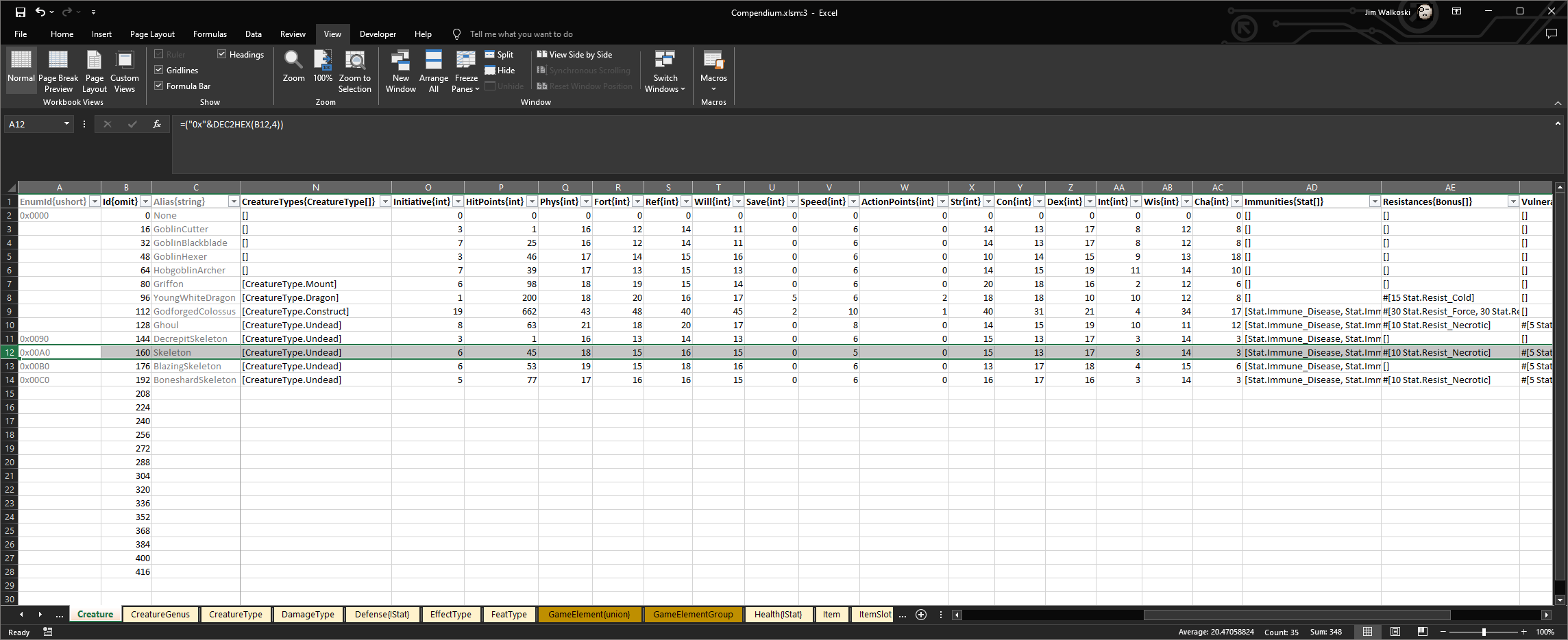
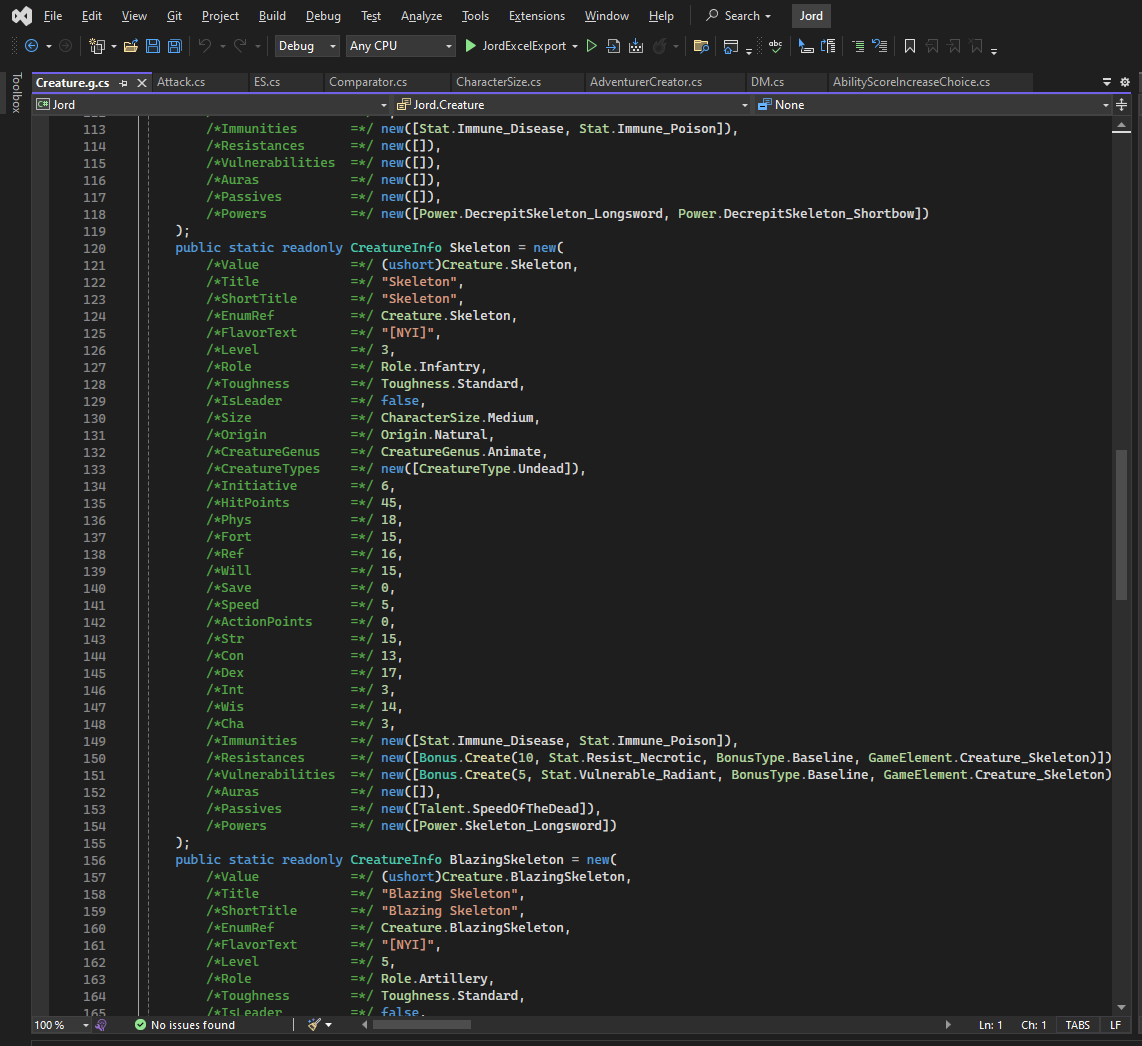
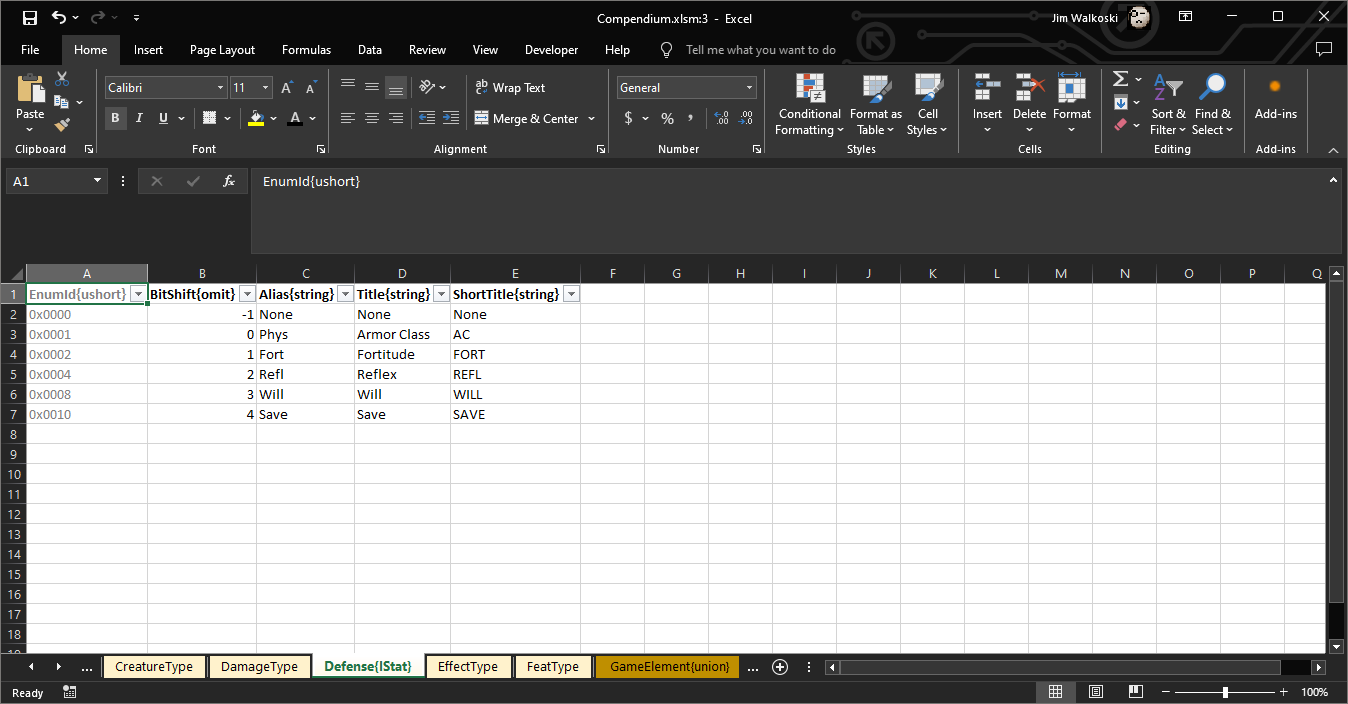
Not sure if anyone is interested in how the sausage is made, but here's an example of how I have those stats defined in Excel and how they are parsed to output C#. On previous projects I had done something similar with T4 templates, but those have limitations so I tried to move to source generators for this project. Unfortunately, source generators have a lot of restrictions around using libraries, for example to parse Excel files. I ended up just making a secondary executable project that manipulates strings and outputs them into code files for the primary project.

For example, to add a new creature, I would define a row in the Creature worksheet, then define any new abilities in the Powers worksheet, put an image file in the right place, and run the Excel export project.

One of the reasons I'm doing things this way is for ease of data entry, but another is so that if I wanted to change how something is named everywhere in the game I could just edit a couple of cells in a spreadsheet.

Image

Image

Image

The next milestone I'm aiming for is to create a test skirmish between some skeletons of different types.
Last edited by J1M on June 13th, 2024, 01:40, edited 1 time in total.
User avatar
J1M
Turtle
Turtle
Posts: 5068
Joined: Feb 15, '23

Geolocation

Adventurer's Guild

Post by J1M »

Complete:
Data for 4 skeleton types and their powers.

Next:
Passive for improved combat advantage for one of them.
Reusable ongoing damage effects for the blazing skeleton.
Port grid code to Godot 4.
User avatar
J1M
Turtle
Turtle
Posts: 5068
Joined: Feb 15, '23

Geolocation

Adventurer's Guild

Post by J1M »

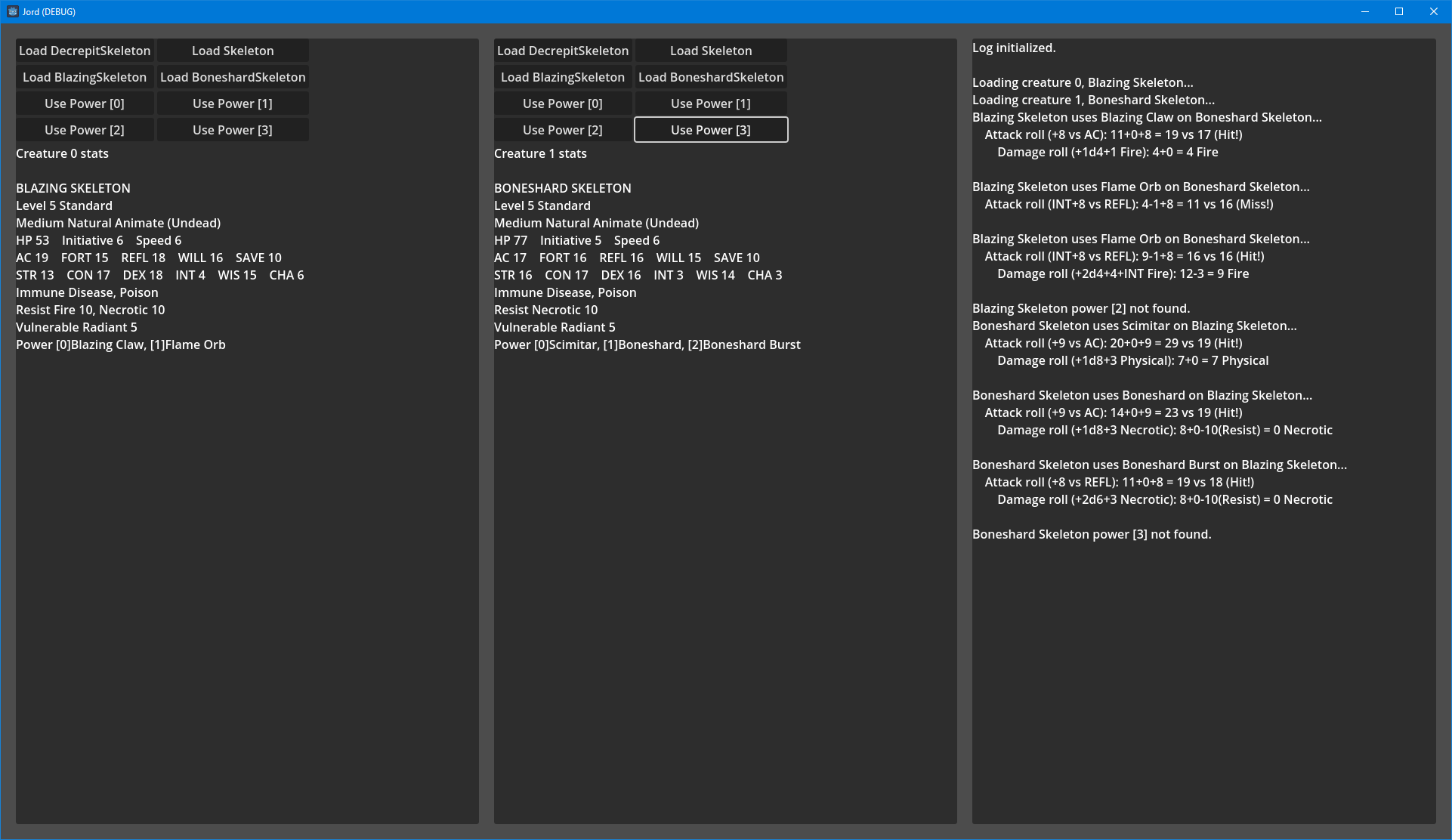
Before looking at the considerations of positioning, I put together a test where creatures could hit each other to check the hit and damage calculations.

If you are wondering why one of the attacks has a -3 modifier on it, it's because 4e uses different calculations for NPC attack rolls. I switched one of the fire attacks to use the INT modifier to check it.

Progress tidbits:
The stats you see for the creatures is not static data. It's imported from static data, but if one of them had a temporary effect like +2 CON or immunity to fire it would be applied in the text blurb and the calculations.
Resistance/vulnerability/immunity calculations are applied correctly, including all of the weird stacking rules.
I have the ability to provide a more detailed breakdown of the roll stat calculations but it needs a better UI treatment.

Image
Last edited by J1M on June 22nd, 2024, 15:08, edited 2 times in total.
User avatar
J1M
Turtle
Turtle
Posts: 5068
Joined: Feb 15, '23

Geolocation

Adventurer's Guild

Post by J1M »

I finally found some instructions for running Godot in conjunction with Visual Studio in order to properly debug C# scripts. Was strangely difficult. A lot of search results polluted by redditors with incorrect solutions and Visual Studio Code. So that's a nice win.

User avatar
Nooneatall
Posts: 2413
Joined: Dec 4, '23
Location: The Congo
Gender: Watermelon

Geolocation

Adventurer's Guild

Post by Nooneatall »

J1M wrote: June 30th, 2024, 01:55
I finally found some instructions for running Godot in conjunction with Visual Studio in order to properly debug C# scripts. Was strangely difficult. A lot of search results polluted by redditors with incorrect solutions and Visual Studio Code. So that's a nice win.

Bite the bullet and get intellij rider. It's an extremely cheap monthly fee and once you pay for a year you can roll with that version. Godot is really good with rider.
I'd volunteer to assist you in coding but don't want to be doxxed. Maybe I can get a burner github account or something.
I made a mod for CK3:
DEI Remover

:knight-cross: donate to the HQ :knight-cross:

Volunteer Moderator
Professional Shitposter
Proud member of the woke right
User avatar
J1M
Turtle
Turtle
Posts: 5068
Joined: Feb 15, '23

Geolocation

Adventurer's Guild

Post by J1M »

Nooneatall wrote: June 30th, 2024, 02:00
J1M wrote: June 30th, 2024, 01:55
I finally found some instructions for running Godot in conjunction with Visual Studio in order to properly debug C# scripts. Was strangely difficult. A lot of search results polluted by redditors with incorrect solutions and Visual Studio Code. So that's a nice win.

Bite the bullet and get intellij rider. It's an extremely cheap monthly fee and once you pay for a year you can roll with that version. Godot is really good with rider.
I'd volunteer to assist you in coding but don't want to be doxxed. Maybe I can get a burner github account or something.
I like Visual Studio. Does IntelliJ support hot reloading C# for Godot 4? That's probably the only reason I could see myself switching.
User avatar
rusty_shackleford
Site Admin
Posts: 45452
Joined: Feb 2, '23
Gender: Watermelon

Geolocation

Adventurer's Guild

Post by rusty_shackleford »

rider >>>> visual studio
jetbrains products are top-notch
Thank you for your attention to this matter!
Steam friend code: 40552640 https://steamcommunity.com/friends/add | email: [email protected]
Having trouble running an old Windows game?
Rusty's Stuff Collection
User avatar
J1M
Turtle
Turtle
Posts: 5068
Joined: Feb 15, '23

Geolocation

Adventurer's Guild

Post by J1M »

Restored the grid movement functionality after porting to Godot 4. Also added an event bus. I like how the generated code for Godot 4 creates some string constants for signals. That was annoying to do by hand in Godot 3 since I'm not going to put myself in a position to be debugging inline string literals.

Still a lot of work to do to hook up the UI and be able to complete a proper turn, but it is cool that the move distance is being pulled from the Character's walk speed stat in this example.

Image
User avatar
J1M
Turtle
Turtle
Posts: 5068
Joined: Feb 15, '23

Geolocation

Adventurer's Guild

Post by J1M »

Difficult to see in a static screenshot, but the characters pulse a glow effect when selected.
Added stats for the different actions each turn.
UI bar on the bottom updates based on the active character.
Movement checks for a move action and is restricted to only the active character.
This is also a test of the general Effect framework I created for character stats. In the log you can see that after the creature moved it has an additional effect. This is a temporary effect that will expire at the start of next turn that grants "-1 Stat.Token_Movement". Overkill for this purpose, but there are a lot of "until end of turn" or "until start of next turn" effects in 4e that this will handle.

Image
Last edited by J1M on July 1st, 2024, 05:06, edited 1 time in total.
User avatar
J1M
Turtle
Turtle
Posts: 5068
Joined: Feb 15, '23

Geolocation

Adventurer's Guild

Post by J1M »

@Acrux @WhiteShark

Which 4e version is best?

Broadly, the options appear to be:
  1. Initial printing, obvious mistakes and rough edges are the spice of life!
  2. Version 4, the last numbered update aka the January 2009 update, aka the version you get if you buy a core book PDF online today aka 4ev4
  3. July 2010 update, the last update prior to the release of Essentials
  4. All published updates, including those that were part of Essentials, compiled and published in 2014
This question is specifically about the pre-Essentials books. The Essentials update mostly brings consistency to some of the rules around things like Sleep/Charm effects and tweaks the effectiveness of certain Powers. The most controversial changes introduced into the core books by the Essentials updates would probably be:
  • Warlock class rework to give it more damage and less control effects.
  • Giving races more powerful choices at character creation, such as Dwarves getting +2 CON and +2 to a choice between STR/WIS or humans getting the Heroic Effort power instead of an extra At-Will power.
  • Sneak Attack being allowed once per turn instead of once per round.
Last edited by J1M on July 7th, 2024, 00:30, edited 2 times in total.
User avatar
WhiteShark
Site Moderator
Posts: 5056
Joined: Feb 2, '23

Geolocation

Adventurer's Guild

Post by WhiteShark »

4e generally improved over time. In particular, the initial monster math was not well thought out and some of the initial classes gained a lot from later books. I'd say go with option 4; resources like the portable compendium already have the updates incorporated so that should also be the easiest to reference.
User avatar
Acrux
Turtle
Turtle
Posts: 6559
Joined: Feb 8, '23

Geolocation

Adventurer's Guild

Post by Acrux »

I'm not especially familiar with the 4E errata Looking through the various updates, I would say the July 2010 update is the best choice, especially if you want to avoid Essentials. Some of the classic spells are brought in line with how they worked previously, which is good. It also avoids the "streamlining" that Essentials did to most classes.

The final updates are probably compatible with picking and choosing pre-Essentials content, but for your own sanity I'd recommend avoiding that.
Like my posts? Consider a donation: PayPal
Hate my posts? Consider a donation: PayPal
Indifferent to my posts? Consider a donation: PayPal
User avatar
WhiteShark
Site Moderator
Posts: 5056
Joined: Feb 2, '23

Geolocation

Adventurer's Guild

Post by WhiteShark »

Acrux wrote: July 6th, 2024, 22:32
It also avoids the "streamlining" that Essentials did to most classes.
In the vast majority of cases, Essentials simply added an alternate verison of the class. The Warlock is exceptional in how much they updated the original class. That's why I don't think including Essentials content is a problem.
User avatar
J1M
Turtle
Turtle
Posts: 5068
Joined: Feb 15, '23

Geolocation

Adventurer's Guild

Post by J1M »

WhiteShark wrote: July 6th, 2024, 22:26
4e generally improved over time. In particular, the initial monster math was not well thought out and some of the initial classes gained a lot from later books. I'd say go with option 4; resources like the portable compendium already have the updates incorporated so that should also be the easiest to reference.
The Rules Compendium has all of the rules updates and no errata was ever published for it, so that is the easiest way to reference the core rules, agreed.

In terms of referencing powers and the specifics of a class, version 4 would be easiest since that's the version of the readily available PDF.

The racial bonus changes don't sound as divisive as I expected them to be. Sounds like all errata is the way to go.
User avatar
J1M
Turtle
Turtle
Posts: 5068
Joined: Feb 15, '23

Geolocation

Adventurer's Guild

Post by J1M »

WhiteShark wrote: July 6th, 2024, 22:26
4e generally improved over time. In particular, the initial monster math was not well thought out and some of the initial classes gained a lot from later books. I'd say go with option 4; resources like the portable compendium already have the updates incorporated so that should also be the easiest to reference.
Was the math for classic monsters like skeletons and kobolds ever updated? The creatures in MM3 are pretty exotic.
User avatar
WhiteShark
Site Moderator
Posts: 5056
Joined: Feb 2, '23

Geolocation

Adventurer's Guild

Post by WhiteShark »

J1M wrote: July 6th, 2024, 23:29
WhiteShark wrote: July 6th, 2024, 22:26
4e generally improved over time. In particular, the initial monster math was not well thought out and some of the initial classes gained a lot from later books. I'd say go with option 4; resources like the portable compendium already have the updates incorporated so that should also be the easiest to reference.
Was the math for classic monsters like skeletons and kobolds ever updated? The creatures in MM3 are pretty exotic.
Not to my knowledge. The standard recommendation, if you're going to use monsters that follow the original scaling, is to update them yourself.

Image

Also, I'm not sure what 4e resources with which you're familiar, but you may find this online database useful: http://iws.mx/dnd/?list.name.All
User avatar
J1M
Turtle
Turtle
Posts: 5068
Joined: Feb 15, '23

Geolocation

Adventurer's Guild

Post by J1M »

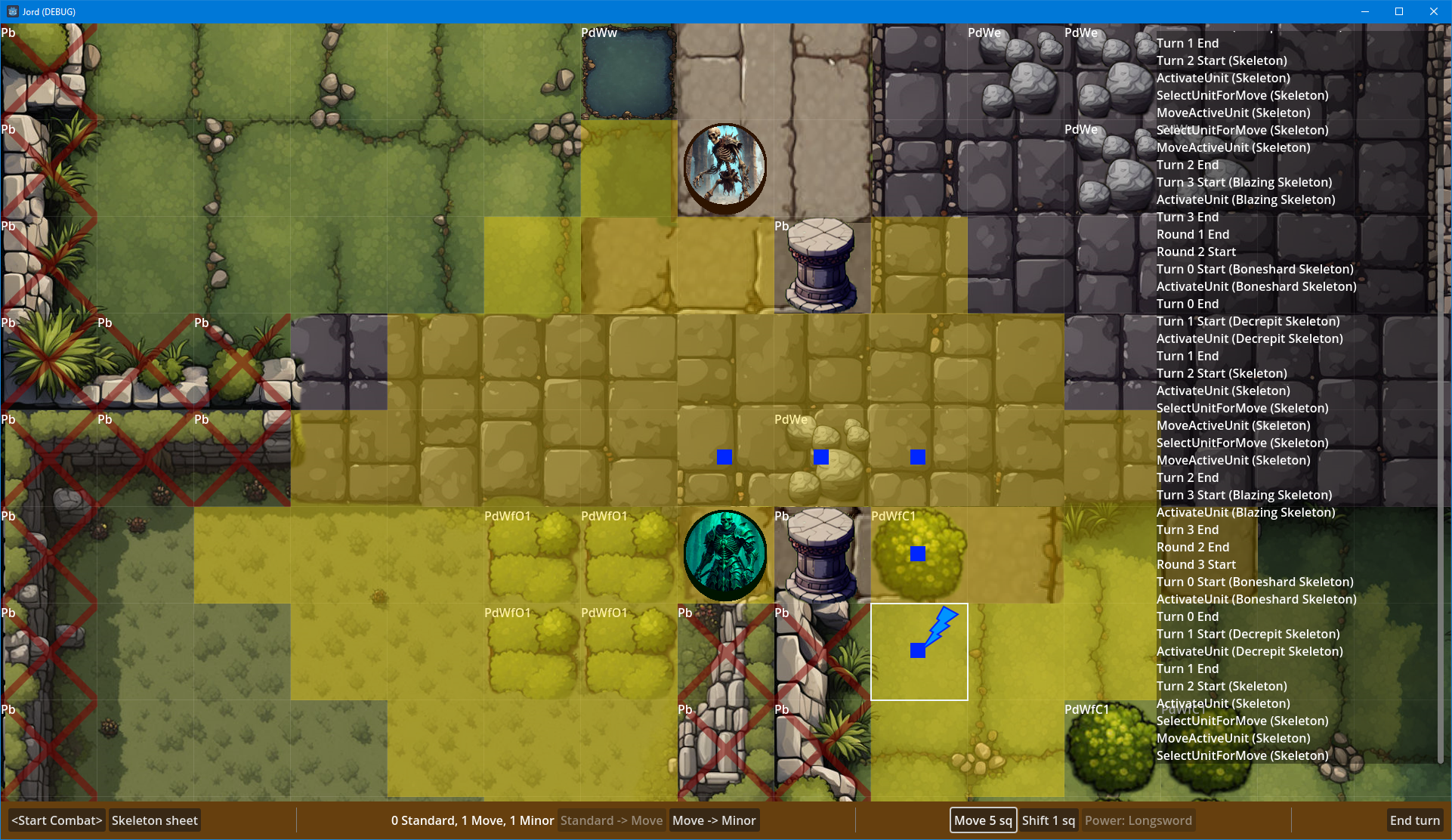
I should probably vary the background in these screenshots more. This one shows the targeting of a power based on its range.
The combat log also shows a melee attack.
Buttons along the bottom middle allow for downranking an action (double move, for example).

Speaking of double moves, does anyone know the motivation behind this rule? Is it just to prevent Shift+Run as a means of disengaging?
Rules Compendium, page 205
Same Move Action Twice: To take a double move, a creature must take the same move action twice in a row on the same turn—two walks, two runs, two shifts, or two crawls.
Image
User avatar
WhiteShark
Site Moderator
Posts: 5056
Joined: Feb 2, '23

Geolocation

Adventurer's Guild

Post by WhiteShark »

J1M wrote: July 8th, 2024, 01:43
Speaking of double moves, does anyone know the motivation behind this rule? Is it just to prevent Shift+Run as a means of disengaging?
No, it seems that's still allowed:
RPG Stack Exchange wrote:
You can still spend your Standard Action on a second Move Action without using the Double Move. ("Substituting Actions", Player's Handbook p. 268).

The Double Move is a specific action where you effectively combine two identical Move Actions to one movement. This is only beneficial in a few cases, usually the following:
  • When you use Athletics to jump, and the first movement would leave you in mid-air, you can spend your Standard Action to make it a Double Move to complete the jump in one fluid motion.
  • When your movement speed is an odd number and it is halved by difficult terrain, you waste the last square of movement because halves are round down. Double Move lets you add together the two halves and squeeze out an extra square of movement.
  • If you want to move twice but can't because the first movement would end on the same square as an ally, a Double Move lets you do it because you don't stop in the ally's square.
User avatar
J1M
Turtle
Turtle
Posts: 5068
Joined: Feb 15, '23

Geolocation

Adventurer's Guild

Post by J1M »

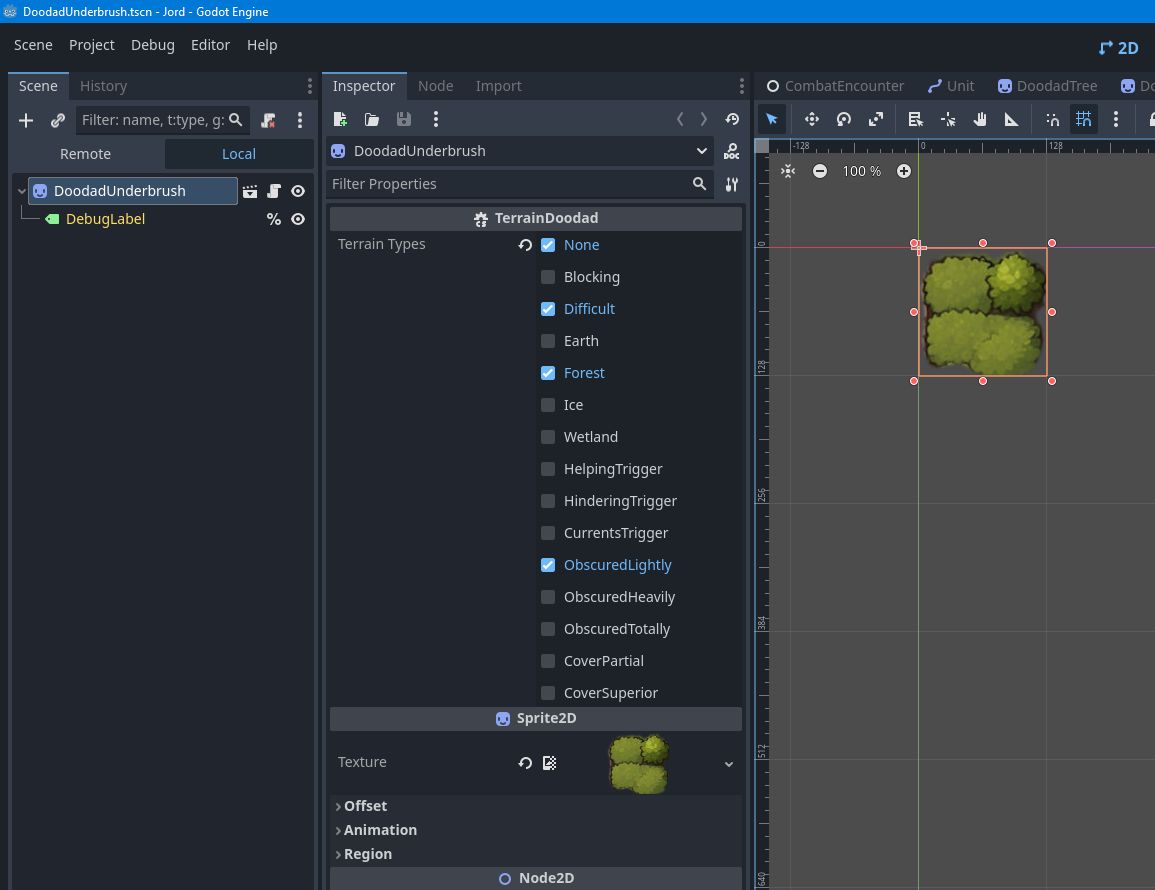
Implemented blocking terrain. Screenshot shows that you can't walk through a large pillar.
The other possible settings that affect movement and attack rolls (not yet implemented) shown in the second image.

Was a little surprised that 4e doesn't have more ground types (fire, astral?) but I guess it doesn't have a geomancer class and things like lava would be considered Hindering terrain.

Image

Image
User avatar
J1M
Turtle
Turtle
Posts: 5068
Joined: Feb 15, '23

Geolocation

Adventurer's Guild

Post by J1M »

A rant about Godot's A* implementation. Godot has a class called AStar3D that makes it easier to implement pathfinding. It also has AStar2D which is unnecessary but locks things to a plane.

Finally there is AStarGrid2D, which you would think would be highly useful for grid based games. It allows you to set a node as blocking or give it a different weight. It also has options for which paths are valid and how to treat diagonal movement!

Sounds perfect. Except for some reason the cost of every path is hard-coded to zero. :mad:
And the weight of a point only impacts the cost of the path if the path ends at that point, not if it passes through it. :notsureif:
And the cost method you can override will be called for points that are not adjacent to each other...

So basically, if you want to do pathfinding where some terrain has different movement costs you have to reimplement A* inside the AStarGrid2D._ComputeCost() function or ignore the grid implementation.
Last edited by J1M on July 13th, 2024, 20:58, edited 2 times in total.
User avatar
J1M
Turtle
Turtle
Posts: 5068
Joined: Feb 15, '23

Geolocation

Adventurer's Guild

Post by J1M »

Since AStarGrid2D is only valid for grids where all movement has the same cost, I had to use AStar2D and establish the connections between cells manually. I also had to manually recompute the cost of each selected path, since the built-in implementation doesn't return the cost along with the path. Not difficult, but it's clear the Godot engine's focus is real-time games.

Since I was doing this anyway, I took it as an opportunity to intentionally leave out some connections to implement the following rule:
Rules Compendium, page 204

Diagonal Movement
Moving diagonally works the same as other movement, except that a creature can’t cross the corner of an obstacle, such as a stone wall, that fills its space. A creature can move diagonally past creatures, since they don’t fill their squares.
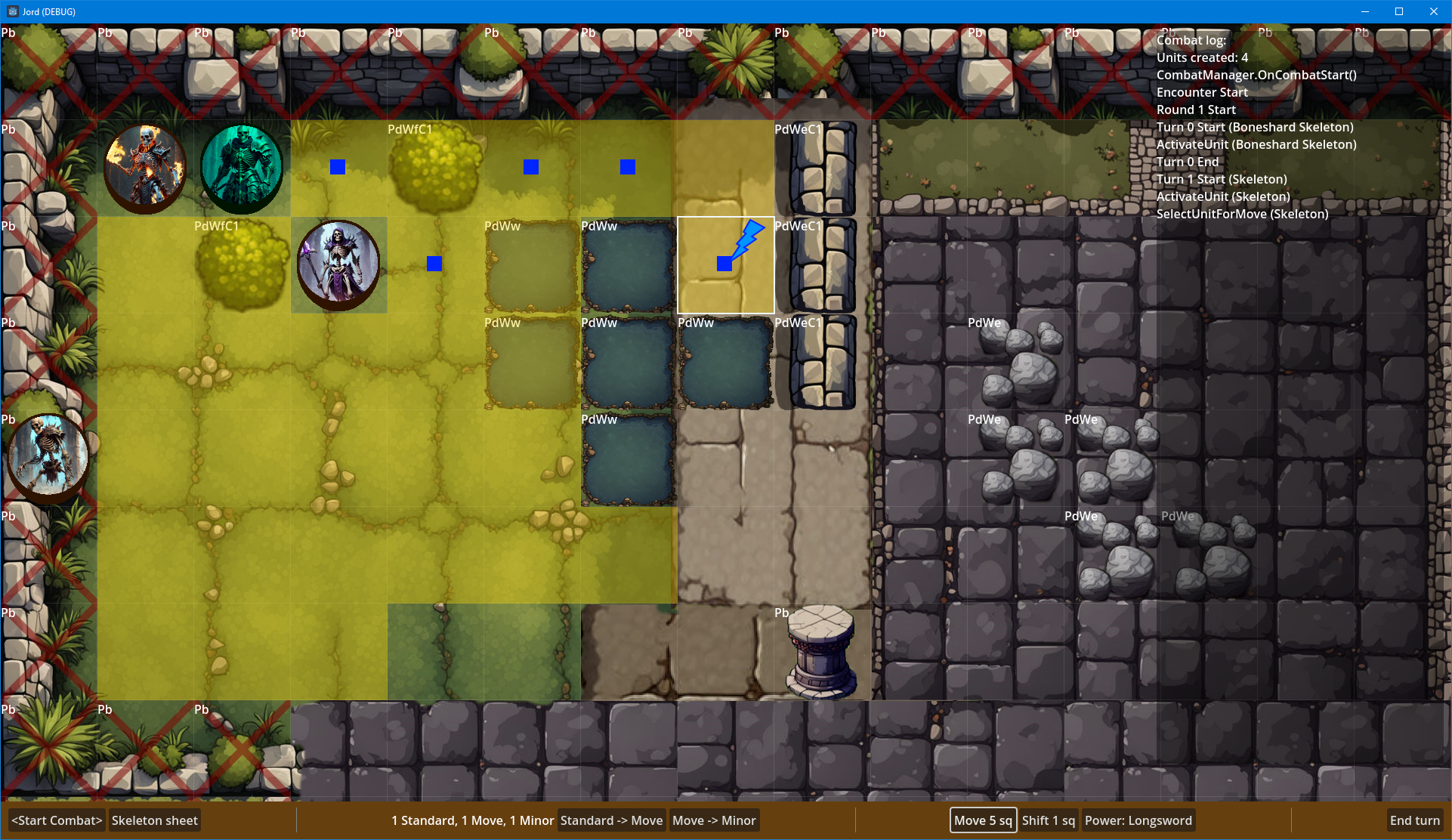
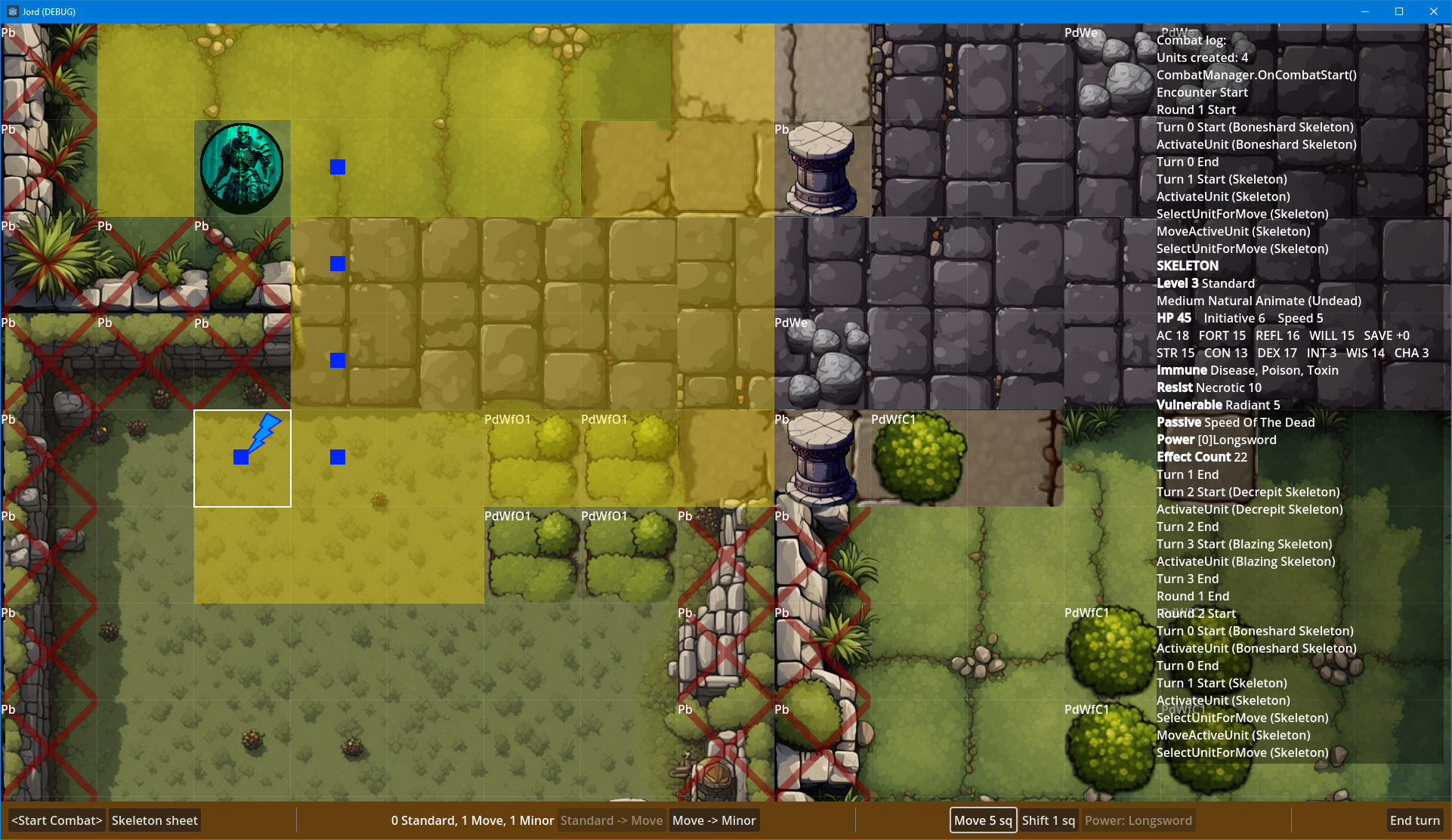
In the first screenshot, the creature avoids the difficult terrain, which costs twice as much to move across, and walks diagonally past the other creature.
In the second screenshot, the creature cannot use diagonal movement to go around the blocking wall terrain.

Image

Image
Last edited by J1M on July 13th, 2024, 21:20, edited 1 time in total.
User avatar
J1M
Turtle
Turtle
Posts: 5068
Joined: Feb 15, '23

Geolocation

Adventurer's Guild

Post by J1M »

The concealment rules in 4e are very clear and easy to perform. You just determine if two characters are adjacent to each other or not and how obscured the target is. The cover rules are a different matter.

Since I'm not going to perform 64 ray traces each time someone tries to target a large creature, I thought I'd canvas for some rule interpretations. Text in teal is of concern to me. Even at the table, allowing players to choose how a mechanic is calculated seems like it should be restricted to high level spells or daily powers. To say nothing of the concerns of slowing down play, or getting different results based on which corner is selected. I guess the other interpretation is that the DM should pick the corner for the calculation, in which case I guess whatever I decide here is RAW. :smug:
Rules Compendium, page 219
Cover
Targets behind a low wall, around a corner, or behind a tree enjoy some amount of cover. They can’t be hit as easily as normal—the attacker takes a penalty to attack rolls against them. There are two degrees of cover.
  • Partial Cover (–2 Penalty to Attack Rolls): An attacker takes a –2 penalty to attack rolls against a target that has partial cover (sometimes simply called “cover”). The target is around a corner or protected by terrain. For instance, the target might be in the same square as a small tree, obstructed by a small pillar or a large piece of furniture, or crouching behind a low wall.
  • Superior Cover (–5 Penalty to Attack Rolls): An attacker takes a –5 penalty to attack rolls against a target that has superior cover. The target is protected by a significant terrain advantage, such as when fighting from behind a window, a portcullis, a grate, or an arrow slit.
The following rules govern both degrees of cover.

Determining Cover: To determine if a target has cover, choose a corner of a square the attacker occupies, or a corner of the attack’s origin square, and trace imaginary lines from that corner to every corner of any one square that the target occupies. If one or two of those lines are blocked by an obstacle or an enemy, the target has partial cover. (A line isn’t blocked if it runs along the edge of an obstacle’s or an enemy’s square.) If three or four of those lines are blocked yet line of effect remains—such as when a target is behind an arrow slit—the target has superior cover.

Reach: If a creature that has reach (see “Creature Size and Space,” page 199) attacks through terrain that would grant cover if the target were in it, the target has cover. For instance, even if a target isn’t in the same square as a small pillar, it has cover against the greatclub attack of an ogre on the other side of the pillar.

Area Attacks and Close Attacks: Against an area attack or a close attack, a target has cover only if there is an obstruction between it and the attack’s origin square.

Creatures and Cover: When a creature makes a ranged attack against an enemy target and other enemies are in the way, the target has partial cover. A creature’s allies never grant cover to the creature’s enemies, and neither allies nor enemies grant cover against melee, close, or area attacks.
I'm going to assume that the ruling around 'edge' also applies to 'corner' in the case of the line being traced through a square's corner.

The issue I see is in the choosing of start and end points for determining cover is that it isn't fun to ask players to choose this when using a ranged attack, and the calculation should be intuitive. With a single-target ranged attack it would be possible to just perform all of the calculations and give the player the most favorable option, but that changes when dealing with area of effect abilities.

The options that I see:
  1. Always use the top-left corner of the origin square for determining cover.
  2. Use the center of the origin square instead of a corner. (This is far simpler and produces the same results in most cases, does anyone know why this wasn't the RAW? Or have a counterargument for making this change?)
  3. Calculate all 4 corners and give the player the best result.
  4. Calculate all 4 corners and give the player the worst result.
The even bigger concern I have is related to the choosing of a single square to perform this calculation on a large to gargantuan creature. For a huge creature, it is simple enough to rule that you use the center square because they take up a 3x3 region, but choosing which square counts as cover for a creature that takes up 16 grid squares has a bad feel to it. For non-area attacks this could be accomplished implicitly by allowing a player to target a specific square. Again, that feels weird, especially if the other squares a character is occupying are all in cover.

The rule change that I am considering would eliminate the ambiguity and is again simpler than RAW:
  • "...trace imaginary lines ... to every corner of any one square the rectangular region that the target occupies."
Interested in others' thoughts, deep lore, and personal experiences.

Last edited by J1M on July 14th, 2024, 17:15, edited 1 time in total.
User avatar
rusty_shackleford
Site Admin
Posts: 45452
Joined: Feb 2, '23
Gender: Watermelon

Geolocation

Adventurer's Guild

Post by rusty_shackleford »

I assume if a player targets a creature they can see, they'd pick the most optimal point to attack — whichever would give them the most favorable outcome. i.e., whatever you'd pick for the AI when targeting an enemy of the AI.
Thank you for your attention to this matter!
Steam friend code: 40552640 https://steamcommunity.com/friends/add | email: [email protected]
Having trouble running an old Windows game?
Rusty's Stuff Collection
User avatar
Acrux
Turtle
Turtle
Posts: 6559
Joined: Feb 8, '23

Geolocation

Adventurer's Guild

Post by Acrux »

I agree with rusty's point.

Also, the Imperial Assault board game has similar rules for line of sight and blocking terrain. https://imperial-assault.com/Rules/The ... Rules.pdf

There's a digital companion version that creates new scenarios using the original rules, it might be worthwhile to see how they've implemented it in the game. (I haven't used it.)

Like my posts? Consider a donation: PayPal
Hate my posts? Consider a donation: PayPal
Indifferent to my posts? Consider a donation: PayPal
User avatar
J1M
Turtle
Turtle
Posts: 5068
Joined: Feb 15, '23

Geolocation

Adventurer's Guild

Post by J1M »

After some more consideration, I think I understand the idea behind targeting a specific square of a large creature. Targeting the whole region would make it easier for a large creature to gain cover than a small creature, which is counterintuitive. It's also a little more consistent since everything else (aside from picking a point of origin) targets a square instead of a corner.

I have a concrete example of where I think the "choose a corner" rule is counterintuitive.

Character (a) attacks character (b). The Xs indicate blocking terrain such as a wall. My understanding of the RAW is that character (a) can choose the top-right corner of their square to shoot from, meaning that character (b) only has partial cover from a ranged attack instead of superior cover (or no line of sight at all).

Code: Select all

..............
.aXXXXXXXXXXb.
Choosing a corner for a point of origin is also inconsistent with how flanking works, which just uses the center of the player's square to determine it. I think I understand its value in terms of allowing a character to "pop out" from cover and make an attack into a larger area. It's not a perfect solution given the example above, but the game doesn't allow partial moves or have something like 3.5's spring attack feat so it's starting to make more sense.
User avatar
J1M
Turtle
Turtle
Posts: 5068
Joined: Feb 15, '23

Geolocation

Adventurer's Guild

Post by J1M »

Implemented zoom and flanking (the +2 portion of the attack roll in the log).
Created a few more test levels.

Image
User avatar
J1M
Turtle
Turtle
Posts: 5068
Joined: Feb 15, '23

Geolocation

Adventurer's Guild

Post by J1M »

Have been looking into tracing these sight lines. There's a few options, but I'm considering rolling my own solution because none of them are a perfect fit. Open to other ideas if anyone wants to dust off their high school geometry.
  1. Assign a bounding polygon to all terrain types and map doodads, use a ray cast to determine if a line is blocked. Downsides: lots of fiddling with engine objects, additional challenges handling line of sight with creatures, since the rule is dependent on whether or not a creature is allied.
  2. Use a modified Bresenham-based supercover line algorithm. Downsides: assumes start and end point are in the center of the grid square, would need tweaks to address that and handle passing directly through a corner.
  3. Custom implementation that increments the slope using integer math (division and modulus). Haven't figured it out completely, but there should be a mathematical relationship between the grid cells and grid corners that allows it to be solved without a continuous solution.
Last edited by J1M on July 18th, 2024, 06:05, edited 1 time in total.
User avatar
J1M
Turtle
Turtle
Posts: 5068
Joined: Feb 15, '23

Geolocation

Adventurer's Guild

Post by J1M »

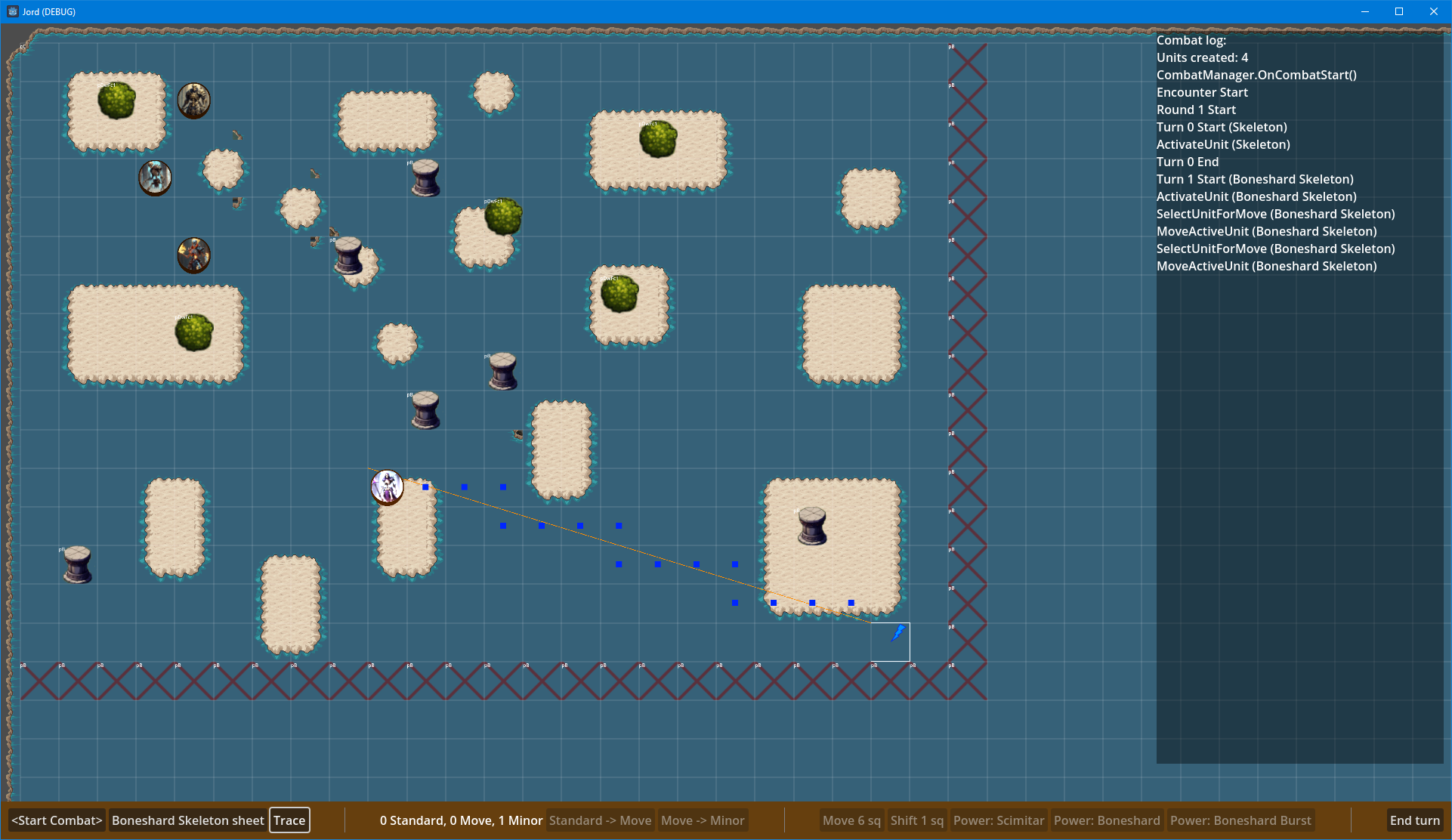
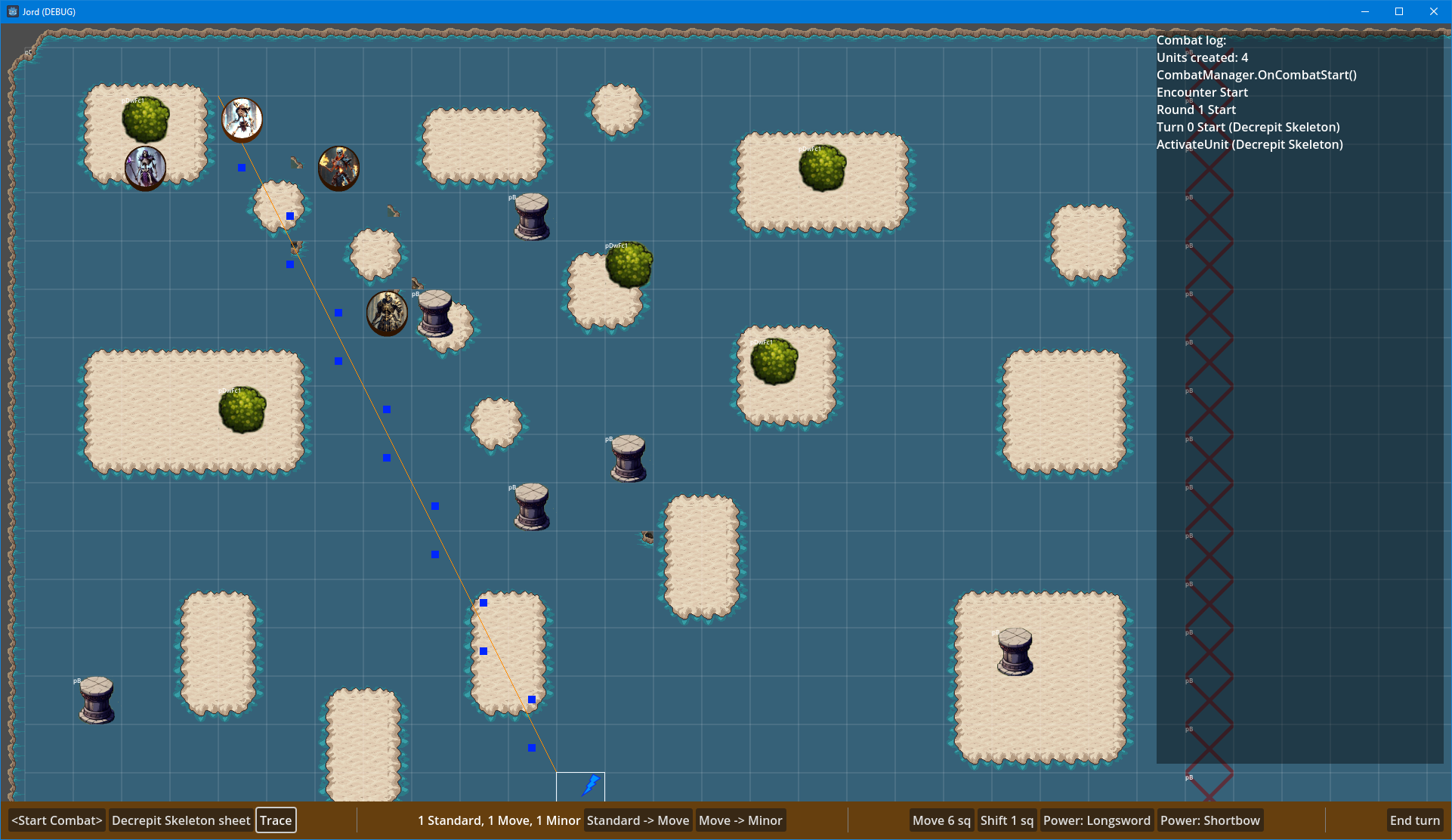
Mission accomplished. I implemented my own algorithm for determining which grid squares need to be checked for line of sight/line of effect. Essentially you just walk the slope one step at a time from origin to target.

The code probably reads as more complicated than it needs to because I collapsed the different directions into a single else case and bbcode has no syntax highlighting. Pretty happy with the result. It's an O(n) loop so it should be very performant. As per the rules cited above, 16 checks need to be made, one from each combination of corners between the origin and target square. The screenshots show a single check for visual clarity as well as a guide line for reference.

Code: Select all

	//origin and destination points are specified by indicating the coordinates of the grid cell that has that point as the top-left corner
	public static List<Vector2I> GridCellsBetweenCorners(Vector2I origin, Vector2I target) {
		List<Vector2I> result = [];
		Vector2I diff = target - origin;
		Vector2I diffSign = diff.Sign();
		if(diff.X == 0 || diff.Y == 0) {
			//parallel to the x or y axis
			//edges don't count as intersections
		} else if(Math.Abs(diff.X) == Math.Abs(diff.Y)) {
			//slope of 1 or -1
			Vector2I walk = diff.Sign();
			Vector2I offset = diff.Y < 0 ? Vector2I.Up : Vector2I.Zero;
			offset += diff.X < 0 ? Vector2I.Left : Vector2I.Zero;
			int distance = Math.Abs(diff.X);
			for(int i = 0; i < distance; i++) {
				result.Add(origin + offset + (walk * i));
			}
		} else {
			if(diffSign.X < 0) {
				Util.Swap(ref origin, ref target);
			}
			int prime = Math.Abs(diff.X) > Math.Abs(diff.Y) ? 0 : 1; //axis index
			int aux = prime == 1 ? 0 : 1; //axis index
			int distance = Math.Abs(target[prime] - origin[prime]);
			bool isSlopePositive = diffSign.X == diffSign.Y;
			Vector2I walk = Vector2I.Zero;
			Vector2I offset = isSlopePositive ? Vector2I.Zero : Vector2I.Up;
			for(int i = 0; i < distance; i++) {
				result.Add(origin + walk + offset);
				if(Math.Abs((i + 1) * diff[aux] / diff[prime]) != Math.Abs(walk[aux])) {
					walk[aux] += (isSlopePositive || prime == 1) ? 1 : -1;
					if(i + 1 != distance && diff[prime] % diff[aux] != 0) {
						result.Add(origin + walk + offset);
					}
				}
				walk[prime] += (isSlopePositive || prime == 0) ? 1 : -1;
			}
		}
		return result;
	}
Image
Image