


On Linux there are three great options: tar, unzip, and atool.Gastrick wrote: ↑ February 15th, 2024, 02:44For archiving software, WinRAR could be included. It's the only one I've ever needed for files on Windows.
We have a Steam curator now. You should be following it. https://store.steampowered.com/curator/44994899-RPGHQ/
The RPGHQ list of software that doesn't suck too hard. All OSes welcome.
-
Nemesis

- Director of Synchronous Communication Channels
- Posts: 1529
- Joined: Feb 2, '23
-
Geolocation
Adventurer's Guild
-
Segata

- Turtle

- Posts: 2289
- Joined: Feb 2, '23
- Location: Sega Saturn, Shiro!
- Gender: Watermelon
-
Geolocation
And private trackers if you care about getting releases earlier than anybody and in lossless quality, but soulseek/nicotine is fine for the average user. Beware of transcodes in the latter, though.Dead wrote: ↑ February 15th, 2024, 02:50If you're asking where to get music, soulseek or nicotine+.Nammu Archag wrote: ↑ February 15th, 2024, 01:47This thread is a blessing. For the guys who have used the music softwares, how do you typically get the music to put on them? I still use Spotify out of habit.
-
Orvas Dren

- Posts: 1614
- Joined: Nov 28, '23
- Location: Desele's House of Earthly Delights
-
Geolocation

how do those workSegata Sanshiro wrote: ↑ February 15th, 2024, 16:01And private trackers if you care about getting releases earlier than anybody and in lossless quality, but soulseek/nicotine is fine for the average user. Beware of transcodes in the latter, though.Dead wrote: ↑ February 15th, 2024, 02:50If you're asking where to get music, soulseek or nicotine+.Nammu Archag wrote: ↑ February 15th, 2024, 01:47This thread is a blessing. For the guys who have used the music softwares, how do you typically get the music to put on them? I still use Spotify out of habit.
VINCE AUT MORIRE
-
rusty_shackleford

- Site Admin
- Posts: 52802
- Joined: Feb 2, '23
- Gender: Watermelon
-
Geolocation
Adventurer's Guild


Private trackers require signing a blood oath with the tracker ****.
Thank you for your attention to this matter!
Steam friend code: 40552640 https://steamcommunity.com/friends/add | email: [email protected] | Questions or problems? PM me. I reply quickly.
Rusty's Stuff Collection
Steam friend code: 40552640 https://steamcommunity.com/friends/add | email: [email protected] | Questions or problems? PM me. I reply quickly.
Rusty's Stuff Collection
-
Jordy

- Posts: 4973
- Joined: Dec 5, '23
- Location: The Past
-
Geolocation
-
Schizoid1488

- Posts: 186
- Joined: Jun 14, '24
-
Geolocation
>[NOT SPONSORED]Jordy wrote: ↑ July 29th, 2024, 22:28
Does that mean every other video is just shilling?

I don't use any telemetry/diagnostic programs aside from BIOS/Task Manager/Device Manager, seems like bloat to me, and I trust Microsoft's elite software engineers to never ever ever ever never break my computer
-
GhostCow

- Turtle
- Posts: 3802
- Joined: Feb 3, '23
- Gender: Dinosaur
-
Geolocation


I like Open Hardware Monitor, but this is the worst guy to promote it. He's the most ******** techtuber of them allJordy wrote: ↑ July 29th, 2024, 22:28
☆HQ Defense Force☆
-
Jordy
- Posts: 4973
- Joined: Dec 5, '23
- Location: The Past
-
Geolocation
I've been using Libre Hardware Monitor recently and I'm preferring simply because it has more info I want to see.GhostCow wrote: ↑ August 8th, 2024, 00:34I like Open Hardware Monitor, but this is the worst guy to promote it. He's the most ******** techtuber of them allJordy wrote: ↑ July 29th, 2024, 22:28
-
1998

- Posts: 2960
- Joined: Jun 23, '23
- Location: Beregost
-
Geolocation
Adventurer's Guild


Honest question, why do you use any hardware monitor on a regular(?) basis? I check it whenever I install a new part to make sure everything is working correctly and that's it.Jordy wrote: ↑ August 8th, 2024, 07:01I've been using Libre Hardware Monitor recently and I'm preferring simply because it has more info I want to see.GhostCow wrote: ↑ August 8th, 2024, 00:34I like Open Hardware Monitor, but this is the worst guy to promote it. He's the most ******** techtuber of them allJordy wrote: ↑ July 29th, 2024, 22:28
My Reviews
Somnus [Not Recommended]
New Arc Line [Early Access] [Informational]
Passageway of the Ancients [Not Recommended]
Beyond Galaxyland [Recommended]
Old School RPG [Informational]
SKALD: The Black Priory [Recommended]
My Steam
38123774
Somnus [Not Recommended]
New Arc Line [Early Access] [Informational]
Passageway of the Ancients [Not Recommended]
Beyond Galaxyland [Recommended]
Old School RPG [Informational]
SKALD: The Black Priory [Recommended]
My Steam
38123774
-
Jordy
- Posts: 4973
- Joined: Dec 5, '23
- Location: The Past
-
Geolocation
I mainly like to keep an eye on my cpu/gpu temps and the fan speeds.1998 wrote: ↑ August 8th, 2024, 16:00Honest question, why do you use any hardware monitor on a regular(?) basis? I check it whenever I install a new part to make sure everything is working correctly and that's it.Jordy wrote: ↑ August 8th, 2024, 07:01I've been using Libre Hardware Monitor recently and I'm preferring simply because it has more info I want to see.GhostCow wrote: ↑ August 8th, 2024, 00:34
I like Open Hardware Monitor, but this is the worst guy to promote it. He's the most ******** techtuber of them all
-
DagothGeas5

- Posts: 2590
- Joined: Dec 13, '23
-
Geolocation
Adventurer's Guild
Last edited by DagothGeas5 on September 13th, 2024, 14:41, edited 1 time in total.
- Here to show my support for normal gaming.
Thank you for existing!
Thank you for existing!
-
rusty_shackleford
- Site Admin
- Posts: 52802
- Joined: Feb 2, '23
- Gender: Watermelon
-
Geolocation
Adventurer's Guild
(some of this is lunix specific, probably)
I use qpdfview for reading pdfs on linux. It's not the best, but it's the only good tabbed pdf reader I know of.
obsidian for taking notes. Zim isn't too different if you must stick with FOSS. Read about logseq, haven't tried it.
I use engrampa for GUI archive extraction now after they broke file-roller
Mission Center for a windows-like process explorer. I hate text-based system monitors, not sorry. All the GUI ones are mediocre compared to the default process explorer let alone a third-party tool like process hacker.
Heroic Games Launcher for GOG/Amazon/Epic store games. Completely open source alternative to their proprietary platforms that allows you to download & run your games, works on lunix or windows: https://heroicgameslauncher.com/
Spotube for music listenin'
Thank you for your attention to this matter!
Steam friend code: 40552640 https://steamcommunity.com/friends/add | email: [email protected] | Questions or problems? PM me. I reply quickly.
Rusty's Stuff Collection
Steam friend code: 40552640 https://steamcommunity.com/friends/add | email: [email protected] | Questions or problems? PM me. I reply quickly.
Rusty's Stuff Collection
-
WhiteShark

- Site Moderator
- Posts: 5057
- Joined: Feb 2, '23
-
Geolocation
Adventurer's Guild


reWASD (cracked), the only piece of software I could find that let me combine multiple input devices into one virtual controller and actually worked. x360ce was supposed to be able to do it, but it didn't work. Every other solution of which I read required using several programs in tandem. reWASD just worked.
-
PixiGreen

- Posts: 447
- Joined: Dec 4, '23
-
Geolocation
-
Pizza

- Posts: 251
- Joined: Oct 17, '24
- Location: Nearest pizza parlor
-
Geolocation
I propose Mumble for the Voice Chat/VoIP category.
- Open source
- Lightweight
- Self hosted
- Multiplatform [Linux, Mac & Windows] [Mumla client for Android]
- Open source
- Lightweight
- Self hosted
- Multiplatform [Linux, Mac & Windows] [Mumla client for Android]
discord? NO WAY! Use Mumble instead!
Latest stable version: 1.5.939 | Latest Release Candidate: 1.6.1001 (RC 2) | Server browser
Latest stable version: 1.5.939 | Latest Release Candidate: 1.6.1001 (RC 2) | Server browser
-
Rand

- Posts: 7468
- Joined: Sep 4, '23
- Location: On my last legs
-
Geolocation
Adventurer's Guild
For a Windows PDF reader, Foxit is pretty good.
You may as well not bother replying to my posts if it's to argue anything except concrete facts or your personal opinion. I still probably won't see it.
Reject your retarded-wing political programming and learn to think.
If you can.
Reject your retarded-wing political programming and learn to think.
If you can.
-
rusty_shackleford
- Site Admin
- Posts: 52802
- Joined: Feb 2, '23
- Gender: Watermelon
-
Geolocation
Adventurer's Guild
Watching stuff in real-time 180hz(my monitor's refresh rate) using SVP frame generation.
https://www.svp-team.com/
Don't have the AI model working yet so idk if it's better or not. Works on lunix just fine.
Will probably take a couple hours for you to get 'used' to it so it doesn't seem cheap.
https://www.svp-team.com/wiki/RIFE_AI_interpolation
https://www.svp-team.com/
Don't have the AI model working yet so idk if it's better or not. Works on lunix just fine.
Will probably take a couple hours for you to get 'used' to it so it doesn't seem cheap.
There's also an AI model:SVP uses the same frame interpolation technique as available in high-end TVs and projectors (see “TrimensionDNM”, “Motion Plus”, “Motionflow” and others).
https://www.svp-team.com/wiki/RIFE_AI_interpolation
Last edited by rusty_shackleford on November 18th, 2024, 08:52, edited 2 times in total.
Thank you for your attention to this matter!
Steam friend code: 40552640 https://steamcommunity.com/friends/add | email: [email protected] | Questions or problems? PM me. I reply quickly.
Rusty's Stuff Collection
Steam friend code: 40552640 https://steamcommunity.com/friends/add | email: [email protected] | Questions or problems? PM me. I reply quickly.
Rusty's Stuff Collection
-
twig

- The Only Good Commie
- Posts: 156
- Joined: Feb 2, '23
-
Geolocation
Neural networks:
Text models:
[wlm] LLM studio
Image generation:
SD 1.5/2.x frontend: [m] a1111 or EasyDiffusion.
SD 3: [m] Forge
Are we gonna do Android programs?
Text models:
[wlm] LLM studio
Image generation:
SD 1.5/2.x frontend: [m] a1111 or EasyDiffusion.
SD 3: [m] Forge
Are we gonna do Android programs?
Last edited by twig on November 20th, 2024, 02:51, edited 3 times in total.
-
Roderick

- Posts: 483
- Joined: Nov 19, '24
-
Geolocation
Adventurer's Guild
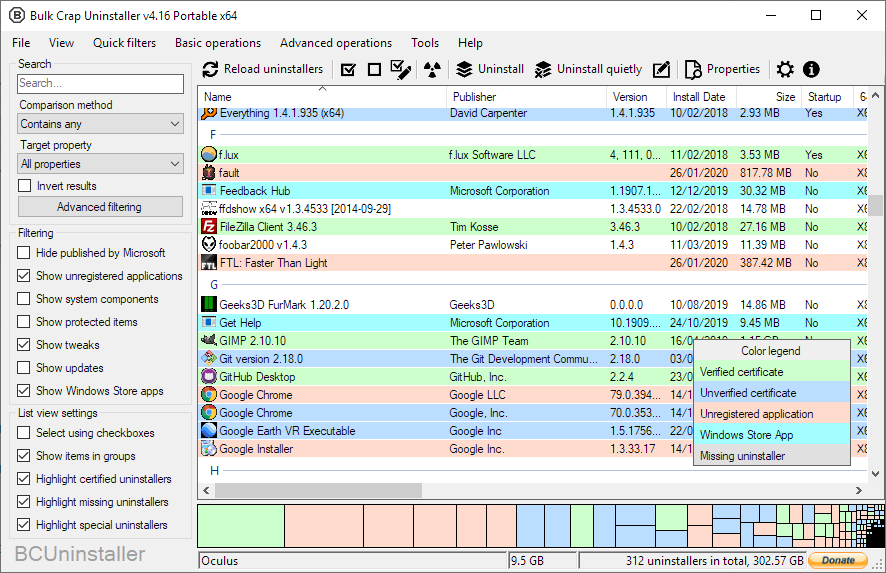
I use Bulk Crap Uninstaller the most.
-
DagothGeas5
- Posts: 2590
- Joined: Dec 13, '23
-
Geolocation
Adventurer's Guild
Does anyone know a good replacement for Microsoft Word? I need something to take notes and copy-paste things I find on the Internet that I wish to save and have illustrations.
Main post has Obsidian https://obsidian.md/ and its canvas mode seems able to handle image and text, but I have no idea if that is what I would be looking for as it looks very advanced while I just need a "glorified Notepad" that is capable of also saving images.
Main post has Obsidian https://obsidian.md/ and its canvas mode seems able to handle image and text, but I have no idea if that is what I would be looking for as it looks very advanced while I just need a "glorified Notepad" that is capable of also saving images.
- Here to show my support for normal gaming.
Thank you for existing!
Thank you for existing!
-
Valter

- Posts: 1913
- Joined: Jun 12, '24
-
Geolocation
Adventurer's Guild


Simple video editing without needing to reencode:
[m] LosslessCut
Tool to unbloat and customize Windows. Very cool.
[w] Winaero Tweaker
[m] LosslessCut
Tool to unbloat and customize Windows. Very cool.
[w] Winaero Tweaker
Steam friend code: 1525876263
-
Tadeusz

- Posts: 656
- Joined: Dec 28, '24
-
Geolocation
Adventurer's Guild


You can try Libre Office instead of Word - it's an open source alternative. Obsidian is great for organising and linking notes and it's not complicated, you just need to learn basic markdown.DagothGeas5 wrote: ↑ January 27th, 2025, 15:20Does anyone know a good replacement for Microsoft Word? I need something to take notes and copy-paste things I find on the Internet that I wish to save and have illustrations.
Main post has Obsidian https://obsidian.md/ and its canvas mode seems able to handle image and text, but I have no idea if that is what I would be looking for as it looks very advanced while I just need a "glorified Notepad" that is capable of also saving images.
-
Roderick
- Posts: 483
- Joined: Nov 19, '24
-
Geolocation
Adventurer's Guild
I assume something like LibreOffice would meet your needs.DagothGeas5 wrote: ↑ January 27th, 2025, 15:20Does anyone know a good replacement for Microsoft Word? I need something to take notes and copy-paste things I find on the Internet that I wish to save and have illustrations.
Main post has Obsidian https://obsidian.md/ and its canvas mode seems able to handle image and text, but I have no idea if that is what I would be looking for as it looks very advanced while I just need a "glorified Notepad" that is capable of also saving images.
-
Roderick
- Posts: 483
- Joined: Nov 19, '24
-
Geolocation
Adventurer's Guild
Switched from Notepad++ to Sublime Text.
-
Roderick
- Posts: 483
- Joined: Nov 19, '24
-
Geolocation
Adventurer's Guild
JPEG VIEW been using it forever and never had a problem with it.
-
Godjjjita

- Posts: 211
- Joined: Feb 27, '24
-
Geolocation
https://alternativeto.net/
https://scoop.sh/#/apps
using these two websites one should find all alternative software it needs.
https://scoop.sh/#/apps
using these two websites one should find all alternative software it needs.
-
Oyster Sauce

- Site Moderator
- Posts: 13728
- Joined: Jun 2, '23
-
Geolocation
Adventurer's Guild

Had to use Everything because Windows Explorer was refusing to give me any search results. Was surprised by how quick it is, took like 1 second to pull up 1000 files.
https://www.voidtools.com/support/everything/
https://www.voidtools.com/support/everything/
Last edited by Oyster Sauce on February 12th, 2025, 17:47, edited 1 time in total.
-
WhiteShark
- Site Moderator
- Posts: 5057
- Joined: Feb 2, '23
-
Geolocation
Adventurer's Guild
You can use Obsidian this way. It's pretty simple. You can make it do more advanced stuff with plugins, but basically it's just a markdown editor, and definitely sufficient for just saving images and text.DagothGeas5 wrote: ↑ January 27th, 2025, 15:20Main post has Obsidian https://obsidian.md/ and its canvas mode seems able to handle image and text, but I have no idea if that is what I would be looking for as it looks very advanced while I just need a "glorified Notepad" that is capable of also saving images.
-
DagothGeas5
- Posts: 2590
- Joined: Dec 13, '23
-
Geolocation
Adventurer's Guild
LibreOffice has been alright so far, but will try Obsidian too then, thank youWhiteShark wrote: ↑ February 12th, 2025, 19:28You can use Obsidian this way. It's pretty simple. You can make it do more advanced stuff with plugins, but basically it's just a markdown editor, and definitely sufficient for just saving images and text.DagothGeas5 wrote: ↑ January 27th, 2025, 15:20Main post has Obsidian https://obsidian.md/ and its canvas mode seems able to handle image and text, but I have no idea if that is what I would be looking for as it looks very advanced while I just need a "glorified Notepad" that is capable of also saving images.

- Here to show my support for normal gaming.
Thank you for existing!
Thank you for existing!
-
Nemesis
- Director of Synchronous Communication Channels
- Posts: 1529
- Joined: Feb 2, '23
-
Geolocation
Adventurer's Guild
The best thing about Obsidian is all your files are in plain text and can be edited outside the program.DagothGeas5 wrote: ↑ February 12th, 2025, 19:34LibreOffice has been alright so far, but will try Obsidian too then, thank youWhiteShark wrote: ↑ February 12th, 2025, 19:28You can use Obsidian this way. It's pretty simple. You can make it do more advanced stuff with plugins, but basically it's just a markdown editor, and definitely sufficient for just saving images and text.DagothGeas5 wrote: ↑ January 27th, 2025, 15:20Main post has Obsidian https://obsidian.md/ and its canvas mode seems able to handle image and text, but I have no idea if that is what I would be looking for as it looks very advanced while I just need a "glorified Notepad" that is capable of also saving images.