
We have a Steam curator now. You should be following it. https://store.steampowered.com/curator/44994899-RPGHQ/

Realms Restored 4.2 — Baldur's Gate 3
Looking for the download?
This mod's files are on ModHQ.
Go to mod page
Moderator: Mod Janitor
-
loregamer

- Site Moderator
- Posts: 5059
- Joined: Dec 3, '23
-
Geolocation


-
cariadagwenu

- Posts: 14
- Joined: Dec 16, '25
-
Geolocation
Is there a way I can attach images from the game to show you? Sorry, I am very new to forums like these
-
Luckmann
- Hamster

- Posts: 544
- Joined: Feb 6, '23
- Location: Scanian Lowlands, National Republic of Scandinavia
-
Geolocation
Adventurer's Guild


I have an odd issue:
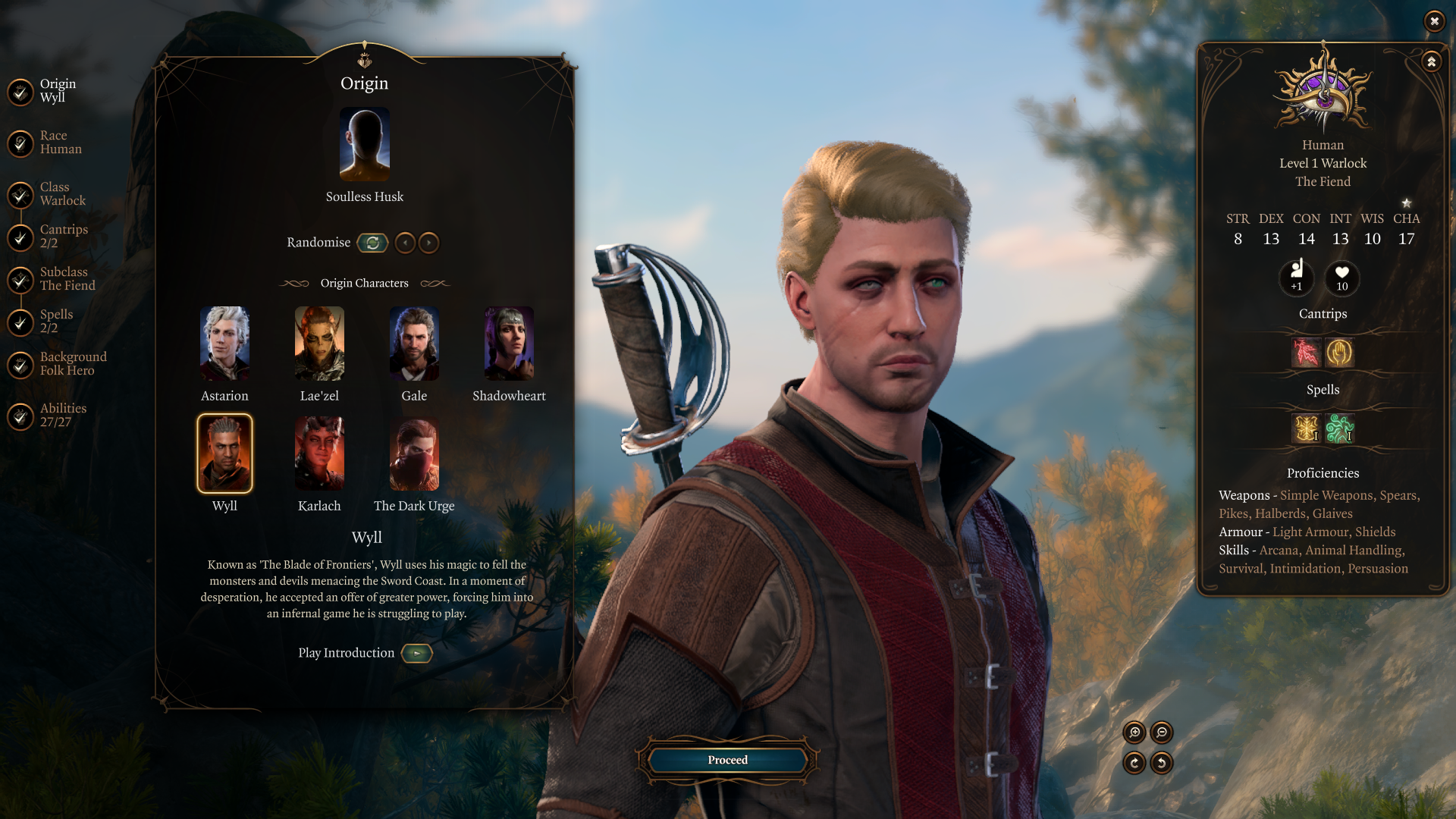
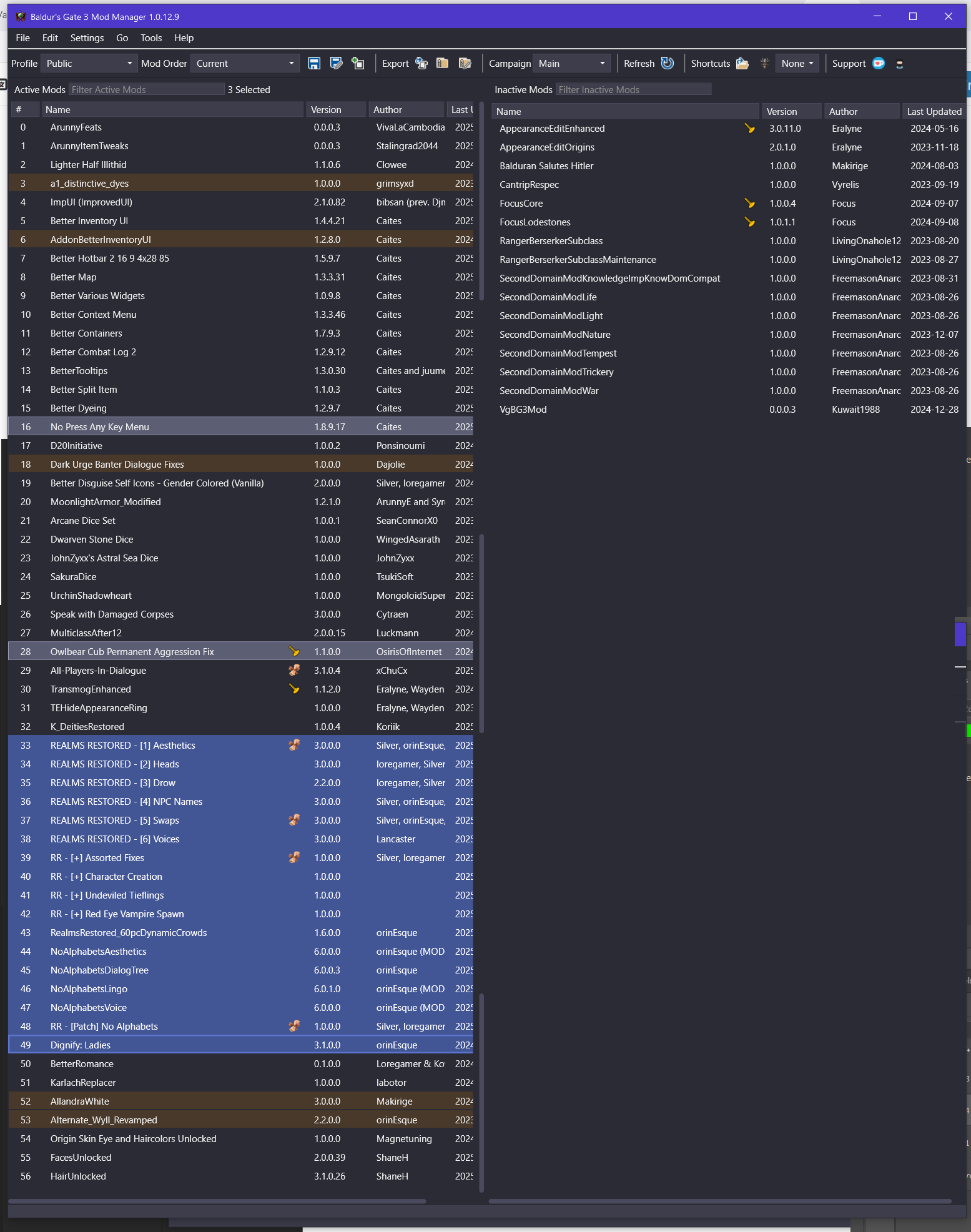
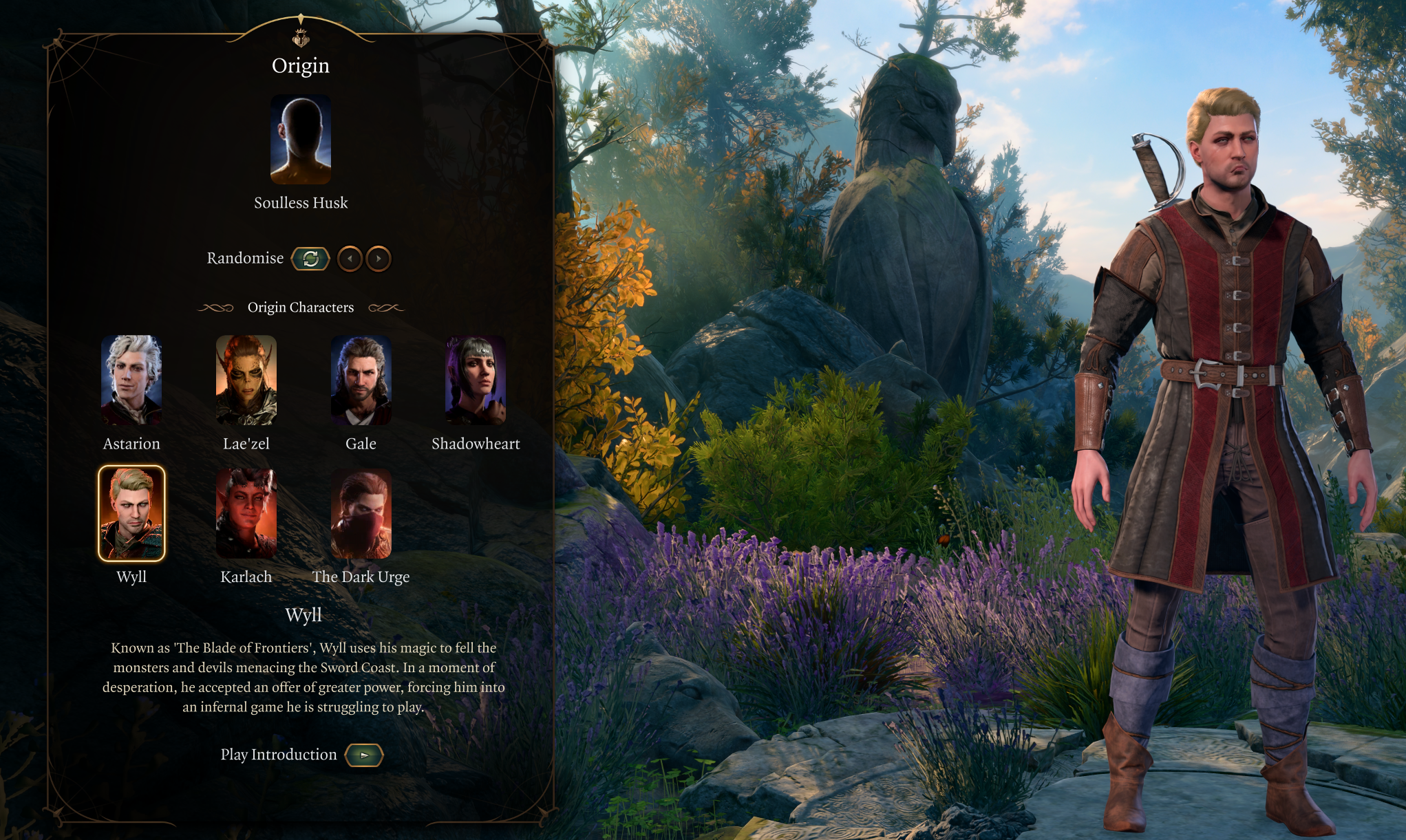
For some reason, Realms Restored seems to be replacing the unique portrait of Alternate Wyll v2.3, which seemed to be working just fine prior to installing Realms Restored and/or No Alphabets, which is an oddity because I cannot fathom why Realms Restored would have that effect at all, seemingly enforcing the game's original portrait, presumably unless running Wylls of Toril, which never was updated to include the original White Wyll.
It is very odd.
Load order included for reference, but should not be relevant; I have tried to order things around or remove certain mods anyway, but couldn't get it to work.
Also, is the new Dark Urge intended to have white hair? The portrait appears to have brown hair, but it could be a lighting issue, as is common with brighter/lighter hair colors. The inclusion of a bandana face mask that will almost certainly disappear upon first portrait update is also odd, especially considering that the game does not feature any such face masks that the player can actually get their hands on, at least not without additional mods, nevermind taking up the entire head slot.
Edit: Immediately fixed by the wonderful @loregamer by correcting the original mod. Very cool.
For some reason, Realms Restored seems to be replacing the unique portrait of Alternate Wyll v2.3, which seemed to be working just fine prior to installing Realms Restored and/or No Alphabets, which is an oddity because I cannot fathom why Realms Restored would have that effect at all, seemingly enforcing the game's original portrait, presumably unless running Wylls of Toril, which never was updated to include the original White Wyll.
It is very odd.
Load order included for reference, but should not be relevant; I have tried to order things around or remove certain mods anyway, but couldn't get it to work.
Also, is the new Dark Urge intended to have white hair? The portrait appears to have brown hair, but it could be a lighting issue, as is common with brighter/lighter hair colors. The inclusion of a bandana face mask that will almost certainly disappear upon first portrait update is also odd, especially considering that the game does not feature any such face masks that the player can actually get their hands on, at least not without additional mods, nevermind taking up the entire head slot.
Edit: Immediately fixed by the wonderful @loregamer by correcting the original mod. Very cool.
Last edited by Luckmann on December 17th, 2025, 06:05, edited 1 time in total.
Hi, my name is Tovi.
All journos must hang.
Join the RPG Codex Official™ Discord Server
MCA, much like Adolf Hitler, did nothing wrong.
All journos must hang.
Join the RPG Codex Official™ Discord Server
MCA, much like Adolf Hitler, did nothing wrong.
-
Luckmann
- Hamster
- Posts: 544
- Joined: Feb 6, '23
- Location: Scanian Lowlands, National Republic of Scandinavia
-
Geolocation
Adventurer's Guild
Yes. Just press the image button in the editor and it will spit out a starting image tag and an ending image tag for you. Then just add the link to wherever your image is uploaded between the tags.cariadagwenu wrote: ↑ December 16th, 2025, 17:46Is there a way I can attach images from the game to show you? Sorry, I am very new to forums like these
Code: Select all
[img]https://i.ibb.co/q33T6X1x/6-******-assburger-lardasses.jpg[/img]Repeat for every image you want to post. Most of us l33t haxx0rs don't even need to press the buttons anymore. We just remember the tags. We are very high concept like that.
Hi, my name is Tovi.
All journos must hang.
Join the RPG Codex Official™ Discord Server
MCA, much like Adolf Hitler, did nothing wrong.
All journos must hang.
Join the RPG Codex Official™ Discord Server
MCA, much like Adolf Hitler, did nothing wrong.
-
orinEsque

- Posts: 4917
- Joined: Oct 9, '23
- Location: Dubai
- Gender: Potato
-
Geolocation
cariadagwenu wrote: ↑ December 16th, 2025, 17:46Is there a way I can attach images from the game to show you? Sorry, I am very new to forums like these
Victors clap when others succeed; Losers feel every spotlight as a personal bleed.
-
orinEsque
- Posts: 4917
- Joined: Oct 9, '23
- Location: Dubai
- Gender: Potato
-
Geolocation
Dark Urge hair is indeed to do with portrait lighting. The inclusion of a bandana face mask is because of dragonborn mouth movements that do not match a human mouth movement and looks like something out of a horror movie.
Last edited by orinEsque on December 16th, 2025, 17:58, edited 1 time in total.
Victors clap when others succeed; Losers feel every spotlight as a personal bleed.
-
cariadagwenu
- Posts: 14
- Joined: Dec 16, '25
-
Geolocation
Are you using any UI mod at all? You don't seem to be having the issue I'm having.Luckmann wrote: ↑ December 16th, 2025, 17:47I have an odd issue:
For some reason, Realms Restored seems to be replacing the unique portrait of Alternate Wyll v2.3, which seemed to be working just fine prior to installing Realms Restored and/or No Alphabets, which is an oddity because I cannot fathom why Realms Restored would have that effect at all, seemingly enforcing the game's original portrait, presumably unless running Wylls of Toril, which never was updated to include the original White Wyll.
It is very odd.
Load order included for reference, but should not be relevant; I have tried to order things around or remove certain mods anyway, but couldn't get it to work.
Also, is the new Dark Urge intended to have white hair? The portrait appears to have brown hair, but it could be a lighting issue, as is common with brighter/lighter hair colors. The inclusion of a bandana face mask that will almost certainly disappear upon first portrait update is also odd, especially considering that the game does not feature any such face masks that the player can actually get their hands on, at least not without additional mods, nevermind taking up the entire head slot.
-
cariadagwenu
- Posts: 14
- Joined: Dec 16, '25
-
Geolocation
I have uploaded the images, hopefully to help.
The first image is my load order. the second image seems to be the correct options that NA gives us through its CCreator optional add-on (when I click on edit character), and the third image is on the main character selection page.
@orinEsque and @loregamer do you know what the issue might be?
I can see that @Luckmann has an extra file called "RR - Character Creation" but I don't see that as an optional download either on RR or NA main pages, is this something we need?
The first image is my load order. the second image seems to be the correct options that NA gives us through its CCreator optional add-on (when I click on edit character), and the third image is on the main character selection page.
@orinEsque and @loregamer do you know what the issue might be?
I can see that @Luckmann has an extra file called "RR - Character Creation" but I don't see that as an optional download either on RR or NA main pages, is this something we need?
You do not have the required permissions to view the files attached to this post.
Last edited by cariadagwenu on December 16th, 2025, 18:48, edited 3 times in total.
-
orinEsque
- Posts: 4917
- Joined: Oct 9, '23
- Location: Dubai
- Gender: Potato
-
Geolocation
If you shout at loregamer enough, he will eventually fix it. Also make sure you have no other ccreator mod installed. only impUI and one NA CCreator mod.cariadagwenu wrote: ↑ December 16th, 2025, 18:44I have uploaded the images, hopefully to help.
The first image is my load order. the second image seems to be the correct options that NA gives us through its CCreator optional add-on (when I click on edit character), and the third image is on the main character selection page.
@orinEsque and @loregamer do you know what the issue might be?
I can see that @Luckmann has an extra file called "RR - Character Creation" but I don't see that as an optional download either on RR or NA main pages, is this something we need?

Victors clap when others succeed; Losers feel every spotlight as a personal bleed.
-
cariadagwenu
- Posts: 14
- Joined: Dec 16, '25
-
Geolocation
Thank you for letting me know this. I will patiently wait until he uploads the 2.0 patch for PlusUI as this seems to be the only fix. I assume this error doesn’t affect how characters refer to you, the changed vocab in the game etc.
-
cariadagwenu
- Posts: 14
- Joined: Dec 16, '25
-
Geolocation
-
cariadagwenu
- Posts: 14
- Joined: Dec 16, '25
-
Geolocation
Is there a reason why PlusUI has corrected the error but the newest patch for ImprovedUI hasn’t?
-
Face

- Posts: 46
- Joined: Dec 3, '23
-
Geolocation

Just finishing up Act 2. Fantastic work, folks. Especially with the camera work.
If you ever get really bored and are still working on this, I have one suggestion.
During the scene where you just killed the drider and are getting the pixie moonlantern, there's a dialogue where the elf Harper dude is saying farewell. Part of it has you staring into one of the Harper's throats (it used to be inside his head) because the Harper has been made taller. I guess if the camera angle could be moved a little to the left we could still see the dude who's talking in the scene. **** Larian and their midget love! xD
If you ever get really bored and are still working on this, I have one suggestion.
During the scene where you just killed the drider and are getting the pixie moonlantern, there's a dialogue where the elf Harper dude is saying farewell. Part of it has you staring into one of the Harper's throats (it used to be inside his head) because the Harper has been made taller. I guess if the camera angle could be moved a little to the left we could still see the dude who's talking in the scene. **** Larian and their midget love! xD
-
Face
- Posts: 46
- Joined: Dec 3, '23
-
Geolocation
I figured it was something like that. Reminds me of the problems folks had modding the Quarians in Mass Effect, making their masks more transparent. Bioware had the Quarians moving the lips and eyes but it was very wonky and they never bothered fixing it because EA was giving them like 2 years to make ME2 and ME3.orinEsque wrote: ↑ December 16th, 2025, 17:58Dark Urge hair is indeed to do with portrait lighting. The inclusion of a bandana face mask is because of dragonborn mouth movements that do not match a human mouth movement and looks like something out of a horror movie.
-
ModdersHQ

- Group Account
- Posts: 109
- Joined: Mar 10, '25
-
Geolocation
Thank you for catching that! Can you give name of said Harper? Or better, if you remember part of the line of dialogue / can provide screenshot of it.Face wrote: ↑ December 16th, 2025, 21:44During the scene where you just killed the drider and are getting the pixie moonlantern, there's a dialogue where the elf Harper dude is saying farewell. Part of it has you staring into one of the Harper's throats (it used to be inside his head) because the Harper has been made taller. I guess if the camera angle could be moved a little to the left we could still see the dude who's talking in the scene. **** Larian and their midget love! xD
Would help a lot in quickly identifying and fixing timeline in the next update.
-
Face
- Posts: 46
- Joined: Dec 3, '23
-
Geolocation
I Grok'd it and this is what Grok said "The main dude talking is Harper Branthos, a wood elf fighter leading the Harper squad in the ambush against Kar'niss (the drider carrying the Moonlantern) in the Shadow-Cursed Lands (Ruined Battlefield area, Act 2).The short person next to him is Harper Elindale, a lightfoot halfling wizard who's part of the same squad and a close friend of Branthos (they even use nicknames like "Bran" and "Elin").This happens right after you side with the Harpers, defeat Kar'niss and his convoy during the ambush (part of the "Seek Protection from the Shadow Curse" quest), and loot/hold up the Moonlantern from the drider's corpse. Branthos approaches, comments on it (e.g., noting the war isn't over), and often takes the lantern temporarily before directing you to Last Light Inn—though you can get it back there via Isobel or other means."ModdersHQ wrote: ↑ December 16th, 2025, 22:02Thank you for catching that! Can you give name of said Harper? Or better, if you remember part of the line of dialogue / can provide screenshot of it.Face wrote: ↑ December 16th, 2025, 21:44During the scene where you just killed the drider and are getting the pixie moonlantern, there's a dialogue where the elf Harper dude is saying farewell. Part of it has you staring into one of the Harper's throats (it used to be inside his head) because the Harper has been made taller. I guess if the camera angle could be moved a little to the left we could still see the dude who's talking in the scene. **** Larian and their midget love! xD
Would help a lot in quickly identifying and fixing timeline in the next update.
It's the last part of the scene, right as they're getting ready to leave. Branthos is telling us to be brave. Right after this, you talk to the pixie and decide whether or not to let it out of the lantern or keep it in the lantern.
-
Face
- Posts: 46
- Joined: Dec 3, '23
-
Geolocation
When I replay I'll confirm, but I don't have a save file near that time period. 
-
ModdersHQ
- Group Account
- Posts: 109
- Joined: Mar 10, '25
-
Geolocation
This is one that was swapped so he is more likely to be the culprit for weird framing during dialogue, unlike Branthos who received only a visual upgrade. Will be easier to find lines.
But if you eventually get a direct line or screenshot during your replay, that would help too. Thank you!
-
loregamer
- Site Moderator
- Posts: 5059
- Joined: Dec 3, '23
-
Geolocation
Oh, I think that's because we said **** it and regenerated all NPC portraits in Realms Restored since we were getting reports of portrait mismatches. The reason that Wyll's vanilla portrait is showing even with Alternate Wyll Revamped higher in load orderis because AWR is overriding the portrait files directly instead of overriding the portrait the "correct" way.Luckmann wrote: ↑ December 16th, 2025, 17:47I have an odd issue:
For some reason, Realms Restored seems to be replacing the unique portrait of Alternate Wyll v2.3, which seemed to be working just fine prior to installing Realms Restored and/or No Alphabets, which is an oddity because I cannot fathom why Realms Restored would have that effect at all, seemingly enforcing the game's original portrait, presumably unless running Wylls of Toril, which never was updated to include the original White Wyll.
It is very odd.
The best solution is to correct the way Alternate Wyll Revamped is overriding portraits. For any other modders reading it, instead of overriding the portraits in [Mods\GustavDev\GUI\Assets\Portraits, the .DDS files should be in Mods\[yourmodfolder]\GUI\Assets\Portraits. Then open your mod in toolkit and go Project > Generate UI Textures Metadata
I'll see if I can quickly do it soon
Last edited by loregamer on December 16th, 2025, 23:47, edited 1 time in total.
Jingle Jangle Jingle
-
loregamer
- Site Moderator
- Posts: 5059
- Joined: Dec 3, '23
-
Geolocation
Here you go @Luckmann
loregamer wrote: ↑ December 17th, 2025, 00:15v2.4
Now compatible with Realms Restored v3
- Fixed how mod is overriding Wyll's portrait
- Split _merged.lsf.lsx's into separate lsx files for toolkit compatibility
- Added @Luckmann to author list
 v2.4
v2.4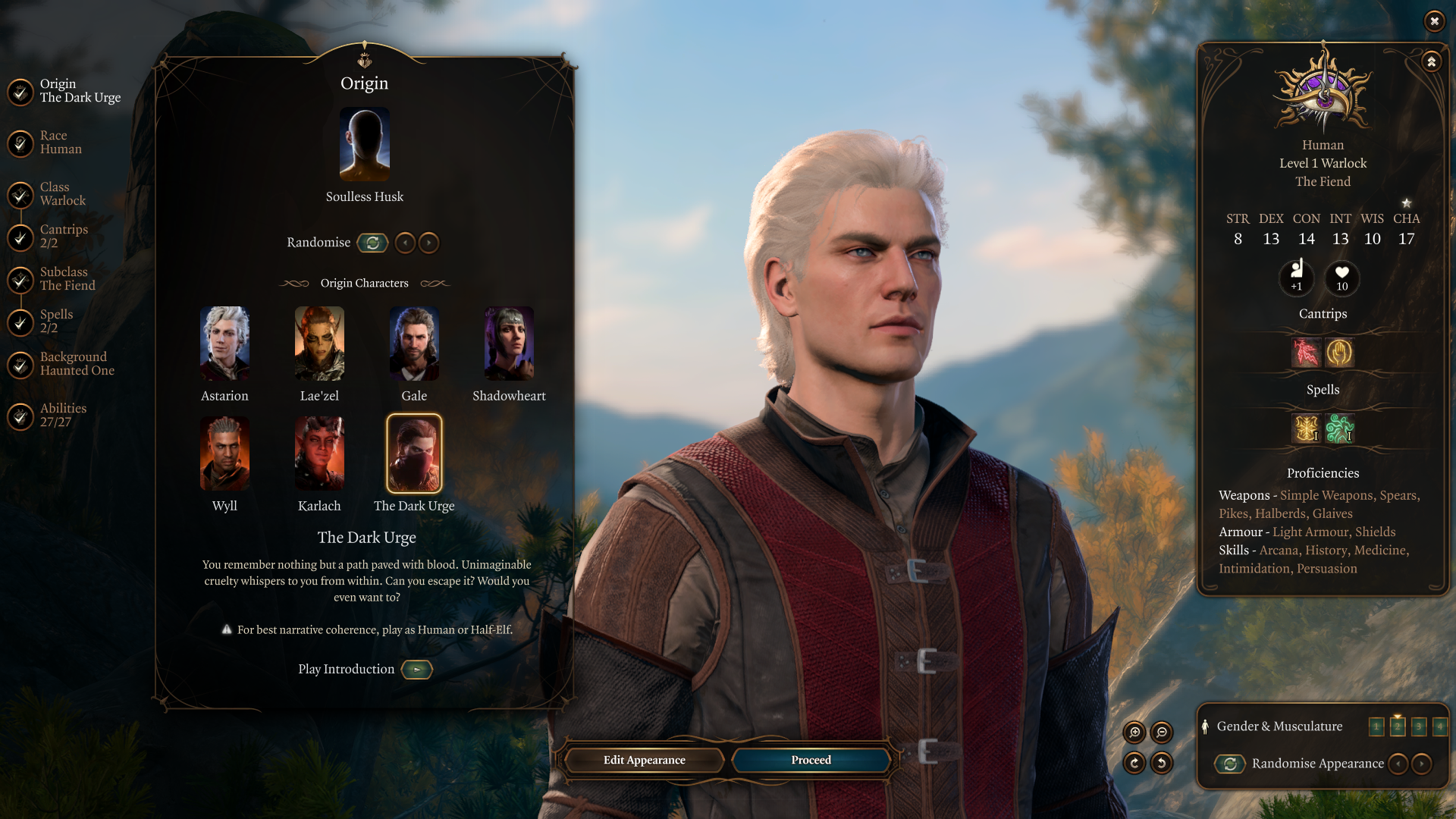
Jingle Jangle Jingle
-
Seikara
- Posts: 20
- Joined: Sep 7, '25
-
Geolocation
I've noticed that a lot of npcs are missing their titles especially many of the druids in Emerald Grove and Disciple Z'rell. They simply say "Not Found" when hovering over them. Admittedly, I was using other visual change mods, and I think removing them mid-playthrough to prioritize your aesthetic changes could be what's causing it. I just want to confirm whether these bugs will be not be present in a new playthrough? Lastly, I know Realm Restored recently got updated to include Mizora Human Form but would you mind providing an optional mod update to remove it? There's currently a bug that causes her to appear human where she's not supposed to be as well as other visual changes mod for her that I'd like to prioritize. I hope that's alright!
-
orinEsque
- Posts: 4917
- Joined: Oct 9, '23
- Location: Dubai
- Gender: Potato
-
Geolocation
could you give us an example so we can test it.Seikara wrote: ↑ December 17th, 2025, 00:47I've noticed that a lot of npcs are missing their titles especially many of the druids in Emerald Grove and Disciple Z'rell. They simply say "Not Found" when hovering over them. Admittedly, I was using other visual change mods, and I think removing them mid-playthrough to prioritize your aesthetic changes could be what's causing it. I just want to confirm whether these bugs will be not be present in a new playthrough? Lastly, I know Realm Restored recently got updated to include Mizora Human Form but would you mind providing an optional mod update to remove it? There's currently a bug that causes her to appear human where she's not supposed to be as well as other visual changes mod for her that I'd like to prioritize. I hope that's alright!
Victors clap when others succeed; Losers feel every spotlight as a personal bleed.
-
ModdersHQ
- Group Account
- Posts: 109
- Joined: Mar 10, '25
-
Geolocation
Just tested both Z'Rell & Emerald Grove.Seikara wrote: ↑ December 17th, 2025, 00:47I've noticed that a lot of npcs are missing their titles especially many of the druids in Emerald Grove and Disciple Z'rell. They simply say "Not Found" when hovering over them. Admittedly, I was using other visual change mods, and I think removing them mid-playthrough to prioritize your aesthetic changes could be what's causing it. I just want to confirm whether these bugs will be not be present in a new playthrough?
Z'Rell has no title in vanilla and she appears to have no title in RR as well, while the rest of her race, name and portrait info displays perfectly fine.
People in Emerald Grove (Volo and Kagha) have their respective titles show up, while the other druids have none both in vanilla and RR.
It must've been a different mod that caused it, so new playthrough should be fine.
There's no bug report on the mod page. Can you clarify what is the exact bug scenario? We have Hum Mizora Wyrm's Rock only version, and we would rather fix the bug if it exists, rather than remove / revert changes completely.Seikara wrote: ↑ December 17th, 2025, 00:47Lastly, I know Realm Restored recently got updated to include Mizora Human Form but would you mind providing an optional mod update to remove it? There's currently a bug that causes her to appear human where she's not supposed to be as well as other visual changes mod for her that I'd like to prioritize. I hope that's alright!
-
loregamer
- Site Moderator
- Posts: 5059
- Joined: Dec 3, '23
-
Geolocation
Weren't you the one with 600 mods? Maybe update Better Target Info if you have it installed @Seikara
Last edited by loregamer on December 17th, 2025, 01:17, edited 1 time in total.
Jingle Jangle Jingle
-
orinEsque
- Posts: 4917
- Joined: Oct 9, '23
- Location: Dubai
- Gender: Potato
-
Geolocation
I was playing around earlier and my modded saves are now loading even with no mods (even script extender ones). How about @Seikara you disable your 600 mods and troubleshoot.
Victors clap when others succeed; Losers feel every spotlight as a personal bleed.
-
Seikara
- Posts: 20
- Joined: Sep 7, '25
-
Geolocation
This is one of many reports highlighting the same issue: "I deleted the mod from my load order and saved it -- yet it still shows Mizora as human in my game. Is my save file bugged now? I was using the Wyrm's Crossing Only version, and the moment I'm referring to is in Act 2 when Mizora appears and gives Wyll a quest to rescue an asset of Zariel. She appears human even though she's not supposed to. Tried deleting the mod, and yet it persist, somehow. What's going on?"ModdersHQ wrote: ↑ December 17th, 2025, 01:08Just tested both Z'Rell & Emerald Grove.Seikara wrote: ↑ December 17th, 2025, 00:47I've noticed that a lot of npcs are missing their titles especially many of the druids in Emerald Grove and Disciple Z'rell. They simply say "Not Found" when hovering over them. Admittedly, I was using other visual change mods, and I think removing them mid-playthrough to prioritize your aesthetic changes could be what's causing it. I just want to confirm whether these bugs will be not be present in a new playthrough?
Z'Rell has no title in vanilla and she appears to have no title in RR as well, while the rest of her race, name and portrait info displays perfectly fine.
People in Emerald Grove (Volo and Kagha) have their respective titles show up, while the other druids have none both in vanilla and RR.
It must've been a different mod that caused it, so new playthrough should be fine.There's no bug report on the mod page. Can you clarify what is the exact bug scenario? We have Hum Mizora Wyrm's Rock only version, and we would rather fix the bug if it exists, rather than remove / revert changes completely.Seikara wrote: ↑ December 17th, 2025, 00:47Lastly, I know Realm Restored recently got updated to include Mizora Human Form but would you mind providing an optional mod update to remove it? There's currently a bug that causes her to appear human where she's not supposed to be as well as other visual changes mod for her that I'd like to prioritize. I hope that's alright!
-
loregamer
- Site Moderator
- Posts: 5059
- Joined: Dec 3, '23
-
Geolocation
Do you not want to see Human Mizora or are you worried about running the bug? If the latter, don't worry my *****.Seikara wrote: ↑ December 17th, 2025, 01:23This is one of many reports highlighting the same issue: "I deleted the mod from my load order and saved it -- yet it still shows Mizora as human in my game. Is my save file bugged now? I was using the Wyrm's Crossing Only version, and the moment I'm referring to is in Act 2 when Mizora appears and gives Wyll a quest to rescue an asset of Zariel. She appears human even though she's not supposed to. Tried deleting the mod, and yet it persist, somehow. What's going on?"
To clarify, the way the mod works is through transforming her character to have a different visual under certain conditions. In vanilla, the Human Mizora visual exists, but isn't used on any character. What the Human Mizora mod does is adds a simple script that:
- Checks if the level is BGO_Main_A (Wyrm's Crossing area)
- Checks that you aren't in camp
- If so, transform Mizora's character to use her Human visual
- If you are in camp, then transform Mizora into her Cambion form
I hope that makes sense. That's how the entirety of the "Act Specific Split Entries" works.
Last edited by loregamer on December 17th, 2025, 01:37, edited 3 times in total.
Jingle Jangle Jingle
-
Face
- Posts: 46
- Joined: Dec 3, '23
-
Geolocation
If you watch this scene at 1:46:13 that's the beginning, has all the lines and characters involved. Of course this is an unmoded version. But the only difference is that when the scene focuses on the bard speaking, the halfling or gnome's head is in the way.ModdersHQ wrote: ↑ December 16th, 2025, 22:02Thank you for catching that! Can you give name of said Harper? Or better, if you remember part of the line of dialogue / can provide screenshot of it.Face wrote: ↑ December 16th, 2025, 21:44During the scene where you just killed the drider and are getting the pixie moonlantern, there's a dialogue where the elf Harper dude is saying farewell. Part of it has you staring into one of the Harper's throats (it used to be inside his head) because the Harper has been made taller. I guess if the camera angle could be moved a little to the left we could still see the dude who's talking in the scene. **** Larian and their midget love! xD
Would help a lot in quickly identifying and fixing timeline in the next update.
Last edited by Face on December 17th, 2025, 02:52, edited 2 times in total.
-
Seikara
- Posts: 20
- Joined: Sep 7, '25
-
Geolocation
Would it be possible to give Minthara the same voice treatment as Florrick? I really like what you did with her, so I'm wondering if you could do the same thing for Minthara.
-
Lancaster
- Posts: 476
- Joined: Jan 31, '24
-
Geolocation
I have tried actually. Like Sarevok, Minthara has a raspy voice that conflicts with the AI too much. I was able to iron out Sarevok due to him only having 300 lines where as Minthara has 7k. Increasing the pitch of her makes her sound like she's sucked in helium.Seikara wrote: ↑ December 17th, 2025, 06:06Would it be possible to give Minthara the same voice treatment as Florrick? I really like what you did with her, so I'm wondering if you could do the same thing for Minthara.