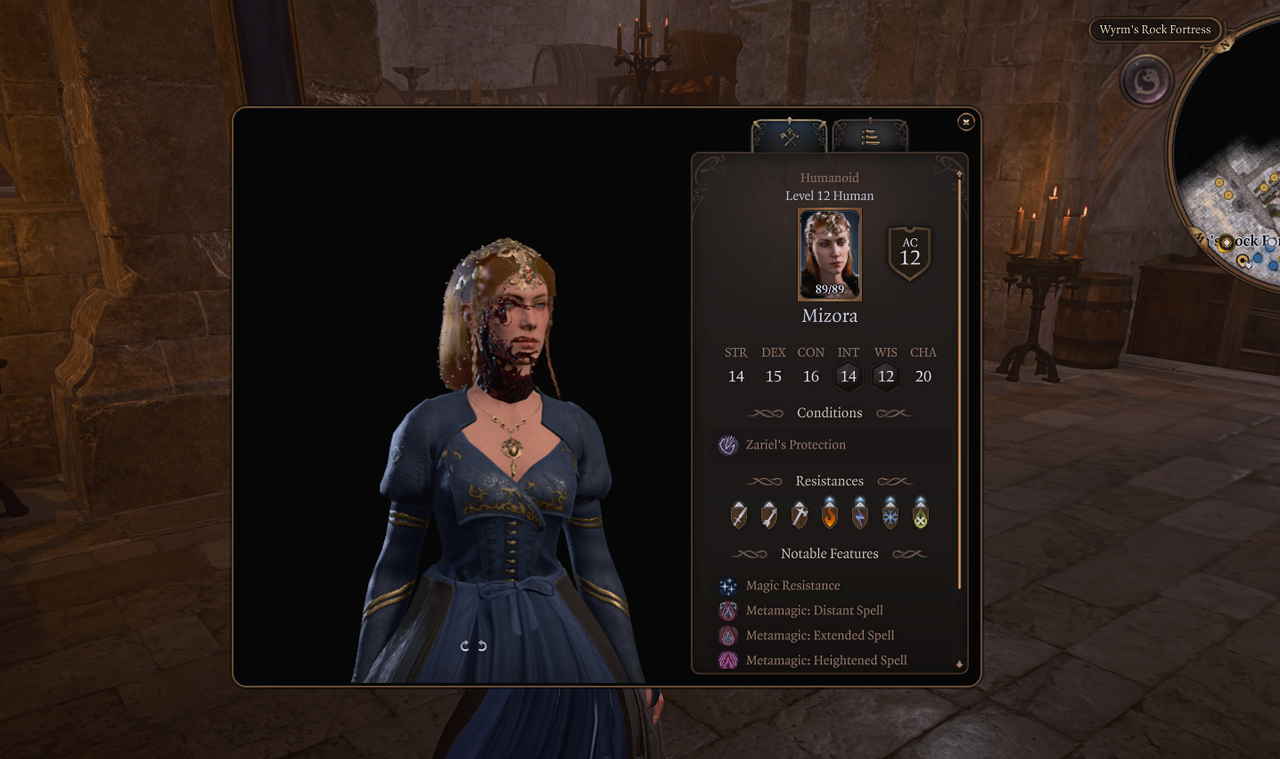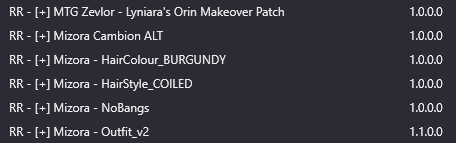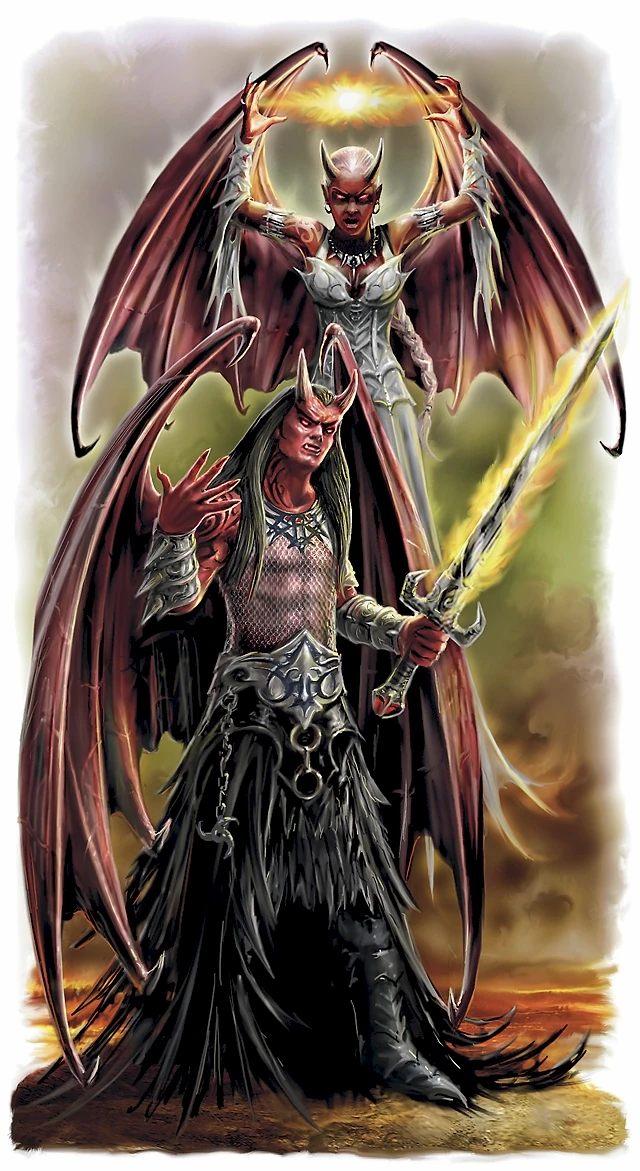

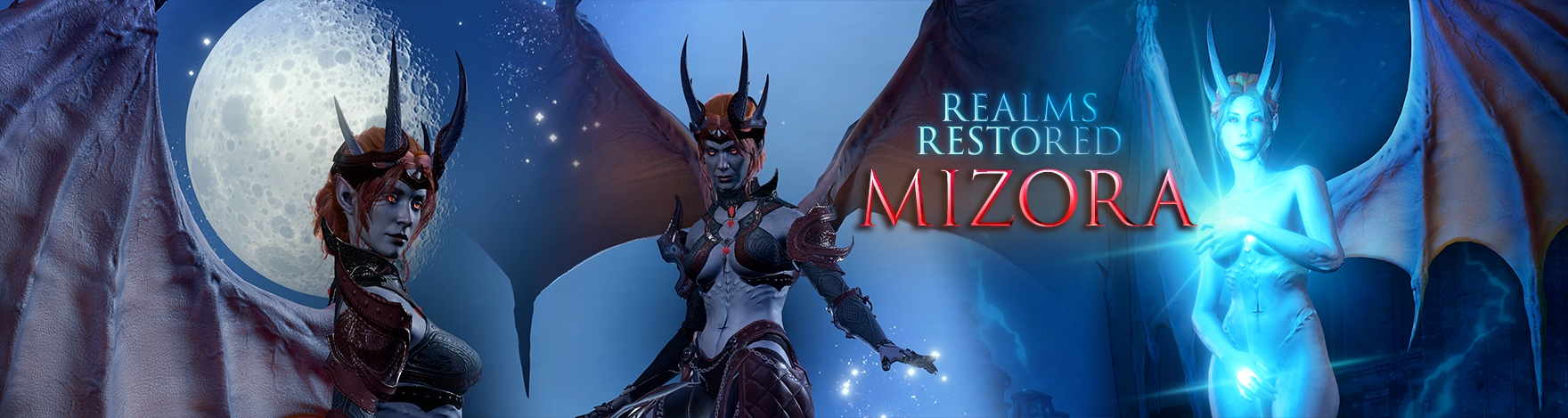
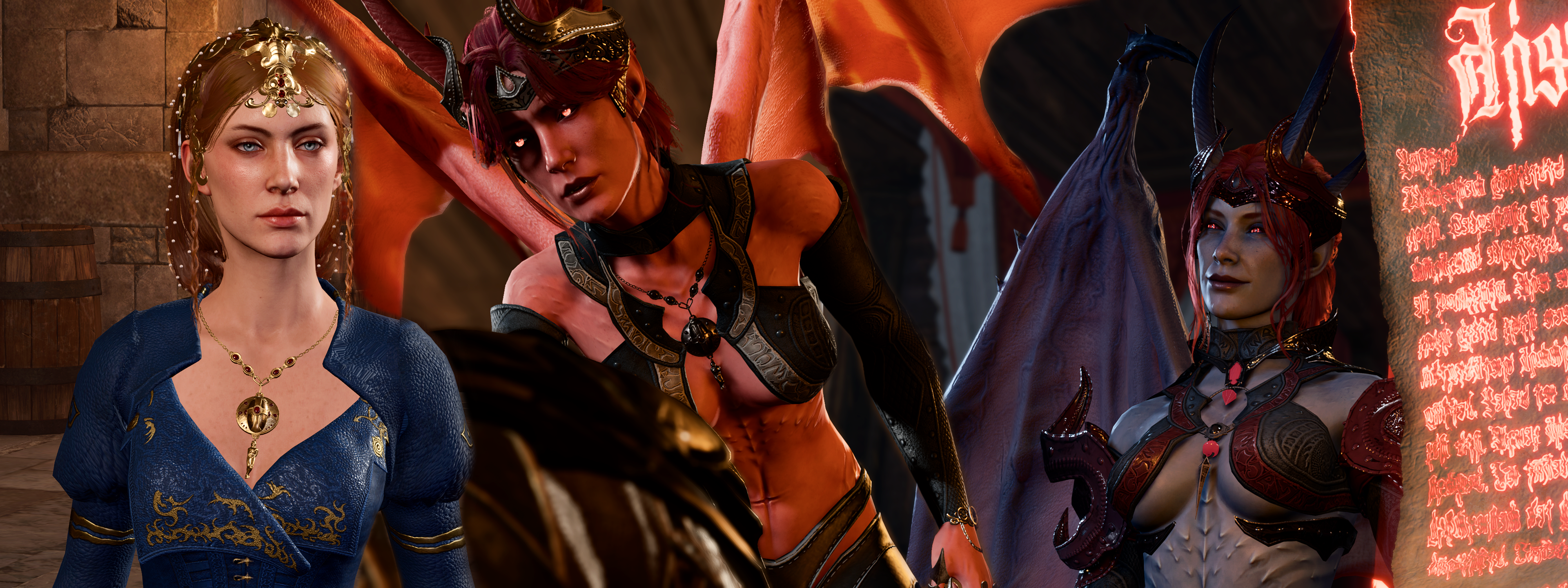
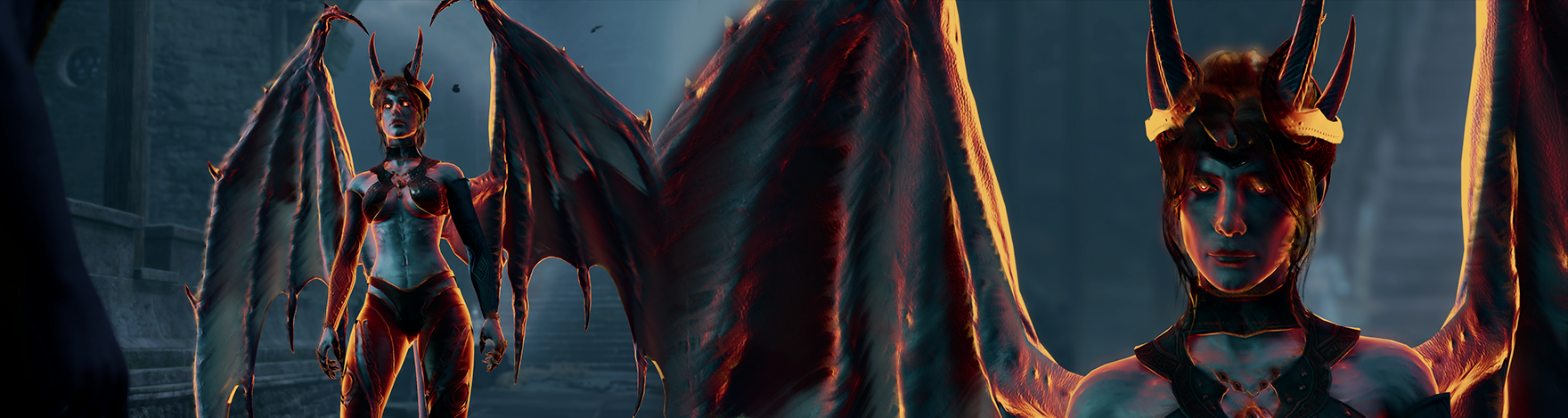
Cambion Mizora received a full re-design that goes hand in hand with Cambion race rework, plus a brand new customisation system that allows you to build your own version of her.
More than 36,126,720 possible unique visual combinations!
![Image]()
► Overview
This mod only edits the CAMBION forms of Mizora.
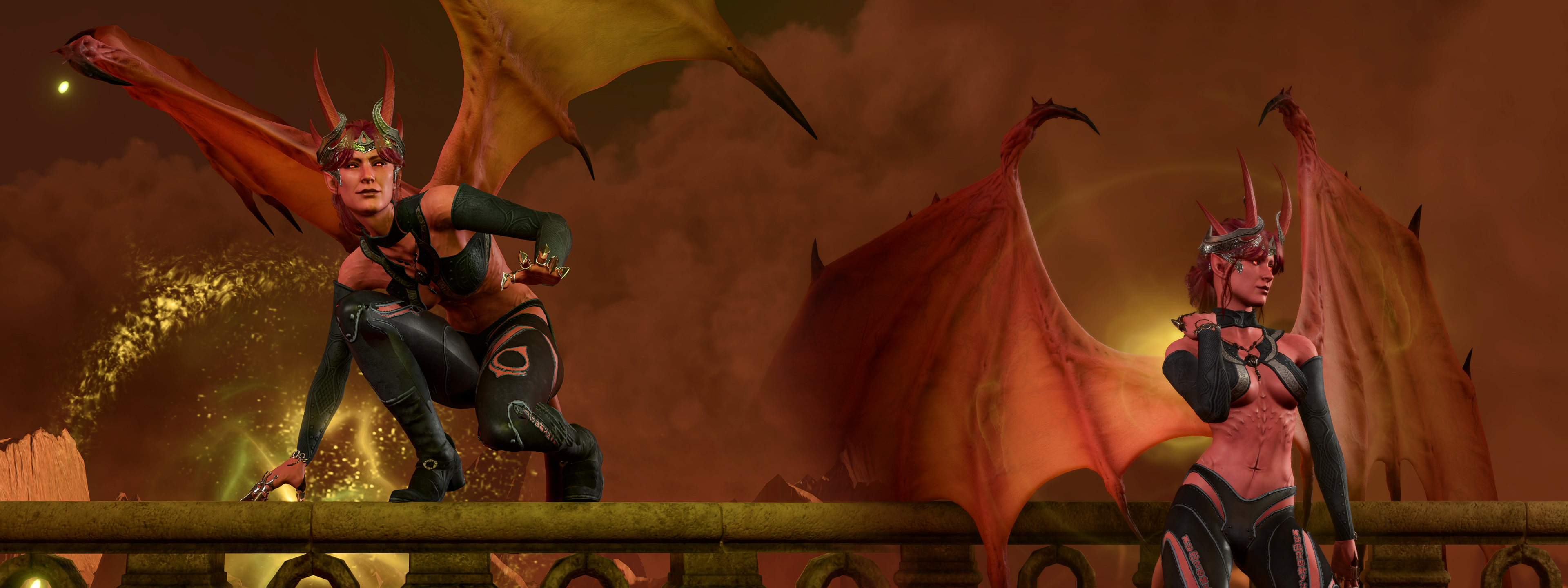
- Human skin was changed to a Tiefling one, to maintain Cambion ridges, spikes and improve on the overall devil-like appearance
- Multiple outfits that look less like "normal human" fashion, and more in line with overall "alternative fashion" of their earler concept art
- Added forehead roots for horns
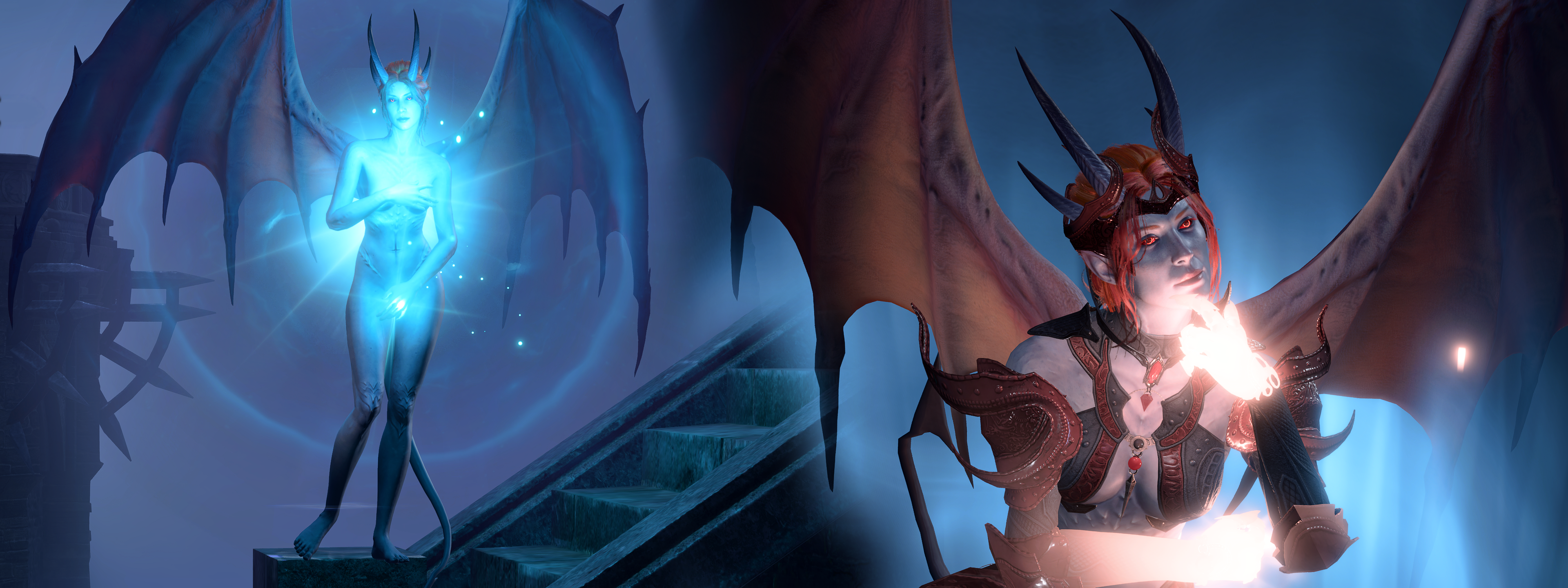
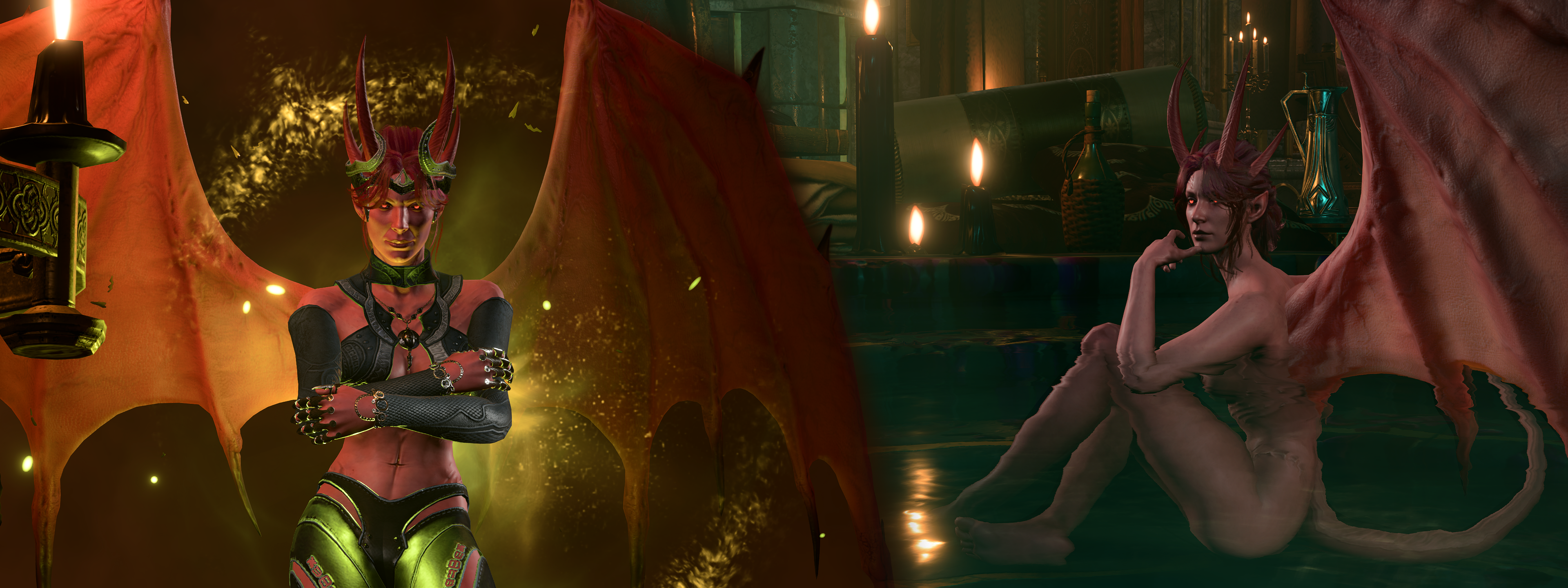
- Human form for Mizora updated to look like a noble lady, matching current aesthetic of nobles present at Wyrm's Rock Fortress [PRESENT IN AESTHETICS]
- Eyelashes and eyebrows colours better match hair colour
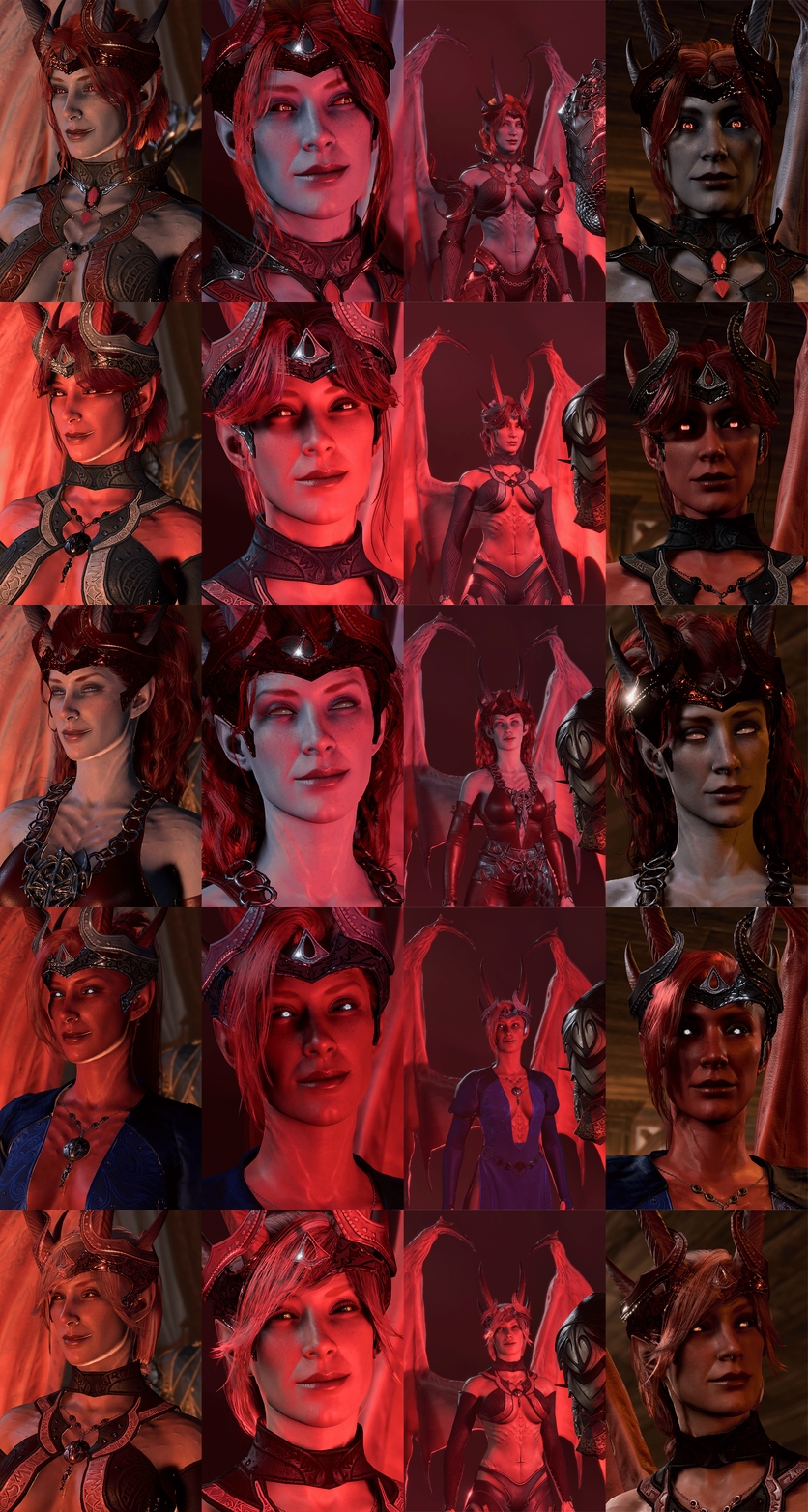
 You may create your own Mizora from the current selection of:
- 4 outfit options
- 7 outfit colour options
- 5 skin colour options
- 6 hair colour options
- 6 hair style options
- 1 option to add classic hair on top
- 8 bangs style options
- 2 permanent fringe style options
- 4 eye style options
- 4 eye glow style options
- 2 unique eye style options
- 7 eye colour options
Description
► INDEX
● Outfit⤴
Versions:⤴
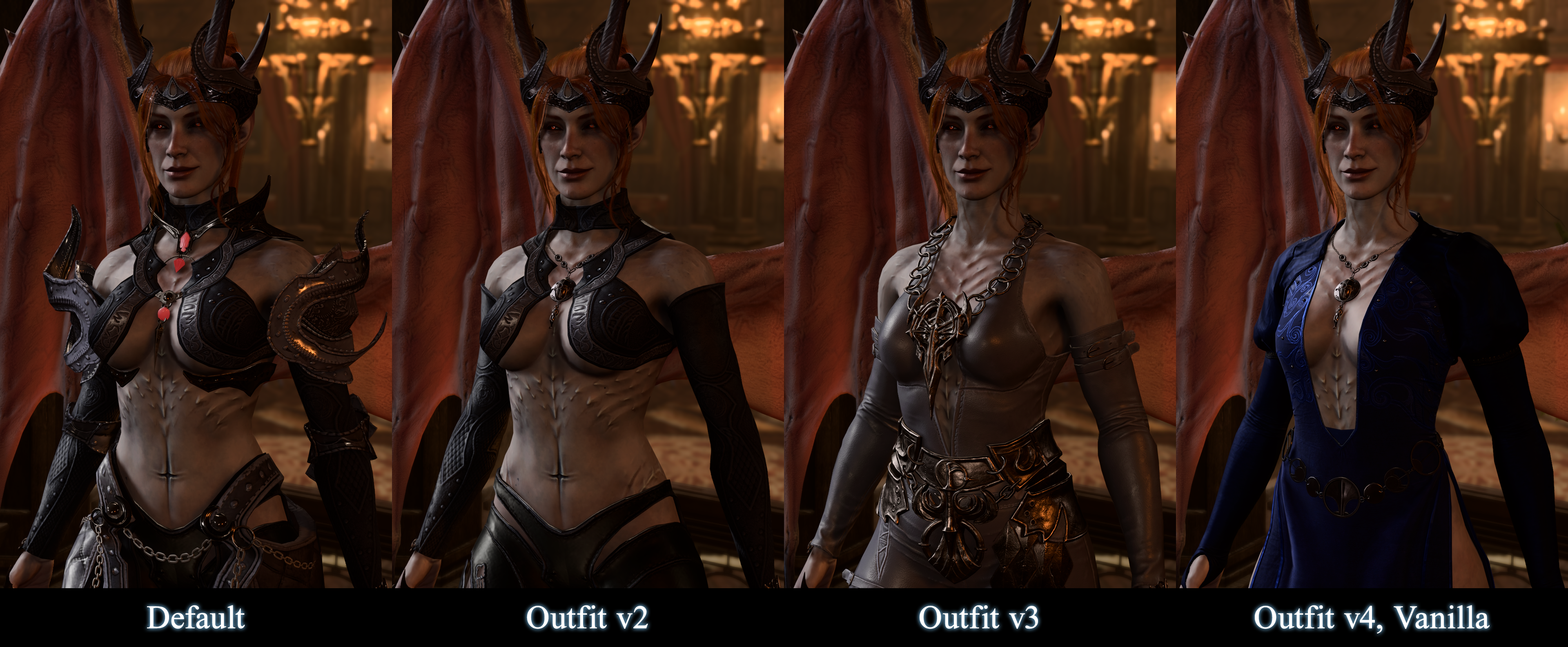
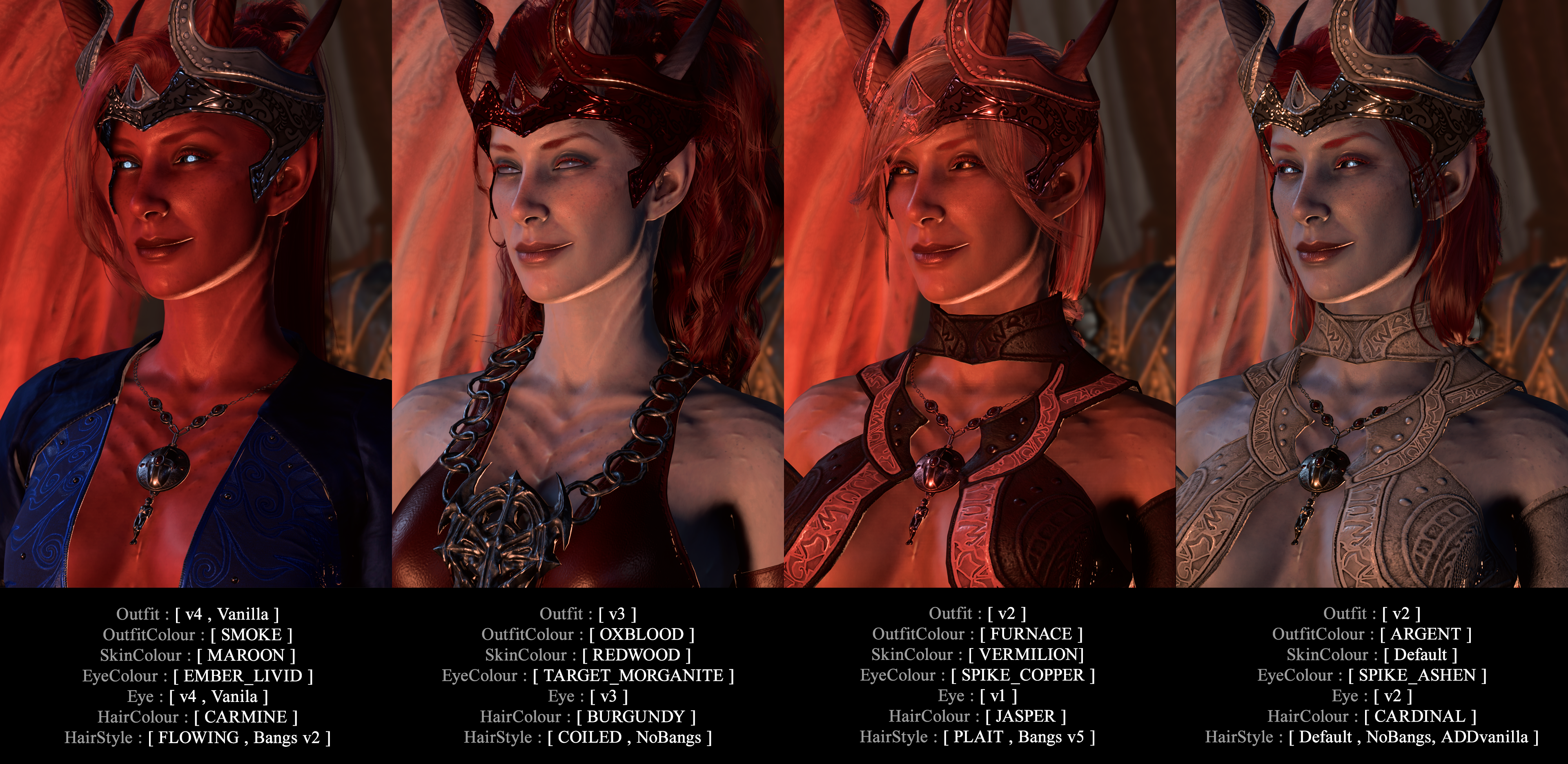
- v1 — Default — New clothes re-fitted by the awesome RubyMage to hug around her horns, wings, hair and ears, which removes ALL clipping with Cambion body parts or her unique head
- v2 — Simpler version of v1 that removes armour bits
- v3 — Blackstar set from RubyMage. Want to get it for your character or companions? Get it here!
- v4 — Vanilla outfit, combined with updated circlet-crown
Notes:
- v4 is not compatible with Scantily Outfit Mizora mod yet — a future update may fix this
- v4 is compatible with Dyeable Mizora Outfit mod, but current OutfitColours variations will not interact with the clothing correctly — a future update may fix this
● Outfit Colours⤴
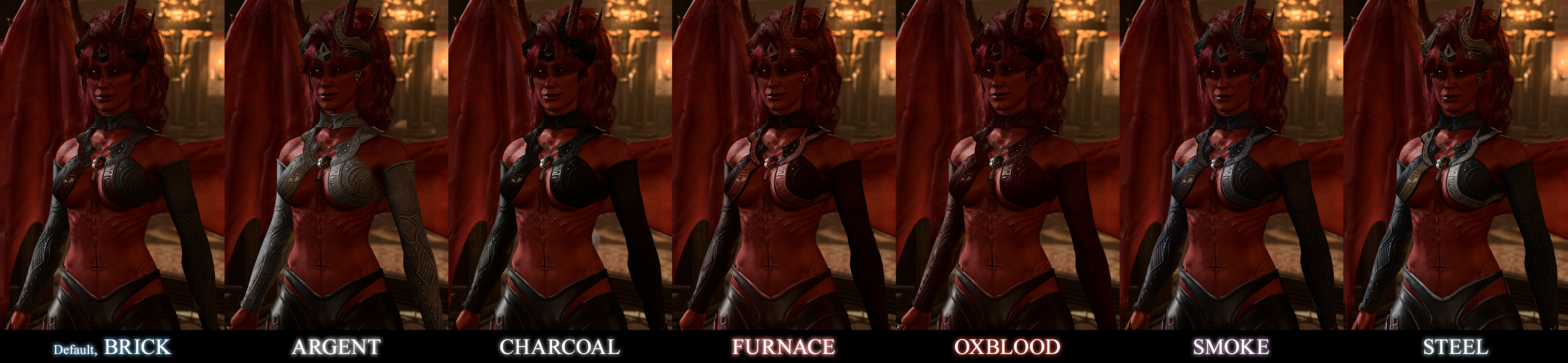
- ---- ㅤBRICK — Default — Predominantly grey colour preset & dark, desaturated red, with silver metals
- ---- ㅤARGENT — Predominantly grey colour preset & black bottoms, with silver metals
- ---- ㅤCHARCOAL — Dark-grey, nearly black colour preset, with dark-silver metals
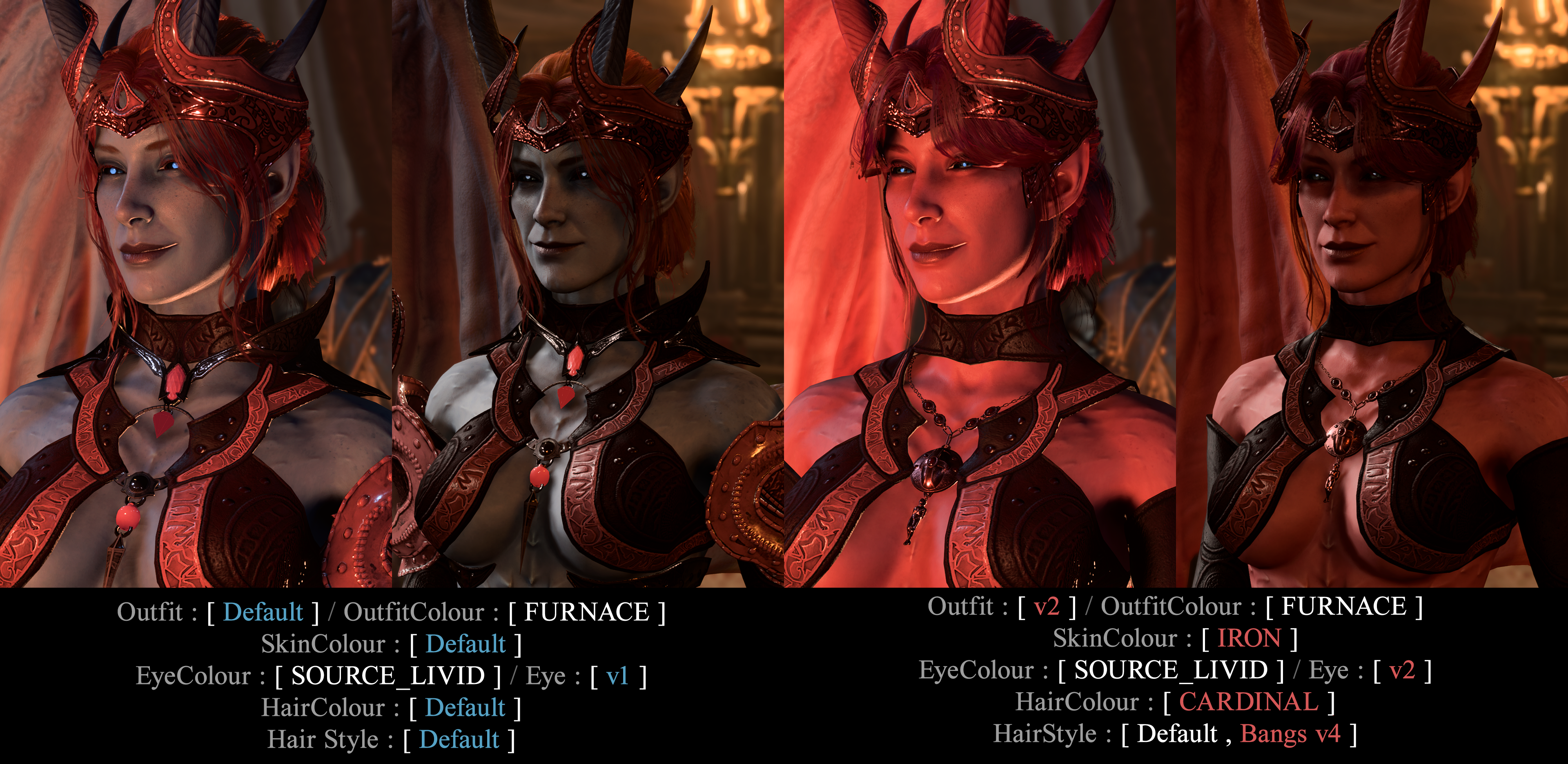
- ---- ㅤFURNACE — Dark, desaturated brown-red & warm peachy-red colour, with copper metals
- ---- ㅤOXBLOOD — Deep, saturated red, with silver metals
- ---- ㅤSMOKE — Pale, desaturated violet-grey, with pale-violet metals
- ---- ㅤSTEEL — Medium-grey & light-grey, with silver metals
● Skin⤴
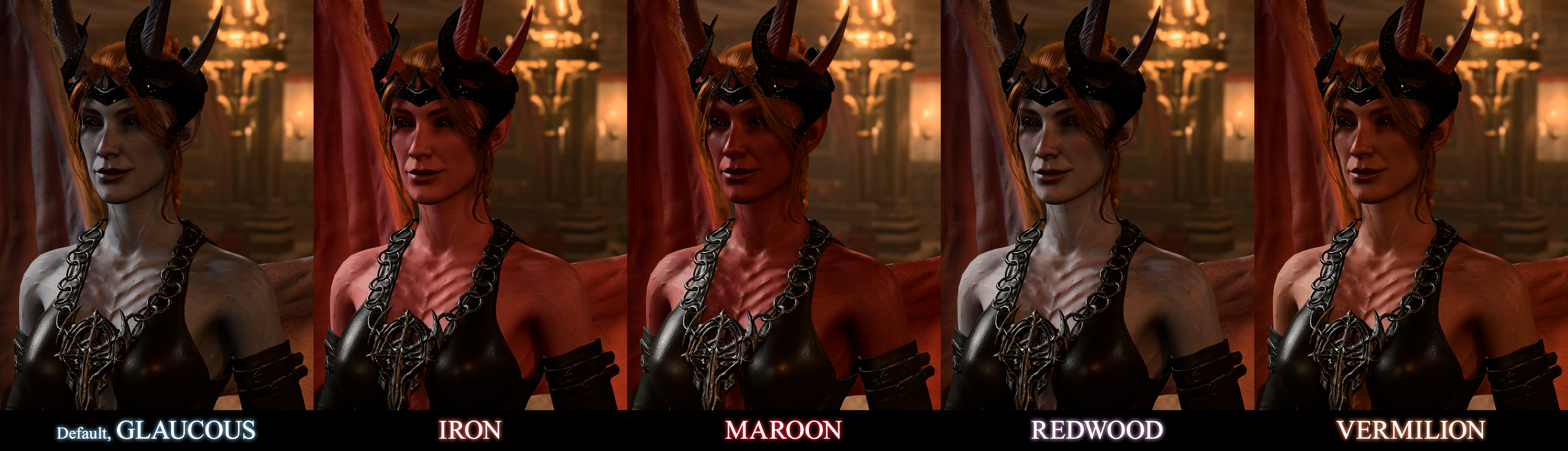
By default, Mizora comes with her unique blue-grey skin. The additional skintones are red-leaning, in line with the Cambion race overhaul:
- ---- ㅤGLAUCOUS — Default — Desaturated grey-blue skin with edited non-skin colours to match new horn roots materials
- ---- ㅤIRON — Bright, red tone
- ---- ㅤMAROON — Deep, red tone
- ---- ㅤREDWOOD — Pale, greyish skin with red hues
- ---- ㅤVERMILION — Red tone leaning warm orange
● Hair Style⤴
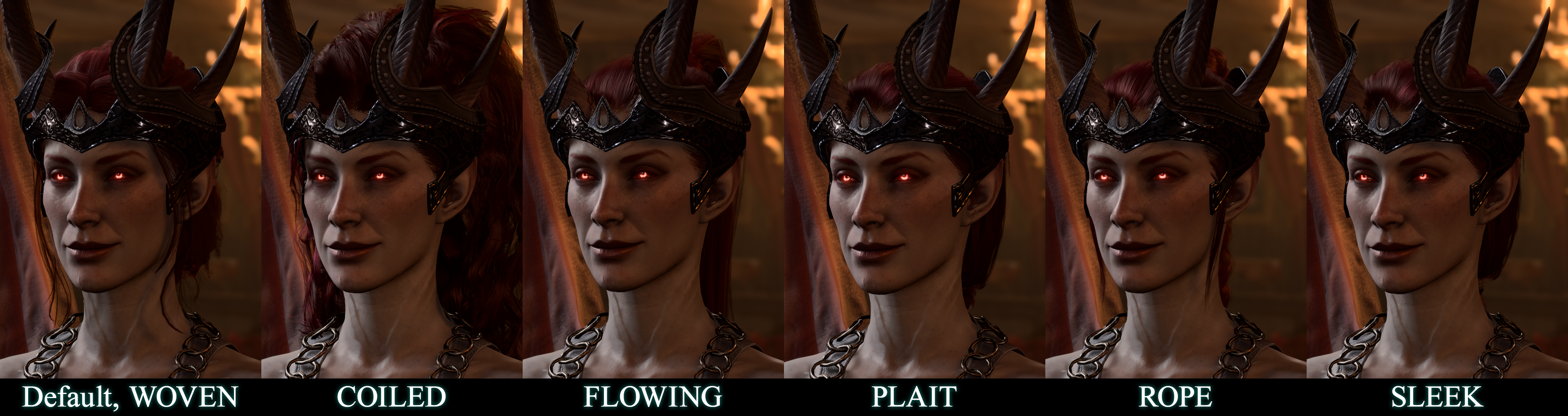
By default, RR Mizora has unique fitted hair that does not clip with her headwear or ears. But here are some more options:
- WOVEN — Default — Low bun updo with braids
- COILED — High ponytail with long, wavy-curly, voluminous hair
- FLOWING — High ponytail with long, straight hair
- PLAIT — Low, long braid
- **** — High, ****-braid
- SLEEP — Low, long ponytail
Why isn't Vanilla Hair the default or a standalone option? Because that hairstyle is shared by Nere, Cazador, Ketheric AND Mizora — it is no longer unique enough to be the sole option.
● Hair Colour⤴
- ---- ㅤRUST — Default — Close edit of her vanilla ginger hair, but with red, desaturated highlights
- ---- ㅤBURGUNDY — Vibrant pinkish-red with black highlights
- ---- ㅤCARDINAL — A more toned-down pinkish-red, less saturated
- ---- ㅤCARMINE — Vibrant, true blood-red
- ---- ㅤJASPER — Light, strawberry-blonde with orange-red highlights
- ---- ㅤPERSIMMON — An update of vanilla orange hair, also matching eyelashes and eyebrows to the hair colour
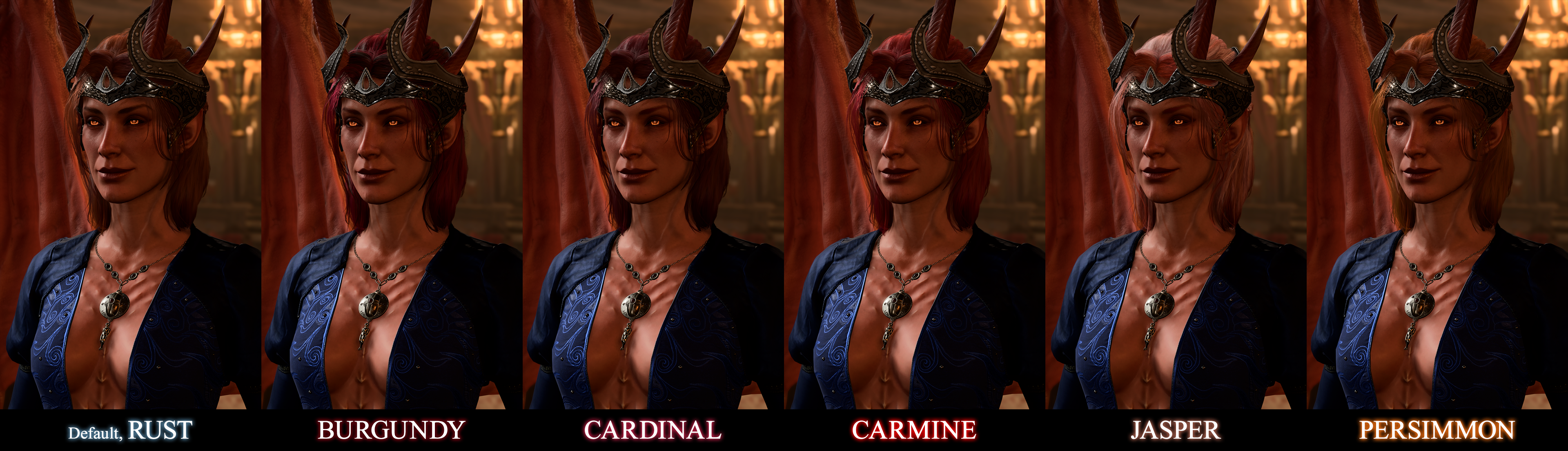
Showcase for Default hairstyle + ADDvanilla
● Bangs⤴
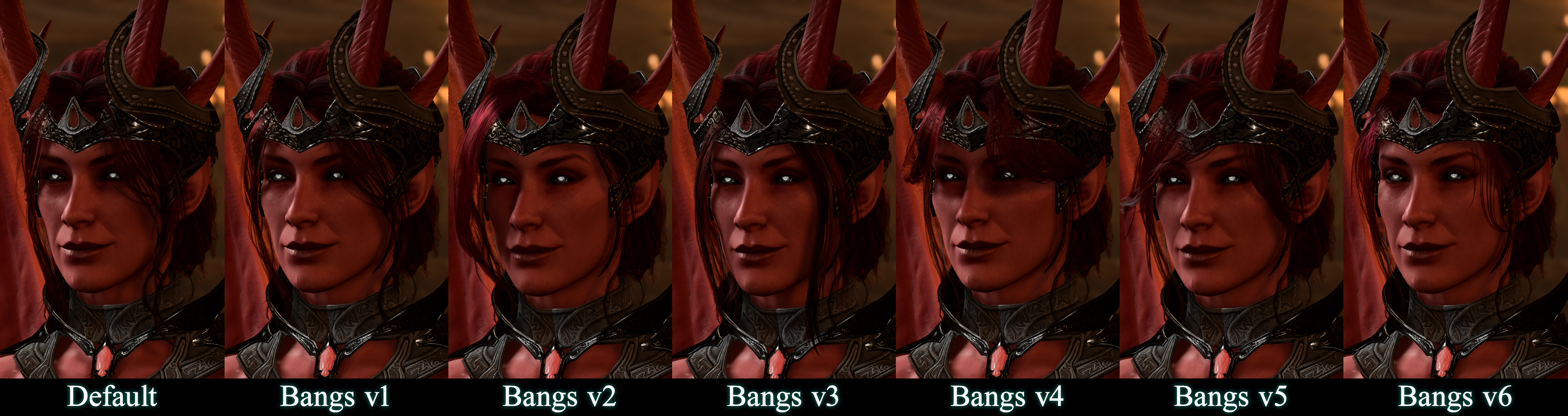
There are 7 variations of equippable bangs including the default set. As well as 2 extra hide-bangs add-ons:
- NoBangs — Removes bangs from Mizora's clothed Cambion form, but keeps them for her naked encounter version where she has no headwear
- NoBangsALL — Removes bangs from both clothed and naked Mizora entries
● Permanent Fringe⤴
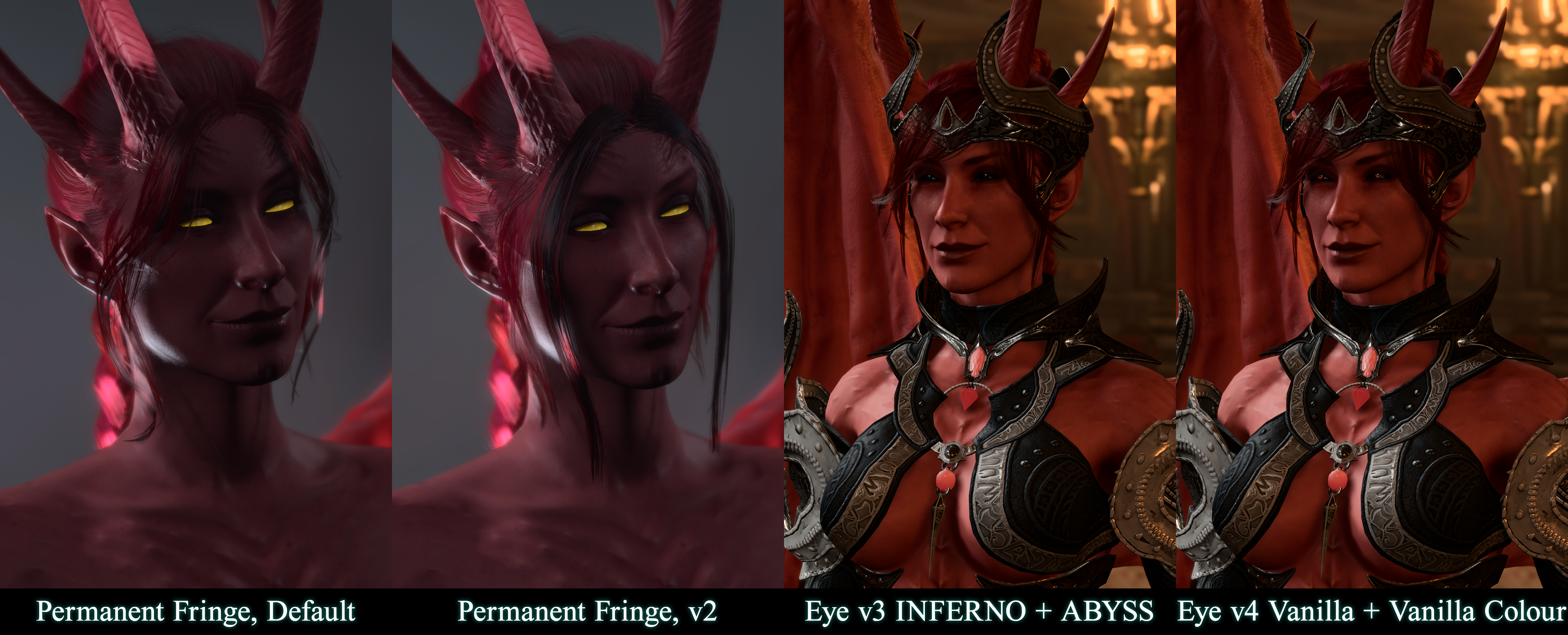
To prevent clipping of hair models with Mizora's horns, her naked character entry has permanent face-framing fringe.
It WILL NOT be removed even in NoBangsALL add-on version, as some forehead-horn-framing is essential.
Currently, we offer only 1 extra option:
- PermanentFringe v2 — straight-hair face-framing strands
● Eye⤴
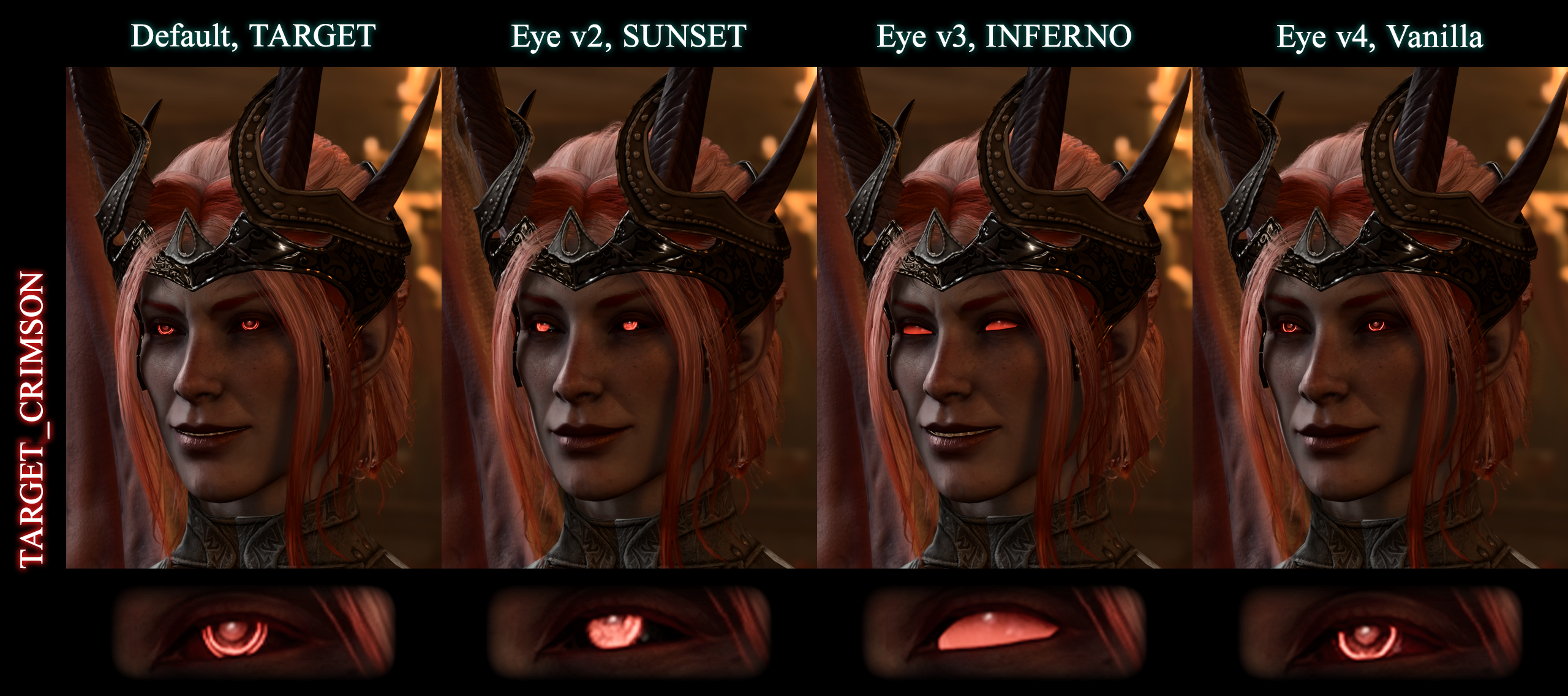
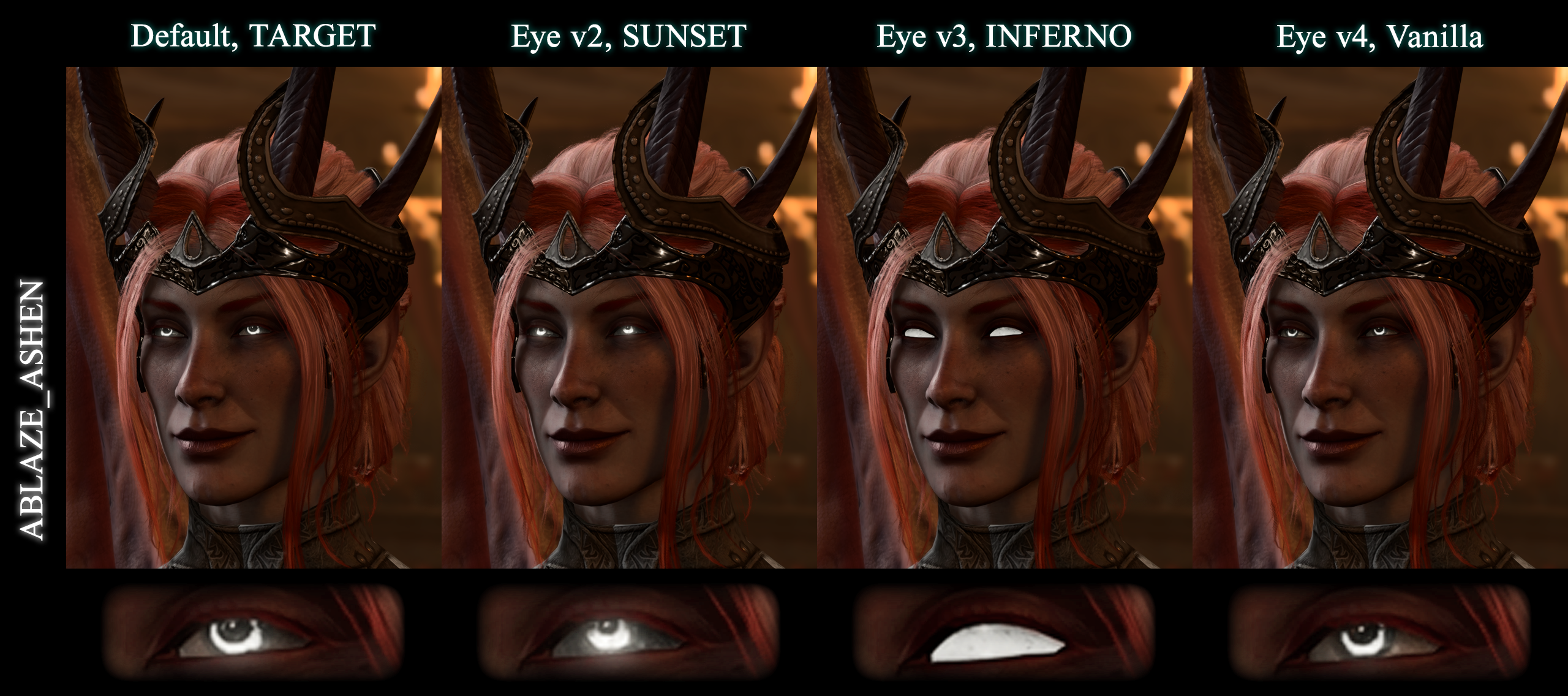
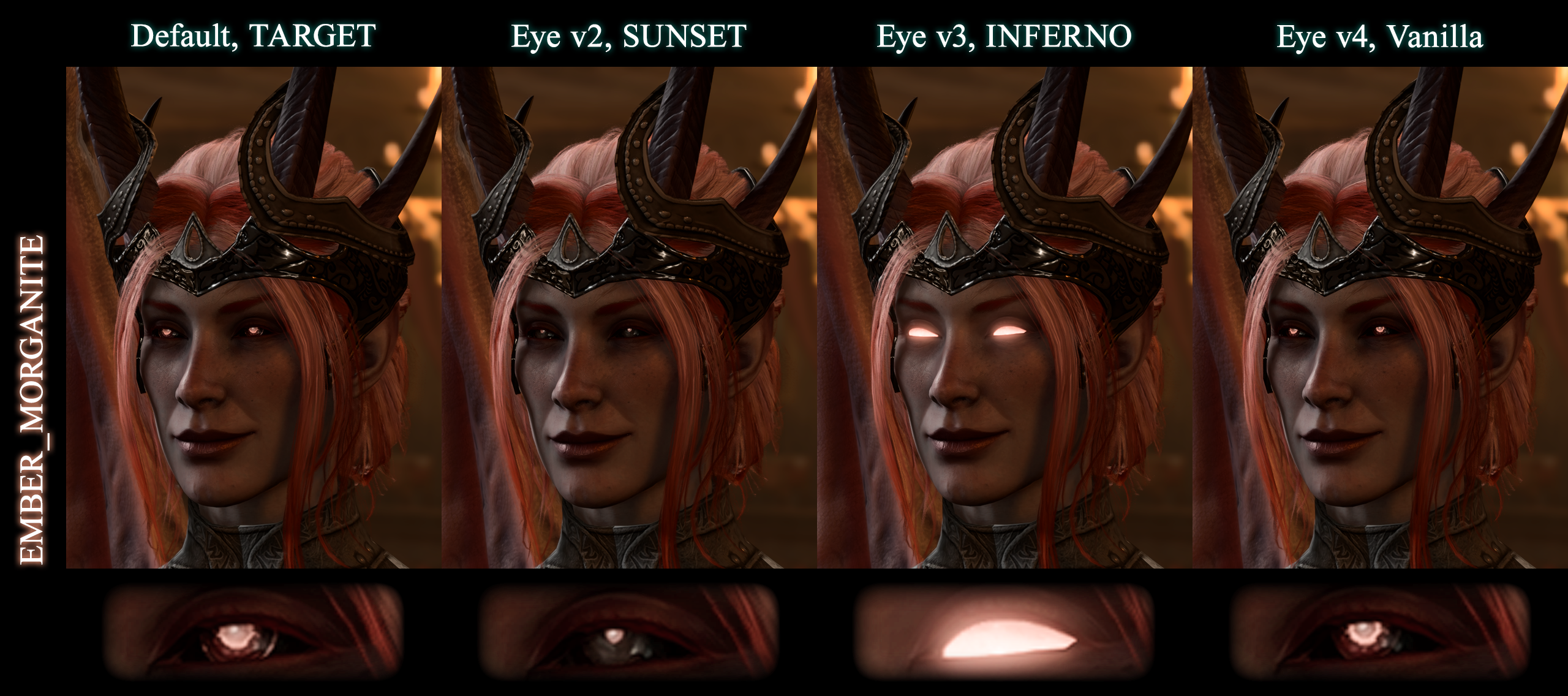
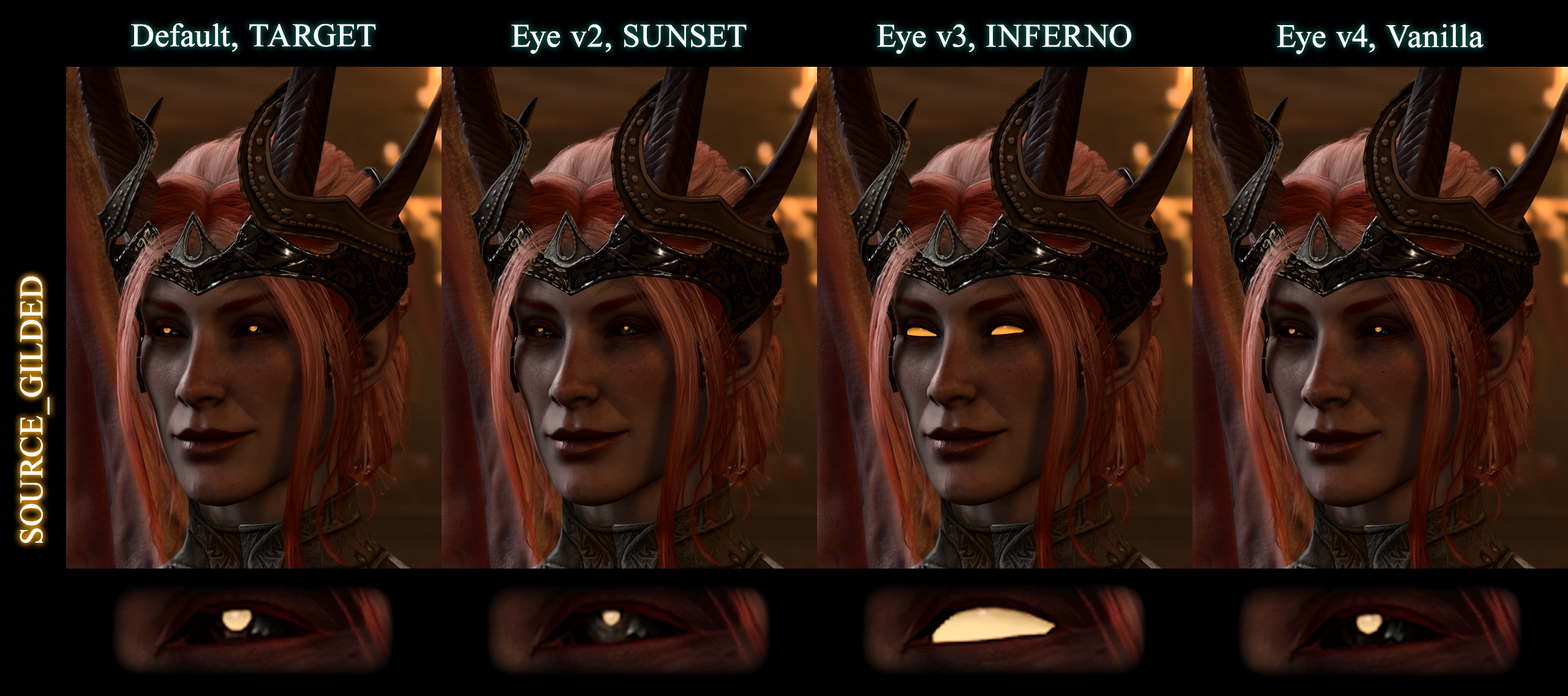
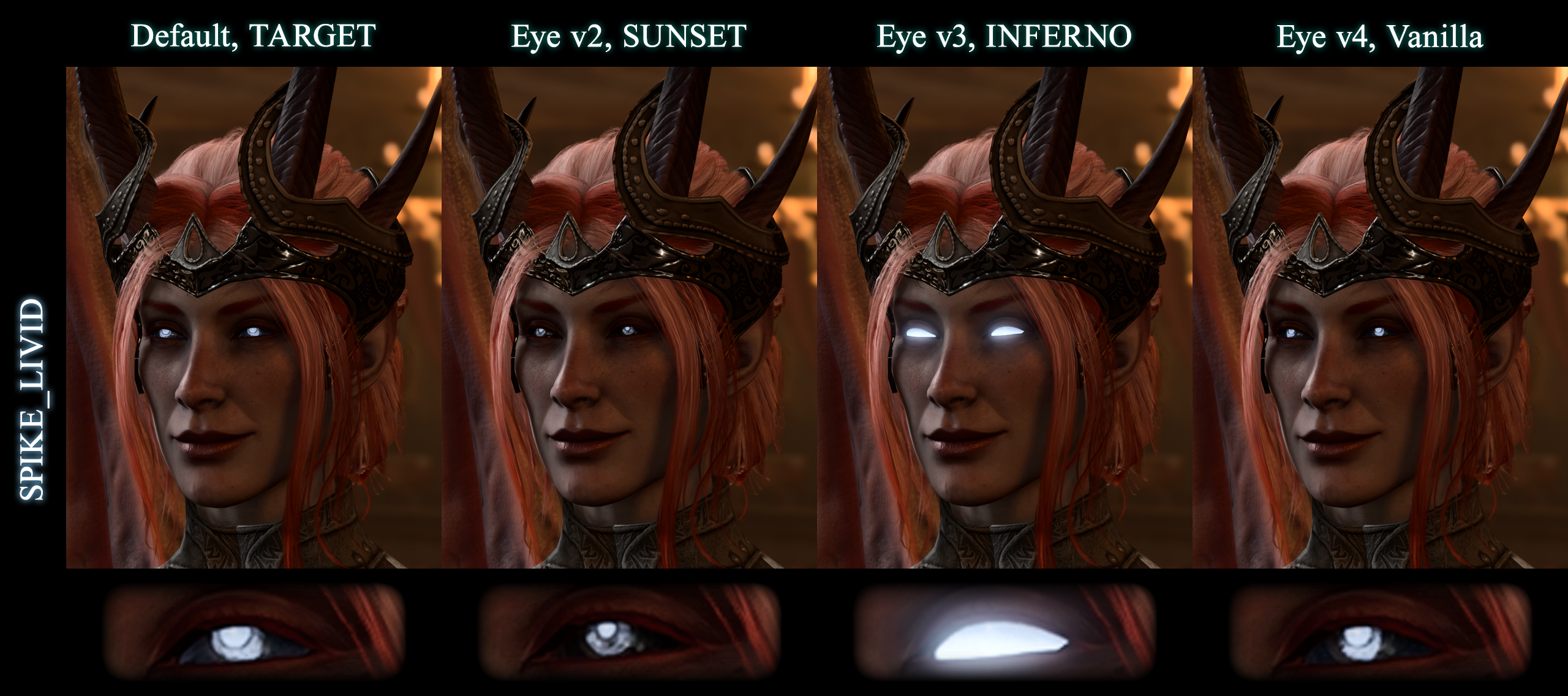
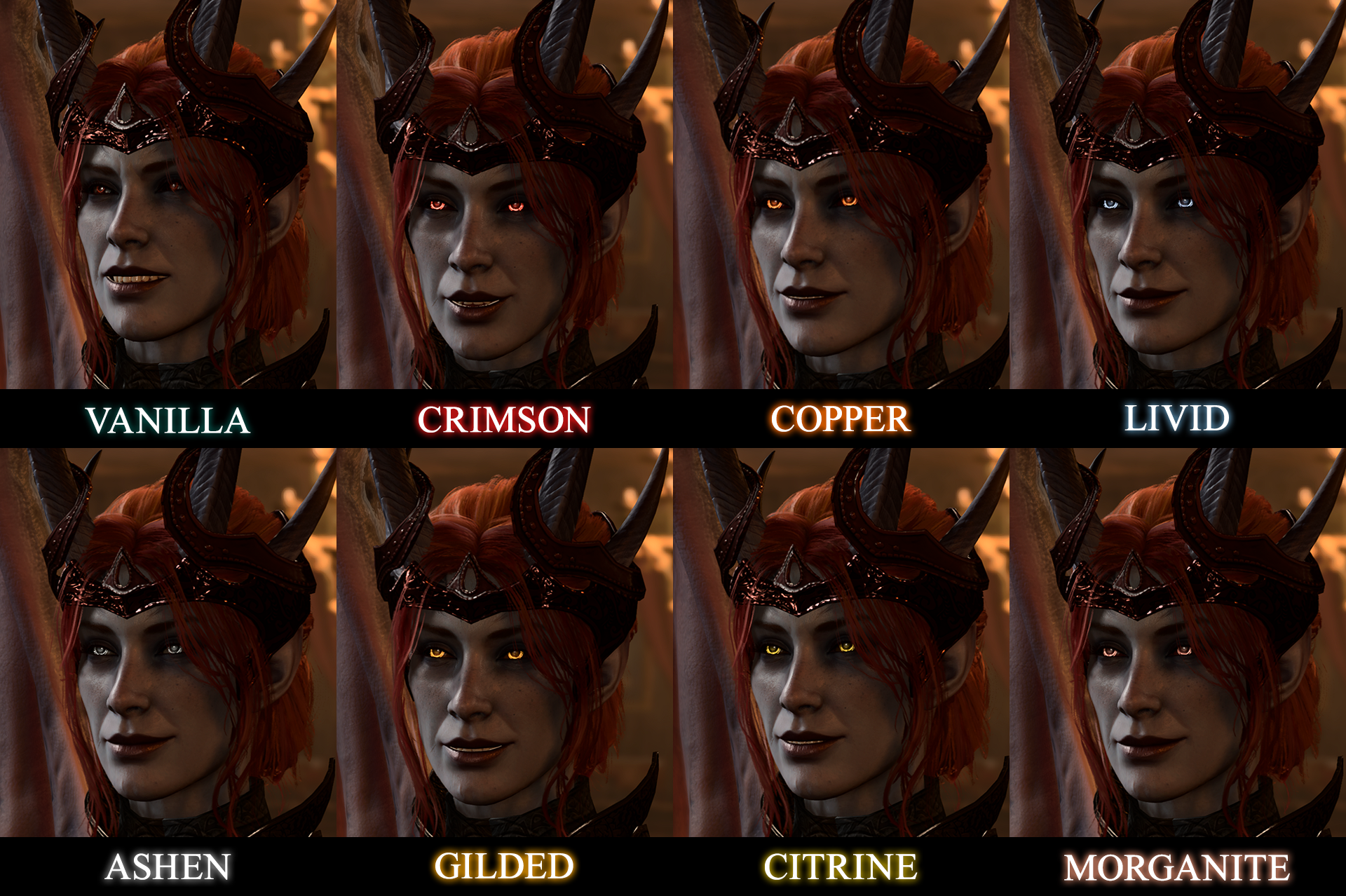
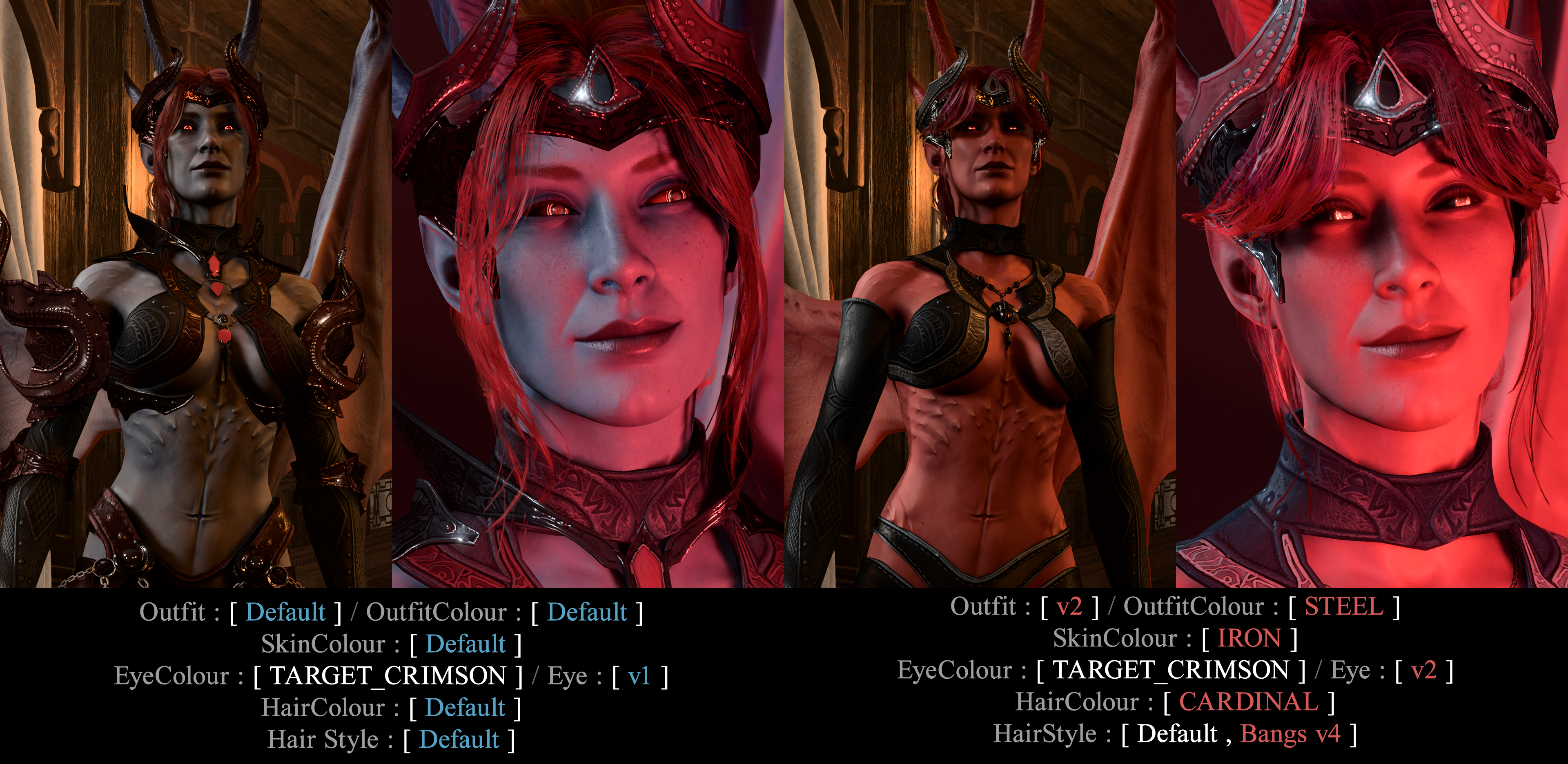
By default, Mizora comes with custom eye materials allowing for an uncanny, perhaps even unsettling look. Additional eyeball / eye glow variations are available — eye colour presets will look different between versions, please refer to screenshots below for a proper visual comparison of all 4 versions.
- v1 TARGET — Default — Pinpoint glow with double circular ring
- v2 SUNSET — Full glow of the iris and pupil
- v3 INFERNO — Full glow of the sclera, iris and pupil all together
- v4 Vanilla — Direct copy of vanilla eye preset, with dull eye glow and normal eyeball presets
● Eye Colour⤴
Depending on the eye preset glow and colour values, there are 5 main eye preset types:
- TARGET — Bright, double-circular iris and pupil glow
- ABLAZE — Bright, high movement flame-like glow and brighter sclera as well
- EMBER — Closest to the default vanilla glow, but slightly brighter
- SOURCE — Pinpoint, pupil-only glow
- SPIKE — Dark sclera, slow flicker of concentrated flame on the pupil
- v1 TARGET and v4 Vanilla are the most similar presets, however;
- v1 will have bigger iris and bigger pupil
- v4 will have default iris and default pupil and is THE ONLY correct preset to use with EyeColour_Vanilla to get fully original Mizora eyes
- v2 SUNSET will have the smallest, pinpoint pupil across all presets
- v2 SUNSET will be the brightest preset when used with ABLAZE and default TARGET presets, but will be the dullest SOURCE, SPIKE & EMBER
- v3 INFERNO will have the most comfortable glow value with presets SOURCE & TARGET, and will have the brightness increasing through presets ABLAZE, EMBER & SPIKE respectfully
All 5 presets come in 7 colour variations:
- ---- ㅤASHEN — Desaturated, pure grey colour
- ---- ㅤCITRINE — Bright yellow, slightly leaning green, cool-toned colour
- ---- ㅤCOPPER — Warm, orange colour
- ---- ㅤCRIMSON — Bright red, neutral-toned colour
- ---- ㅤGILDED — Bright yellow, warm-toned colour
- ---- ㅤLIVID — Desaturated, blue-grey colour
- ---- ㅤMORGANITE — Desaturated, pale pink-toned colour
- ---- ㅤABYSS — Full sclera, pupil and iris in pure black. Best paired with v3 Eye INFERNO
- ---- ㅤVanilla — Duplicate of vanilla Mizora eye colour, eye glow and style. For full vanilla look best paired with v4 Eye Vanilla
🖼️ SCR


🖼️ Variations & Comparison

📥 Downloads
RR Mizora Downloads
Pick the core file first, then layer in the visual add-ons you want.
Pick the core file first, then layer in the visual add-ons you want.
Core
Outfit
Outfit Style
| Files | Version | Type | Description |
|---|---|---|---|
 Outfit v2 Outfit v2 | 1.1 | Add-on | Simpler outfit variant |
| Outfit v3 | 1.0 | Add-on | Blackstar outfit variant |
| Outfit v4 Vanilla | 1.0 | Add-on | Vanilla outfit with updated circlet-crown |
Outfit Colours
| Files | Version | Type | Description |
|---|---|---|---|
| ---- ㅤARGENT | 1.0 | Add-on | Grey and black with silver metals |
| ---- ㅤCHARCOAL | 1.0 | Add-on | Near-black dark grey with dark-silver metals |
| ---- ㅤFURNACE | 1.0 | Add-on | Desaturated brown-red with copper metals |
| ---- ㅤOXBLOOD | 1.0 | Add-on | Deep saturated red with silver metals |
| ---- ㅤSMOKE | 1.0 | Add-on | Pale violet-grey with pale-violet metals |
| ---- ㅤSTEEL | 1.0 | Add-on | Medium grey and light grey with silver metals |
Skin
Skin Colours
| Files | Version | Type | Description |
|---|---|---|---|
| ---- ㅤIRON | 1.0 | Add-on | Bright red skin tone |
| ---- ㅤMAROON | 1.0 | Add-on | Deep red skin tone |
| ---- ㅤREDWOOD | 1.0 | Add-on | Pale greyish skin with red hues |
| ---- ㅤVERMILION | 1.0 | Add-on | Warm orange-red skin tone |
Hair
Hair Styles
| Files | Version | Type | Description |
|---|---|---|---|
| ADD Vanilla | 1.0 | Add-on | Layers classic Mizora hair into the selected style |
| COILED | 1.0 | Add-on | High ponytail with long voluminous curls |
| FLOWING | 1.0 | Add-on | High ponytail with long straight hair |
| PLAIT | 1.0 | Add-on | Low long braid |
| **** | 1.0 | Add-on | High ****-braid |
| SLEEK | 1.0 | Add-on | Sleek low ponytail |
Hair Colours
| Files | Version | Type | Description |
|---|---|---|---|
| ---- ㅤBURGUNDY | 1.0 | Add-on | Vibrant pinkish-red with black highlights |
| ---- ㅤCARDINAL | 1.0 | Add-on | Toned-down pinkish-red |
| ---- ㅤCARMINE | 1.0 | Add-on | True blood-red |
| ---- ㅤJASPER | 1.0 | Add-on | Light strawberry-blonde with orange-red highlights |
| ---- ㅤPERSIMMON | 1.0 | Add-on | Orange hair with matching lashes and brows |
Showcase for Default hairstyle + ADDvanilla
Bangs
Bangs & Fringe
| Files | Version | Type | Description |
|---|---|---|---|
| Bangs v1 | 1.0 | Add-on | Bangs style v1 |
| Bangs v2 | 1.0 | Add-on | Bangs style v2 |
| Bangs v3 | 1.0 | Add-on | Bangs style v3 |
| Bangs v4 | 1.0 | Add-on | Bangs style v4 |
| Bangs v5 | 1.0 | Add-on | Bangs style v5 |
| Bangs v6 | 1.0 | Add-on | Bangs style v6 |
| NoBangs | 1.0 | Add-on | Removes bangs from clothed Cambion Mizora |
| NoBangsALL | 1.0 | Add-on | Removes bangs from clothed and naked Cambion Mizora |
| Permanent Fringe v2 | 1.0 | Add-on | Alternate permanent face-framing fringe |
Eyes
Eye Styles
| Files | Version | Type | Description |
|---|---|---|---|
| Eye v2 SUNSET | 1.0 | Add-on | Full glow of the iris and pupil OR very small pinpoint glow |
| Eye v3 INFERNO | 1.0 | Add-on | Full sclera, iris, and pupil glow |
| Eye v4 Vanilla | 1.0 | Add-on | Vanilla-style eyeball preset |
Eye Colours
ABLAZE
| Files | Version | Type | Description |
|---|---|---|---|
| ---- ㅤABLAZE Ashen | 1.0 | Add-on | Bright flame-like glow in ashen grey |
| ---- ㅤABLAZE Citrine | 1.0 | Add-on | Bright flame-like glow in citrine |
| ---- ㅤABLAZE Copper | 1.0 | Add-on | Bright flame-like glow in copper |
| ---- ㅤABLAZE Crimson | 1.0 | Add-on | Bright flame-like glow in crimson |
| ---- ㅤABLAZE Gilded | 1.0 | Add-on | Bright flame-like glow in gilded gold |
| ---- ㅤABLAZE Livid | 1.0 | Add-on | Bright flame-like glow in livid blue-grey |
| ---- ㅤABLAZE Morganite | 1.0 | Add-on | Bright flame-like glow in morganite |
EMBER
| Files | Version | Type | Description |
|---|---|---|---|
| ---- ㅤEMBER Ashen | 1.0 | Add-on | Slightly brighter than vanilla glow in ashen grey |
| ---- ㅤEMBER Citrine | 1.0 | Add-on | Slightly brighter than vanilla glow in citrine |
| ---- ㅤEMBER Copper | 1.0 | Add-on | Slightly brighter than vanilla glow in copper |
| ---- ㅤEMBER Crimson | 1.0 | Add-on | Slightly brighter than vanilla glow in crimson |
| ---- ㅤEMBER Gilded | 1.0 | Add-on | Slightly brighter than vanilla glow in gilded gold |
| ---- ㅤEMBER Livid | 1.0 | Add-on | Slightly brighter than vanilla glow in livid blue-grey |
| ---- ㅤEMBER Morganite | 1.0 | Add-on | Slightly brighter than vanilla glow in morganite |
SOURCE
| Files | Version | Type | Description |
|---|---|---|---|
| ---- ㅤSOURCE Ashen | 1.0 | Add-on | Pupil-only glow in ashen grey |
| ---- ㅤSOURCE Citrine | 1.0 | Add-on | Pupil-only glow in citrine |
| ---- ㅤSOURCE Copper | 1.0 | Add-on | Pupil-only glow in copper |
| ---- ㅤSOURCE Crimson | 1.0 | Add-on | Pupil-only glow in crimson |
| ---- ㅤSOURCE Gilded | 1.0 | Add-on | Pupil-only glow in gilded gold |
| ---- ㅤSOURCE Livid | 1.0 | Add-on | Pupil-only glow in livid blue-grey |
| ---- ㅤSOURCE Morganite | 1.0 | Add-on | Pupil-only glow in morganite |
SPIKE
| Files | Version | Type | Description |
|---|---|---|---|
| ---- ㅤSPIKE Ashen | 1.0 | Add-on | Dark sclera spike glow in ashen grey |
| ---- ㅤSPIKE Citrine | 1.0 | Add-on | Dark sclera spike glow in citrine |
| ---- ㅤSPIKE Copper | 1.0 | Add-on | Dark sclera spike glow in copper |
| ---- ㅤSPIKE Crimson | 1.0 | Add-on | Dark sclera spike glow in crimson |
| ---- ㅤSPIKE Gilded | 1.0 | Add-on | Dark sclera spike glow in gilded gold |
| ---- ㅤSPIKE Livid | 1.0 | Add-on | Dark sclera spike glow in livid blue-grey |
| ---- ㅤSPIKE Morganite | 1.0 | Add-on | Dark sclera spike glow in morganite |
TARGET
| Files | Version | Type | Description |
|---|---|---|---|
| ---- ㅤTARGET Ashen | 1.0 | Add-on | Target glow in ashen grey |
| ---- ㅤTARGET Citrine | 1.0 | Add-on | Target glow in citrine |
| ---- ㅤTARGET Copper | 1.0 | Add-on | Target glow in copper |
| ---- ㅤTARGET Gilded | 1.0 | Add-on | Target glow in gilded gold |
| ---- ㅤTARGET Livid | 1.0 | Add-on | Target glow in livid blue-grey |
| ---- ㅤTARGET Morganite | 1.0 | Add-on | Target glow in morganite |
Special
| Files | Version | Type | Description |
|---|---|---|---|
| ---- ㅤABYSS | 1.0 | Add-on | Pure black full-eye preset |
| ---- ㅤVanilla | 1.0 | Add-on | Vanilla Mizora eye colour and glow |
Install
INSTALLATION
Index ⤴1. Install Prerequisites
- Install a mod manager for BG3
- Windows/Mac: BG3 Mod Manager
- Linux: Lampray
- Simply drop the zip file onto the right-hand panel of the BG3 Mod Manager.
- Once there, drag the mod to the left-hand panel.
- Go to File > Export Order to Game.
- Go to File > Refresh Mod Updates.
- If upon refresh your mods end up on the right-hand panel, repeat from step 2.
⤴Uninstalling
It IS SAFE to uninstall RR Mizora at any point in your game.
- Go into BG3 Mod Manager.
- Permanently delete all RR Mizora modules you added. NOTE: it is not enough to simply disable the mod, you have to delete it permanently.
Credits
NPC Aesthetics —
 Silver
Technical Work —
 loregamer
Outfits v1-3 & Edited hair model —
 RubyMage
Recommended Mods
- Make Baldur's Gate sane again with Even Better Romance & No Alphabets.
- For a full list, read: HQ's RECOMMENDED MODS
Donate
All proceeds go to funding Elevenlabs and other AI subscriptions until we run out of mods we want to make!
PayPal









 RealmsRestored_Mizora_ALT_Outfit_v4_Vanilla-r2