We have a Steam curator now. You should be following it. https://store.steampowered.com/curator/44994899-RPGHQ/
Chat client updated, if you have issues using chat press CTRL + SHIFT + R to force a hard refresh.

ElevenLabs Batch Voice Changer 1.3 — Modding Tools

Looking for the download?
This mod's files are on ModHQ.
Go to mod page
Share things you've made or found for games here.

Moderator: Mod Janitor

Ignore Topic
User avatar
loregamer
Site Moderator
Posts: 5059
Joined: Dec 3, '23

Geolocation

ElevenLabs Batch Voice Changer 1.3 — Modding Tools

Post by loregamer »

ElevenLabs Batch Voice Changer — Modding Tools
If you are looking for a tool to batch generate voice lines from text, check this:
ElevenLabs Batch Generator — Modding Tools


Overview
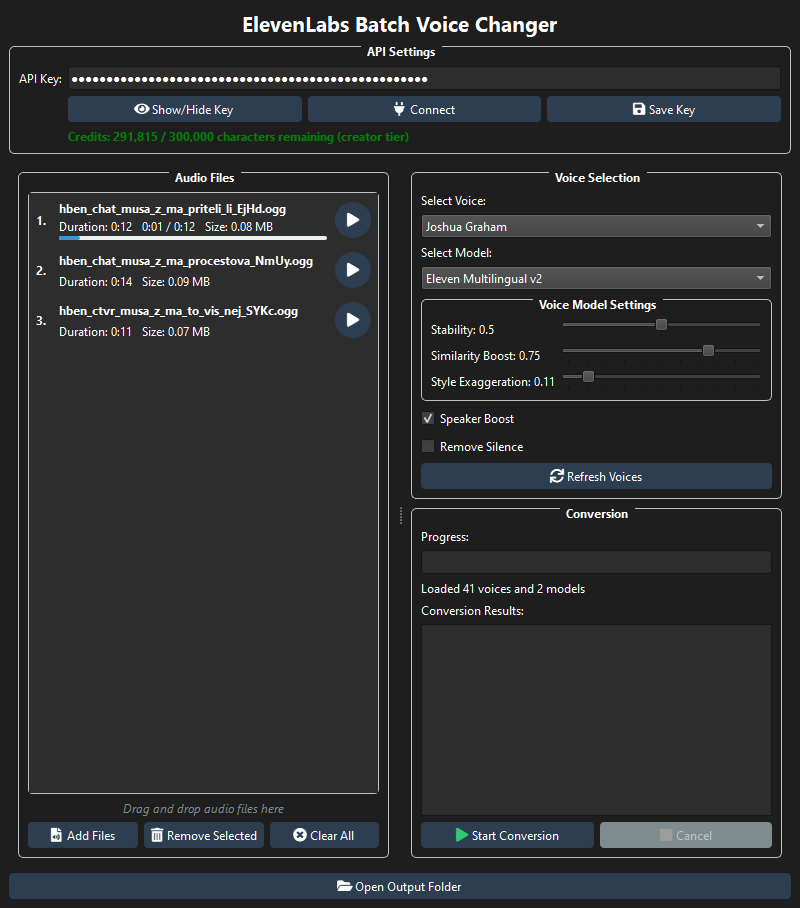
Tool that helps you quickly voice change multiple audio files using ElevenLabs API.
  • Batch process multiple audio files at once
  • Full integration with all ElevenLabs voices and models
  • Adjustable voice parameters (stability, similarity boost, style exaggeration)
  • Built-in audio playback for both source and converted files
  • Real-time credit tracking
Image


Downloads
FilesVersionTypeDescription
📥 ElevenLabs Batch Voice Changer (Windows) 1.3MainExtract and open the .exe file
► Old Versions


Installation Instructions
  1. Download the zip file and extract the exe to your preferred location
    • Password to extract the file is the epic gamer slur (all lowercase)
  2. Launch the application
  3. Enter your ElevenLabs API key (you can get this from your ElevenLabs account settings)
    • Key will be something like this: sk_8d3a71c4520b60d28af76e41c49d12e735c84a0867d5fd23
  4. Click Connect to authenticate and load available voices
  5. Add audio files and select your desired voice settings
  6. Click Start Conversion to begin the batch process


To Do
  • Linux compatibility?
  • Make voice parameters save per model


Reporting Bugs
To report any bugs, please submit a post in the Mod Support section and mention my username.


Source Code (for dev ****)
The GitGud repo can be found here: https://gitgud.io/loregamer/elevenlabs-batch-tool
Last edited by loregamer on October 3rd, 2025, 15:13, edited 18 times in total.
Jingle Jangle Jingle
User avatar
loregamer
Site Moderator
Posts: 5059
Joined: Dec 3, '23

Geolocation

Post by loregamer »

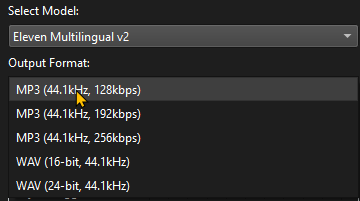
📥v1.1

Added an Audio Format option
Image
Last edited by loregamer on March 1st, 2025, 08:46, edited 1 time in total.
Jingle Jangle Jingle
User avatar
rusty_shackleford
Site Admin
Posts: 45443
Joined: Feb 2, '23
Gender: Watermelon

Geolocation

Adventurer's Guild

Post by rusty_shackleford »

loregamer wrote: March 1st, 2025, 08:46
📥v1.1

Added an Audio Format option
Image
where is the flac option for audiophiles
Thank you for your attention to this matter!
Steam friend code: 40552640 https://steamcommunity.com/friends/add | email: [email protected]
Having trouble running an old Windows game?
Rusty's Stuff Collection
User avatar
loregamer
Site Moderator
Posts: 5059
Joined: Dec 3, '23

Geolocation

Post by loregamer »

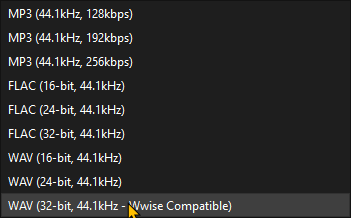
📥v1.2

Image
  • Added .wav output format that will work with wwise
  • Added .flac output format or autistphiles
  • Your last selected voice saved when re-opening
  • Voice Model settings will be saved per voice

Jingle Jangle Jingle
User avatar
traxtan
Posts: 796
Joined: Jan 1, '25

Geolocation

Post by traxtan »

Can't see the voice model settings, 1080p laptop monitor with 125% dpi scaling in Windows. Works if I put it back to 100%

125%
Screenshot 2025-03-02 014753.png
100%
Screenshot 2025-03-02 015017.png
You do not have the required permissions to view the files attached to this post.
User avatar
loregamer
Site Moderator
Posts: 5059
Joined: Dec 3, '23

Geolocation

Post by loregamer »

traxtan wrote: March 1st, 2025, 22:54
Can't see the voice model settings, 1080p laptop monitor with 125% dpi scaling in Windows. Works if I put it back to 100%

125%
Image

100%
Image
Can you try this exe?
https://f.rpghq.org/JMTAcp1cdsjI.zip?n= ... v1.2.1.zip

Can't tell if I made the exe open slower or if it's because I have a Wabbajack install going

EDIT: Wait I'm ******** I can just set my resolution to the same as you
Last edited by loregamer on March 2nd, 2025, 00:07, edited 2 times in total.
Jingle Jangle Jingle
User avatar
A Chinese opium den
Posts: 3025
Joined: Dec 6, '23

Geolocation

Post by A Chinese opium den »

User avatar
loregamer
Site Moderator
Posts: 5059
Joined: Dec 3, '23

Geolocation

Post by loregamer »

📥v1.2.1

Fixed this
traxtan wrote: March 1st, 2025, 22:54
Can't see the voice model settings, 1080p laptop monitor with 125% dpi scaling in Windows. Works if I put it back to 100%

Jingle Jangle Jingle
User avatar
loregamer
Site Moderator
Posts: 5059
Joined: Dec 3, '23

Geolocation

Post by loregamer »

Apparently these are missing advanced features we can access from using the API instead of through their site. If you guys need any of of these, lemme know
  • Voice Conversion Enhancements
    • Voice Seed Parameter: Add support for the seed parameter to enable deterministic voice generation for consistent results when converting the same audio multiple times.
    • Voice Isolation Pre-processing: Implement the ElevenLabs Audio Isolation API as a pre-processing step to clean up input audio before voice conversion.
    • Clarity Boost: Add support for the clarity boost parameter available in newer ElevenLabs models.
    • Chunking for Large Files: Implement chunking to process longer audio files in segments, improving reliability and potentially reducing processing time.
    • Pronunciation Guide: Add support for pronunciation dictionaries to improve specific word pronunciations.
  • Voice Creation and Management
    • Voice Generation from Description: Add the ability to generate custom voices from text descriptions using the Voice Generation API.
    • Voice Cloning from Samples: Allow users to create custom voices by uploading voice samples.
    • Voice Library Management: Add functionality to save, categorize, and manage favorite voices.
  • Advanced Processing
    • Timestamps and Word-level Control: Implement support for generating timestamps for each word, enabling more precise audio editing.
    • Streaming Processing: Add streaming support for real-time processing of audio files.
    • Language Detection and Translation: Automatically detect the source language and offer translation options.
    • Batch Processing Optimization: Implement parallel processing for multiple files to speed up batch conversions.
  • User Experience
    • Audio Preview: Add the ability to preview how a voice will sound before processing the entire file.
    • Advanced Output Settings: Provide more control over output audio quality, format, and compression.
    • Preset Management: Allow saving and loading of voice conversion presets.
    • Progress Estimation: Implement more accurate progress and time remaining estimates.
Last edited by loregamer on March 2nd, 2025, 00:12, edited 1 time in total.
Jingle Jangle Jingle
User avatar
traxtan
Posts: 796
Joined: Jan 1, '25

Geolocation

Post by traxtan »

I tried installing it via github and I think you broke it.
I tried anaconda with py 3.8 env and my normal 3.12 python install (yes I tried reinstalling the libraries), both didn't work.
Screenshot 2025-03-02 031652.png
So is it a problem on my end or what?
You do not have the required permissions to view the files attached to this post.
Last edited by traxtan on March 2nd, 2025, 00:43, edited 2 times in total.
User avatar
loregamer
Site Moderator
Posts: 5059
Joined: Dec 3, '23

Geolocation

Post by loregamer »

traxtan wrote: March 2nd, 2025, 00:20
Password doesn't work anymore, also I tried installing it via github and I think you broke it.
I tried anaconda with py 3.8 env and my normal 3.12 python install (yes I tried reinstalling the libraries), both didn't work.
Image
So is it a problem on my end or what?
Edit: To clarify the password "epic gamer slur" does not work on v1.2.1, I tried 7zip and winrar.
The zip password? I just redownloaded and works for me

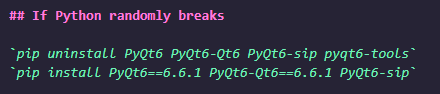
In terms of PyQt6, I had to do this to get it working. Can copypasta it from the github readme
Image
Jingle Jangle Jingle
User avatar
traxtan
Posts: 796
Joined: Jan 1, '25

Geolocation

Post by traxtan »

loregamer wrote: March 2nd, 2025, 00:25
In terms of PyQt6, I had to do this to get it working. Can copypasta it from the github readme
Image
The copypasta uninstalls pyqt6-tools but does not reinstall it (tried reinstalling but still didn't work), anyway I already told you I tried it but for good measure I tried it again and it still doesn't work :headbang: seems like it werks on your machine but not mine which is fine.
Last edited by traxtan on March 2nd, 2025, 00:39, edited 1 time in total.
User avatar
loregamer
Site Moderator
Posts: 5059
Joined: Dec 3, '23

Geolocation

Post by loregamer »

Check PMs @traxtan
Jingle Jangle Jingle
User avatar
loregamer
Site Moderator
Posts: 5059
Joined: Dec 3, '23

Geolocation

Post by loregamer »

📥v1.3

Fixed freezing issues when clearing all or adding files
Last edited by loregamer on October 3rd, 2025, 15:13, edited 2 times in total.
Jingle Jangle Jingle
User avatar
loregamer
Site Moderator
Posts: 5059
Joined: Dec 3, '23

Geolocation

Post by loregamer »

You ****** should yell at me to fix bugs more often. That was horrible
Jingle Jangle Jingle
User avatar
Vergil
Posts: 15670
Joined: Sep 6, '23

Geolocation

Post by Vergil »

To make sure I understand this correctly, you upload all of the audio files you want to convert, select the voice you're trying to use, and then it spits out those files but with the voiceover you want?
I'm just stating the facts.
Question is are you going to gargle the truth or swallow?
User avatar
loregamer
Site Moderator
Posts: 5059
Joined: Dec 3, '23

Geolocation

Post by loregamer »

Yeah it's a nice 1:1 "change these voice lines into sounding like someone else" tool. Not just text to speech

I'm working on an update to use all the ElevenLabs features so you don't even need to go to the website, but I guess that will be a separate tool @Vergil
Jingle Jangle Jingle
User avatar
loregamer
Site Moderator
Posts: 5059
Joined: Dec 3, '23

Geolocation

Post by loregamer »

I would also highly suggest using my BG3 Dialogue Finder tool if this is for BG3
Jingle Jangle Jingle
User avatar
loregamer
Site Moderator
Posts: 5059
Joined: Dec 3, '23

Geolocation

Post by loregamer »

Moved the repo to GitGud and added the +****** license
https://gitgud.io/loregamer/elevenlabs-batch-tool
Jingle Jangle Jingle
User avatar
AuctorLucan
Posts: 4
Joined: Sep 24, '25

Geolocation

Post by AuctorLucan »

Hmm... It seems to me the Speaker Boost toggle isn't working? At least when I disable it in the tool, it still generates with Speaker Boost when looking at the log at the site.

The result is also clearly with Speaker Boost.
Last edited by AuctorLucan on February 23rd, 2026, 16:28, edited 1 time in total.
User avatar
loregamer
Site Moderator
Posts: 5059
Joined: Dec 3, '23

Geolocation

Post by loregamer »

AuctorLucan wrote: February 23rd, 2026, 16:27
Hmm... It seems to me the Speaker Boost toggle isn't working? At least when I disable it in the tool, it still generates with Speaker Boost when looking at the log at the site.

The result is also clearly with Speaker Boost.
Been a while since I worked on this, will add to my list. Git repo is up incase anyone wants to put up a PR
Last edited by loregamer on February 23rd, 2026, 16:30, edited 1 time in total.

Jingle Jangle Jingle
User avatar
AuctorLucan
Posts: 4
Joined: Sep 24, '25

Geolocation

Post by AuctorLucan »

Thanks in advance! It would be super if this could be fixed since Speaker Boost just cause clipping and artefacts when ElevenLabs apply it.