
We have a Steam curator now. You should be following it. https://store.steampowered.com/curator/44994899-RPGHQ/

Sample Cheat Arrows 1.0 — Helldivers 2
This mod has been delisted and is no longer included in public listings.
Reason: Outdated, superseded by super credit cheat arrows mod
Looking for the download?
This mod's files are on ModHQ.
Go to mod page
Moderator: Mod Janitor
-
babaziker

- Posts: 2
- Joined: Jul 13, '25
-
Geolocation

-
leoleahy
- Posts: 34
- Joined: Jul 15, '25
-
Geolocation
no surprise, today's update seems to have killed the mod again. until i have time to get the hang of it, would you mind updating it once more mr @Saren ?Saren wrote: ↑ August 16th, 2025, 12:12@leoleahy I just realized the mod can be updated pretty easily like this:loregamer wrote: ↑ May 18th, 2025, 03:14Updating Outdated Model Mods
Prerequisites
Blender 4.0 and the Helldivers 2 addon, HD2SDK-CommunityEdition
Steps
- Extract the outdated mod files anywhere
- It will have three files typically, like this
- Open Blender
- Make sure you have downloaded Blender version 4.0 and the HD2SDK-CommunityEdition addon
- Click N, then select Modding
ㅤ- If you haven't already, set your game folder in settings
ㅤ- Select the ★ icon (this loads the base archives)
ㅤ- If the mod replaces a specific armor, select Search Found Archives, search for it, click the +, then OK
ㅤ- Click the Browse icon next to Patch
ㅤ- Select the extracted mod's .patch file
ㅤ- Shift select all the meshes that have a shield icon, right click, and select Import Meshes
ㅤ- Click all the checked shield icons, like this:
ㅤ- In the top left of Blender, click Select > All
ㅤ- Click the arrow under the mesh section, right click, and select Save Meshes
ㅤ- Switch archives, and repeat (Select > Click the arrow under the mesh section, right click, and select Save Meshes)
ㅤ- Click Write Patch
ㅤ- Click Export Patch
ㅤ- Save the zip file wherever you want
NOTE: I may be missing a step since I can't seem to fix this for the NCR Ranger mod. Will update the post when I figure it out


-
Saren

- Posts: 42
- Joined: May 13, '25
-
Geolocation
Lazily updated, probably got stuff wrong
 CHEAT ARROWS - Regular Samples - v0.3
CHEAT ARROWS - Rare Samples - v0.3
CHEAT ARROWS - Medals and Artifacts - v0.3
 CHEAT ARROWS - Regular Samples - v0.3 CHEAT ARROWS - Rare Samples - v0.3 CHEAT ARROWS - Medals and Artifacts - v0.3
Last edited by Saren on August 26th, 2025, 16:04, edited 2 times in total.
-
leoleahy
- Posts: 34
- Joined: Jul 15, '25
-
Geolocation
Thank you! I will test the medals and the rare samples and i'll get back to yaSaren wrote: ↑ August 26th, 2025, 15:59Lazily updated, probably got stuff wrong
-
leoleahy
- Posts: 34
- Joined: Jul 15, '25
-
Geolocation
Tested and it's working with Medals, Requisition Slips and Rare Samples. I did not test common samples and Super Samples.Saren wrote: ↑ August 26th, 2025, 15:59Lazily updated, probably got stuff wrong
You do not have the required permissions to view the files attached to this post.
-
Saren
- Posts: 42
- Joined: May 13, '25
-
Geolocation
Did I get the colors right? I tried color coordinating their rarity this time. Though it's still by ingame model, so generic case models will always show a green arrowleoleahy wrote: ↑ August 26th, 2025, 16:32Tested and it's working with Medals, Requisition Slips and Rare Samples. I did not test common samples and Super Samples.Saren wrote: ↑ August 26th, 2025, 15:59Lazily updated, probably got stuff wrong

-
Saren
- Posts: 42
- Joined: May 13, '25
-
Geolocation
-
leoleahy
- Posts: 34
- Joined: Jul 15, '25
-
Geolocation
Saren wrote: ↑ August 26th, 2025, 16:58Did I get the colors right? I tried color coordinating their rarity this time. Though it's still by ingame model, so generic case models will always show a green arrowleoleahy wrote: ↑ August 26th, 2025, 16:32Tested and it's working with Medals, Requisition Slips and Rare Samples. I did not test common samples and Super Samples.Saren wrote: ↑ August 26th, 2025, 15:59Lazily updated, probably got stuff wrong
Rare samples are green, requisition slips are some sort of blue, medals are purple. this works for me as is lol.
As for the rendering, this is a lot of messing around with that config file but this tanks my FPS to under half or sometimes worse. Right there this was 30fps. I only use it like this when I'm actively farming. When I am playing regular missions i get it back to normal so it only shows up when i'm a lot closer. and also, the flicker is unavoidable, it seems. Smaller lvl 1 and 2 maps are tolerable though, i get close to 60fps most of the time with some random stutters.
I use lod_selection_multiplier = 69.8
view_distance = "ultra"
occlusion_culling_depth_buffer_size_type = 3
idk how much of it actually makes a difference, but this was the best I got after a lot of trial and error.
Here is the whole thing if anyone is interested
audio_device = 3
audio_volume = 1
maximized_window = false
voice_chat_volume = 1
framerate_limit_enabled = false
fullscreen = false
music_volume = 0.29752066731452942
dialogue_volume = 1
aspect_ratio = -1
sfx_volume = 0.52892565727233887
borderless_fullscreen = true
hostability = "0001257b00016b930000000100000000d18ffa8d"
prev_audio_device = 0
adapter_index = 0
enable_resource_lock_debug = true
version = 15
render_backend = 0
prefer_hdr = false
render_settings = {
light_falloff_end_target_bias = 0.5
post_effects_enabled = true
cubemap_lod_object_multiplier = 4
gbuffer_subsurface_visualization = false
motion_blur_enabled = false
shadows = 2
terrain_quality = 2
terrain_trample_enabled = true
gbuffer_iridescence_visualization = false
gbuffer_heightmap_ao_visualization = false
forward_local_lights_cast_shadows = true
sun_lens_flare_mask_visualization = false
gbuffer_specular_color_visualization = false
cubemap_high_altitude_clouds_resolution = [
64
64
]
gbuffer_ambient_diffuse_visualization = false
debug_rendering = false
taa_no_history_visualization = false
ssr_enabled = false
renderer = {
}
object_lod_quality = 2
static_slice_half_size = 1024
gbuffer_specular_visualization = false
debug_lod = false
gbuffer_roughness_visualization = false
tweak_camo_customization = false
gbuffer_ssao_visualization = false
sun_shadow_map_visualization = false
particles_cast_shadows = false
speedtree_grass_shadow_lod_multiplier = 1
volumetric_clouds_quality = 0
shadow_atlas_visualization = false
gbuffer_reconstructed_normal_visualization = false
ambient_only_visualization = 0
gbuffer_albedo_verification_visualization = false
tweak_pattern_customization = false
shadow_mask_visualization = false
last_grass_shadow_slice = 1
cubemap_volumetric_clouds_resolution = [
32
32
]
debug_shadow_lod = false
cs_cluster_max_depth_override = 0
taa_enabled = true
debug_forced_lod = 0
static_slice_constribution_cull_scale = 0.25
taa_stable_depth_visualization = false
min_object_contribution_scale_cubemap = 4
sun_shadows = true
sun_flare_enabled = true
hdr_enabled = false
survey_url = "legal forced me to remove the placeholder"
light_count_heatmap_visualization = false
mirror_screen = 0
bloom_visualization = false
light_cull_distance_multiplier = 35
dof_enabled = false
auto_exposure_visualization = false
imp_transparent_override = 0
sun_shadow_map_filter_quality = "medium"
baker_filter_lightmap = true
texture_density_visualization = 0
particles_local_lighting = true
min_object_size_generation = 1
far_fog_enabled = false
object_ids_visualization = false
ui_brightness = 336.35858154296875
min_object_size_shadow = 0.050000000745058101
depth_capture_enabled = false
scatter_distance_multiplier = 1
bloom_enabled = false
deferred_local_lights_cast_shadows = true
last_slice_subdivisions = 2
gbuffer_lighting_only_visualization = false
imp_tile_size = 32
high_altitude_clouds_enabled = false
static_slice_min_object_size = 0.009999999776482589
enable_gpu_crash_debug = true
shadow_cascade_visualization = false
taa_hdr0_clamp_visualization = false
color_blindness_simulation = 0
use_static_last_slice = false
local_lights_shadow_atlas_size = [
1024
1024
]
checkerboarding_enabled = false
scatter_density = 2
view_distance = "ultra"
ssr_mask_visualization = false
wind_enabled = true
local_lights_shadow_map_filter_quality = "medium"
ui_blur_sigma = 2.5
gbuffer_clearcoat_normal_visualization = false
clear_before_hologram = false
light_falloff_end_target = 75
cubemap_resolution = [
128
128
]
taa_ao_lerp_visualization = false
baker_full_visualization = false
max_num_shadow_casters = 2
fsr_enabled = true
reflection_quality = 1
baker_materials_visualization = false
space_probe_rendering = false
local_lights = true
gbuffer_wetness_visualization = false
gbuffer_sun_shadow_visualization = false
terrain_blending_enabled = true
lighting_and_material_quality = 3
ssgi_enabled = 1
gbuffer_ssgi_mask_visualization = false
debug_baker = false
dof_visualization = false
min_object_contribution_scale = 1
gbuffer_normal_visualization = false
screen_brightness = 1.2800006866455078
debug_forced_shadow_lod = 0
gbuffer_ssr_visualization = false
particle_quality = 3
min_object_size_cubemap = 3
taa_hdr0_lerp_visualization = false
gbuffer_specular_dielectric_visualization = false
particles_tessellation = true
color_grading_enabled = true
taa_hdr0_jitter_visualization = false
render_resolution = [
2880
1620
]
use_new_lod_selection = true
lod_selection_multiplier = 69.8
heathaze_enabled = true
occlusion_culling_depth_buffer_size_type = 3
gbuffer_ssgi_visualization = false
overdraw_visualization = false
sun_shadow_map_size = [
1024
1024
]
debug_taa = false
use_imp = true
gbuffer_clearcoat_roughness_visualization = false
cubemap_mip_levels = 5
gbuffer_velocity_visualization = false
debug_space_rs = false
terminal_canvas_resolution = [
960
1080
]
circular_dof = false
ssao_enabled = 1
allow_async_compute = false
gbuffer_ao_visualization = false
min_object_contribution_scale_generation = 2
particles_receive_shadows = true
fxaa_enabled = false
gbuffer_metallic_visualization = false
space_quality = 0
volumetric_fog_quality = 2
speedtree_shadow_lod_multiplier = 2
lens_quality_enabled = true
debug_deformation_prevention = false
gbuffer_albedo_visualization = false
gbuffer_fuzz_visualization = false
gbuffer_subsurface_color_visualization = false
gbuffer_clearcoat_visualization = false
gbuffer_sun_subsurface_shadow_visualization = false
gbuffer_material_ao_visualization = false
imp_material_count_visualization = false
atmospheric_lookup_visualization = false
selection_enabled = true
state_game = true
motion_blur_amount_multiplier = 0
sharpening_amount = 0.64999991655349776
sharpening_enabled = true
scatter_bake_face = 0
tweak_material_customization = true
tweak_cape_customization = true
capture_cctv_feed = false
far_scatter_enabled = true
cluster_max_depth_multiplier = 1
light_falloff_end_target_exposure_offset = 1
min_object_ss_size_multiplier = 1
graphics_preset = 4
texture_quality = 3
render_resolution_factor_index = 1
}
initial_setup_completed = true
fullscreen_output = 0
vsync = false
screen_resolution = [
1920
1080
]
tts_volume = 1
midnight_mode = false
vertical_fov = 65
framerate_limit = 120
data_privacy = 1
Last edited by leoleahy on August 26th, 2025, 19:22, edited 2 times in total.
-
AlligatorFren

- Posts: 3
- Joined: Jul 15, '25
-
Geolocation
Is there a way to seperate the medals and req slips? Farming medals sucks when i approach a container and it ends up being req slips
-
Saren
- Posts: 42
- Joined: May 13, '25
-
Geolocation
AlligatorFren wrote: ↑ August 26th, 2025, 22:48Is there a way to seperate the medals and req slips? Farming medals sucks when i approach a container and it ends up being req slips
CHEAT ARROWS - Medals CHEAT ARROWS - Requisition SlipsRequisition Slips are yellow, Medals are pink
-
Saren
- Posts: 42
- Joined: May 13, '25
-
Geolocation
v1 update done, check it out boys
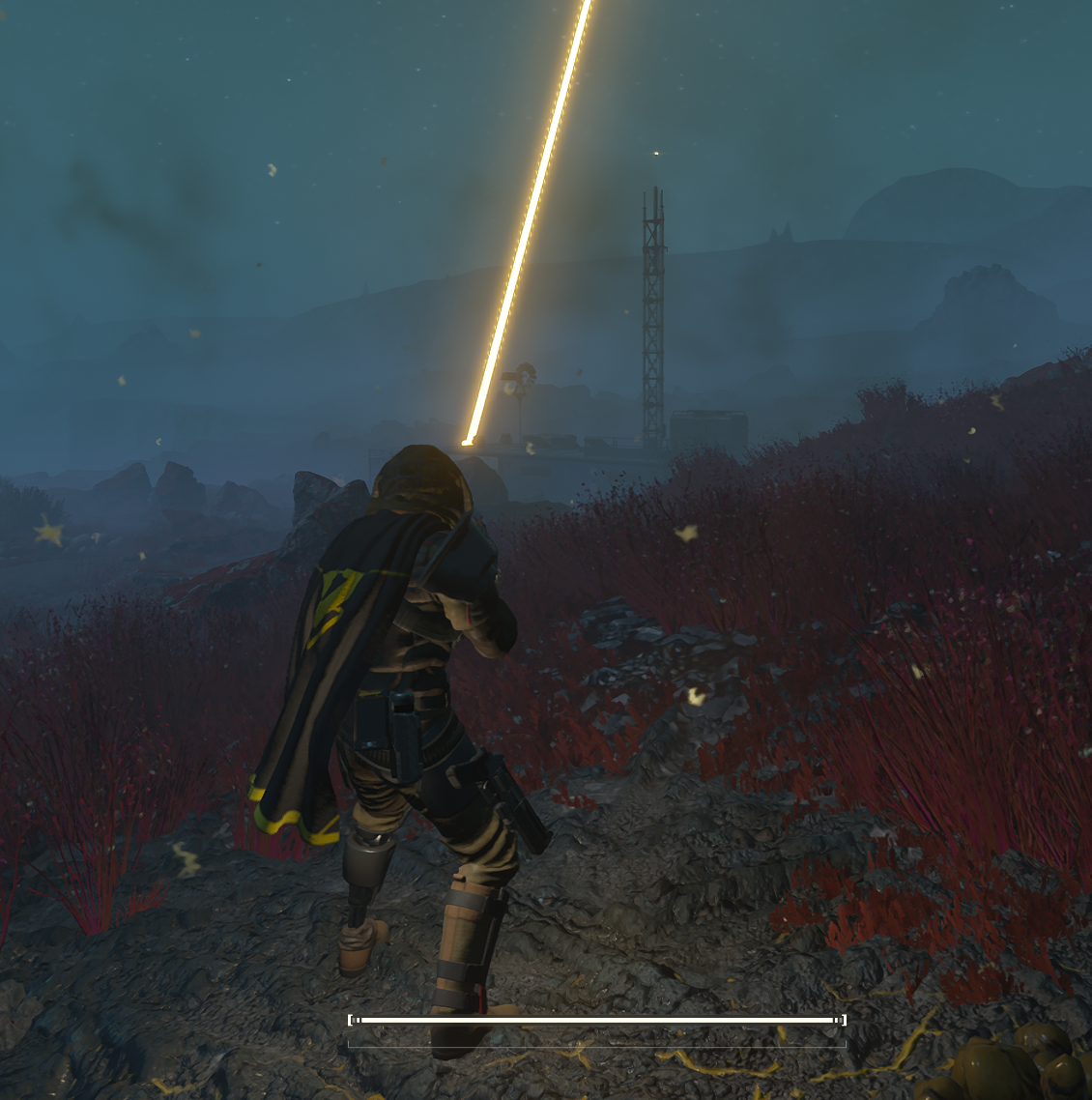
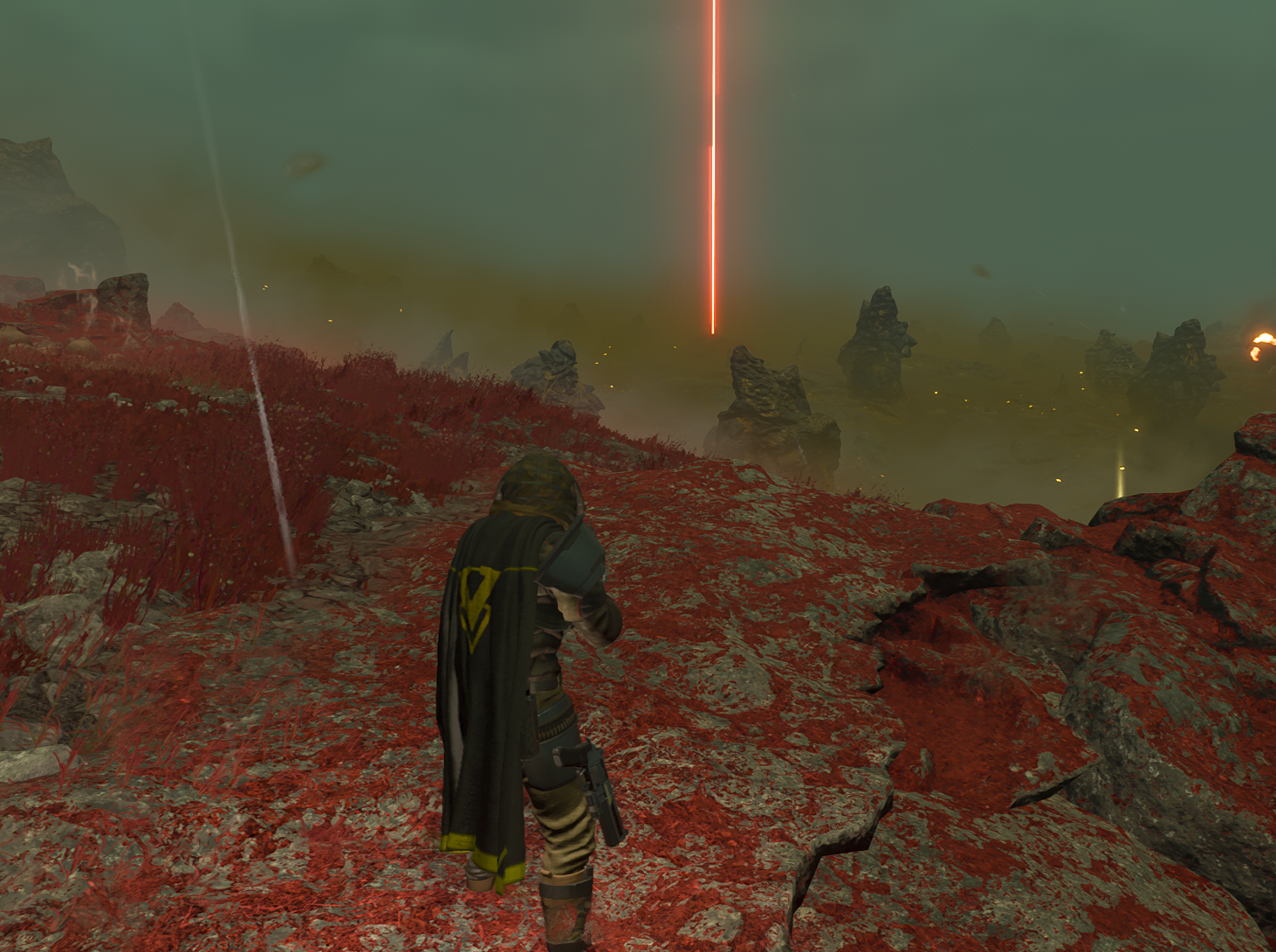
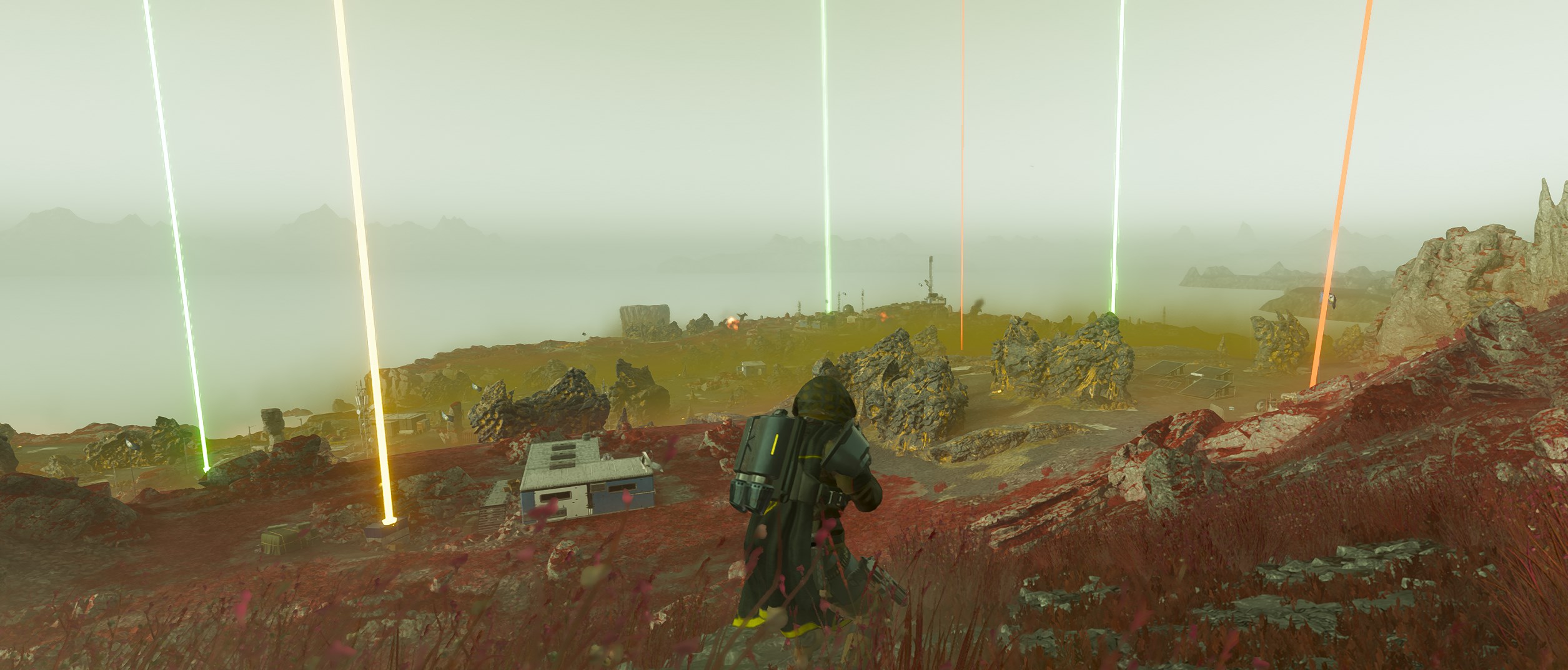
| Files | Version | Description | Archive ID | Mesh ID |
|---|---|---|---|---|
| Common Samples | v1.0 | Adds green arrows to sample cases, flowers, and other conventional sample models | 501b113721d6faf0, f6b59d283df68ad0, 715dcc69bf13acb0, 7ca11e54b19cb723, bb6ac645c30f0266 | 2976556536743111746, 5771061903247604588, 12806174284631042940, 15304220425359002535, 5691626237303103123, 13741222368367787890, 16009055276064363569, 16496326307674548889, 3494241250398732730, 12943291850073424771, 10095142954806958829, 7256596000532615782, 14923473746413089367, 3468100940980596463 |
| Rare Samples | v1.0 | Adds orange arrows to rare samples | bc35eebd1ddb6858, b4bc0833706d87e0, 8d05fccea5bbbc54 | 12508512869271882154, 6871854334868199957, 14354105468730937293, 10343492841715251981, 10839006562151151350, 16068287307180393021, 6758858337978261627, 13632525282499700070, 14262917838733338858 |
| Medals | v1.0 | Adds red arrows to Medals | 6286516637d5c967 | 8591814228145000671 |
| Requisition Slips | v1.0 | Adds yellow arrows to Requisition Slips | 6286516637d5c967 | 15725536894954390575 |
Last edited by loregamer on August 28th, 2025, 15:47, edited 1 time in total.
-
leoleahy
- Posts: 34
- Joined: Jul 15, '25
-
Geolocation
You're the actual bestSaren wrote: ↑ August 28th, 2025, 15:43v1 update done, check it out boys
Files Version Description Archive ID Mesh ID v1.0 Adds green arrows to sample cases, flowers, and other conventional sample models 501b113721d6faf0, f6b59d283df68ad0, 715dcc69bf13acb0, 7ca11e54b19cb723, bb6ac645c30f0266 2976556536743111746, 5771061903247604588, 12806174284631042940, 15304220425359002535, 5691626237303103123, 13741222368367787890, 16009055276064363569, 16496326307674548889, 3494241250398732730, 12943291850073424771, 10095142954806958829, 7256596000532615782, 14923473746413089367, 3468100940980596463 v1.0 Adds orange arrows to rare samples bc35eebd1ddb6858, b4bc0833706d87e0, 8d05fccea5bbbc54 12508512869271882154, 6871854334868199957, 14354105468730937293, 10343492841715251981, 10839006562151151350, 16068287307180393021, 6758858337978261627, 13632525282499700070, 14262917838733338858 v1.0 Adds red arrows to Medals 6286516637d5c967 8591814228145000671 v1.0 Adds yellow arrows to Requisition Slips 6286516637d5c967 15725536894954390575

-
Saren
- Posts: 42
- Joined: May 13, '25
-
Geolocation
I keep confusing some of the colors. Thinking stratagem lines are rare samples!
Any suggestions on the colors to change them to?
Any suggestions on the colors to change them to?
-
Saren
- Posts: 42
- Joined: May 13, '25
-
Geolocation
ShaderToggler addon for ReShade can turn off certain visuals and increase visibility on arrows
Will share later
Will share later
-
leoleahy
- Posts: 34
- Joined: Jul 15, '25
-
Geolocation
@Saren Idk what I'm doing wrong but all my arrows are orange... Any idea what could be happening? I'm using the super credit arrows, medals and rare samples only. Credits are blue, but samples and medals are always the same color, orange. Is there a trick in the mod manager? Does it matter what order I install them?
-
Saren
- Posts: 42
- Joined: May 13, '25
-
Geolocation
They're all literally the same color or just too close to the same color? I was thinking I'd change req slips and rare samples to different colors just to give more differentiationleoleahy wrote: ↑ September 4th, 2025, 18:31@Saren Idk what I'm doing wrong but all my arrows are orange... Any idea what could be happening? I'm using the super credit arrows, medals and rare samples only. Credits are blue, but samples and medals are always the same color, orange. Is there a trick in the mod manager? Does it matter what order I install them?
If they are literally the same color, make sure you have v1.0 for all variants
-
leoleahy
- Posts: 34
- Joined: Jul 15, '25
-
Geolocation
Literally the same color. I'll test again to make sure. I'll get back to youSaren wrote: ↑ September 4th, 2025, 19:18They're all literally the same color or just too close to the same color? I was thinking I'd change req slips and rare samples to different colors just to give more differentiationleoleahy wrote: ↑ September 4th, 2025, 18:31@Saren Idk what I'm doing wrong but all my arrows are orange... Any idea what could be happening? I'm using the super credit arrows, medals and rare samples only. Credits are blue, but samples and medals are always the same color, orange. Is there a trick in the mod manager? Does it matter what order I install them?
If they are literally the same color, make sure you have v1.0 for all variants
-
leoleahy
- Posts: 34
- Joined: Jul 15, '25
-
Geolocation
Okay, tested. Not the same color but very similar. I wish they were bright red like your screenshot :/ @SarenSaren wrote: ↑ September 4th, 2025, 19:18They're all literally the same color or just too close to the same color? I was thinking I'd change req slips and rare samples to different colors just to give more differentiationleoleahy wrote: ↑ September 4th, 2025, 18:31@Saren Idk what I'm doing wrong but all my arrows are orange... Any idea what could be happening? I'm using the super credit arrows, medals and rare samples only. Credits are blue, but samples and medals are always the same color, orange. Is there a trick in the mod manager? Does it matter what order I install them?
If they are literally the same color, make sure you have v1.0 for all variants
You do not have the required permissions to view the files attached to this post.
-
Saren
- Posts: 42
- Joined: May 13, '25
-
Geolocation
-
Runey
- Posts: 1
- Joined: Sep 20, '25
-
Geolocation
anyone got an update for the arrows?
Stopped working yesterday 9/18/2025.
Stopped working yesterday 9/18/2025.
-
greenguardianz
- Posts: 10
- Joined: Oct 13, '25
-
Geolocation
i am new to this etc. i love this mod helps a lot.
i tryed to give the supers arrwos but it locks like i cant give any arrows maybe i do something wrong.
i hope it gets a patch/update after the big patch HA promissed.
PS: i know why supers are invisible!
in the moment we edit them they get saved away from the interaction point so they are underground! why ther are no arrows is maybe the same reason. maybe we need to edit the the sphere upwards so it matches with the interaction point!?!
colors for stuff what can be good:
green = common sambles
Orange = rare samples
pink = super samples
like the color they have in the HUD.
super credits can be white
and medals blue.
the normal money dont know.
i tryed to give the supers arrwos but it locks like i cant give any arrows maybe i do something wrong.
i hope it gets a patch/update after the big patch HA promissed.
PS: i know why supers are invisible!
in the moment we edit them they get saved away from the interaction point so they are underground! why ther are no arrows is maybe the same reason. maybe we need to edit the the sphere upwards so it matches with the interaction point!?!
colors for stuff what can be good:
green = common sambles
Orange = rare samples
pink = super samples
like the color they have in the HUD.
super credits can be white
and medals blue.
the normal money dont know.
Last edited by greenguardianz on October 13th, 2025, 18:35, edited 1 time in total.
-
greenguardianz
- Posts: 10
- Joined: Oct 13, '25
-
Geolocation
this day patch broken this mods sadly.
and i still cant get my blender to do it right so i cant do it my self..
any one out ther can do it and fix it even for SC and Super samples?! plz.
and i still cant get my blender to do it right so i cant do it my self..
any one out ther can do it and fix it even for SC and Super samples?! plz.
-
Oyster Sauce

- Site Moderator
- Posts: 11405
- Joined: Jun 2, '23
-
Geolocation
Adventurer's Guild


I've got my top guy working on it RIGHT NOW!greenguardianz wrote: ↑ February 3rd, 2026, 11:25this day patch broken this mods sadly.
and i still cant get my blender to do it right so i cant do it my self..
any one out ther can do it and fix it even for SC and Super samples?! plz.
-
leoleahy
- Posts: 34
- Joined: Jul 15, '25
-
Geolocation
On the other thread some dude was making an "always visible" button implementation. Any idea if that's something you guys will ever be able to make work? That'd be a 10/10 life saver because right now I run the config file modified to see the arrows from further away and it takes a lot of my FPS away.Oyster Sauce wrote: ↑ February 3rd, 2026, 11:26I've got my top guy working on it RIGHT NOW!greenguardianz wrote: ↑ February 3rd, 2026, 11:25this day patch broken this mods sadly.
and i still cant get my blender to do it right so i cant do it my self..
any one out ther can do it and fix it even for SC and Super samples?! plz.
Thank you @Oyster Sauce
-
loregamer

- Site Moderator
- Posts: 5110
- Joined: Dec 3, '23
-
Geolocation


Use this instead, it has sample arrowsgreenguardianz wrote: ↑ February 3rd, 2026, 11:25this day patch broken this mods sadly.
and i still cant get my blender to do it right so i cant do it my self..
any one out ther can do it and fix it even for SC and Super samples?! plz.
Super Credits Cheat Arrows (All Currencies Update) 6.0 — Helldivers 2
Last edited by loregamer on February 4th, 2026, 00:13, edited 1 time in total.
Jingle Jangle Jingle
-
greenguardianz
- Posts: 10
- Joined: Oct 13, '25
-
Geolocation
nice. thx.Use this instead, it has sample arrows
Super Credits Cheat Arrows (All Currencies Update) 6.0 — Helldivers 2
2 questions!
why the arrows are only to see wen the "item" is in vision and not blocked by a rock? the item is still ther but wne a small rock is between me and the item/arrow the arrow disappears.
and is it posible to have the arrow be so long likt in "highe" but go close to the item?
if not..i need to deal with it but that the arrows disappears is realy anoying. sadly it cant be made like the evac beam who is seen from every wear?!
Last edited by greenguardianz on February 5th, 2026, 07:38, edited 2 times in total.