



Overview
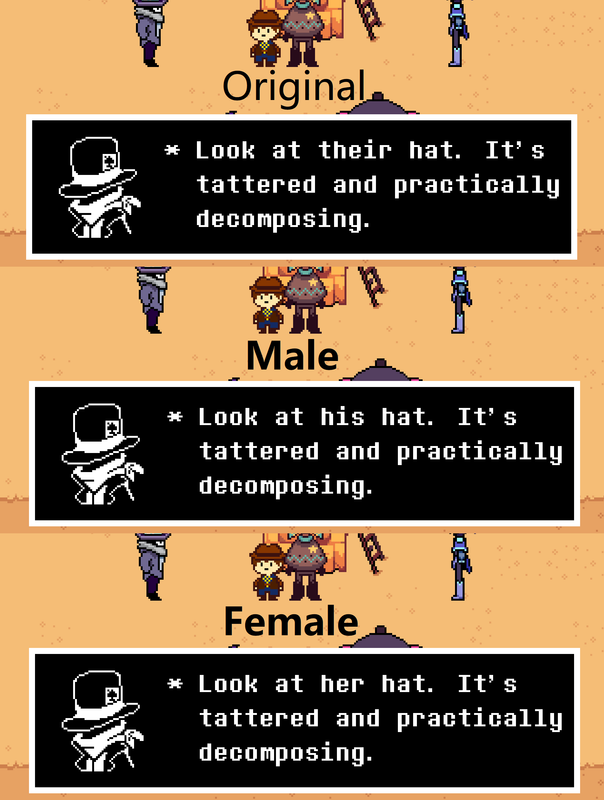
The developers of Undertale Yellow, a fan game of Undertale, has stated on their Tumblr that Clover's gender is left to personal interpretation. Despite this, a couple pieces of dialogue seems to lean towards a male Clover, being called a fella and a king. This mod simply switches Clover's pronouns from they/them to he/him.
For those that want Female Clover, that's included in here as well. Slight changes were made to the lines that leaned towards Clover being male in that version. Also includes optional patches that switches Moray's pronouns to he/him or she/her as well.
If there's any instances that I missed on the male or female versions, let me know and I'll correct it.
Created with UndertaleModTool using Version 1.1 of the game.
Downloads
| Files | Version | Type | Description |
|---|---|---|---|
 Gendered Clover (and Moray) Gendered Clover (and Moray) | 1.5 | Main | Updated XDelta patches for V1.2.2. Now includes CSX scripts instead of being separated. |
► Show Spoiler
Changelog
► Show Spoiler
Reporting Bugs
To report any bugs, please submit a post in the Mod Support section and mention my username.
Credits
- GotPlatinum - Creator
My Other Mods
- Billboard Mod (Ricardo Milos) — Buck Up And Drive!
- Less Anachronism 1.3 — Small Saga
- Gendered Kris — Deltarune
- Gendered Frisk and Chara — Undertale
Delta Patcher Installation
1. Download the files and launch the included Delta Patcher program.
2. (Optional) Back up the unmodified data.win file.
3. Copy the path to the unmodified data.win file located in the game directory OR drag and drop the file into the "Original file" path.
4. Copy the path to the the XDelta patch of your choosing OR drag and drop the chosen file into the "XDelta patch" path.
5. Click on Apply patch. If done correctly, you should see a popup saying that it was applied successfully.
6. Enjoy!
CSX Script Installation:
1. Download the CSX Script and UndertaleModTool. The tool isn't included to keep the file size down and it can be downloaded here.
2. (Optional) Back up the data.win file.
3. Launch the data.win file using UndertaleModTool.
4. In the dropdown menu for "Scripts" located on the upper left, click on "Run other script..."
5. Select one of the CSX files.
6. You should get a popup window that asks whether the character should be male or female. Select whichever one you prefer.
7. If everything is done correctly, another pop-up window will appear saying that the script is applied.
8. Save the modified data.win file.
9. Repeat steps 3 to 8 with the other script as necessary.
10. Enjoy!
Backup Downloads
Catbox Mirror
Mediafire Mirror