


I'm using the latest BG3MM (1.0.12.2) and the file from April 18th. No joy.johnsmith wrote: ↑ April 23rd, 2025, 19:06It should work when u download the most recent version of the bg3mm specifically from github (1.0.12.2).Crazed Weevil wrote: ↑ April 23rd, 2025, 09:37Is there some trick to getting this to work on Patch 8? I cannot get it to load no matter what I try.
I've installed it through BG3MM, can see it added to the left hand pane, added to modlist file and it shows up in the game's inbuilt Mod Manager and it is active. No error messages, nothing. But it doesn't do anything. It's like the game just doesn't want to load override mods for some reason. All the other mods I tried work as far as I can tell (Realms Restored, No Alphabets, the usual UI mods, etc), but not this. I've even tried stripping BG3 back to bare metal without the Script Extender or any other mods and just this mod and it still won't work.
If it still doesn't work, u can try using the file loregamer released on April 18th.
We have a Steam curator now. You should be following it. https://store.steampowered.com/curator/44994899-RPGHQ/
Plus UI (Unofficial Patch 8 Fix) 2.0 — Baldur's Gate 3
Looking for the download?
This mod's files are on ModHQ.
Go to mod page
Moderator: Mod Janitor
-
Crazed Weevil
- Posts: 39
- Joined: Feb 28, '24
-
Geolocation
-
Crazed Weevil
- Posts: 39
- Joined: Feb 28, '24
-
Geolocation
OK, new symptom. If I load a save the game tells me that it has detected a new mod: Plus UI and shows it active. It still doesn't work, and this happens even if I save the game after this and reload that save (this is a full manual reload, not quickload by the way).
Since then I've completely reinstalled BG3, cleared all Larian folders, unsubscribed from all mods, only installed BG3MM (latest version & no script extender for now) and the following mods in the below load order:
REALMS RESTORED - [1] Aesthetics (1.0.0.0)
REALMS RESTORED - [2] Heads (1.0.0.0)
REALMS RESTORED - [3] Drows (1.0.0.0)
REALMS RESTORED - [4] Name Changes (1.0.0.0)
REALMS RESTORED - [5] Swaps (1.0.0.0)
RealmsRestored_80pcDynamicCrowds (1.6.0.0)
NoAlphabetsDialogTree (6.0.0.3)
NoAlphabetsLingo (6.0.1.0)
NoAlphabetsVoice (6.0.0.0)
NoAlphabetsAesthetics (6.0.0.0)
Plus UI - Updated + NA (1.8.0.0)
Start the game, create new character. No sign of Plus UI, no sub catagories, still have large female options, etc. Everything else seems to be there (new heads, changes to Durge, etc). If I save the game and then reload that save, the game still says new mod detected: Plus UI - Updated + NA.
Since then I've completely reinstalled BG3, cleared all Larian folders, unsubscribed from all mods, only installed BG3MM (latest version & no script extender for now) and the following mods in the below load order:
REALMS RESTORED - [1] Aesthetics (1.0.0.0)
REALMS RESTORED - [2] Heads (1.0.0.0)
REALMS RESTORED - [3] Drows (1.0.0.0)
REALMS RESTORED - [4] Name Changes (1.0.0.0)
REALMS RESTORED - [5] Swaps (1.0.0.0)
RealmsRestored_80pcDynamicCrowds (1.6.0.0)
NoAlphabetsDialogTree (6.0.0.3)
NoAlphabetsLingo (6.0.1.0)
NoAlphabetsVoice (6.0.0.0)
NoAlphabetsAesthetics (6.0.0.0)
Plus UI - Updated + NA (1.8.0.0)
Start the game, create new character. No sign of Plus UI, no sub catagories, still have large female options, etc. Everything else seems to be there (new heads, changes to Durge, etc). If I save the game and then reload that save, the game still says new mod detected: Plus UI - Updated + NA.
-
GhostCow
- Turtle

- Posts: 3259
- Joined: Feb 3, '23
- Gender: Dinosaur
-
Geolocation


Every time I load a save it gives me a popup saying new mod detected and shows PlusUI even though I've had it installed since before I started the game. Am I doing something wrong or is it a bug?
☆HQ Defense Force☆
-
loregamer

- Site Moderator
- Posts: 5060
- Joined: Dec 3, '23
-
Geolocation


Last edited by loregamer on April 27th, 2025, 06:08, edited 1 time in total.
Jingle Jangle Jingle
-
Crazed Weevil
- Posts: 39
- Joined: Feb 28, '24
-
Geolocation
-
mercerxiv
- Posts: 534
- Joined: Mar 6, '25
- Location: Dixie
-
Geolocation
Ok, loaded it last and it seems to still have some issues. Good news the UI is working now, mostly.loregamer wrote: ↑ April 27th, 2025, 06:07v1.8.1
Fixed it loading in game I think? @GhostCow @mercerxiv
I gonna go sleep now, but will mess around more tomorrow.
What I found so far:
1) Voices are still broken as I have described earlier: both male and female show up, all voices regardless use either voice 1 or 2 depending on sex.
2) Drow faces have "Not found" instead of Head 1,2,3,...
3) Randomize button don't work. No idea if it ever worked in vanilla though.
4) Jewelry tab appeared (?) but seems to lack icons for everything. Works otherwise.
5) Back tab appeared, is empty.
6) Colour tab appeared and only has nail color (???) which only has one setting.
Screenshots below.
You do not have the required permissions to view the files attached to this post.
Last edited by mercerxiv on April 27th, 2025, 09:12, edited 1 time in total.
I like sugar, and I like tea.
-
fkirenicus

- Posts: 783
- Joined: Feb 29, '24
-
Geolocation
Adventurer's Guild

@mercerxiv , can confirm voice problems still persist. The other problems you mention however, I do not have. I am using NA CCreator (no gen) mod (loads first among the NA mods). PlusUI is the last mod to load, except for CompFramework.
-
loregamer
- Site Moderator
- Posts: 5060
- Joined: Dec 3, '23
-
Geolocation
Starting to wonder if I should just do this from scratch cleanly
At least then I could document the changes
At least then I could document the changes
Jingle Jangle Jingle
-
loregamer
- Site Moderator
- Posts: 5060
- Joined: Dec 3, '23
-
Geolocation
Remaking this mod from scratch loregamerly, everything should be more stable after that
Jingle Jangle Jingle
-
loregamer
- Site Moderator
- Posts: 5060
- Joined: Dec 3, '23
-
Geolocation
-
Auld_SnawBeard

- Posts: 136
- Joined: Apr 23, '25
- Gender: Dinosaur
-
Geolocation

I went through the character creation UI using your Plus UI as my only mod. I installed it with your MO2 edition + Root Builder. I clicked through just about every Edit Appearance option for every race + body type combination and the origin characters. These are the appearant oddities I found.. I of course don't know if they are bugs or not.
Oddities:
-The Central Panel Toggle only works the first time you toggle it on. Once it's on it cannot be turned off with the toggle. It turns off when I switch tabs tho. It only does anything for the race, subrace, class and subclass tabs for me (which may be intended for all I know).
-The Appearance Label Toggle doesn't seem to do anything.
-When in the Edit Appearance display the Jewlery tab are missing icons. The jewlery itself is there tho, just without icons, and they work as intended.
-When in the Edit Appearance display the Back tab is empty for everyone except dragonborn and origin characters, neither of which have the tab at all. I'm not sure what the tab is intended for, but I assume it's something you haven't gotten around to yet. Still I thought I'd better mention.
-The nail color menu is empty for me. No colors to choose from, but I can at least open the menu.
That's all. Everything else seemed to work for me. Love this mod. So many annoyances removed
Edit: Drow heads and all race+gender voices and the randomize button works as intended for me.
Oddities:
-The Central Panel Toggle only works the first time you toggle it on. Once it's on it cannot be turned off with the toggle. It turns off when I switch tabs tho. It only does anything for the race, subrace, class and subclass tabs for me (which may be intended for all I know).
-The Appearance Label Toggle doesn't seem to do anything.
-When in the Edit Appearance display the Jewlery tab are missing icons. The jewlery itself is there tho, just without icons, and they work as intended.
-When in the Edit Appearance display the Back tab is empty for everyone except dragonborn and origin characters, neither of which have the tab at all. I'm not sure what the tab is intended for, but I assume it's something you haven't gotten around to yet. Still I thought I'd better mention.
-The nail color menu is empty for me. No colors to choose from, but I can at least open the menu.
That's all. Everything else seemed to work for me. Love this mod. So many annoyances removed
Edit: Drow heads and all race+gender voices and the randomize button works as intended for me.
Last edited by Auld_SnawBeard on April 28th, 2025, 00:27, edited 3 times in total.
-
loregamer
- Site Moderator
- Posts: 5060
- Joined: Dec 3, '23
-
Geolocation
I'm gonna go ahead and revert the main post version and write it for Patch 7 only for now. Too many things to fix
Jingle Jangle Jingle
-
loregamer
- Site Moderator
- Posts: 5060
- Joined: Dec 3, '23
-
Geolocation
Mod remake in progress
Luckily it'll be a lot more maintainable and I'll provide a ton of docs in the mod files
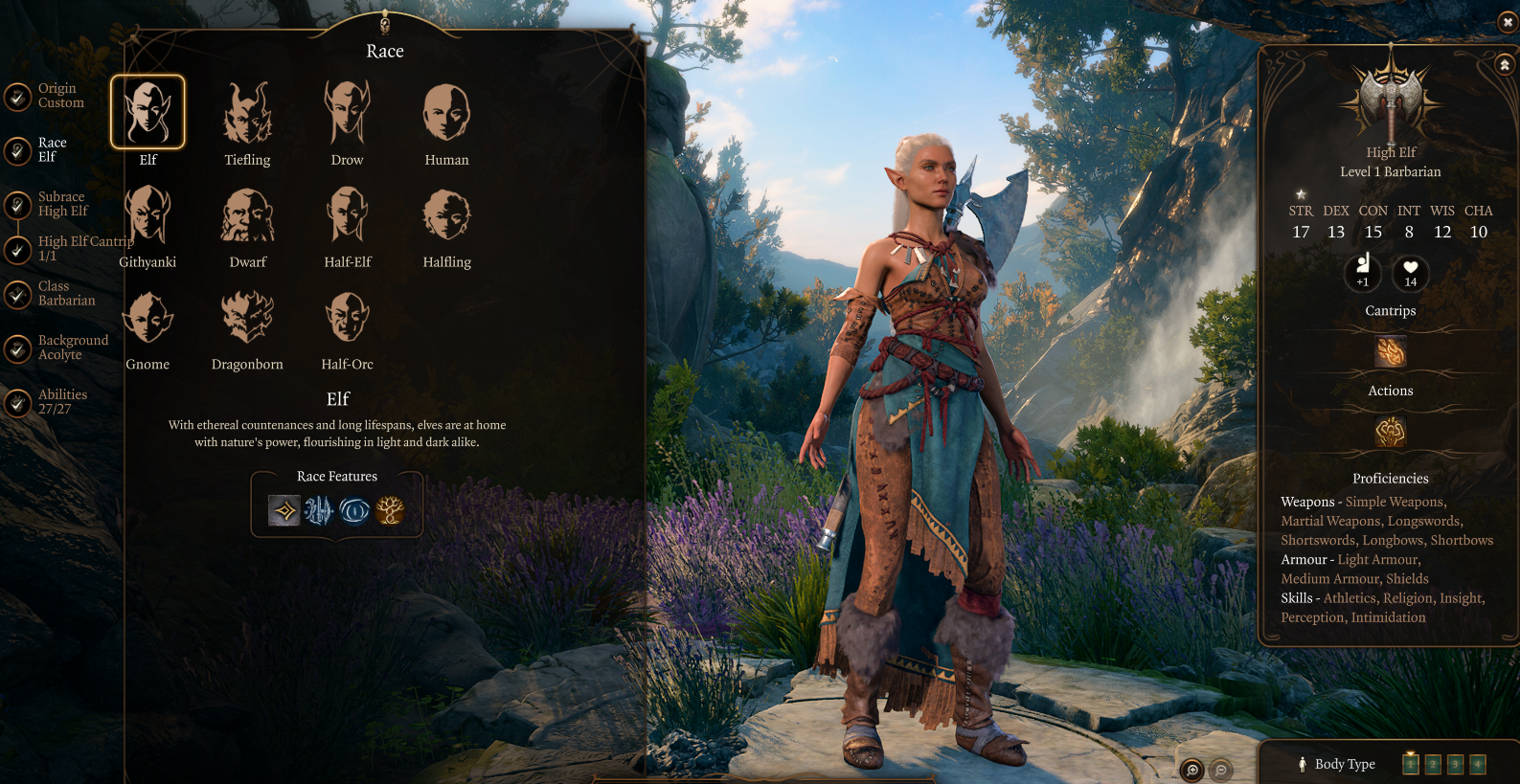
Luckily it'll be a lot more maintainable and I'll provide a ton of docs in the mod files
Jingle Jangle Jingle
-
loregamer
- Site Moderator
- Posts: 5060
- Joined: Dec 3, '23
-
Geolocation
Last edited by loregamer on April 28th, 2025, 05:09, edited 1 time in total.
Jingle Jangle Jingle
-
Reichspepe

- Posts: 1169
- Joined: Sep 2, '23
- Location: Prussia
-
Geolocation
Adventurer's Guild


-
loregamer
- Site Moderator
- Posts: 5060
- Joined: Dec 3, '23
-
Geolocation
-
loregamer
- Site Moderator
- Posts: 5060
- Joined: Dec 3, '23
-
Geolocation
Update almost done I think
Jingle Jangle Jingle
-
loregamer
- Site Moderator
- Posts: 5060
- Joined: Dec 3, '23
-
Geolocation
Got one more bug to iron out. Voice selection working again though, and I made this much more maintainable
Tomorrow, maybe
Tomorrow, maybe
Jingle Jangle Jingle
-
loregamer
- Site Moderator
- Posts: 5060
- Joined: Dec 3, '23
-
Geolocation
 v1.9.9.9999
I am too **** lazy to fix this one bug but this seems good to go
When you first open Edit Character on Durge, it will show "Make a Choice" on the voice selection. But it works now
Last edited by loregamer on May 5th, 2025, 00:04, edited 1 time in total.
Jingle Jangle Jingle
-
loregamer
- Site Moderator
- Posts: 5060
- Joined: Dec 3, '23
-
Geolocation
If everything else looks good, I'll fix that "Make A Choice" thing later and v2 this
After dissecting this mod, I understand fully how it works and what the original author's workflow was. So I will write up a dev guide if any newfags want to do something similar
After dissecting this mod, I understand fully how it works and what the original author's workflow was. So I will write up a dev guide if any newfags want to do something similar
Last edited by loregamer on May 4th, 2025, 21:21, edited 1 time in total.
Jingle Jangle Jingle
-
Makirige

- Posts: 239
- Joined: Dec 23, '23
- Gender: Watermelon
-
Geolocation
Will it be compatible with this? 
https://www.nexusmods.com/baldursgate3/mods/2538
Basically it's making the horns, nails and tails options available to all races. But also maybe take my mod where I gendered the nails ?
https://www.nexusmods.com/baldursgate3/mods/2538
Basically it's making the horns, nails and tails options available to all races. But also maybe take my mod where I gendered the nails ?
Unavailable due to work and thesis 
Thou must returneth whence thou came. This land is peaceful, its inhabitants kind, but thou dost not belong. I beg of thee, plunge down from the plank, and hurry home.
Thou must returneth whence thou came. This land is peaceful, its inhabitants kind, but thou dost not belong. I beg of thee, plunge down from the plank, and hurry home.
-
loregamer
- Site Moderator
- Posts: 5060
- Joined: Dec 3, '23
-
Geolocation
idk but it should be fine if it's just defining slots via character creation appearance visualsMakirige wrote: ↑ May 4th, 2025, 22:40Will it be compatible with this?
https://www.nexusmods.com/baldursgate3/mods/2538
Basically it's making the horns, nails and tails options available to all races. But also maybe take my mod where I gendered the nails ?
Jingle Jangle Jingle
-
Auld_SnawBeard
- Posts: 136
- Joined: Apr 23, '25
- Gender: Dinosaur
-
Geolocation

-
Reichspepe
- Posts: 1169
- Joined: Sep 2, '23
- Location: Prussia
-
Geolocation
Adventurer's Guild
I think I'm doing something wrong, because when I enable PlusUI, everything looks "normal" and not like on the screenshot in the mod description. Female Strong Body is still there, the icons look placed like vanilla etc.
This is my load order:

This is my load order:

-
Auld_SnawBeard
- Posts: 136
- Joined: Apr 23, '25
- Gender: Dinosaur
-
Geolocation
PlusUI goes almost at the end of the load-list. I think I read somewhere that just after NoAlphabetsVoice and just before NoAlphabetsAesthetics is a good place for it.Reichspepe wrote: ↑ May 5th, 2025, 14:37I think I'm doing something wrong, because when I enable PlusUI, everything looks "normal" and not like on the screenshot in the mod description. Female Strong Body is still there, the icons look placed like vanilla etc.
This is my load order:
-
Reichspepe
- Posts: 1169
- Joined: Sep 2, '23
- Location: Prussia
-
Geolocation
Adventurer's Guild
Thanks, gonna test it shortly.Auld_SnawBeard wrote: ↑ May 5th, 2025, 14:44PlusUI goes almost at the end of the load-list. I think I read somewhere that just after NoAlphabetsVoice and just before NoAlphabetsAesthetics is a good place for it.Reichspepe wrote: ↑ May 5th, 2025, 14:37I think I'm doing something wrong, because when I enable PlusUI, everything looks "normal" and not like on the screenshot in the mod description. Female Strong Body is still there, the icons look placed like vanilla etc.
This is my load order:
-
xonmyhand
- Posts: 28
- Joined: Apr 18, '25
-
Geolocation
I experienced the same and I solved it by replacing it like this order BUT every other section doesn't work for me. General etc. are still the same as vanilla/ImpUI. Example image: https://i.imgur.com/ncbiAI9.pngReichspepe wrote: ↑ May 5th, 2025, 14:37I think I'm doing something wrong, because when I enable PlusUI, everything looks "normal" and not like on the screenshot in the mod description. Female Strong Body is still there, the icons look placed like vanilla etc.
This is my load order:


Last edited by xonmyhand on May 5th, 2025, 15:08, edited 1 time in total.
𝐈 𝐝𝐨𝐧'𝐭 𝐝𝐫𝐢𝐧𝐤, 𝐈 𝐝𝐨𝐧'𝐭 𝐬𝐦𝐨𝐤𝐞, 𝐈 𝐝𝐨𝐧'𝐭 𝐝𝐨 𝐝𝐫𝐮𝐠𝐬. 𝐌𝐲 𝐚𝐝𝐝𝐢𝐜𝐭𝐢𝐨𝐧 𝐢𝐬 𝐰𝐫𝐞𝐬𝐭𝐥𝐢𝐧𝐠, 𝐦𝐲 𝐨𝐛𝐬𝐞𝐬𝐬𝐢𝐨𝐧 𝐢𝐬 𝐜𝐨𝐦𝐩𝐞𝐭𝐢𝐭𝐢𝐨𝐧. 𝐄𝐯𝐞𝐧 𝐭𝐡𝐫𝐨𝐮𝐠𝐡 𝐭𝐡𝐞 𝐝𝐚𝐫𝐤𝐞𝐬𝐭 𝐝𝐚𝐲𝐬, 𝐭𝐡𝐢𝐬 𝐟𝐢𝐫𝐞 𝐢𝐧 𝐦𝐞 𝐛𝐮𝐫𝐧𝐬. 𝐀𝐥𝐰𝐚𝐲𝐬.
-
loregamer
- Site Moderator
- Posts: 5060
- Joined: Dec 3, '23
-
Geolocation
Edited my post to put that for best compatibility, this should be put near the bottom of your load order. And it already covers the changes from No Alphabets CCreator, so that can be safely uninstalled
Last edited by loregamer on May 5th, 2025, 16:16, edited 2 times in total.
Jingle Jangle Jingle
-
xonmyhand
- Posts: 28
- Joined: Apr 18, '25
-
Geolocation
Can confirm, removing No Alphabets CCreator and putting Plus UI on third from the bottom works like a charm. Thank you for your great work as usual @loregamer !
𝐈 𝐝𝐨𝐧'𝐭 𝐝𝐫𝐢𝐧𝐤, 𝐈 𝐝𝐨𝐧'𝐭 𝐬𝐦𝐨𝐤𝐞, 𝐈 𝐝𝐨𝐧'𝐭 𝐝𝐨 𝐝𝐫𝐮𝐠𝐬. 𝐌𝐲 𝐚𝐝𝐝𝐢𝐜𝐭𝐢𝐨𝐧 𝐢𝐬 𝐰𝐫𝐞𝐬𝐭𝐥𝐢𝐧𝐠, 𝐦𝐲 𝐨𝐛𝐬𝐞𝐬𝐬𝐢𝐨𝐧 𝐢𝐬 𝐜𝐨𝐦𝐩𝐞𝐭𝐢𝐭𝐢𝐨𝐧. 𝐄𝐯𝐞𝐧 𝐭𝐡𝐫𝐨𝐮𝐠𝐡 𝐭𝐡𝐞 𝐝𝐚𝐫𝐤𝐞𝐬𝐭 𝐝𝐚𝐲𝐬, 𝐭𝐡𝐢𝐬 𝐟𝐢𝐫𝐞 𝐢𝐧 𝐦𝐞 𝐛𝐮𝐫𝐧𝐬. 𝐀𝐥𝐰𝐚𝐲𝐬.
-
Auld_SnawBeard
- Posts: 136
- Joined: Apr 23, '25
- Gender: Dinosaur
-
Geolocation
I particularly appreciate the "soulless husk" detail. Closing off the new-player trap of playing a stumped character in a way that gave me a good laugh 