We have a Steam curator now. You should be following it. https://store.steampowered.com/curator/44994899-RPGHQ/

Documenting camera controls in third person games

No RPG elements? It probably goes here!
Ignore Topic
User avatar
rusty_shackleford
Site Admin
Posts: 46459
Joined: Feb 2, '23
Gender: Watermelon

Geolocation

Adventurer's Guild

Documenting camera controls in third person games

Post by rusty_shackleford »

Nearly every game has a way to invert controls now, but I notice even the default ones aren't standard. I thought I'd go about documenting the default without any invert enabled for each game I play, if anyone wants to contribute too that's fine. Maybe a game developer will find this valuable. :pipe-hat:

Terminology:
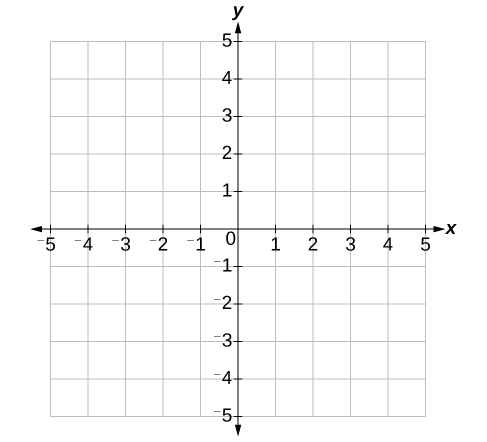
The movement axis of the input device will be in X & Y space, a standard Cartesian plane. This can be a gamepad or a mouse, it doesn't matter.
Image


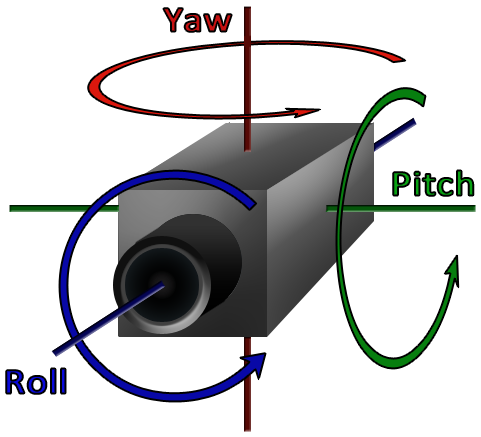
The camera itself will be described in terms of Pitch, yaw, and roll. However, pretty much(?) only 6DOF games allow roll, so it will be simpler to describe it in terms of pitch and yaw unless otherwise required.
Image
We do not need to specify the handedness of the coordinate system here.

That is, +Yaw would look left from its perspective. +Pitch would look down.

I'll probably format this into a table eventually.

"Pitch up" in this context would mean -Pitch — therefore, Look Up — FYI.

Insomnia: The Ark

Can invert camera controls? NO
Pitch: N/A
+Yaw(Look Left): -X (Mouse Left)
-Yaw(Look Right): +X (Mouse Right)
Orbit: No

Enclave

+Pitch(Look Down): -Y (Mouse Down)
-Pitch(Look Up): +Y (Mouse Up)
+Yaw(Look Left): -X (Mouse Left)
-Yaw(Look Right): +X (Mouse Right)
Orbit: Pitch+Yaw? Need to test Yaw.

Notes:
Camera pulls out when looking down, and pulls in when looking up.


Final Fantasy XI

Can invert camera controls? YES
+Pitch(Look Down): +Y (Mouse Up)
-Pitch(Look Up): -Y (Mouse Down)
+Yaw(Look Left): +X (Mouse Right)
-Yaw(Look Right): -X (Mouse Left)
Orbit: Pitch+Yaw
Last edited by rusty_shackleford on September 13th, 2024, 07:59, edited 4 times in total.
Thank you for your attention to this matter!
Steam friend code: 40552640 https://steamcommunity.com/friends/add | email: [email protected]
Having trouble running an old Windows game?
Rusty's Stuff Collection
User avatar
rusty_shackleford
Site Admin
Posts: 46459
Joined: Feb 2, '23
Gender: Watermelon

Geolocation

Adventurer's Guild

Post by rusty_shackleford »

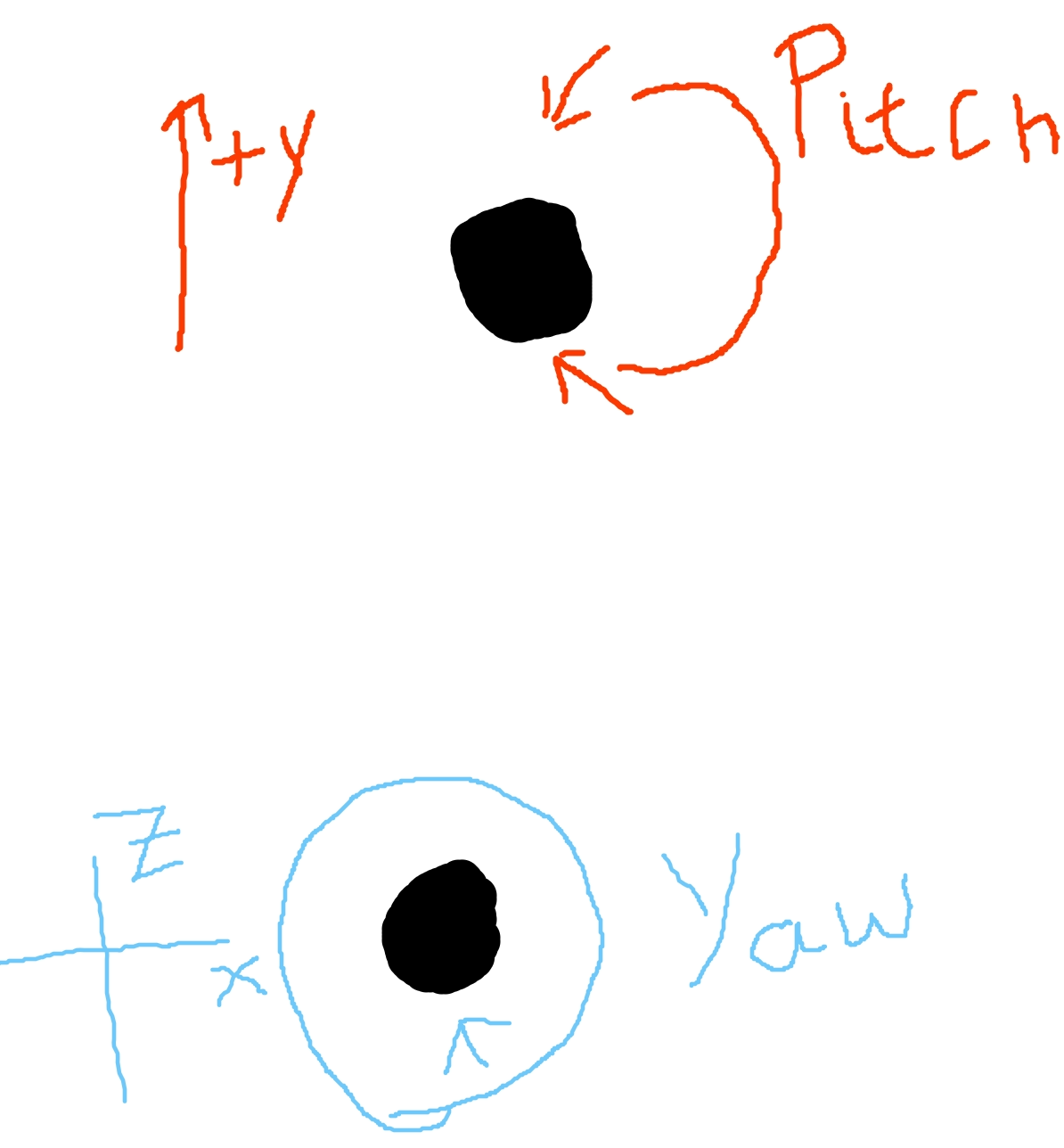
n.b. some cameras translate their pitch & yaw when looking around. I've drawn a crude diagram for this:
Image


The pitch translation tends to be, but is not always, more complex than the yaw translation.
For the Pitch, if this is true then the length of the camera arm will change along with its position on the Y axis, while the camera itself pitches to look at its target.
For the Yaw, it typically will rotate around the target in a 360 degree fashion while yawing to look at the target.

I will mark these games with 'Orbit: Pitch+Yaw', or the individual orbit elements.

As an example that doesn't, Insomnia: The Ark has no pitch at all, and the yaw allows your camera to look left and right rather than orbit around the camera target(PC).
Last edited by rusty_shackleford on September 14th, 2024, 14:34, edited 1 time in total.
Thank you for your attention to this matter!
Steam friend code: 40552640 https://steamcommunity.com/friends/add | email: [email protected]
Having trouble running an old Windows game?
Rusty's Stuff Collection
User avatar
logincrash
The Music Man
Posts: 6174
Joined: Sep 3, '23
Location: Niger

Geolocation

Adventurer's Guild

Post by logincrash »

All this geometry stuff is gay.
To me the camera should operate the same way my mouse cursor does. Simple as.
"Oh, it all makes sense now, brother."
User avatar
rusty_shackleford
Site Admin
Posts: 46459
Joined: Feb 2, '23
Gender: Watermelon

Geolocation

Adventurer's Guild

Post by rusty_shackleford »

When introducing orbit, the choice of which scheme to use becomes more complicated. Consider this hypothetical scenario with camera orbit:

If the camera pitches up, then the camera itself will be moved on the vertical axis(along with perhaps shortening the 'arm' of the camera) downwards. That is, the camera pitches in the opposite direction of the translation. The further down the camera is translation on the vertical axis, the more it must be pitched up to continue looking at the target.

So, which is the correct way to handle this? Should camera controls handle the translation, or the yaw/pitch? It seems there is no standard for this, and gamers don't seem to have a complete preference either.


Incidentally, I find what I expect the camera to do to change depending on whether I am using keys to control the camera, or I am using an analog input(gamepad, mouse, etc.,). If I am pressing an 'Up' key, I want the camera to orbit up, pitching down is coincidental to this. OTOH, when I drag my mouse, I expect dragging down to pitch up. I am controlling the camera using keys in FFXI and had to use the default camera scheme now, whereas I was using inverted prior.
Last edited by rusty_shackleford on September 13th, 2024, 10:22, edited 4 times in total.
Thank you for your attention to this matter!
Steam friend code: 40552640 https://steamcommunity.com/friends/add | email: [email protected]
Having trouble running an old Windows game?
Rusty's Stuff Collection
User avatar
DagothGeas5
Posts: 2590
Joined: Dec 13, '23

Geolocation

Adventurer's Guild

Post by DagothGeas5 »

rusty_shackleford wrote: September 13th, 2024, 10:18
Incidentally, I find what I expect the camera to do to change depending on whether I am using keys to control the camera, or I am using an analog input(gamepad, mouse, etc.,).
Same here.
As for which should handle witch, I myself the only thing I not much like is the shortening that happens in some games, which forces the camera in towards the character (usually making the character disappear from view as well), as if there was an obstacle in the back when looking up. It feels like I can see less, if that is true or just an illusion I am not sure.
- Here to show my support for normal gaming.

Thank you for existing! :bounce:
User avatar
rusty_shackleford
Site Admin
Posts: 46459
Joined: Feb 2, '23
Gender: Watermelon

Geolocation

Adventurer's Guild

Post by rusty_shackleford »

Other than the Gothic games, can anyone think of 3D third person games with camera traditionally controlled by keyboard?
Bonus points if it has support for multiple input devices.
Thank you for your attention to this matter!
Steam friend code: 40552640 https://steamcommunity.com/friends/add | email: [email protected]
Having trouble running an old Windows game?
Rusty's Stuff Collection
User avatar
DagothGeas5
Posts: 2590
Joined: Dec 13, '23

Geolocation

Adventurer's Guild

Post by DagothGeas5 »

Aladdin revenge of Nasira was for PS1 but I played it on PC and it used a rotating axis for camera using the keyboard only.

There was also a game that used Q and E for horizzontal and something like I and K for the vertical (not sure if it was Soul Reaver, though these seem to all be PS1 to PC games).
- Here to show my support for normal gaming.

Thank you for existing! :bounce:
User avatar
Element
Posts: 1167
Joined: Jul 23, '23

Geolocation

Adventurer's Guild

Post by Element »

Tomb Raider 1-5
Prince of Persia 3D

TR would jump the camera into the eyes of the protagonist when engaging the look-around mode, and pitch+yaw in place. In PoP iirc the camera would remain a distance behind the camera, and pitch+yaw about the character in order to look in the same direction as the prince as he rotated his head.
Edit: no, they both did that. It was Soul Reaver that would reposition the camera.
Last edited by Element on September 13th, 2024, 13:21, edited 3 times in total.