
We have a Steam curator now. You should be following it. https://store.steampowered.com/curator/44994899-RPGHQ/

[Solved] Spanish translation issue
Moderator: Mod Janitor
-
DonCatalonia

- Posts: 8
- Joined: Aug 12, '24
-
Geolocation

[Solved] Spanish translation issue
Alright so I installed everything and its working great. I am having issues with the translation tho. I am trying to use the spanish translation but it is not working. I have tried extracting the files both manually and with the mod manager and the game is still showing up in english. Am I doing anything wrong or I will have to live with it?
Last edited by orinEsque on November 15th, 2024, 16:34, edited 1 time in total.
-
WhiteShark
- Site Moderator
- Posts: 5056
- Joined: Feb 2, '23
-
Geolocation
Adventurer's Guild


It looks like the Lingo ES file is for version 4.4.0. I'm guessing that means you need to install Lingo 4.4.0 from the Older Versions spoiler instead of the current Lingo file for it to be compatible.
-
orinEsque

- Posts: 4918
- Joined: Oct 9, '23
- Location: Dubai
- Gender: Potato
-
Geolocation

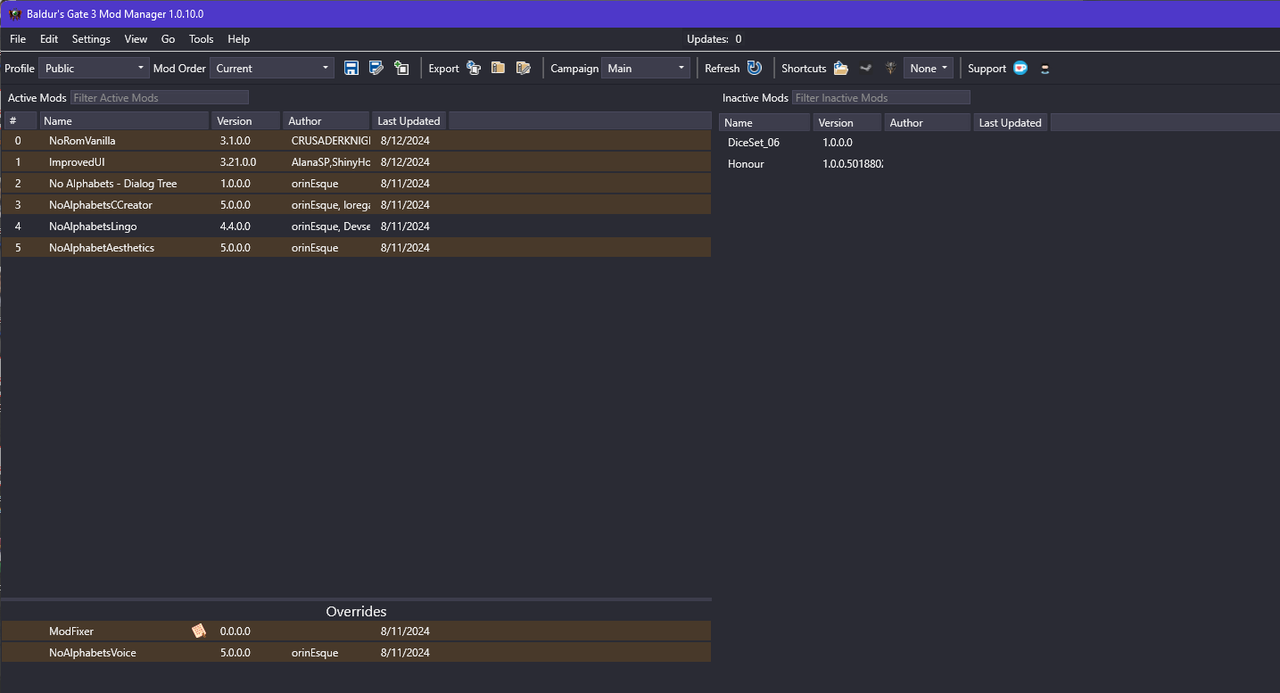
Make sure you haven't installed the English version. And show me your load order.DonCatalonia wrote: ↑ August 12th, 2024, 06:01Alright so I installed everything and its working great. I am having issues with the translation tho. I am trying to use the spanish translation but it is not working. I have tried extracting the files both manually and with the mod manager and the game is still showing up in english. Am I doing anything wrong or I will have to live with it?
Victors clap when others succeed; Losers feel every spotlight as a personal bleed.
-
DonCatalonia
- Posts: 8
- Joined: Aug 12, '24
-
Geolocation
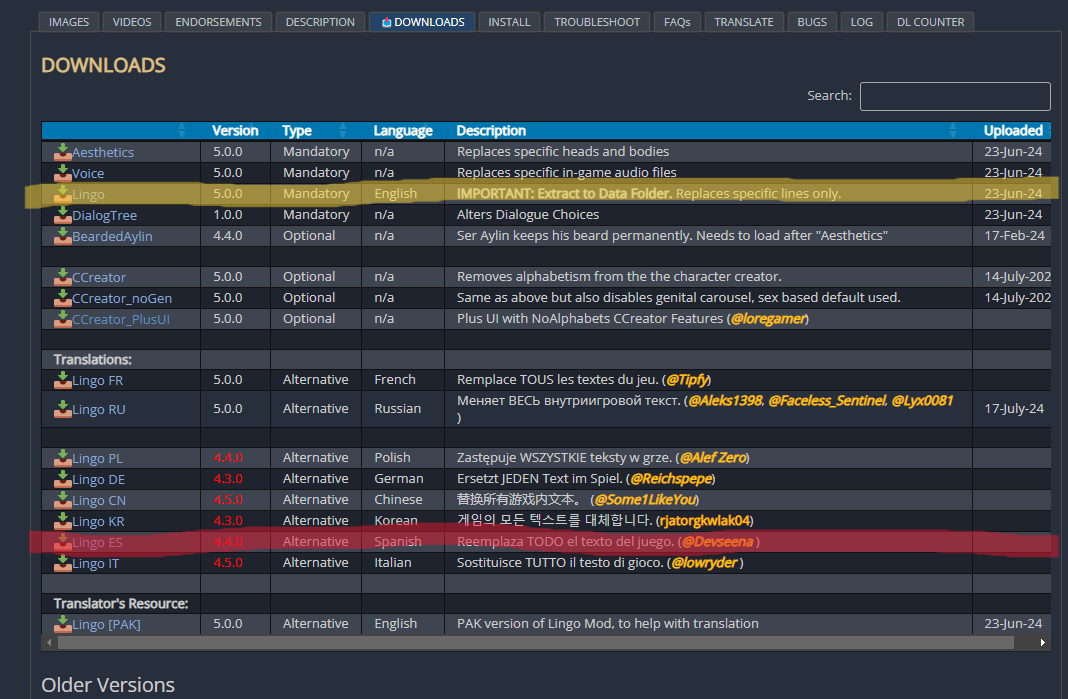
Hi! sorry for the late response and thank you for helping me. I installed the file highlighted in yellow as it was described in the install instructions. The spanish translation in the bottom I installed it afterwards, I did it with the mod manager, it didnt work, I tried installing it manually and it didnt work either.orinEsque wrote: ↑ August 12th, 2024, 10:17Make sure you haven't installed the English version. And show me your load order.DonCatalonia wrote: ↑ August 12th, 2024, 06:01Alright so I installed everything and its working great. I am having issues with the translation tho. I am trying to use the spanish translation but it is not working. I have tried extracting the files both manually and with the mod manager and the game is still showing up in english. Am I doing anything wrong or I will have to live with it?
I am guessing the problem is that I installed the first file, I see in its description it says that it changes all the text lines and subtitles. Its the file that has to be installed in the BG3 Data folder. How do I correct this?
-
orinEsque
- Posts: 4918
- Joined: Oct 9, '23
- Location: Dubai
- Gender: Potato
-
Geolocation
Your problem is definitely that you installed the english version.DonCatalonia wrote: ↑ August 12th, 2024, 15:17Hi! sorry for the late response and thank you for helping me. I installed the file highlighted in yellow as it was described in the install instructions. The spanish translation in the bottom I installed it afterwards, I did it with the mod manager, it didnt work, I tried installing it manually and it didnt work either.orinEsque wrote: ↑ August 12th, 2024, 10:17Make sure you haven't installed the English version. And show me your load order.DonCatalonia wrote: ↑ August 12th, 2024, 06:01Alright so I installed everything and its working great. I am having issues with the translation tho. I am trying to use the spanish translation but it is not working. I have tried extracting the files both manually and with the mod manager and the game is still showing up in english. Am I doing anything wrong or I will have to live with it?
I am guessing the problem is that I installed the first file, I see in its description it says that it changes all the text lines and subtitles. Its the file that has to be installed in the BG3 Data folder. How do I correct this?
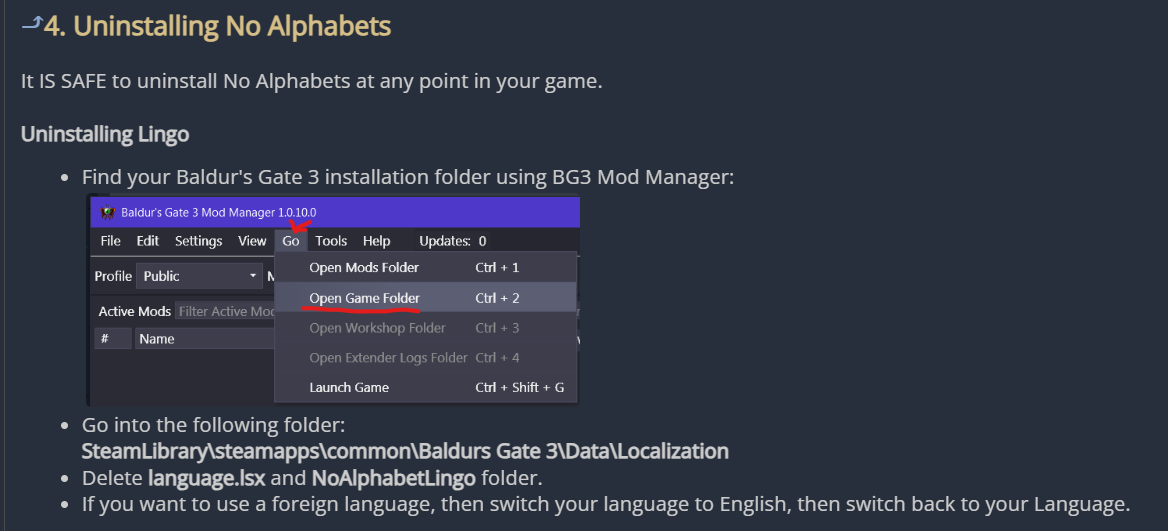
Go to NoAlphabets --> Install --> Uninstalling No Alphabets it has the instructions on how to remove it.
Last edited by orinEsque on August 12th, 2024, 16:16, edited 3 times in total.
Victors clap when others succeed; Losers feel every spotlight as a personal bleed.
-
DonCatalonia
- Posts: 8
- Joined: Aug 12, '24
-
Geolocation
Alright I believe I managed to change the game to my language. Just to be sure, what am I supposed to do with the LingoES file? Installing it with the mod manager is good enough? If so I think I am good to go now.orinEsque wrote: ↑ August 12th, 2024, 16:11Your problem is definitely that you installed the english version.DonCatalonia wrote: ↑ August 12th, 2024, 15:17Hi! sorry for the late response and thank you for helping me. I installed the file highlighted in yellow as it was described in the install instructions. The spanish translation in the bottom I installed it afterwards, I did it with the mod manager, it didnt work, I tried installing it manually and it didnt work either.orinEsque wrote: ↑ August 12th, 2024, 10:17
Make sure you haven't installed the English version. And show me your load order.
I am guessing the problem is that I installed the first file, I see in its description it says that it changes all the text lines and subtitles. Its the file that has to be installed in the BG3 Data folder. How do I correct this?
Go to NoAlphabets --> Install --> Uninstalling No Alphabets it has the instructions on how to remove it.
![Image]()
Thank you so much!
-
orinEsque
- Posts: 4918
- Joined: Oct 9, '23
- Location: Dubai
- Gender: Potato
-
Geolocation
Yep just install normally using mod manager.DonCatalonia wrote: ↑ August 12th, 2024, 16:43Alright I believe I managed to change the game to my language. Just to be sure, what am I supposed to do with the LingoES file? Installing it with the mod manager is good enough? If so I think I am good to go now.orinEsque wrote: ↑ August 12th, 2024, 16:11Your problem is definitely that you installed the english version.DonCatalonia wrote: ↑ August 12th, 2024, 15:17
Hi! sorry for the late response and thank you for helping me. I installed the file highlighted in yellow as it was described in the install instructions. The spanish translation in the bottom I installed it afterwards, I did it with the mod manager, it didnt work, I tried installing it manually and it didnt work either.
I am guessing the problem is that I installed the first file, I see in its description it says that it changes all the text lines and subtitles. Its the file that has to be installed in the BG3 Data folder. How do I correct this?
Go to NoAlphabets --> Install --> Uninstalling No Alphabets it has the instructions on how to remove it.
![Image]()
Thank you so much!
Victors clap when others succeed; Losers feel every spotlight as a personal bleed.