Page 1 of 1
[Closed] Localisation do not work
Posted: April 17th, 2024, 11:56
by Faceless_Sentinel
For some reason, after i done "new way of translating", game do not load needed localization, it is loading english with edits of NoAlphabet translation (places where there were edits are in Russsian, everything else is in english).
langusage.lsx:
► Show Spoiler
Code: Select all
<?xml version="1.0" encoding="UTF-8" ?>
<save>
    <header version="2" time="1534250670" />
    <version major="3" minor="6" revision="0" build="3" />
    <region id="Config">
        <node id="root">
            <children>
                <node id="ConfigEntry">
                    <attribute id="MapKey" value="Language" type="22" />
                    <attribute id="Type" value="1" type="5" />
                    <attribute id="Value" value="Russian" type="20" />
                </node>
                <node id="ConfigEntry">
                    <attribute id="MapKey" value="Language" type="22" />
                    <attribute id="Type" value="1" type="5" />
                    <attribute id="Value" value="NoAlphabetsLingoRU" type="20" />
                </node>
            </children>
        </node>
    </region>
</save>
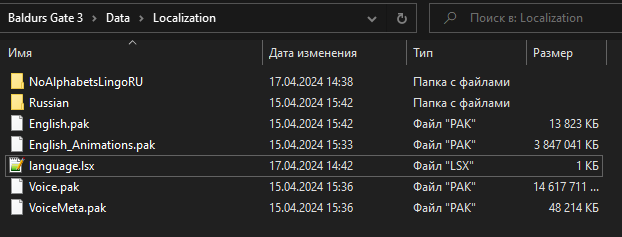
Localization folder:
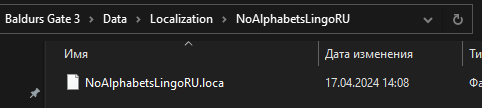
NoAlphabetsLingoRU folder:
Localisation do not work
Posted: April 17th, 2024, 13:28
by orinEsque
Faceless_Sentinel wrote: ↑
April 17th, 2024, 11:56
For some reason, after i done "new way of translating", game do not load needed localization, it is loading english with edits of NoAlphabet translation (places where there were edits are in Russsian, everything else is in english).
langusage.lsx:
► Show Spoiler
Code: Select all
<?xml version="1.0" encoding="UTF-8" ?>
<save>
    <header version="2" time="1534250670" />
    <version major="3" minor="6" revision="0" build="3" />
    <region id="Config">
        <node id="root">
            <children>
                <node id="ConfigEntry">
                    <attribute id="MapKey" value="Language" type="22" />
                    <attribute id="Type" value="1" type="5" />
                    <attribute id="Value" value="Russian" type="20" />
                </node>
                <node id="ConfigEntry">
                    <attribute id="MapKey" value="Language" type="22" />
                    <attribute id="Type" value="1" type="5" />
                    <attribute id="Value" value="NoAlphabetsLingoRU" type="20" />
                </node>
            </children>
        </node>
    </region>
</save>
Localization folder:
NoAlphabetsLingoRU folder:
Can you change your language to English then back to Russian. And screenshot what the language.lsx file looks like?
Localisation do not work
Posted: April 17th, 2024, 14:25
by Faceless_Sentinel
orinEsque wrote: ↑
April 17th, 2024, 13:28
Faceless_Sentinel wrote: ↑
April 17th, 2024, 11:56
For some reason, after i done "new way of translating", game do not load needed localization, it is loading english with edits of NoAlphabet translation (places where there were edits are in Russsian, everything else is in english).
langusage.lsx:
► Show Spoiler
Code: Select all
<?xml version="1.0" encoding="UTF-8" ?>
<save>
    <header version="2" time="1534250670" />
    <version major="3" minor="6" revision="0" build="3" />
    <region id="Config">
        <node id="root">
            <children>
                <node id="ConfigEntry">
                    <attribute id="MapKey" value="Language" type="22" />
                    <attribute id="Type" value="1" type="5" />
                    <attribute id="Value" value="Russian" type="20" />
                </node>
                <node id="ConfigEntry">
                    <attribute id="MapKey" value="Language" type="22" />
                    <attribute id="Type" value="1" type="5" />
                    <attribute id="Value" value="NoAlphabetsLingoRU" type="20" />
                </node>
            </children>
        </node>
    </region>
</save>
Localization folder:
NoAlphabetsLingoRU folder:
Can you change your language to English then back to Russian. And screenshot what the language.lsx file looks like?
How can I do this? I use langusage.lsx to change language to russian manually from the release.
Localisation do not work
Posted: April 17th, 2024, 14:57
by orinEsque
Faceless_Sentinel wrote: ↑
April 17th, 2024, 14:25
orinEsque wrote: ↑
April 17th, 2024, 13:28
Faceless_Sentinel wrote: ↑
April 17th, 2024, 11:56
For some reason, after i done "new way of translating", game do not load needed localization, it is loading english with edits of NoAlphabet translation (places where there were edits are in Russsian, everything else is in english).
langusage.lsx:
► Show Spoiler
Code: Select all
<?xml version="1.0" encoding="UTF-8" ?>
<save>
    <header version="2" time="1534250670" />
    <version major="3" minor="6" revision="0" build="3" />
    <region id="Config">
        <node id="root">
            <children>
                <node id="ConfigEntry">
                    <attribute id="MapKey" value="Language" type="22" />
                    <attribute id="Type" value="1" type="5" />
                    <attribute id="Value" value="Russian" type="20" />
                </node>
                <node id="ConfigEntry">
                    <attribute id="MapKey" value="Language" type="22" />
                    <attribute id="Type" value="1" type="5" />
                    <attribute id="Value" value="NoAlphabetsLingoRU" type="20" />
                </node>
            </children>
        </node>
    </region>
</save>
Localization folder:
NoAlphabetsLingoRU folder:
Can you change your language to English then back to Russian. And screenshot what the language.lsx file looks like?
How can I do this? I use langusage.lsx to change language to russian manually from the release.
Are you on steam?
Then you can do that from settings in the game page
Localisation do not work
Posted: April 17th, 2024, 15:40
by Faceless_Sentinel
Gog. Larian Launcher will do?
Localisation do not work
Posted: April 17th, 2024, 15:45
by orinEsque
No it doesn't. What I'll do it diagnose this myself. On my end. Obviously if it works I'll see Russian everywhere and English where no alphabets should be in my case
Localisation do not work
Posted: April 17th, 2024, 16:30
by Faceless_Sentinel
orinEsque wrote: ↑
April 17th, 2024, 15:45
No it doesn't. What I'll do it diagnose this myself. On my end. Obviously if it works I'll see Russian everywhere and English where no alphabets should be in my case
Here, loca file. It would be great.
https://f.rpghq.org/w3KAsy3hgtYU.loca?n ... ngoRU.loca
Localisation do not work
Posted: April 17th, 2024, 18:59
by orinEsque
Tested it out. Game will only accept one translation at a time. So non English translations have to be done the old way

. I've added a PAK version of the Lingo file just in case you need it.
Localisation do not work
Posted: April 17th, 2024, 20:00
by Faceless_Sentinel
orinEsque wrote: ↑
April 17th, 2024, 18:59
Tested it out. Game will only accept one translation at a time. So non English translations have to be done the old way
. I've added a PAK version of the Lingo file just in case you need it.
I hope they will not do anything with loca files anymore in the future. By your lines, in my localization additionally need to edit about 70 more (this is only those that found), I will not survive once again edit all lines by my hands.
Localisation do not work
Posted: April 17th, 2024, 20:44
by orinEsque
Faceless_Sentinel wrote: ↑
April 17th, 2024, 20:00
orinEsque wrote: ↑
April 17th, 2024, 18:59
Tested it out. Game will only accept one translation at a time. So non English translations have to be done the old way
. I've added a PAK version of the Lingo file just in case you need it.
I hope they will not do anything with loca files anymore in the future. By your lines, in my localization additionally need to edit about 70 more (this is only those that found), I will not survive once again edit all lines by my hands.
Have you not moved the lines you need to the bottom of your loca file? This way you don't need to do it every time.
Localisation do not work
Posted: April 18th, 2024, 05:54
by Faceless_Sentinel
orinEsque wrote: ↑
April 17th, 2024, 20:44
Faceless_Sentinel wrote: ↑
April 17th, 2024, 20:00
I hope they will not do anything with loca files anymore in the future. By your lines, in my localization additionally need to edit about 70 more (this is only those that found), I will not survive once again edit all lines by my hands.
Have you not moved the lines you need to the bottom of your loca file? This way you don't need to do it every time.
I moved them, but I'm afraid that they make changes so big in the future, that I will forced to do it once more.
Localisation do not work
Posted: April 18th, 2024, 11:07
by orinEsque
Faceless_Sentinel wrote: ↑
April 18th, 2024, 05:54
orinEsque wrote: ↑
April 17th, 2024, 20:44
Faceless_Sentinel wrote: ↑
April 17th, 2024, 20:00
I hope they will not do anything with loca files anymore in the future. By your lines, in my localization additionally need to edit about 70 more (this is only those that found), I will not survive once again edit all lines by my hands.
Have you not moved the lines you need to the bottom of your loca file? This way you don't need to do it every time.
I moved them, but I'm afraid that they make changes so big in the future, that I will forced to do it once more.
Until i do nine fingers i think we will have only few lines here and there