
We have a Steam curator now. You should be following it. https://store.steampowered.com/curator/44994899-RPGHQ/

[Helldivers 2] Updating outdated mods
Moderator: Mod Janitor
-
Twiglite

- Posts: 2
- Joined: Feb 4, '26
-
Geolocation

Hey yeah this armor does thankfully work in-game. There was another armor mod I had downloaded that did this and a few of the units failed to be repatched for some reason so I just assumed the big purple balls meant bad lol. I'm not really sure why that other one is failing to repatch all the way (usually 4 of the 19 units fail the first time, then when I delete all of the units and try again they all succeed, but none of the models show up in-game and only parts of the base model show up.) Maybe it's just a quirk of how the mod was made? Like the repatcher can't recognize the manifest or something? I'm unfortunately on the less enlightened end of Helldivers 2 modding so I dunno.
Last edited by Twiglite on February 4th, 2026, 12:00, edited 1 time in total.
-
loregamer

- Site Moderator
- Posts: 5060
- Joined: Dec 3, '23
-
Geolocation


It's also possible that the armor has been changed somehow and the mod is no longer compatible. Something something composite meshes? (I'm speaking nonsense, I'm ******** at modeling)Twiglite wrote: ↑ February 4th, 2026, 11:58Hey yeah this armor does thankfully work in-game. There was another armor mod I had downloaded that did this and a few of the units failed to be repatched for some reason so I just assumed the big purple balls meant bad lol. I'm not really sure why that other one is failing to repatch all the way (usually 4 of the 19 units fail the first time, then when I delete all of the units and try again they all succeed, but none of the models show up in-game and only parts of the base model show up.) Maybe it's just a quirk of how the mod was made? Like the repatcher can't recognize the manifest or something? I'm unfortunately on the less enlightened end of Helldivers 2 modding so I dunno.
Jingle Jangle Jingle
-
Chicho
- Posts: 2
- Joined: Feb 4, '26
-
Geolocation
Hello im new to blender and i tried updating this armor set https://www.nexusmods.com/helldivers2/mods/3999 for the sr-34 armor set and i ran into an issue. it updated properly but when i launched the game, the torso was missing as well as a floating shoulder piece. I have no idea whats causing it or how to fix it. if you could spare me some of your time to guide me on how to fix this issue that would be greatly appreciated.
-
Antares30
- Posts: 1
- Joined: Jul 26, '25
-
Geolocation
I've been trying to use the folder patcher to fix the SR-24 hellhound armor and I can't get it working. Still crashes the game after patching. And no errors are thrown after using the patcher either.
-
poloska

- Posts: 6
- Joined: Feb 6, '26
-
Geolocation
I have the same problem, but my armor doesn't work and I get broken bones.loregamer wrote: ↑ February 4th, 2026, 03:52Those are static meshes. Does the armor work in game? Can ignore it if soTwiglite wrote: ↑ February 4th, 2026, 03:25Hey there! Looking to use this plugin to repatch a bunch of my mods I had downloaded that got broken in the update, but I've encountered this issue shown a few times. I'm not sure what's causing it as it doesn't throw an error or anything. Any help would be greatly appreciated.

If not, then I need to rethink Repatch logic
And the manual method didn't help either.
-
Chicho
- Posts: 2
- Joined: Feb 4, '26
-
Geolocation
I get the same thing as twiglite for the hellcat NSFW and dina armor in blender, except when i hit repatch for some reason the chest piece increases in scale from 1 to 100 causing it to have a missing chest piece.
-
loregamer
- Site Moderator
- Posts: 5060
- Joined: Dec 3, '23
-
Geolocation
Could one of you bros infiltrate the Discord and get the repatch instructions from the HD2 Modding team? I am wondering if there are special steps that are missing. You just need to open a ticket on the HD2 Modding discord and prove you've posted and own a mod needing repatching on Nexus
Then just leak that gatekept ***** knowledge here
Then just leak that gatekept ***** knowledge here
Last edited by loregamer on February 6th, 2026, 19:30, edited 1 time in total.
Jingle Jangle Jingle
-
loregamer
- Site Moderator
- Posts: 5060
- Joined: Dec 3, '23
-
Geolocation
I think I've identified a critical step in the repatch process required. Needs testing tho
TLDR, for static meshes, we need to set BoneInfoIndex and delete unused vertex groups, I think
TLDR, for static meshes, we need to set BoneInfoIndex and delete unused vertex groups, I think
Last edited by loregamer on February 6th, 2026, 19:31, edited 1 time in total.
Jingle Jangle Jingle
-
loregamer
- Site Moderator
- Posts: 5060
- Joined: Dec 3, '23
-
Geolocation
LEGACY WEIGHT NAMES. That's the ******* gatekept knowledge.
HD2 Modding Community team, get raped you *******. Billions must repatch
HD2 Modding Community team, get raped you *******. Billions must repatch
Jingle Jangle Jingle
-
yahtzee6
- Posts: 26
- Joined: Jul 16, '25
-
Geolocation
Open Blender, Open the SDK menu
Load the Base Archive by clicking [STAR] button
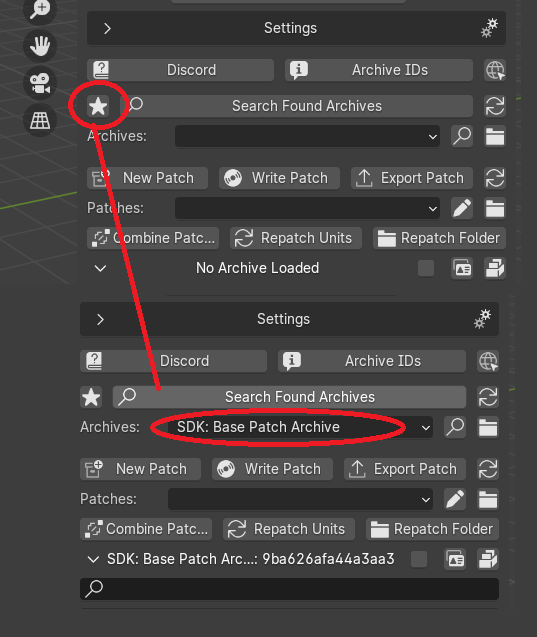
Use the lower [FOLDER] icon to load your patch files
Select and Import all your changed meshes from your patch (these will have a [SHIELD] symbol next to them)
[If they dont show up, go to Settings at the top, look at "Import Options" then tick "Import Static Meshes"]
There's also a little checkbox you can enable to show only content that is inside your patch
Once all your meshes have been imported, click the [SHIELD] next to each mesh ID to remove them from the patch
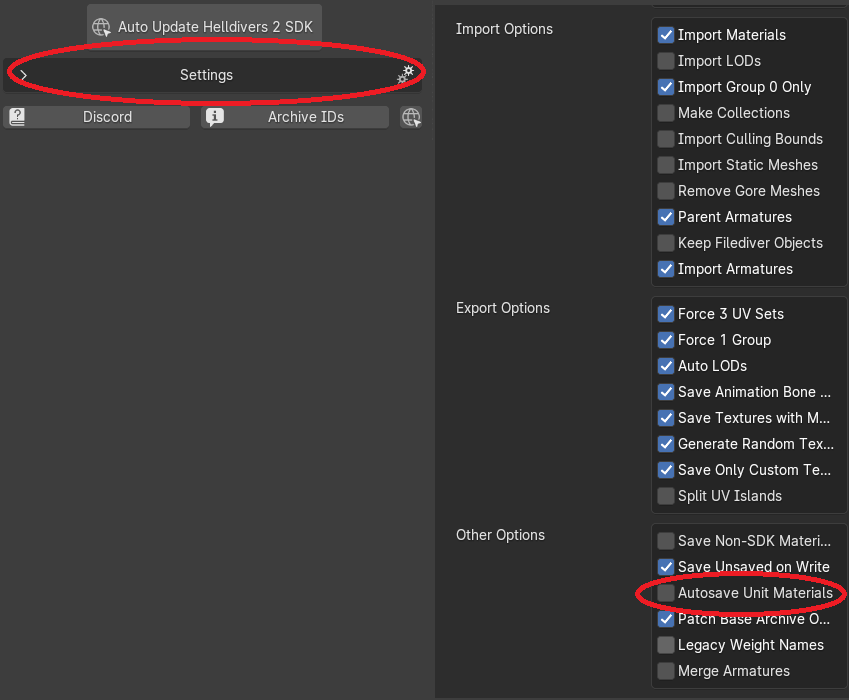
In the SDK Settings, disable Autosave Unit Materials
(for repatching only)
Now, in the actual model viewer window, click SELECT > ALL and highlight all the meshes you've imported to the project
Right Click the highlighted group, click SAVE UNITS
Once your project unfreezes, click Write Patch
Export Patch to any folder then load file into the mod manager (HD2MM/Arsenal)
NOTES:
If your mod is an ID Swap, you cannot repatch it
You need the original file
If its bugging out (unusually large):
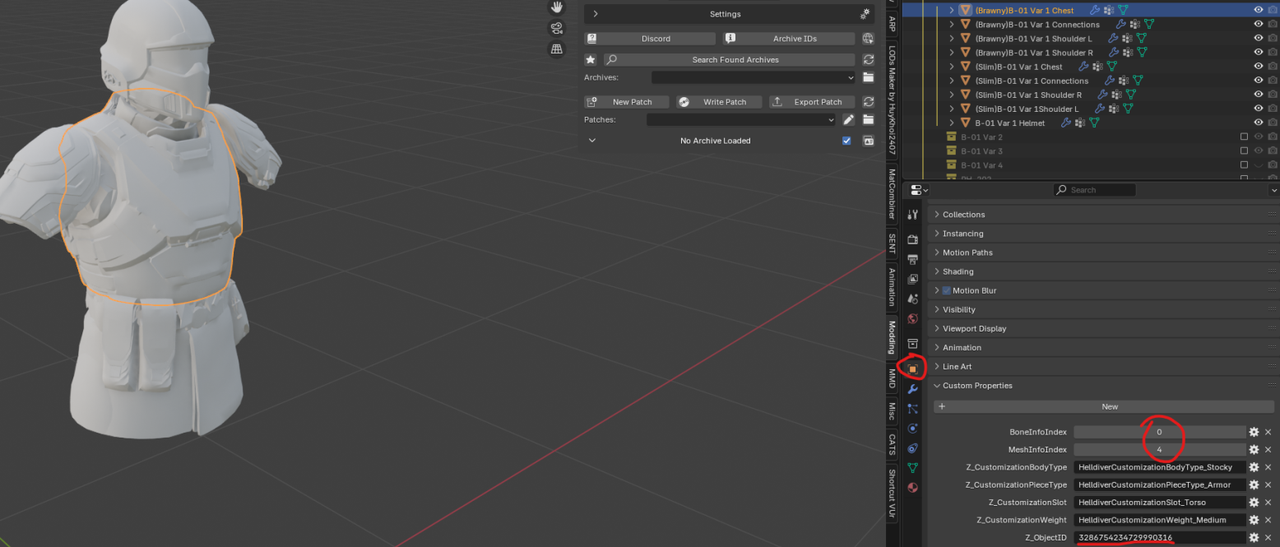
Update your MeshInfoIndex.
Import the original in-game model. Check the properties on it.
Fix your custom model to match the new properties.
Load the Base Archive by clicking [STAR] button
Use the lower [FOLDER] icon to load your patch files
Select and Import all your changed meshes from your patch (these will have a [SHIELD] symbol next to them)
[If they dont show up, go to Settings at the top, look at "Import Options" then tick "Import Static Meshes"]
There's also a little checkbox you can enable to show only content that is inside your patch
Once all your meshes have been imported, click the [SHIELD] next to each mesh ID to remove them from the patch
In the SDK Settings, disable Autosave Unit Materials
(for repatching only)
Now, in the actual model viewer window, click SELECT > ALL and highlight all the meshes you've imported to the project
Right Click the highlighted group, click SAVE UNITS
Once your project unfreezes, click Write Patch
Export Patch to any folder then load file into the mod manager (HD2MM/Arsenal)
NOTES:
If your mod is an ID Swap, you cannot repatch it
You need the original file
If its bugging out (unusually large):
Update your MeshInfoIndex.
Import the original in-game model. Check the properties on it.
Fix your custom model to match the new properties.
Last edited by yahtzee6 on March 20th, 2026, 06:41, edited 1 time in total.
-
loregamer
- Site Moderator
- Posts: 5060
- Joined: Dec 3, '23
-
Geolocation
OOOOOOOOHHHHHHHHHH. Alright, thank you. This in particular is very helpful to knowyahtzee6 wrote: ↑ February 6th, 2026, 23:25Load Up Blender, Open the SDK menu
Load the Base Archive by clicking [STAR] button
Use the lower [FOLDER] icon to load your patch files
Select and Import all your changed meshes from your patch (these will have a [SHIELD] symbol next to them)
There's also a little checkbox you can enable to show only content that is inside your patch
Once all your meshes have been imported, click the [SHIELD] next to each mesh ID to remove them from the patch
In the SDK Settings, disable Autosave Unit Materials
(for repatching only)
Now, in the actual model viewer window, click SELECT > ALL and highlight all the meshes you've imported to the project
Right Click the highlighted group, click SAVE UNITS
Once your project unfreezes, click Write Patch
Export Patch to any folder then load file into the mod manager (HD2MM/Arsenal)
NOTES:
If your mod is an ID Swap, you cannot repatch
You need the original file
If its bugging out (unusually large):
Update your MeshInfoIndex.
Import the original in-game model. Check the properties on it.
Fix your custom model to match the new properties.
It explains everythingIf your mod is an ID Swap, you cannot repatch
Last edited by loregamer on February 7th, 2026, 00:45, edited 1 time in total.
Jingle Jangle Jingle
-
loregamer
- Site Moderator
- Posts: 5060
- Joined: Dec 3, '23
-
Geolocation
I think we CAN repatch ID Swapped armors based on my findings today, but no promises
Jingle Jangle Jingle
-
DrSneed

- Posts: 759
- Joined: Jan 1, '25
-
Geolocation
The plethora of gooncoons will be ecstaticloregamer wrote: ↑ February 6th, 2026, 19:48LEGACY WEIGHT NAMES. That's the ******* gatekept knowledge.
HD2 Modding Community team, get raped you *******. Billions must repatch
-
yahtzee6
- Posts: 26
- Joined: Jul 16, '25
-
Geolocation
Glad to help. I despise ******** modders that think they are obligated over stolen assets and are just hypocrites when they cry someone else does it to them
Believe me, I've tried several times after every update mod crash and even the HD2 Discord fagmins can't do it since a lot of their stuff is also IDswapped.
Its necessary to repatch the main file, then IDswap it again every time.
Feel free to tryloregamer wrote: ↑ February 7th, 2026, 00:46I think we CAN repatch ID Swapped armors based on my findings today, but no promises
Believe me, I've tried several times after every update mod crash and even the HD2 Discord fagmins can't do it since a lot of their stuff is also IDswapped.
Its necessary to repatch the main file, then IDswap it again every time.
-
loregamer
- Site Moderator
- Posts: 5060
- Joined: Dec 3, '23
-
Geolocation
I just implemented swap source detection. The cheat arrow mod seems to use Illuminate: Overship as its base. I just need to reverse the swapping processyahtzee6 wrote: ↑ February 7th, 2026, 01:05Feel free to try
Believe me, I've tried several times after every update mod crash and even the HD2 Discord fagmins can't do it since a lot of their stuff is also IDswapped.
Its necessary to repatch the main file, then IDswap it again every time.
Last edited by loregamer on February 7th, 2026, 01:15, edited 1 time in total.
Jingle Jangle Jingle
-
loregamer
- Site Moderator
- Posts: 5060
- Joined: Dec 3, '23
-
Geolocation
Do you know an armor I can test this? Something not updated that used swaps? @yahtzee6
One that isn't for gooners, preferably
One that isn't for gooners, preferably
Jingle Jangle Jingle
-
poloska
- Posts: 6
- Joined: Feb 6, '26
-
Geolocation
well, I've been trying to fix this mod https://www.nexusmods.com/helldivers2/mods/5676 (dp-40), but it's not working. The body parts are missing and the bones are broken.
Can someone help me, or am I doing something wrong?
Can someone help me, or am I doing something wrong?
-
Oyster Sauce

- Site Moderator
- Posts: 11291
- Joined: Jun 2, '23
-
Geolocation
Adventurer's Guild


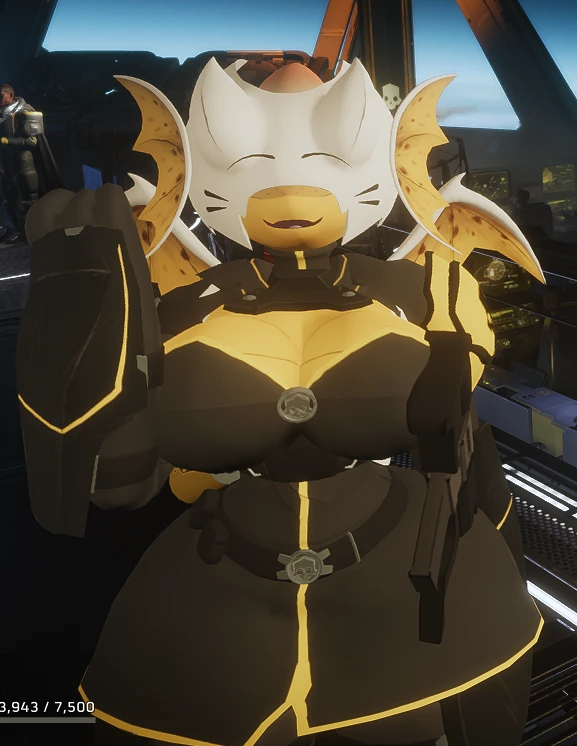
poloska wrote: ↑ February 7th, 2026, 10:28well, I've been trying to fix this mod https://www.nexusmods.com/helldivers2/mods/5676 (dp-40), but it's not working. The body parts are missing and the bones are broken.
Can someone help me, or am I doing something wrong?
-
poloska
- Posts: 6
- Joined: Feb 6, '26
-
Geolocation
I just did everything in the guide, but I can't do it. In the manual method, the model doesn't replace itself.Oyster Sauce wrote: ↑ February 7th, 2026, 10:37poloska wrote: ↑ February 7th, 2026, 10:28well, I've been trying to fix this mod https://www.nexusmods.com/helldivers2/mods/5676 (dp-40), but it's not working. The body parts are missing and the bones are broken.
Can someone help me, or am I doing something wrong?
-
loregamer
- Site Moderator
- Posts: 5060
- Joined: Dec 3, '23
-
Geolocation
-
poloska
- Posts: 6
- Joined: Feb 6, '26
-
Geolocation
yes there is such a thing, but it still doesn't work, maybe I should write a tutorial for fools (me)
it doesn't change the model even in manual mode
-
Aha_wasp
- Posts: 2
- Joined: Feb 8, '26
-
Geolocation
Alright so I'm ******. I'm trying to update this mod - https://www.nexusmods.com/helldivers2/mods/5869 - but this ******* torso WILL NOT stay put. I've tried all three ways of repatching documented on here, but the torso is way too big and it's rotated. I know that yahtzee6 said something about this, but I'm ******** and don't know what any of that means. Any help would be appreciated, because I'm bugging the hell out.
-
Oyster Sauce
- Site Moderator
- Posts: 11291
- Joined: Jun 2, '23
-
Geolocation
Adventurer's Guild
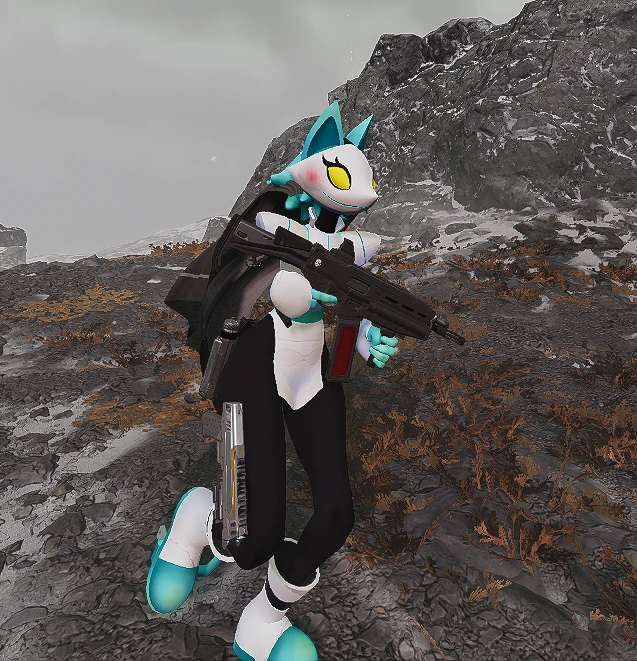
Aha_wasp wrote: ↑ February 8th, 2026, 20:06Alright so I'm ******. I'm trying to update this mod - https://www.nexusmods.com/helldivers2/mods/5869 - but this ******* torso WILL NOT stay put. I've tried all three ways of repatching documented on here, but the torso is way too big and it's rotated. I know that yahtzee6 said something about this, but I'm ******** and don't know what any of that means. Any help would be appreciated, because I'm bugging the hell out.
-
Aha_wasp
- Posts: 2
- Joined: Feb 8, '26
-
Geolocation
uh... yeah that's the one!Oyster Sauce wrote: ↑ February 8th, 2026, 20:34Aha_wasp wrote: ↑ February 8th, 2026, 20:06Alright so I'm ******. I'm trying to update this mod - https://www.nexusmods.com/helldivers2/mods/5869 - but this ******* torso WILL NOT stay put. I've tried all three ways of repatching documented on here, but the torso is way too big and it's rotated. I know that yahtzee6 said something about this, but I'm ******** and don't know what any of that means. Any help would be appreciated, because I'm bugging the hell out.
-
loregamer
- Site Moderator
- Posts: 5060
- Joined: Dec 3, '23
-
Geolocation
You guys are lucky my drive to spite modders outweighs not wanting to see these
Jingle Jangle Jingle
-
poloska
- Posts: 6
- Joined: Feb 6, '26
-
Geolocation
well, modding wasn't always a good thing.loregamer wrote: ↑ February 8th, 2026, 22:07You guys are lucky my drive to spite modders outweighs not wanting to see these
and the author asked me for $40 to update the mod, lol
-
Magick

- Posts: 3133
- Joined: Jan 29, '24
- Location: USA
- Gender: Potato
-
Geolocation
Adventurer's Guild


Lore will do it for $39.poloska wrote: ↑ February 9th, 2026, 08:01well, modding wasn't always a good thing.loregamer wrote: ↑ February 8th, 2026, 22:07You guys are lucky my drive to spite modders outweighs not wanting to see these
and the author asked me for $40 to update the mod, lol
-
Midnightus_III
- Posts: 1
- Joined: Feb 11, '26
-
Geolocation
Anyone know how to update mod files that have alternative files, such as like.. i dunno an armour variant?
I've been trying for hours to see if there is a way to update it but i'm at a loss forgive the degeneracy, but if anyone can take a look and get back to me it'd be most appreciated. https://www.nexusmods.com/helldivers2/m ... ?tab=files
I've been trying for hours to see if there is a way to update it but i'm at a loss forgive the degeneracy, but if anyone can take a look and get back to me it'd be most appreciated. https://www.nexusmods.com/helldivers2/m ... ?tab=files
-
loregamer
- Site Moderator
- Posts: 5060
- Joined: Dec 3, '23
-
Geolocation
I can't
Jingle Jangle Jingle
-
Finarfin

- Connoisseur of Slop
- Posts: 5020
- Joined: May 20, '24
- Location: Tirion upon Túna
-
Geolocation
Adventurer's Guild


asking here but feel free to remove the post but how does one make a music replacer mod? wanted to add music to the Ship.
Steam code: 10514930
My Reviews:
El Matador RECOMMENDED
Dungeons of Sundaria NOT RECOMMENDED
VLADiK BRUTAL RECOMMENDED
Ultimate Zombie Defense 2 INFORMATIONAL
Deathless: The Hero Quest RECOMMENDED
Door Kickers 2 RECOMMENDED
Folklands INFORMATIONAL
My Reviews:
El Matador RECOMMENDED
Dungeons of Sundaria NOT RECOMMENDED
VLADiK BRUTAL RECOMMENDED
Ultimate Zombie Defense 2 INFORMATIONAL
Deathless: The Hero Quest RECOMMENDED
Door Kickers 2 RECOMMENDED
Folklands INFORMATIONAL