We have a Steam curator now. You should be following it. https://store.steampowered.com/curator/44994899-RPGHQ/
Chat client updated, if you have issues using chat press CTRL + SHIFT + R to force a hard refresh.

[BG3] Modding BG3 - Getting Started

Game development hub. Projects, modding, and resources.

Moderator: Mod Janitor

Ignore Topic
User avatar
orinEsque
Posts: 4918
Joined: Oct 9, '23
Location: Dubai
Gender: Potato

Geolocation

[BG3] Modding BG3 - Getting Started

Post by orinEsque »

Index
  1. Prerequisites
  2. Unpacking Game Files
  3. Using the BG3MT Search function
  4. Creating a .pak Mod that works with mod managers
  5. How to change your mod's version
  6. Unpacking an existing mod
  7. Modding Best Practices
  8. How to change NPC visuals [redirect]
  9. How to change Voice using AI [redirect]
  10. Using Virtual Textures
  11. Editing Dialogue / Ingame Text [redirect]
  12. Generate Portraits Automatically [redirect]


[back to index]
1.Prerequisites
  1. BG3 Multimodders Tool (BG3MT) - Download
  2. Norbyte's Lslib Tool - Download
  3. Notepad++ - Download

    If you intend to edit/create BG3 meshes in blender:
  4. Norbyte's Collada/GR2 Blender plugin - Download
[back to index]
2.Unpacking Game Files
  1. Open BG3 Multimodders Tool (BG3MT)
  2. Click on "Configuration" & set your BG3.exe path to where is steamlibrary folder is. This should be something like: C:\SteamLibrary\steamapps\common\Baldurs Gate 3\bin\bg3.exe
  3. Set your game's document folder to: C:\Users\yourUserrname\AppData\Local\Larian Studios\Baldur's Gate 3
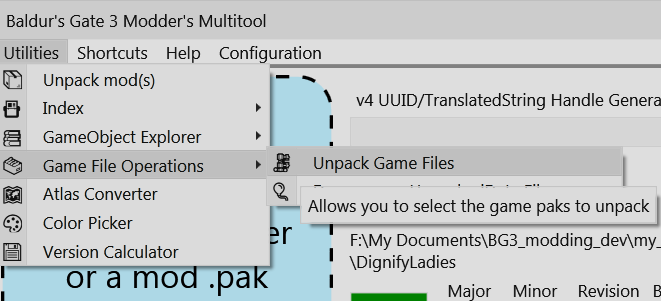
  4. Now go to Utilities > Game File Operations > Unpack Game Files
    Image
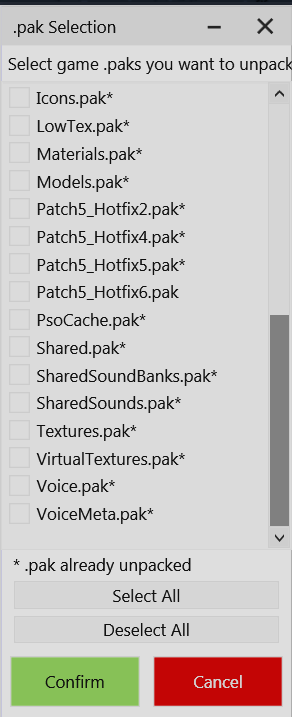
  5. Unpack the relevant pak file, or all if you have enough disk space.
    ► Which .pak do I need?
    Image
  6. Game File Operations > Decompress Unpacked Game Files
    Image
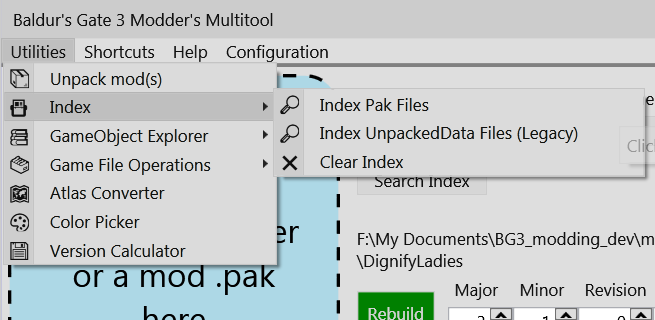
  7. Index > Index Pak Files
    Image
  8. Index > Index Unpacked Files
Last edited by orinEsque on September 24th, 2024, 01:36, edited 45 times in total.
Victors clap when others succeed; Losers feel every spotlight as a personal bleed.
User avatar
orinEsque
Posts: 4918
Joined: Oct 9, '23
Location: Dubai
Gender: Potato

Geolocation

Post by orinEsque »

[back to index]
3. Using the BG3MT Search function
Once you have indexed your game files, BG3MT can be used to search for contents of these game files.
Starting with an easy example, let's say I want to find the file that defines what Lorroakan looks like.
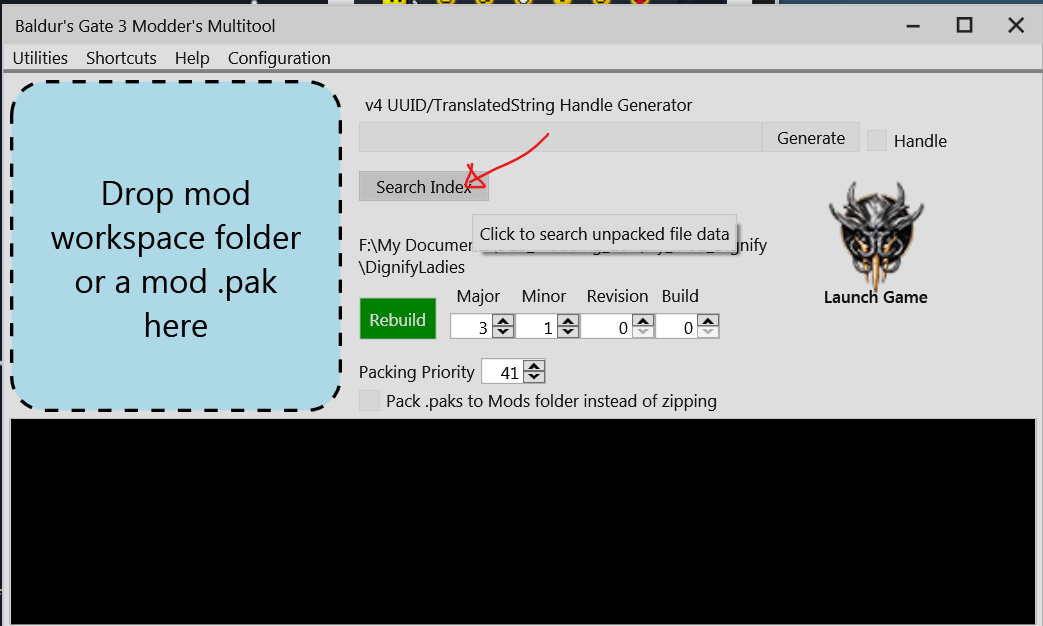
  1. Click Search Index
    Image
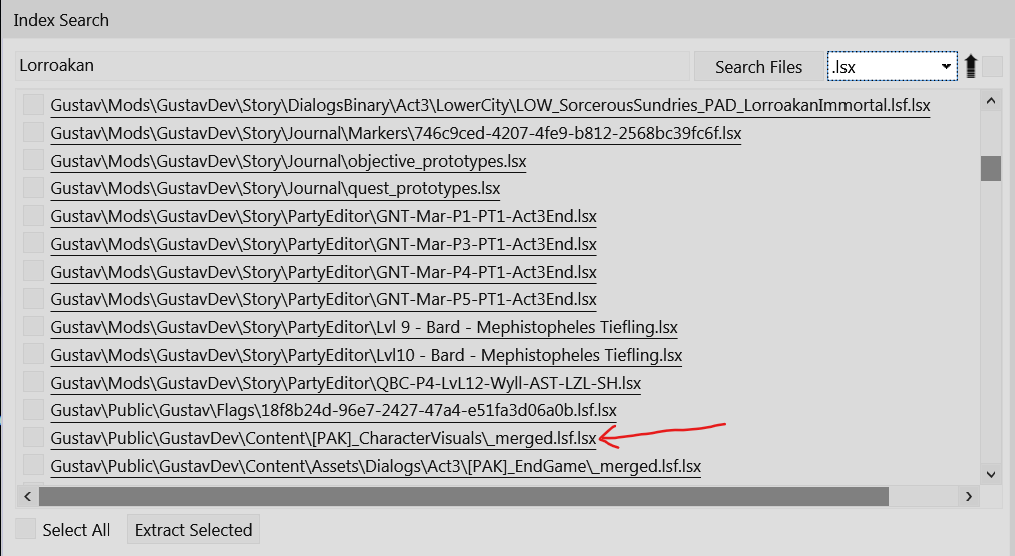
  2. Search "Lorroakan". And set file type to .lsx
  3. Scroll down till you find [PAK]CharacterVisuals\_merged.lsf.lsx
    Image
  4. Open this file in notepad++
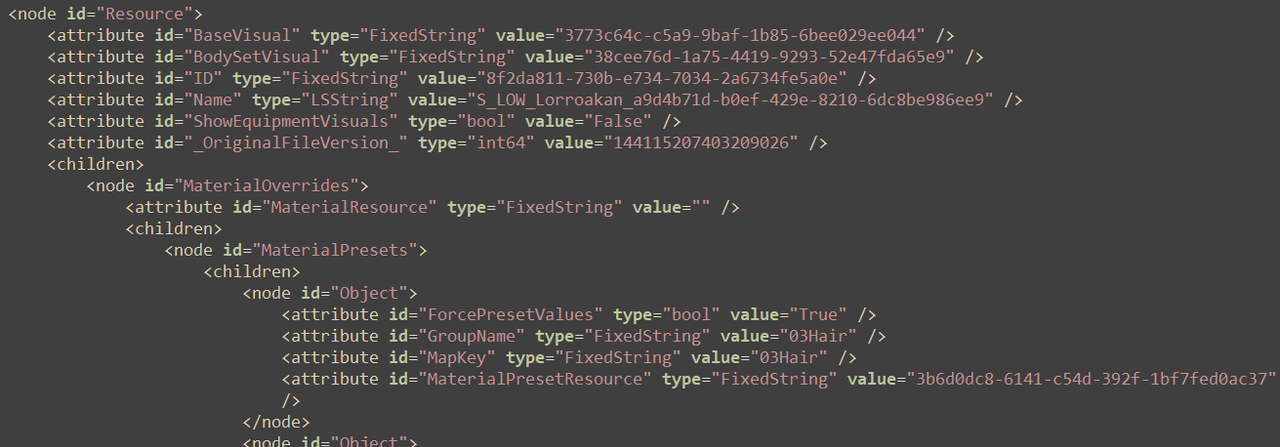
  5. Do a search (Ctrl+F) for "Lorroakan" and it should take you to the section that defines his visuals.
  6. What you have here is an xml file. It's similar to bbcode in that it has "tags" that open and close. <mytag> some text </mytag>
    Image
Last edited by orinEsque on March 6th, 2024, 14:57, edited 7 times in total.
Victors clap when others succeed; Losers feel every spotlight as a personal bleed.
User avatar
orinEsque
Posts: 4918
Joined: Oct 9, '23
Location: Dubai
Gender: Potato

Geolocation

Post by orinEsque »

[back to index]
4. Creating a .pak mod that works with mod managers
  1. Let's create myFirstMod-v1.0.
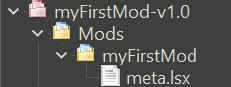
  2. Create a folder named myFirstMod-v1.0
  3. Inside create a folder called "Mods".
  4. Inside the "Mods" folder create a unique folder name that corresponds to your mod but without spaces e.g: called myFirstMod. This folder name is important.
    ► you can skip these step now
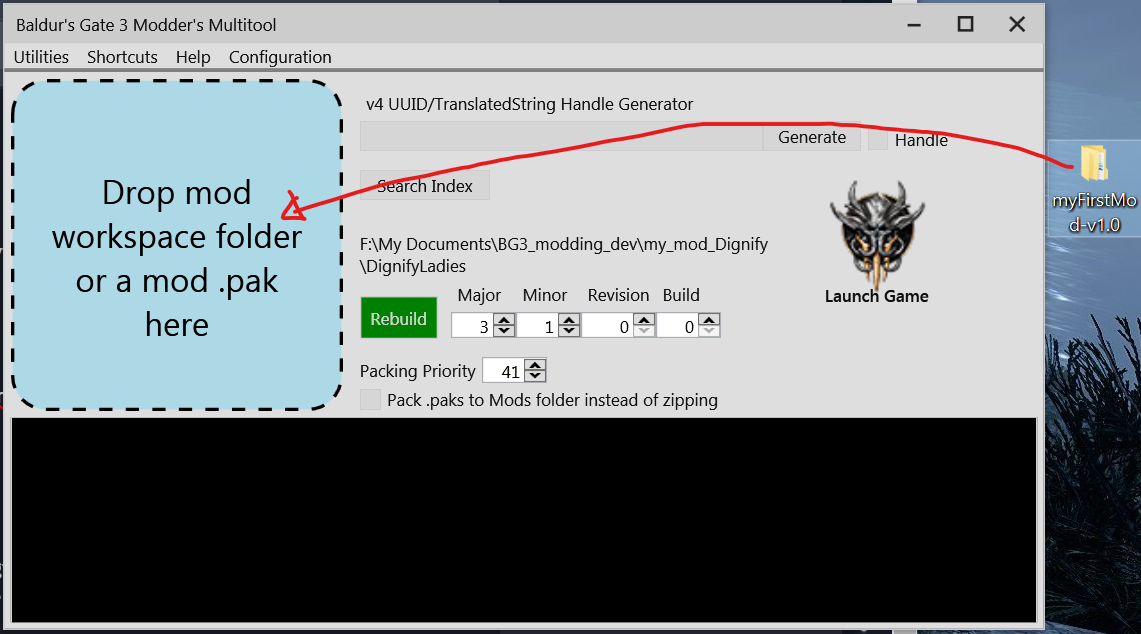
  5. Now you can drop the myFirstMod-v1.0 folder into the blue area in BG3MTool.
    Image
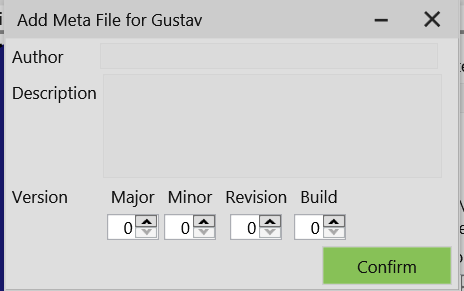
  6. Now BG3MT will as you to put Author, Description and Version.
    Image
  7. Make sure you set version to be higher than 0.0.0.0. Otherwise your mod may not work.
  8. This will now create myFirstMod-v1.0.zip. It doesn't do anything in the game yet but if you drop it in your mod manager, it will show up as a mod.
Last edited by orinEsque on April 22nd, 2024, 23:03, edited 12 times in total.
Victors clap when others succeed; Losers feel every spotlight as a personal bleed.
User avatar
orinEsque
Posts: 4918
Joined: Oct 9, '23
Location: Dubai
Gender: Potato

Geolocation

Post by orinEsque »

[back to index]
5. How to change your Mod's version
  1. Open BG3 Multi Modders Tool (BG3MT)
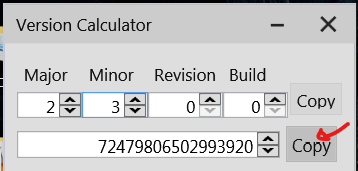
  2. Go to Utilities > Version Calculator
  3. I want version 2.3. So set it and copy the long number
    Image
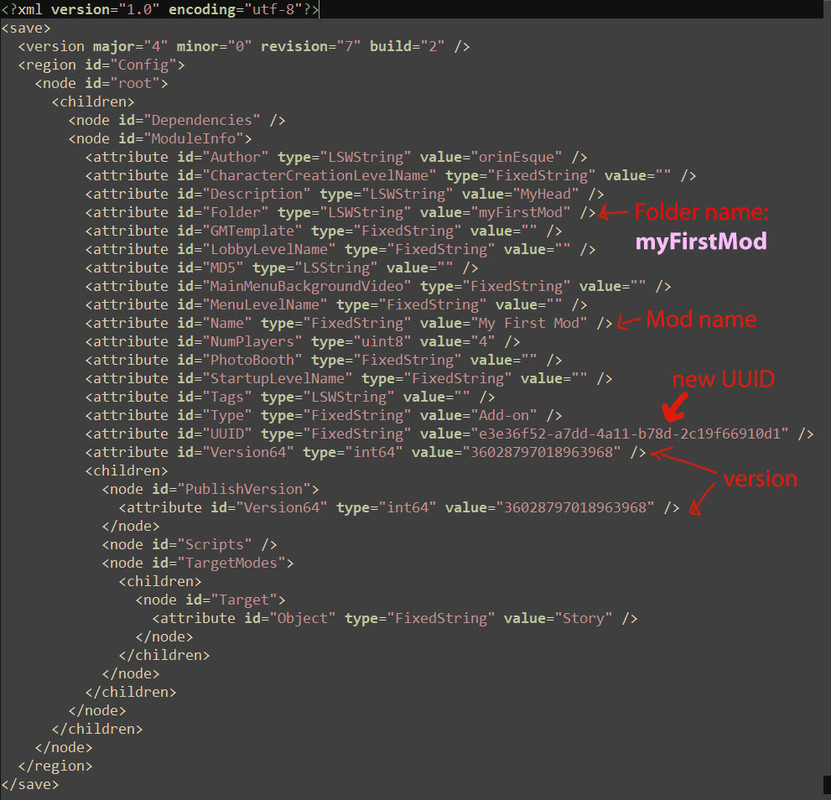
  4. Paste this in place of the two long numbers indicated as version.
    Image
[back to index]
6. Unpack an Existing mod
  1. If the mod is in a zip file, unzip it.
  2. Open BG3MT
  3. Drop the .pak file in the blue area
  4. Then go to Shortcuts > Unpacked Mods
  5. You should see a folder corresponding to the .pak file's name. Congratz, you have unpacked the mod!
[back to index]
7. Modding Best Practices
Only use the necessary assets & make your mod future proof.
  1. LSF files in the same file path after SharedDev, Shared, GustavDev, Gustav all merge together into one before the game is loaded. E.g.
    • Public / SharedDev /Content/[PAK]Character_visual/merged.lsf
    • Public / Shared /Content/[PAK]Character_visual merged.lsf
    • Public / GustavDev /Content/ [PAK]Character_visual /merged.lsf
    • Public / Gustav /Content/[PAK]Character_visual /merged.lsf
    • Public / yourmodname /Content/[PAK]Character_visual /merged.lsf.
    All the LSF files from above get merged into one big xml file. With yourmodname/merged.lsf getting priority.
  2. Renaming your merged.lsf to random.lsf still works.
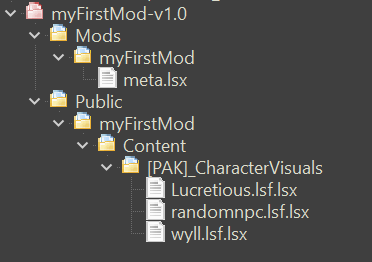
  3. Multiple .lsf files can be dropped in the same Public/yourmodname/ folder and have the same effect as dropping Gustav/../merged.lsf and GustavDev /../merged.lsf separately. E.g.
    Image
  4. Your mod’s LSF file does NOT need to contain everything from the original file if you use this file convention:
    • Public/Yourmodname/Content/[PAK]Character_visual /renamed.lsf
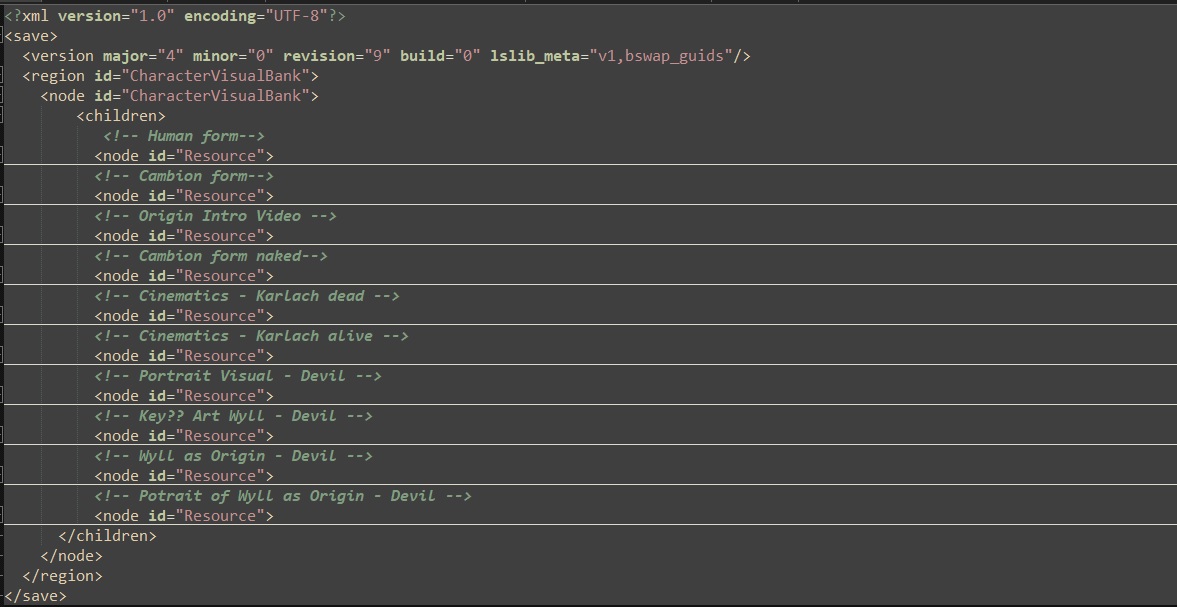
    This way you can avoid issues like headless cats! being changed in a new patch. And your mod size will be tiny because your .LSF file will only contain the code for the character you changed only. E.g. I have only included Wyll’s variables so instead of a 100000+ lines, I have 2500.
    Image
  5. Note: EVERYTHING between a <node=”Resource”> and </node> has to be included otherwise if you change eye colour in the Resource and leave out the rest. You’ll just have floating eyes.
  6. It's best to use the LSV from the latest PatchXHotfixY.pak file instead of the one from Gustav.pak or Shared.pak when you first build your mod.
  7. Finally, you can pack your mod into a handy little zip file using bg3-modders-multitool, and we can easily import stuff into BG3 manager. This way we can decide which mod gets priority if two mods have some clashing character Resources.
Last edited by orinEsque on March 6th, 2024, 17:42, edited 9 times in total.
Victors clap when others succeed; Losers feel every spotlight as a personal bleed.
User avatar
Oyster Sauce
Site Moderator
Posts: 11293
Joined: Jun 2, '23

Geolocation

Adventurer's Guild

Post by Oyster Sauce »

I tried making a mod and it seemed too difficult so I gave up. Now, thanks to this guide, I know I was correct.
Last edited by Oyster Sauce on February 17th, 2024, 02:01, edited 1 time in total.
User avatar
Magick
Posts: 3133
Joined: Jan 29, '24
Location: USA
Gender: Potato

Geolocation

Adventurer's Guild

Post by Magick »

Oyster Sauce wrote: February 17th, 2024, 02:01
I tried making a mod and it seemed too difficult so I gave up. Now, thanks to this guide, I know I was correct.
If a woman can do it, why can't you? ;)
User avatar
Kowe
Posts: 386
Joined: Feb 6, '24
Gender: Helicopter

Geolocation

Adventurer's Guild

Post by Kowe »

A rather general question. What programming language is used for Baldur's Gate 3 ? Someone said C# and Lua on a Steam forum post. Is this correct ?
I am only a bit familiar with Java and Python (therefore some general knowledge), but it can't hurt to dive deeper into the code in the long-run.
User avatar
rusty_shackleford
Site Admin
Posts: 45467
Joined: Feb 2, '23
Gender: Watermelon

Geolocation

Adventurer's Guild

Post by rusty_shackleford »

Kowe wrote: February 21st, 2024, 22:04
What programming language is used for Baldur's Gate 3 ?
Engine is in C++, scripting is done in their own scripting language that is based on prolog/datalog.
Thank you for your attention to this matter!
Steam friend code: 40552640 https://steamcommunity.com/friends/add | email: [email protected]
Having trouble running an old Windows game?
Rusty's Stuff Collection
User avatar
Kowe
Posts: 386
Joined: Feb 6, '24
Gender: Helicopter

Geolocation

Adventurer's Guild

Post by Kowe »

rusty_shackleford wrote: February 21st, 2024, 22:06
Kowe wrote: February 21st, 2024, 22:04
What programming language is used for Baldur's Gate 3 ?
Engine is in C++, scripting is done in their own scripting language that is based on prolog/datalog.
Thank you very much!
Time to get some good tutorials/books/PDFs for both.
User avatar
rusty_shackleford
Site Admin
Posts: 45467
Joined: Feb 2, '23
Gender: Watermelon

Geolocation

Adventurer's Guild

Post by rusty_shackleford »

Kowe wrote: February 21st, 2024, 22:09
rusty_shackleford wrote: February 21st, 2024, 22:06
Kowe wrote: February 21st, 2024, 22:04
What programming language is used for Baldur's Gate 3 ?
Engine is in C++, scripting is done in their own scripting language that is based on prolog/datalog.
Thank you very much!
Time to get some good tutorials/books/PDFs for both.
The only one of the two used by modders will be the latter, but not until they release their devkit.
Thank you for your attention to this matter!
Steam friend code: 40552640 https://steamcommunity.com/friends/add | email: [email protected]
Having trouble running an old Windows game?
Rusty's Stuff Collection
User avatar
Tweed
Turtle
Turtle
Posts: 6837
Joined: Feb 2, '23

Geolocation

Adventurer's Guild

Post by Tweed »

BobT wrote: February 17th, 2024, 02:19
Oyster Sauce wrote: February 17th, 2024, 02:01
I tried making a mod and it seemed too difficult so I gave up. Now, thanks to this guide, I know I was correct.
If a woman can do it, why can't you? ;)
>woman
User avatar
AtomicSpaceKitty
Posts: 8
Joined: Dec 4, '23

Geolocation

Post by AtomicSpaceKitty »

Thank you so much, @orinEsque , for these tutorials. They helped me to figure out how to merge your No Alphabets Lingo file with the Show Approval Ratings mod. :toot:
User avatar
orinEsque
Posts: 4918
Joined: Oct 9, '23
Location: Dubai
Gender: Potato

Geolocation

Post by orinEsque »

AtomicSpaceKitty wrote: March 2nd, 2024, 04:35
Thank you so much, @orinEsque , for these tutorials. They helped me to figure out how to merge your No Alphabets Lingo file with the Show Approval Ratings mod. :toot:
Glad I could help!
Victors clap when others succeed; Losers feel every spotlight as a personal bleed.
User avatar
gastovski
Posts: 264
Joined: Dec 15, '23
Location: Earth
Gender: Watermelon

Geolocation

Post by gastovski »

Is it possible to convert spells to cantrips? there is a nice paladin overhaul mod on nexus but its a bit tedious to play atm.
User avatar
orinEsque
Posts: 4918
Joined: Oct 9, '23
Location: Dubai
Gender: Potato

Geolocation

Post by orinEsque »

gastovski wrote: April 16th, 2024, 11:43
Is it possible to convert spells to cantrips? there is a nice paladin overhaul mod on nexus but its a bit tedious to play atm.
@Slavic Sorcerer may be able to answer this question
Victors clap when others succeed; Losers feel every spotlight as a personal bleed.
User avatar
Slavic Sorcerer
Posts: 905
Joined: Sep 9, '23
Location: Poland

Geolocation

Post by Slavic Sorcerer »

orinEsque wrote: April 16th, 2024, 11:53
@Slavic Sorcerer may be able to answer this question
Thanks for tagging me :heart:
gastovski wrote: April 16th, 2024, 11:43
Is it possible to convert spells to cantrips? there is a nice paladin overhaul mod on nexus but its a bit tedious to play atm.
It is possible. I didn't do it (yet), but part of my Cleric and Paladin mod project (still WIP) was converting NPC spells into Player ones.
Converting a spell to a cantrip shouldn't be too different.

What spell you'd want to convert to a cantrip? I could write a guide on the process.
Last edited by Slavic Sorcerer on April 16th, 2024, 13:57, edited 2 times in total.
It's just my opinion, not the absolute truth
___________________________________

"Why don't you put that in your signature instead of having to type it every week?"
~Dead about me being gay

"Read his signature, he's gay"
~Dead
User avatar
gastovski
Posts: 264
Joined: Dec 15, '23
Location: Earth
Gender: Watermelon

Geolocation

Post by gastovski »

i think i have figured it out
► Show Spoiler
i have removed spell slot costs so instead converting it only costs bonus action i hope it wont be op later, thanks for response
User avatar
bloodedhunter
Posts: 167
Joined: May 24, '24

Geolocation

Post by bloodedhunter »

So here's another really important question: How do we create and modify custom equipment stats and attributes?
I'm just a simple man, trying to make my way in the universe.
User avatar
orinEsque
Posts: 4918
Joined: Oct 9, '23
Location: Dubai
Gender: Potato

Geolocation

Post by orinEsque »

bloodedhunter wrote: May 27th, 2024, 02:56
So here's another really important question: How do we create and modify custom equipment stats and attributes?
To modify weapons, you'll have to edit Weapon.txt
Image

Sample Equipment Mod on nexus shows you how to Add Equipment
https://www.nexusmods.com/baldursgate3/mods/249
Last edited by orinEsque on May 28th, 2024, 02:22, edited 1 time in total.
Victors clap when others succeed; Losers feel every spotlight as a personal bleed.
User avatar
Dhanriel
Posts: 3
Joined: Jul 26, '24

Geolocation

Post by Dhanriel »

Is there any tutorial for creating a deity? I want to add two selectable deities on the creation screen for a cleric: the God of Failures and 'None.' Initially, just that, but later, I'd also like to know how to modify dialogues so I can add or change certain dialogues to accommodate these deities.
User avatar
orinEsque
Posts: 4918
Joined: Oct 9, '23
Location: Dubai
Gender: Potato

Geolocation

Post by orinEsque »

Dhanriel wrote: August 3rd, 2024, 01:46
Is there any tutorial for creating a deity? I want to add two selectable deities on the creation screen for a cleric: the God of Failures and 'None.' Initially, just that, but later, I'd also like to know how to modify dialogues so I can add or change certain dialogues to accommodate these deities.
Never tried creating a deity. I would try and see if anyone made one in nexus and reverse engineer it.

In terms of dialogue, you can add new text dialogue in loca.xml files like this:

1. So my mod is called HoodofAthkatla. So the loca file is also named HoodofAthkatla.loca.xml
Image

2. These are the contents:
Image
► code snippet
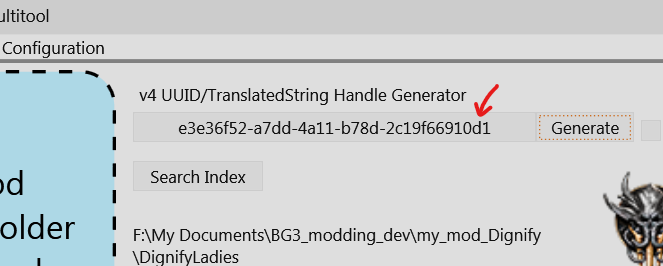
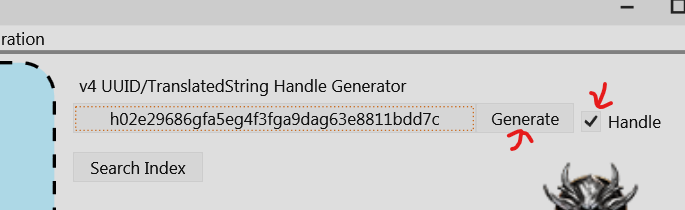
3. Each line is a ingame text. It has a unique handle given by the contentuid. you can create one using BG3MT by ticking the "Handle" box and clicking generate
Image
Last edited by orinEsque on August 3rd, 2024, 01:55, edited 2 times in total.
Victors clap when others succeed; Losers feel every spotlight as a personal bleed.