


Definitely also interested in updating some mods that are outdated. Running into similar issues with this process that you did with the NCR in the post. Looking forward to any updates if you find them, appreciate the guide.loregamer wrote: ↑ May 18th, 2025, 03:14Shoutout to the Helldivers 2 modding Discord for motivating me to write this guide (lol @ this)
We have a Steam curator now. You should be following it. https://store.steampowered.com/curator/44994899-RPGHQ/
[Helldivers 2] Updating outdated mods
Moderator: Mod Janitor
-
unit899

- Posts: 6
- Joined: Aug 28, '25
-
Geolocation
[Helldivers 2] Updating outdated mods
-
loregamer

- Site Moderator
- Posts: 5063
- Joined: Dec 3, '23
-
Geolocation


What mod are you trying to update? I can help take a lookunit899 wrote: ↑ August 29th, 2025, 13:05Definitely also interested in updating some mods that are outdated. Running into similar issues with this process that you did with the NCR in the post. Looking forward to any updates if you find them, appreciate the guide.loregamer wrote: ↑ May 18th, 2025, 03:14Shoutout to the Helldivers 2 modding Discord for motivating me to write this guide (lol @ this)
Last edited by loregamer on October 7th, 2025, 20:27, edited 2 times in total.
Jingle Jangle Jingle
-
unit899
- Posts: 6
- Joined: Aug 28, '25
-
Geolocation
I'm mostly looking at (very slightly nsfw warning?)loregamer wrote: ↑ August 29th, 2025, 13:07What mod are you trying to update? I can help take a lookunit899 wrote: ↑ August 29th, 2025, 13:05Definitely also interested in updating some mods that are outdated. Running into similar issues with this process that you did with the NCR in the post. Looking forward to any updates if you find them, appreciate the guide.loregamer wrote: ↑ May 18th, 2025, 03:14Shoutout to the Helldivers 2 modding Discord for motivating me to write this guide (lol @ this)
► Show Spoiler
-
loregamer
- Site Moderator
- Posts: 5063
- Joined: Dec 3, '23
-
Geolocation
I don't have that armor so I can't fully test, but I forked the HD2SDK Blender plugin with a repatching utility. Will release soon
Don't have to load archives, will just have to load the original patch and click a button
Don't have to load archives, will just have to load the original patch and click a button
Jingle Jangle Jingle
-
loregamer
- Site Moderator
- Posts: 5063
- Joined: Dec 3, '23
-
Geolocation
@unit899 Replace your HD2SDK blender addon with my version:
 HD2SDK-HQ_Edition.zip
Just load the patch and then click this:

Lemme know how it goes
 HD2SDK-HQ_Edition.zip
Just load the patch and then click this:
Lemme know how it goes
Last edited by loregamer on August 29th, 2025, 18:22, edited 2 times in total.
Jingle Jangle Jingle
-
unit899
- Posts: 6
- Joined: Aug 28, '25
-
Geolocation

Looks like about the same result as when i did it via the guide, maybe I'm doing something wrong?
Process for this one with your version of the SDK was
-Load Base Archive
-Load Patch
-Click Repatch Meshes
-Export Patch
-Load with HD2 Mod Manager
-
loregamer
- Site Moderator
- Posts: 5063
- Joined: Dec 3, '23
-
Geolocation
-
loregamer
- Site Moderator
- Posts: 5063
- Joined: Dec 3, '23
-
Geolocation
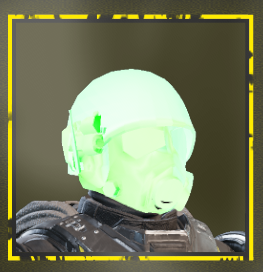
I think there's a material issue that all old mods have, like a missing material or something. When I slapped a random glowing Advanced material onto the NCR ranger armor, its icon shows up @unit899
Jingle Jangle Jingle
-
loregamer
- Site Moderator
- Posts: 5063
- Joined: Dec 3, '23
-
Geolocation
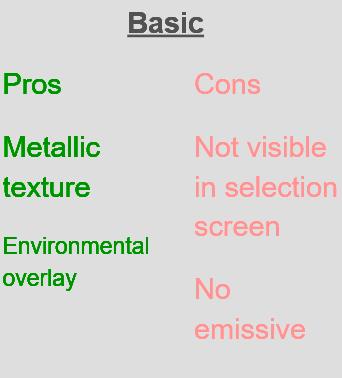
Ah. It's just a Basic material issue. It needs to be converted to a different one
Jingle Jangle Jingle
-
unit899
- Posts: 6
- Joined: Aug 28, '25
-
Geolocation
loregamer wrote: ↑ August 29th, 2025, 17:04I think there's a material issue that all old mods have, like a missing material or something. When I slapped a random glowing Advanced material onto the NCR ranger armor, its icon shows up @unit899
I see, I'm still pretty new to this stuff so I'm not exactly sure what the steps forward would be from here, but I appreciate the insight for sure.loregamer wrote: ↑ August 29th, 2025, 17:13Ah. It's just a Basic material issue. It needs to be converted to a different one
-
loregamer
- Site Moderator
- Posts: 5063
- Joined: Dec 3, '23
-
Geolocation
No worries. There's no good way to do this since the HD2 modding community has intentionally made info obscure and gatekept
I'll figure out a good way to convert Basic materials to Basic+
I'll figure out a good way to convert Basic materials to Basic+
Last edited by loregamer on August 29th, 2025, 17:24, edited 1 time in total.
Jingle Jangle Jingle
-
loregamer
- Site Moderator
- Posts: 5063
- Joined: Dec 3, '23
-
Geolocation
@unit899 Alright give this a try:
HD2SDK-HQ_Edition-2
I added a way to convert Basic materials to Basic+
Just right click on the Materials that are Basic (You can tell since it has three textures, PBR, Base Color, and Normal)
Then click Convert To Basic+
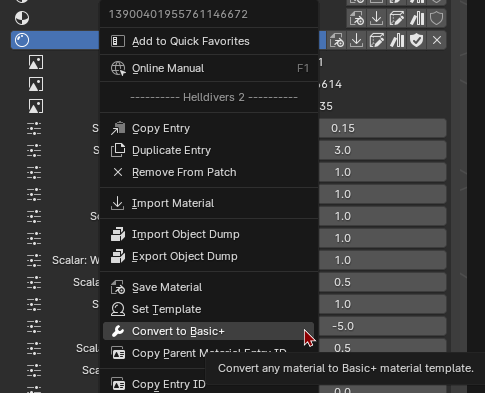
This will break Emissions on the armor if there are any, though. So only do if there are no glowing parts on the armor
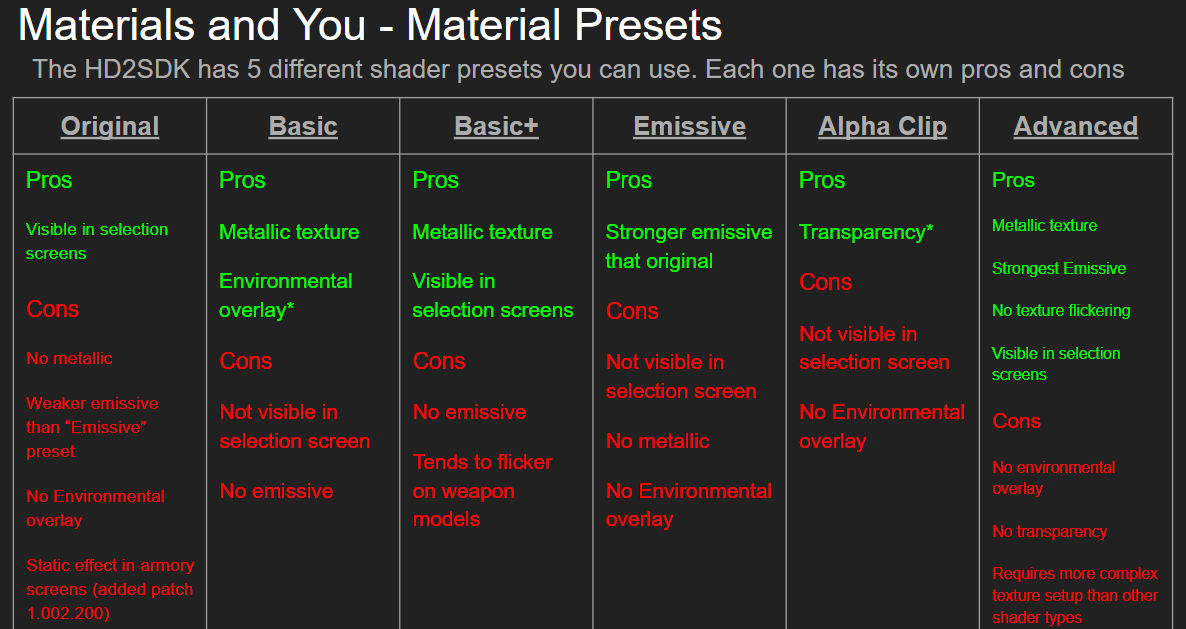
HD2SDK-HQ_Edition-2I added a way to convert Basic materials to Basic+
Just right click on the Materials that are Basic (You can tell since it has three textures, PBR, Base Color, and Normal)
Then click Convert To Basic+
This will break Emissions on the armor if there are any, though. So only do if there are no glowing parts on the armor
Last edited by loregamer on August 29th, 2025, 18:22, edited 2 times in total.
Jingle Jangle Jingle
-
unit899
- Posts: 6
- Joined: Aug 28, '25
-
Geolocation
I think? I did this right, not 100% sure I got all/the right materials swapped over (Was having some trouble identifying them) correctly but same result as before.loregamer wrote: ↑ August 29th, 2025, 17:34@unit899 Alright give this a try:
I added a way to convert Basic materials to Basic+
Just right click on the Materials that are Basic (You can tell since it has three textures, PBR, Base Color, and Normal)
Then click Convert To Basic+

Not sure if I'm missing a step regarding needing to do anything on other armor archives or not? (Since this mod affects two armors being the CE-81 Juggernaut and the FS-34 Exterminator.)
Process was -
- Load Base Archive
- Load Patch
- Repatch Meshes
- Convert Basic Materials to Basic+
- Export Patch
- Load with HD2 Mod Manager
-
loregamer
- Site Moderator
- Posts: 5063
- Joined: Dec 3, '23
-
Geolocation
Try converting the materials first. Saving meshes can mess with the material because of this setting

Jingle Jangle Jingle
-
unit899
- Posts: 6
- Joined: Aug 28, '25
-
Geolocation
Still the same result. Feels like I might be missing something / doing something wrong but not exactly sure where or what.loregamer wrote: ↑ August 29th, 2025, 18:26Try converting the materials first. Saving meshes can mess with the material because of this setting
-
loregamer
- Site Moderator
- Posts: 5063
- Joined: Dec 3, '23
-
Geolocation
Maybe try another mod and see how it goes
Jingle Jangle Jingle
-
Gwymble
- Posts: 5
- Joined: Aug 31, '25
-
Geolocation
got a question, when I patched the old model everything shows up fine in blender i do the export and load it hd2, but in game the torso and arms are still the original model, the helmet and lower half changed just not the torso or arms
-
loregamer
- Site Moderator
- Posts: 5063
- Joined: Dec 3, '23
-
Geolocation
I think that means the armor has been modularized and needs manual intervention? Just guessing though
I'll update the blender addon to allow force overriding of meshes so you can just re-save it on multiple pieces
I'll update the blender addon to allow force overriding of meshes so you can just re-save it on multiple pieces
Jingle Jangle Jingle
-
Gwymble
- Posts: 5
- Joined: Aug 31, '25
-
Geolocation
thanks that makes sense, um one more question i tried updating a weapon and i got everything lined up, looks ok, but now its got like weird lighting effects kinda like ghosting. thanks for the tool and the help!loregamer wrote: ↑ August 31st, 2025, 15:44I think that means the armor has been modularized and needs manual intervention? Just guessing though
I'll update the blender addon to allow force overriding of meshes so you can just re-save it on multiple pieces
-
loregamer
- Site Moderator
- Posts: 5063
- Joined: Dec 3, '23
-
Geolocation
-
Gwymble
- Posts: 5
- Joined: Aug 31, '25
-
Geolocation
ridoxt g36c for the adjudicator https://www.nexusmods.com/helldivers2/mods/2559
-
Gwymble
- Posts: 5
- Joined: Aug 31, '25
-
Geolocation

Last edited by Gwymble on August 31st, 2025, 16:48, edited 1 time in total.
-
loregamer
- Site Moderator
- Posts: 5063
- Joined: Dec 3, '23
-
Geolocation
Can this guy have Vault access? @rusty_shackleford
Jingle Jangle Jingle
-
loregamer
- Site Moderator
- Posts: 5063
- Joined: Dec 3, '23
-
Geolocation
Right click on the material and do Convert To Basic+ @Gwymble

Then see how it looks ingame
Maybe it won't flicker
Then see how it looks ingame
Maybe it won't flicker
Last edited by loregamer on August 31st, 2025, 19:02, edited 2 times in total.
Jingle Jangle Jingle
-
Gwymble
- Posts: 5
- Joined: Aug 31, '25
-
Geolocation
-
IhideSPEED

- Posts: 1
- Joined: Jan 31, '26
-
Geolocation
Hello,
First of all, thank you for providing a solution for this problem. Some outdated mods have authors that are long gone/can't be contacted so getting their permission is impossible.
Now, I have tried to use your blender add-on v2.1 and I am encountering 2 different kinds of errors when loading in the patches of randomly chosen mods:
First for Iron Sentinel sci fi armor or Corpus Armors for example, I am encountering this error:
Then there are some outdated mods that shows this error instead.
The only mod with a patch that I have successfully imported is SR-24 Hellhound.
Your help will be greatly appreciated in finding out what's going on here. The mods that I want to repatch has authors that are probably no longer online or not interested on working on them anymore.
Thank you for your time!
First of all, thank you for providing a solution for this problem. Some outdated mods have authors that are long gone/can't be contacted so getting their permission is impossible.
Now, I have tried to use your blender add-on v2.1 and I am encountering 2 different kinds of errors when loading in the patches of randomly chosen mods:
First for Iron Sentinel sci fi armor or Corpus Armors for example, I am encountering this error:
► Show Spoiler
► Show Spoiler
Your help will be greatly appreciated in finding out what's going on here. The mods that I want to repatch has authors that are probably no longer online or not interested on working on them anymore.
Thank you for your time!
-
Oyster Sauce

- Site Moderator
- Posts: 11293
- Joined: Jun 2, '23
-
Geolocation
Adventurer's Guild


IhideSPEED wrote: ↑ January 31st, 2026, 20:51The only mod with a patch that I have successfully imported is SR-24 Hellhound.

-
Twiglite

- Posts: 2
- Joined: Feb 4, '26
-
Geolocation
Hey there! Looking to use this plugin to repatch a bunch of my mods I had downloaded that got broken in the update, but I've encountered this issue shown a few times. I'm not sure what's causing it as it doesn't throw an error or anything. Any help would be greatly appreciated.

Last edited by rusty_shackleford on February 4th, 2026, 03:29, edited 3 times in total.
-
loregamer
- Site Moderator
- Posts: 5063
- Joined: Dec 3, '23
-
Geolocation
Those are static meshes. Does the armor work in game? Can ignore it if soTwiglite wrote: ↑ February 4th, 2026, 03:25Hey there! Looking to use this plugin to repatch a bunch of my mods I had downloaded that got broken in the update, but I've encountered this issue shown a few times. I'm not sure what's causing it as it doesn't throw an error or anything. Any help would be greatly appreciated.
If not, then I need to rethink Repatch logic
Jingle Jangle Jingle
-
Ubusunagami
- Posts: 2
- Joined: Feb 1, '26
-
Geolocation
I figured it out by messing around and it looks like replacing parts that are marked as "any" does indeed affect both body types. That just means I may as well replace bulky/stocky and slim bodies with the new model.loregamer wrote: ↑ February 4th, 2026, 03:53You'll have to wait until @Nessa is back I think, I'm ******** at Blender modding other than making plugins for it
I am running into another issue, though. I got the Hellbot model into Blender and pulled it apart so I can line the pieces up with the Shadow Paragon armor. The model textures all look fine and render in Blender. When I copy the pieces over to the Shadow Paragon armor, they keep their textures as well. However, when I join, say, the Hellbot's lower leg to the Shadow Paragon's lower leg (to retain the ID and properties), the Hellbot loses its texture and I have no idea how to add it back. I tried to add a new material to select the textures and such that came with the model, but I can only select a template and can't pick the texture files. Here's some screenshots of what is happening.
https://imgur.com/a/A4Ja6jr
Last edited by Ubusunagami on February 4th, 2026, 07:39, edited 1 time in total.