We have a Steam curator now. You should be following it. https://store.steampowered.com/curator/44994899-RPGHQ/
Chat client updated, if you have issues using chat press CTRL + SHIFT + R to force a hard refresh.

Skyrim Mod Organizer 2 Not running

Moderator: Mod Janitor

Ignore Topic
User avatar
Ananas
Posts: 4
Joined: Jun 4, '26

Geolocation

Skyrim Mod Organizer 2 Not running

Post by Ananas »

Hello, I'm new to this Forum :)

I've been struggling for days trying to get Skyrim to run somehow.

I have Skyrim v1.6.1170, including the Anniversary Edition and all Creation Club content.

I used the latest Wabbajack Unlocked version and successfully downloaded and installed the "Legends of the Frost" modpack.

Now I'm at the Mod Organizer 2 stage.

Whenever I try to launch the game through Mod Organizer, the game simply doesn't open. I only get a message saying that the application has to finish running, and then nothing happens. After that, I can click the "RUN" button again.

I discovered that inside the Mod Organizer folder I have a folder called "Game Root," which also contains the original game files such as SkyrimSE.exe. I placed my Codex crack there.

I noticed that every time I tried to launch the game through Mod Organizer and it failed to start, the steam_emu file would get deleted from the "Game Root" folder.

At that point it became clear to me what was happening. There is also another folder for RootBuilder inside the MO2 plugins directory, and inside it there is a file called RootBuilderCacheData.json. This file contains a list of the essential files from the Game Root folder along with their hashes.

I noticed that if I remove an entry and its hash from that file—for example the entry for SkyrimSE.exe—and then try to launch the game through Mod Organizer, the SkyrimSE.exe file gets deleted from the Game Root folder. So it seems that all files not listed in RootBuilderCacheData.json are automatically deleted.

So I thought I could simply add the steam_emu file to the JSON file with a text editor so it wouldn't be deleted, making sure it was separated from the other entries with a comma. However, when I tried to launch the game through Mod Organizer afterward, I got a dozen error messages. I assume this happened because I added the steam_emu entry to the JSON file but didn't include a corresponding hash.

So I opened the RootBuilder settings in the Mod Organizer UI, deleted the backup and cache, and clicked "Build" again. Since the crack, including steam_emu, was present in the Game Root folder at that time, a new RootBuilderCacheData.json was generated correctly. Since then, nothing gets deleted when I try to launch the game through MO2.

At that point I tried to start the game, but now when I click RUN I get a message saying that my Skyrim version is newer than the version supported by SKSE.

So I downloaded the latest version of SKSE from the official website and copied it into MO2's Game Root folder. The game can now be launched directly through the SKSE loader executable, but whenever I try to launch it through MO2 by clicking RUN, it still tells me that I'm using a newer Skyrim version than the installed SKSE supports.

My next step was to open the dropdown menu in MO2 where SKSE is listed, click Edit, then Paths, and point it to the new SKSE loader executable.

And STILL, every time I try to start the game, MO2 tells me that my Skyrim version is too new for SKSE.

I don't even know whether replacing SKSE was the right thing to do, because Wabbajack should have set everything up exactly the way it needs to be for this modpack, right?

At this point I'm completely frustrated. I have no idea what else to do. If I launch the game manually through skse_loader.exe, none of the mods are loaded, so I have to launch it through MO2. But I simply don't know how to proceed anymore.

Could someone who knows what they're doing please help me? I would really appreciate it.

User avatar
loregamer
Site Moderator
Posts: 5065
Joined: Dec 3, '23

Geolocation

Post by loregamer »

Ananas wrote: Today, 07:19
Hello, I'm new to this Forum :)

I've been struggling for days trying to get Skyrim to run somehow.

I have Skyrim v1.6.1170, including the Anniversary Edition and all Creation Club content.

I used the latest Wabbajack Unlocked version and successfully downloaded and installed the "Legends of the Frost" modpack.

Now I'm at the Mod Organizer 2 stage.

Whenever I try to launch the game through Mod Organizer, the game simply doesn't open. I only get a message saying that the application has to finish running, and then nothing happens. After that, I can click the "RUN" button again.

I discovered that inside the Mod Organizer folder I have a folder called "Game Root," which also contains the original game files such as SkyrimSE.exe. I placed my Codex crack there.

I noticed that every time I tried to launch the game through Mod Organizer and it failed to start, the steam_emu file would get deleted from the "Game Root" folder.

At that point it became clear to me what was happening. There is also another folder for RootBuilder inside the MO2 plugins directory, and inside it there is a file called RootBuilderCacheData.json. This file contains a list of the essential files from the Game Root folder along with their hashes.

I noticed that if I remove an entry and its hash from that file—for example the entry for SkyrimSE.exe—and then try to launch the game through Mod Organizer, the SkyrimSE.exe file gets deleted from the Game Root folder. So it seems that all files not listed in RootBuilderCacheData.json are automatically deleted.

So I thought I could simply add the steam_emu file to the JSON file with a text editor so it wouldn't be deleted, making sure it was separated from the other entries with a comma. However, when I tried to launch the game through Mod Organizer afterward, I got a dozen error messages. I assume this happened because I added the steam_emu entry to the JSON file but didn't include a corresponding hash.

So I opened the RootBuilder settings in the Mod Organizer UI, deleted the backup and cache, and clicked "Build" again. Since the crack, including steam_emu, was present in the Game Root folder at that time, a new RootBuilderCacheData.json was generated correctly. Since then, nothing gets deleted when I try to launch the game through MO2.

At that point I tried to start the game, but now when I click RUN I get a message saying that my Skyrim version is newer than the version supported by SKSE.

So I downloaded the latest version of SKSE from the official website and copied it into MO2's Game Root folder. The game can now be launched directly through the SKSE loader executable, but whenever I try to launch it through MO2 by clicking RUN, it still tells me that I'm using a newer Skyrim version than the installed SKSE supports.

My next step was to open the dropdown menu in MO2 where SKSE is listed, click Edit, then Paths, and point it to the new SKSE loader executable.

And STILL, every time I try to start the game, MO2 tells me that my Skyrim version is too new for SKSE.

I don't even know whether replacing SKSE was the right thing to do, because Wabbajack should have set everything up exactly the way it needs to be for this modpack, right?

At this point I'm completely frustrated. I have no idea what else to do. If I launch the game manually through skse_loader.exe, none of the mods are loaded, so I have to launch it through MO2. But I simply don't know how to proceed anymore.

Could someone who knows what they're doing please help me? I would really appreciate it.
I'm sorry brother, that sounds frustrating. This is why I'm not a big fan of Root Builder.

Here's what I'd try doing:
  1. Close Mod Organizer 2
  2. Where you have ModOrganizer.exe, go into the plugins folder
  3. Delete the rootbuilder folder
  4. Launch Mod Organizer 2 again
  5. In the dropdown to run the game, set it to "Explore Virtual Folder" and click Run
    Image
  6. Click into the "root" folder in your game folder location
  7. Copy all the contents of that folder, and paste it to a random folder on your system, like My Documents or something
  8. Close the virtual file explorer
  9. In your actual file explorer, go to the folder you created
  10. Copy all the files to your game root
  11. In Mod Organizer 2, click the dropdown again and select <Edit...>
    Image
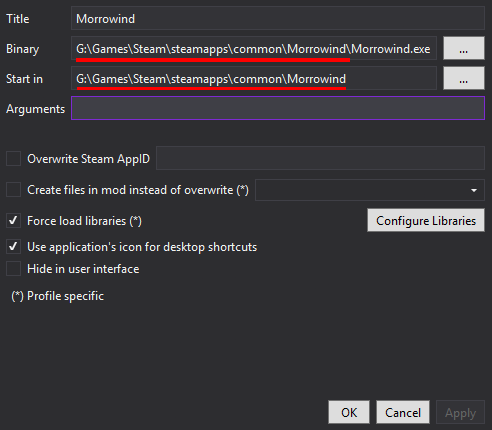
  12. For each Executable, set the Binary and if needed the Start in parameters to the game root location exe's
    Image
  13. Launch and play

Then you should be good to go :cowboy: Let us know if it works!
Last edited by loregamer on June 4th, 2026, 12:53, edited 2 times in total.
Jingle Jangle Jingle
User avatar
Ananas
Posts: 4
Joined: Jun 4, '26

Geolocation

Post by Ananas »

loregamer wrote: Today, 12:50
Ananas wrote: Today, 07:19
Hello, I'm new to this Forum :)

I've been struggling for days trying to get Skyrim to run somehow.

I have Skyrim v1.6.1170, including the Anniversary Edition and all Creation Club content.

I used the latest Wabbajack Unlocked version and successfully downloaded and installed the "Legends of the Frost" modpack.

Now I'm at the Mod Organizer 2 stage.

Whenever I try to launch the game through Mod Organizer, the game simply doesn't open. I only get a message saying that the application has to finish running, and then nothing happens. After that, I can click the "RUN" button again.

I discovered that inside the Mod Organizer folder I have a folder called "Game Root," which also contains the original game files such as SkyrimSE.exe. I placed my Codex crack there.

I noticed that every time I tried to launch the game through Mod Organizer and it failed to start, the steam_emu file would get deleted from the "Game Root" folder.

At that point it became clear to me what was happening. There is also another folder for RootBuilder inside the MO2 plugins directory, and inside it there is a file called RootBuilderCacheData.json. This file contains a list of the essential files from the Game Root folder along with their hashes.

I noticed that if I remove an entry and its hash from that file—for example the entry for SkyrimSE.exe—and then try to launch the game through Mod Organizer, the SkyrimSE.exe file gets deleted from the Game Root folder. So it seems that all files not listed in RootBuilderCacheData.json are automatically deleted.

So I thought I could simply add the steam_emu file to the JSON file with a text editor so it wouldn't be deleted, making sure it was separated from the other entries with a comma. However, when I tried to launch the game through Mod Organizer afterward, I got a dozen error messages. I assume this happened because I added the steam_emu entry to the JSON file but didn't include a corresponding hash.

So I opened the RootBuilder settings in the Mod Organizer UI, deleted the backup and cache, and clicked "Build" again. Since the crack, including steam_emu, was present in the Game Root folder at that time, a new RootBuilderCacheData.json was generated correctly. Since then, nothing gets deleted when I try to launch the game through MO2.

At that point I tried to start the game, but now when I click RUN I get a message saying that my Skyrim version is newer than the version supported by SKSE.

So I downloaded the latest version of SKSE from the official website and copied it into MO2's Game Root folder. The game can now be launched directly through the SKSE loader executable, but whenever I try to launch it through MO2 by clicking RUN, it still tells me that I'm using a newer Skyrim version than the installed SKSE supports.

My next step was to open the dropdown menu in MO2 where SKSE is listed, click Edit, then Paths, and point it to the new SKSE loader executable.

And STILL, every time I try to start the game, MO2 tells me that my Skyrim version is too new for SKSE.

I don't even know whether replacing SKSE was the right thing to do, because Wabbajack should have set everything up exactly the way it needs to be for this modpack, right?

At this point I'm completely frustrated. I have no idea what else to do. If I launch the game manually through skse_loader.exe, none of the mods are loaded, so I have to launch it through MO2. But I simply don't know how to proceed anymore.

Could someone who knows what they're doing please help me? I would really appreciate it.
I'm sorry brother, that sounds frustrating. This is why I'm not a big fan of Root Builder.

Here's what I'd try doing:
  1. Close Mod Organizer 2
  2. Where you have ModOrganizer.exe, go into the plugins folder
  3. Delete the rootbuilder folder
  4. Launch Mod Organizer 2 again
  5. In the dropdown to run the game, set it to "Explore Virtual Folder" and click Run
    Image
  6. Click into the "root" folder in your game folder location
  7. Copy all the contents of that folder, and paste it to a random folder on your system, like My Documents or something
  8. Close the virtual file explorer
  9. In your actual file explorer, go to the folder you created
  10. Copy all the files to your game root
  11. In Mod Organizer 2, click the dropdown again and select <Edit...>
    Image
  12. For each Executable, set the Binary and if needed the Start in parameters to the game root location exe's
    Image
  13. Launch and play

Then you should be good to go :cowboy: Let us know if it works!
First of all, thank you very much for your reply and for all the effort you're putting into helping me!

I wanted to follow your steps, but you mentioned that I should select "Explorer virtual folder" from the dropdown menu. Unfortunately, I don't have that option available. The only options I can see are "Skyrim Script Extender" and "Edit".

I continued reading your message, and you said that I should go to the "Root" folder of my Game Folder Location.

Do you mean the "Game Root" folder in Mod Organizer, or the actual folder where the game is originally installed? Because in the original game directory I can't find any folder called "Root"—I only see "Creations", "Data", "Mods", and "Skyrim".

Or do you mean that I should copy all files from my original game installation into a folder in Documents first, and then later copy everything from there into the "Game Root" folder in Mod Organizer?

Thank you very much for your help! :)

Many thanks! :)
User avatar
loregamer
Site Moderator
Posts: 5065
Joined: Dec 3, '23

Geolocation

Post by loregamer »

Ananas wrote: Today, 16:46
I wanted to follow your steps, but you mentioned that I should select "Explorer virtual folder" from the dropdown menu. Unfortunately, I don't have that option available. The only options I can see are "Skyrim Script Extender" and "Edit".
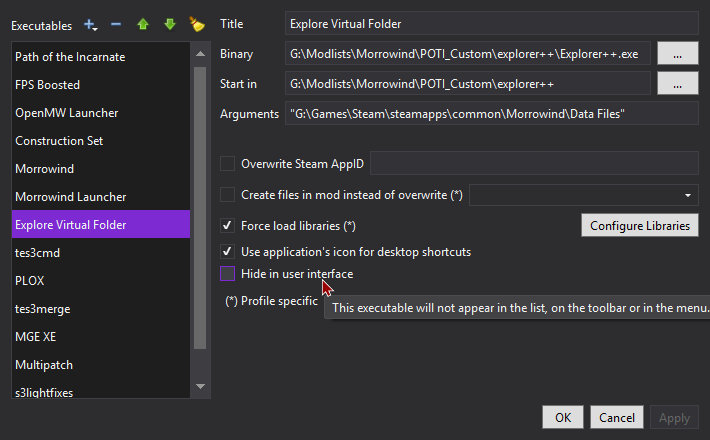
Go to <Edit...> and check if this is checked, you need to uncheck it. If this isn't even listed, then you need to create this:
Image


Ananas wrote: Today, 16:46
I continued reading your message, and you said that I should go to the "Root" folder of my Game Folder Location.

Do you mean the "Game Root" folder in Mod Organizer, or the actual folder where the game is originally installed? Because in the original game directory I can't find any folder called "Root"—I only see "Creations", "Data", "Mods", and "Skyrim".
No, the "Game Root" folder. What your modlist did was copied your game folder, copied it to the "Game Root" folder, and runs that from Mod Organizer 2. You need to work within that folder.


Ananas wrote: Today, 16:46
Or do you mean that I should copy all files from my original game installation into a folder in Documents first, and then later copy everything from there into the "Game Root" folder in Mod Organizer?
No no, forget about your game installation folder. "Game Root" is what you'll be using for your game. Your game installation was essentially a snapshot Wabbajack used as a base. Wabbajack cloned it completely. You shouldn't be messing with it actually, since it's good to keep an untouched copy of Skyrim if you're modding it. Don't do anything to the game folder you used for Wabbajack's installation.

For clarity what I'm having you do is disable Root Builder and manually copy what Root Builder would've deployed to the "Game Root" folder that you're running for Mod Organizer 2. What root builder does is copies files in mods' "root" folder to your Game Root folder. What we're doing is disabling Root Builder, opening Virtual File Explorer (which is a File Explorer including Mod Organizer 2's virtual files), copying the root folder contents to a temporary location, and copying those to the "Game Root" ourselves.
Last edited by loregamer on June 4th, 2026, 17:07, edited 4 times in total.
Jingle Jangle Jingle
User avatar
Ananas
Posts: 4
Joined: Jun 4, '26

Geolocation

Post by Ananas »

thank you so much for your help and explanation!
i will try it later when i'm at home and i will let you know If it worked