BG3 Dialogue Finder Tool -UPDATED- 3.0 — Modding Tools
Posted: March 1st, 2025, 07:16
by loregamer
► BG3 DIALOGUE FINDER 3.0 ◄
► OVERVIEW
A desktop tool for searching and managing Baldur's Gate 3 dialogue audio files. Search 291,000+ dialogue entries by character, dialogue text, audio type, or filename - then copy the .wem files you need to a destination folder.
Complete rewrite with a new UI and rebuilt database.
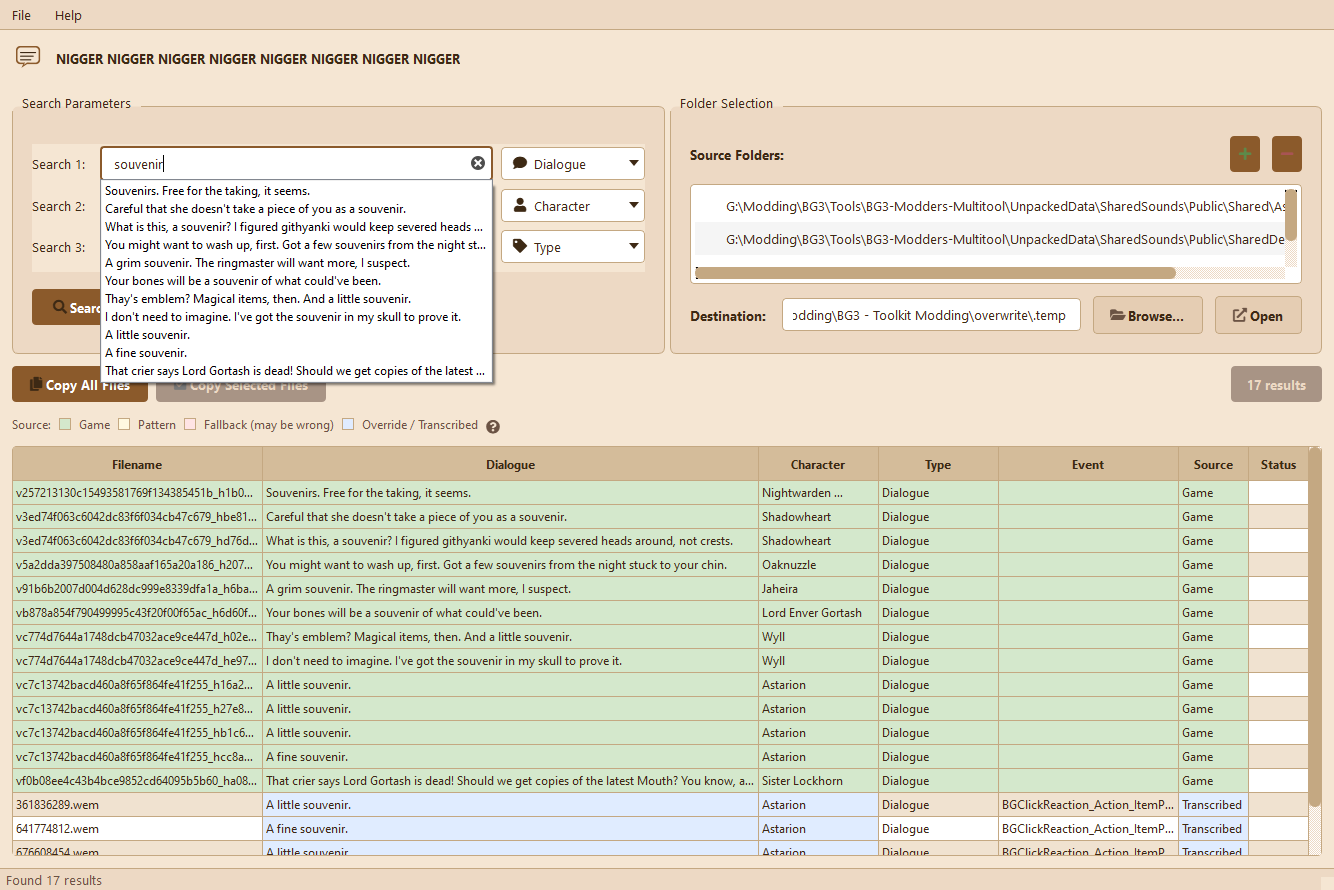
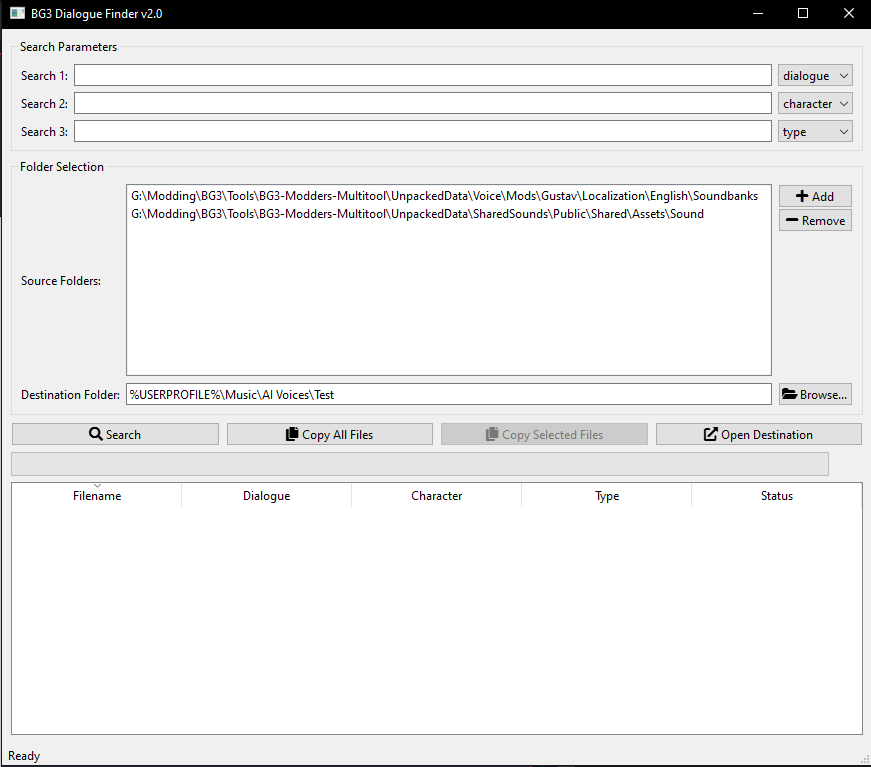
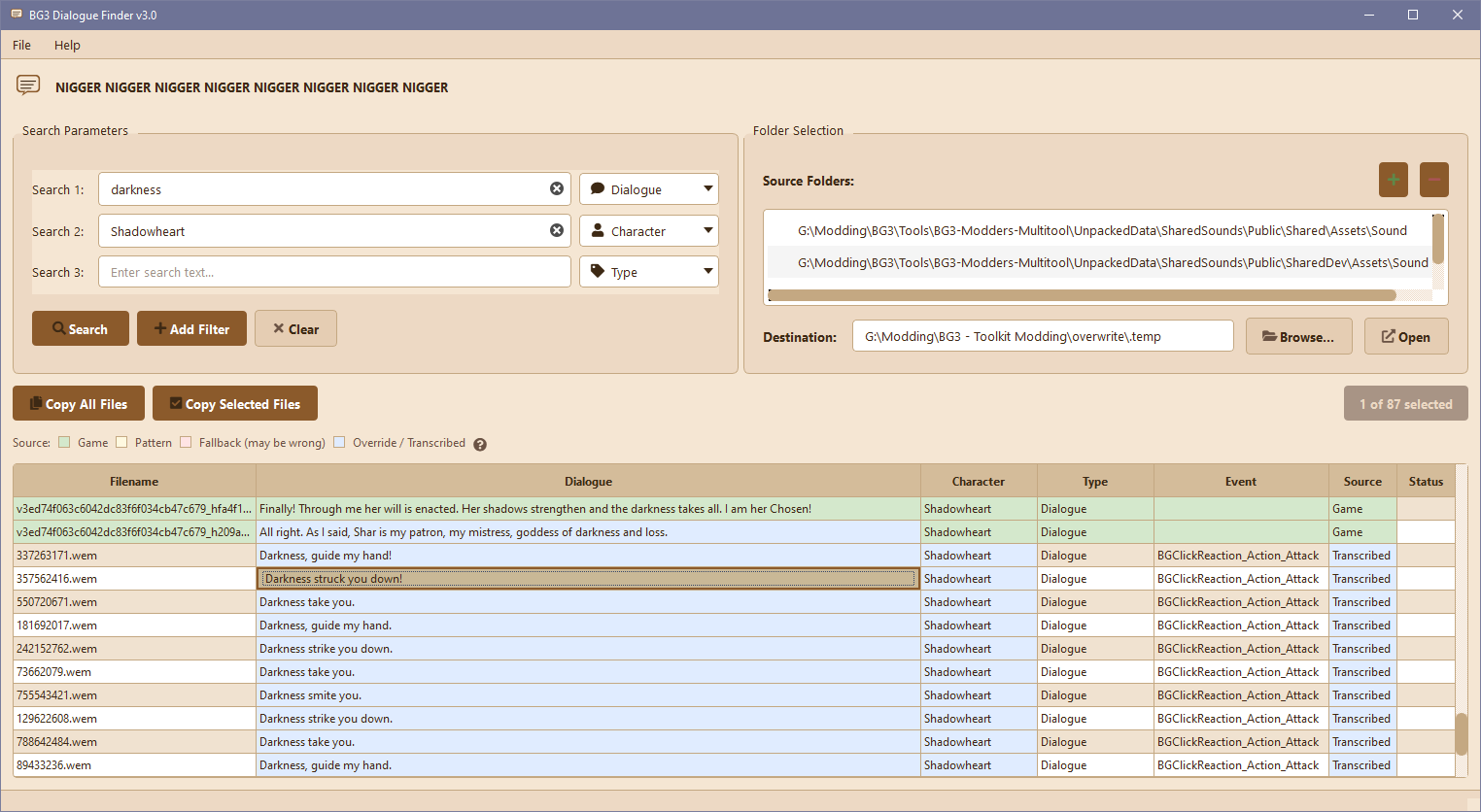
Complete visual overhaul. The old v2 interface was a basic table with row selection and single-column sorting. The new table is more like a spreadsheet.
Results table
7 columns - Filename, Dialogue, Character, Type, Event, Source, Status (v2 had 5)
Cell selection - Click and drag to select individual cells or ranges, not just whole rows
Compact rows - Smaller font and tighter spacing so you can see more results at once
Alternating row colors - Easier to read across long rows
Multi-column sorting
Click any column header to sort by that column
Shift+click another header to add a secondary sort (e.g., sort by Character, then by Type within each character)
Ctrl+click to clear all sorting
Headers show ▲/▼ arrows with position numbers when multi-sorting
Context menu
Right-click any cell for quick actions:
Copy Selection (or Ctrl+C)
Copy Filename
Copy Dialogue
Copy Row(s) - copies full rows with column headers
Select Entire Row
Search filters
Add filters - Click "+ Add Filter" to add more search rows. Each row has a text field and a dropdown to pick what you're searching (Dialogue, Character, Type, Filename, Source).
Search for multiple things - Two filters with the same type finds either match (Character: Astarion OR Character: Shadowheart)
Narrow your search - Combine different filter types to require all conditions (Character: Astarion AND Type: Combat)
► SOURCE CONFIDENCE
Every entry now tracks where its data came from. Individual cells are colored based on their source - a single row can have multiple colors if data comes from different sources.
The colors
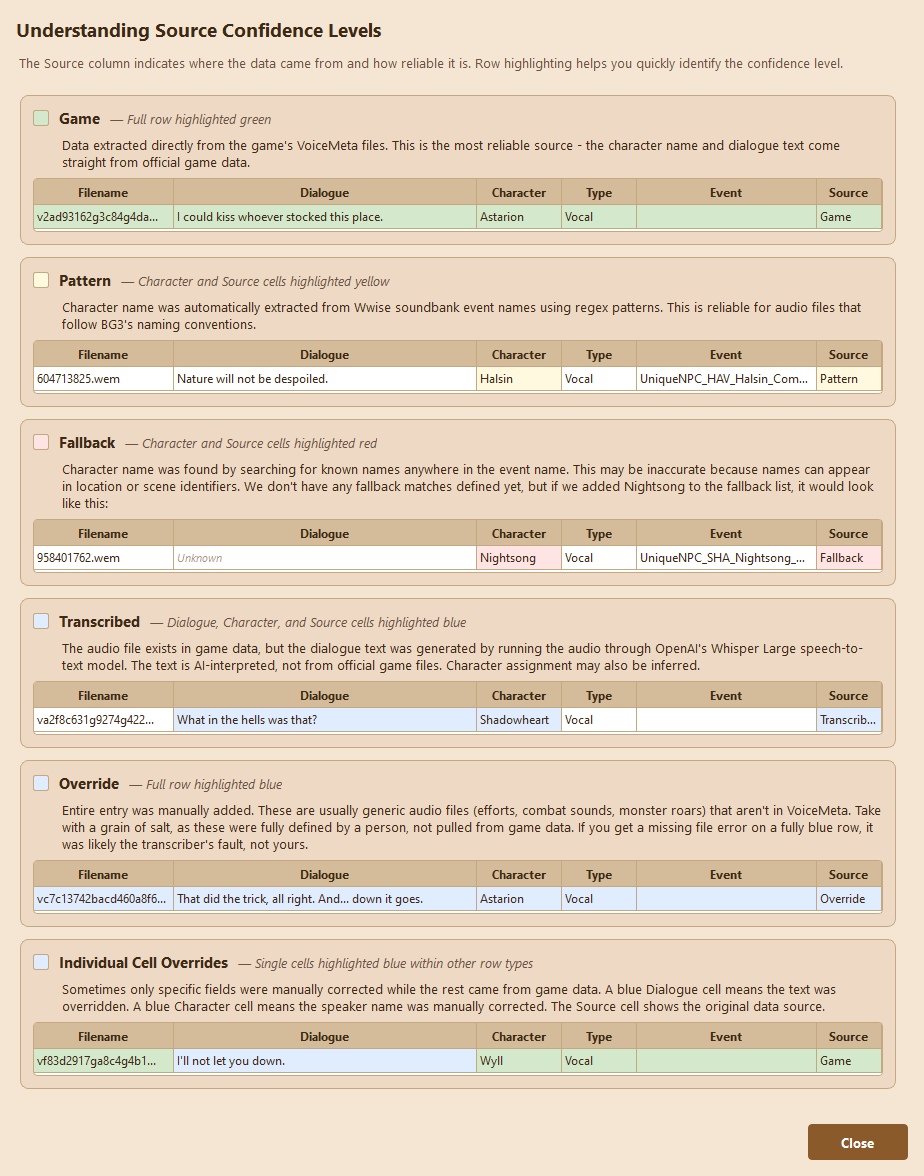
Game (green) - Extracted from VoiceMeta. 100% accurate.
Pattern (yellow) - Character parsed from sound event name. Sometimes reliable.
Fallback (red) - No entries will show up like this yet, but they will be for characters guessed from event string. May be wrong. Basically just throwing **** at the wall to TRY and guess the character.
Override / Transcribed (blue) - Manually added, or auto-transcribed by OpenAI Whisper. May have errors.
Example rows
Click the ? button next to the source legend to see detailed explanations with example rows for each confidence level. When in doubt, find a similarly-colored row in the helper to interpret your data.
► DATABASE
Completely rebuilt. No longer uses @NoComply's database at all.
The old database used in v1 and v2 was a flat table with four columns: filename, dialogue, character, type. No way to know if data was accurate. Inconsistent character names. No event info.
What's new
Source tracking - Every entry has a confidence level. Know instantly if character attribution is reliable.
Event names - Sound event names now stored (e.g., UniqueNPC_LOW_Halsin_Combat_Pain).
Normalized schema - Separate tables for characters and audio types with foreign keys.
Entry counts
291,297 total entries (up from 290,257 in v2 - +1,040 entries, +0.4%)
The entry count is nearly the same, but entries now have source tracking and metadata:
185,970 game - VoiceMeta dialogue with subtitles (100% accurate)
99,409 transcribed - dialogue auto-transcribed by OpenAI Whisper for files missing from VoiceMeta
3,818 pattern - character parsed from event names like UniqueNPC_GLO_Halsin_Combat_Pain
2,091 characters normalized (was 1,910 with duplicates like "Astarion" vs "ASTARION")
237,209 entries have dialogue text, 54,088 are audio-only (efforts, combat, etc.)
► OTHER
Settings persist via Windows registry
► CHANGELOG
► Show Spoiler
v3.0
Complete rewrite with new UI and rebuilt database
7 columns instead of 5 (added Event and Source)
Cell selection instead of row selection
Multi-column sorting with Shift+click
Dynamic search filters with OR/AND logic
Source confidence tracking for all entries
Event names stored for 87,346 entries
Settings persist via Windows registry
v2.0
Added ability to set multiple input source folders
Added an Open Destination Folder button
Folders are now saved so you don't have to set them every time
Other UI improvements
v1.0
Initial public release
► WHAT I NEED FROM YOU *******
Report everything you can. Data irregularities, stuff that should be manually overridden, everything. The more you guys report, the more the database improves.
Feel free to report any bugs or findings in this thread.
I'm gonna keep doing this when I think a tool is too useful that normies may stumble upon it btw
Password to extract the file is the epic gamer slur(all lowercase)
Hi. Glad you're making use of my work, nice job. It's open source, and I gave permission people permission to do whatever they want, but I'm going to politely ask you once to not gatekeep it.
Edit: Just guessed the password. Wow. Yeah I think you can take this down now.
I'm gonna keep doing this when I think a tool is too useful that normies may stumble upon it btw
Password to extract the file is the epic gamer slur(all lowercase)
Hi. Glad you're making use of my work, nice job. It's open source, and I gave permission people permission to do whatever they want, but I'm going to politely ask you once to not gatekeep it.
Edit: Just guessed the password. Wow. Yeah I think you can take this down now.
I'm gonna keep doing this when I think a tool is too useful that normies may stumble upon it btw
Password to extract the file is the epic gamer slur(all lowercase)
Hi. Glad you're making use of my work, nice job. It's open source, and I gave permission people permission to do whatever they want, but I'm going to politely ask you once to not gatekeep it.
Edit: Just guessed the password. Wow. Yeah I think you can take this down now.
I'm gonna keep doing this when I think a tool is too useful that normies may stumble upon it btw
Password to extract the file is the epic gamer slur(all lowercase)
Hi. Glad you're making use of my work, nice job. It's open source, and I gave permission people permission to do whatever they want, but I'm going to politely ask you once to not gatekeep it.
Edit: Just guessed the password. Wow. Yeah I think you can take this down now.
Edit: Just guessed the password. Wow. Yeah I think you can take this down now.
I no comply.
BG3 Dialogue Finder Tool 2.0 — Modding Tools
Posted: January 14th, 2026, 15:22
by loregamer
huge update soon
BG3 Dialogue Finder Tool 2.0 — Modding Tools
Posted: January 15th, 2026, 23:44
by loregamer
► BG3 DIALOGUE FINDER 3.0 ◄
Complete rewrite with a new UI and rebuilt database.
► NEW UI
Complete visual overhaul. The old v2 interface was a basic table with row selection and single-column sorting. The new table is more like a spreadsheet.
Per @NoComply's request, I have removed "******" as the zip file password. It's now spammed in the header title instead.
Results table
7 columns - Filename, Dialogue, Character, Type, Event, Source, Status (v2 had 5)
Cell selection - Click and drag to select individual cells or ranges, not just whole rows
Compact rows - Smaller font and tighter spacing so you can see more results at once
Alternating row colors - Easier to read across long rows
Multi-column sorting
Click any column header to sort by that column
Shift+click another header to add a secondary sort (e.g., sort by Character, then by Type within each character)
Ctrl+click to clear all sorting
Headers show ▲/▼ arrows with position numbers when multi-sorting
Context menu
Right-click any cell for quick actions:
Copy Selection (or Ctrl+C)
Copy Filename
Copy Dialogue
Copy Row(s) - copies full rows with column headers
Select Entire Row
Search filters
Add filters - Click "+ Add Filter" to add more search rows. Each row has a text field and a dropdown to pick what you're searching (Dialogue, Character, Type, Filename, Source).
Search for multiple things - Two filters with the same type finds either match (Character: Astarion OR Character: Shadowheart)
Narrow your search - Combine different filter types to require all conditions (Character: Astarion AND Type: Combat)
► SOURCE CONFIDENCE
Every entry now tracks where its data came from. Individual cells are colored based on their source - a single row can have multiple colors if data comes from different sources.
The colors
Game (green) - Extracted from VoiceMeta. 100% accurate.
Pattern (yellow) - Character parsed from sound event name. Sometimes reliable.
Fallback (red) - No entries will show up like this yet, but they will be for characters guessed from event string. May be wrong. Basically just throwing **** at the wall to TRY and guess the character.
Override / Transcribed (blue) - Manually added, or auto-transcribed by OpenAI Whisper. May have errors.
Example rows
Click the ? button next to the source legend to see detailed explanations with example rows for each confidence level. When in doubt, find a similarly-colored row in the helper to interpret your data.
► DATABASE
Completely rebuilt. No longer uses @NoComply's database at all.
The old database was a flat table with four columns: filename, dialogue, character, type. No way to know if data was accurate. Inconsistent character names. No event info.
What's new
Source tracking - Every entry has a confidence level. Know instantly if character attribution is reliable.
Event names - Sound event names now stored (e.g., UniqueNPC_LOW_Halsin_Combat_Pain).
Normalized schema - Separate tables for characters and audio types with foreign keys.
Entry counts
291,297 total entries (up from 290,257 in v2 - +1,040 entries, +0.4%)
The entry count is nearly the same, but entries now have source tracking and metadata:
185,970 game - VoiceMeta dialogue with subtitles (100% accurate)
99,409 transcribed - dialogue auto-transcribed by OpenAI Whisper for files missing from VoiceMeta
3,818 pattern - character parsed from event names like UniqueNPC_GLO_Halsin_Combat_Pain
2,091 characters normalized (was 1,910 with duplicates like "Astarion" vs "ASTARION")
237,209 entries have dialogue text, 54,088 are audio-only (efforts, combat, etc.)
► OTHER
Settings persist via Windows registry
► WHAT I NEED FROM YOU *******
Report everything you can. Data irregularities, stuff that should be manually overridden, everything. The more you guys report, the more the database improves.
BG3 Dialogue Finder Tool -UPDATED- 3.0 — Modding Tools
Posted: January 16th, 2026, 00:12
by loregamer
Oh before she holds a grudge at me for forgetting to mention, thank you @orinEsque for helping me with the speaker to character name mappings, and general datamining in general. Very helpful
Unfortunately, the database as it is is as good as it gets in regard to automagically identifying dialogue. Someone’s gotta go and listen to them…
BG3 Dialogue Finder Tool -UPDATED- 3.0 — Modding Tools
BG3 Dialogue Finder Tool -UPDATED- 3.0 — Modding Tools
Posted: February 23rd, 2026, 17:57
by loregamer
Added cool thumbnail for ModHQ
BG3 Dialogue Finder Tool -UPDATED- 3.0 — Modding Tools
Posted: April 1st, 2026, 10:11
by frankiebowman
Hey, this is great. I've been looking into turning Minthara into a Skyrim follower and this was super helpful in finding her dialogue.
Is there any possibility of a batch name-writing function in the future? It'd be really cool if I could replace the numbers with the dialogue line all at once instead of manually.
BG3 Dialogue Finder Tool -UPDATED- 3.0 — Modding Tools
Hey, this is great. I've been looking into turning Minthara into a Skyrim follower and this was super helpful in finding her dialogue.
Is there any possibility of a batch name-writing function in the future? It'd be really cool if I could replace the numbers with the dialogue line all at once instead of manually.
 BG3 Dialogue Finder Tool