Page 1 of 1
[Solved] Mod not working in the game
Posted: January 16th, 2024, 13:28
by AlderDean
Hi,
Thanks for the cool idea of cleansing the fashionable alphabetic sheet from the game.
The mod does not seem to work for me. I installed the 'NoAlphabets' mods via BG3 mod manager and activated them. However, when creating a new character, the alphabetic options are still there.
I have the latest release of the mod manager and 4.1.1.4425968 version of the game.
Mod Fixer is sitting in Overrides section of the mod manager and cannot be moved to the load order area. Can it be the case?
Any advise would be appreciated.
Thanks again for the great mod (though not working for me).
AlderDean
Mod not working in the game
Posted: January 16th, 2024, 16:54
by orinEsque
That is normal. So the issue you are describing is due to CCreator or CCreator_noGen not working. Do you have those in your mod manager? Please upload a screenshot of your mod manager.
But check if its any of the issues below, and let me know how you managed to fix it.
Troubleshooting
- Naked people standing around in Character Creation - install latest version of Mod Fixer
- Can't speak to NPCs - You forgot to install .NET (not framework) as a part of your BG3 Mod Manager installation.
- Can't click on anything in game - you may need the install latest version of Script Extender. Note: None of my mods use Script Extender.
- Can't click on anything in game but I have installed all of the above! - (1) You need to download latest Lingo version. If that doesn't work then disable Lingo and wait for me to release an update. (2) You are using new Lingo mod, but your game is outdated. Either update your game or download an older version of the Lingo file.
Mod not working in the game
Posted: January 16th, 2024, 21:50
by AlderDean
Thank you for a quick response.
I have none of the symptoms you described.
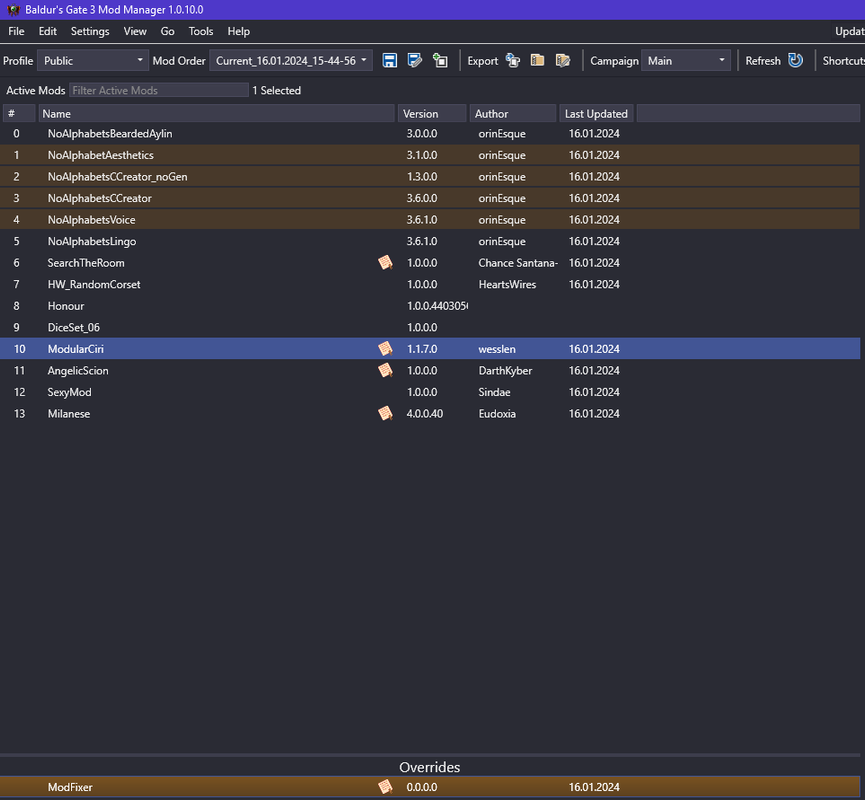
Here is the screenshot of my BG3 mod manager.
Mod not working in the game
Posted: January 16th, 2024, 22:00
by orinEsque
1. higher priority means bigger number. So all the no alphabet stuff should be in the bottom of your list.
2. And leave ccreator and voice in the override area in the bottom.
3. Only install CCreator_noGen, you don't need both CCreator and CCreator_noGen
4. If you want Aylin to always have a beard put BeardedAylin under Aesthetics
5.You should put honour and dice set on the right side, otherwise something weird might happen to your savegames.
Mod not working in the game
Posted: January 16th, 2024, 23:09
by AlderDean
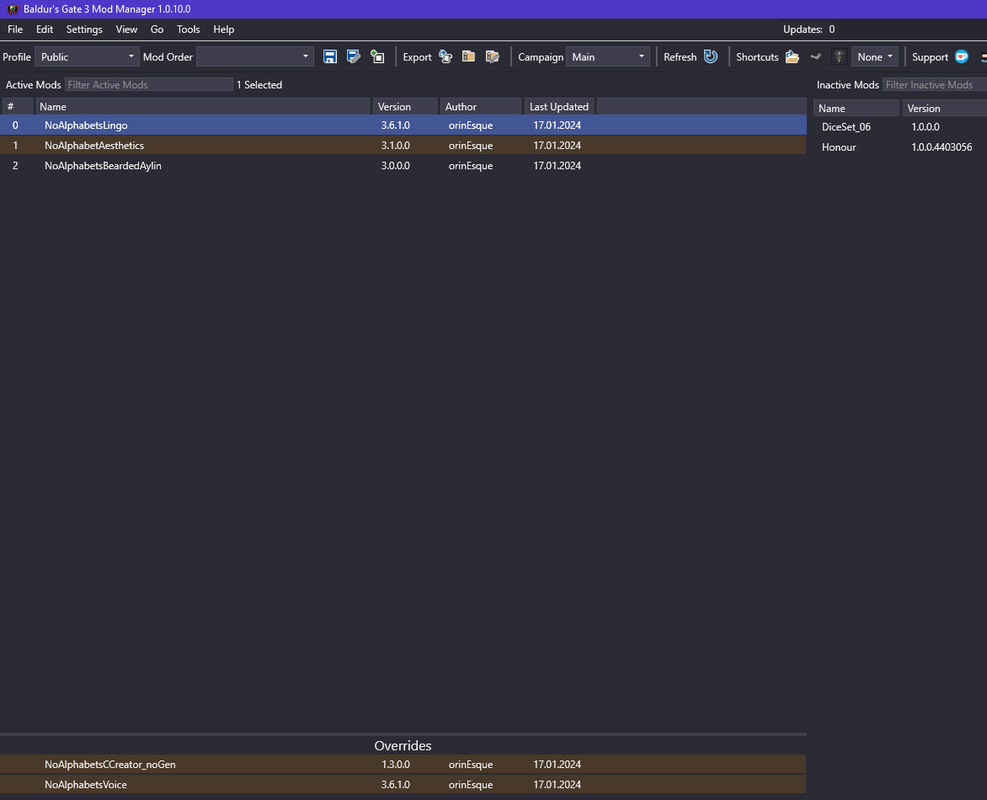
I did as you instructed but failed again.
I removed all other mods except for no_alphabets, I have the script extender installed and running.
When I remove the mod fixer, I do get a bunch of naked dummies in the cc window.
But when mod fixer is in the Mods folder (not even registered in the mod manager), the game goes vanilla with all its rainbow stuff.
It seems to me the game as I have it only accepts mods that add something to the game. If the mod alters existing assets, the changes are ignored.
Mod not working in the game
Posted: January 16th, 2024, 23:13
by orinEsque
AlderDean wrote: ↑
January 16th, 2024, 23:09
I did as you instructed but failed again.
I removed all other mods except for no_alphabets, I have the script extender installed and running.
When I remove the mod fixer, I do get a bunch of naked dummies in the cc window.
But when mod fixer is in the Mods folder (not even registered in the mod manager), the game goes vanilla with all its rainbow stuff.
It seems to me the game as I have it only accepts mods that add something to the game. If the mod alters existing assets, the changes are ignored.
YOu don't have the latest version of CCreator_noGen. That should fix your problem.
Mod not working in the game
Posted: January 17th, 2024, 08:10
by AlderDean
I updated CCreator_noGen and it finally seems to work.
Hope the other parts of the mod, such as Aesthetics, are in good shape now too.
BTW, being desperate to force your mods to work I updated the game to version 4.1.1.4494476.
So far, the combination of the game version and the mod version is operable.
Thanks again for a great mod and your willingness to look into issues of common users like myself.
Keep up the good job and all the best.
AlderDean
Mod not working in the game
Posted: January 17th, 2024, 12:37
by orinEsque
AlderDean wrote: ↑
January 17th, 2024, 08:10
I updated CCreator_noGen and it finally seems to work.
Hope the other parts of the mod, such as Aesthetics, are in good shape now too.
BTW, being desperate to force your mods to work I updated the game to version 4.1.1.4494476.
So far, the combination of the game version and the mod version is operable.
Thanks again for a great mod and your willingness to look into issues of common users like myself.
Keep up the good job and all the best.
AlderDean
No problem

This helps me figure out where i need to improve my instructions so everyone can easily install the mod. Enjoy!
[Solved] Mod not working in the game
Posted: August 16th, 2024, 02:47
by steeleecate
thanks for making this post I was just trying to figure out why it wasn't working. had pretty much similar problem.