Wabbajack UNLOCKED 3.7 — Modding Tools
Posted: January 11th, 2026, 22:44
Sorry I haven't been responding in this thread. Got a lot on my mind, and... well... in it!
Oh, lovely, they've sent me a morooooon!1 INT Courier wrote: ↑ January 11th, 2026, 21:00Helo, me thank author.
me ask ****** ****** conts on official FN Wild Card discord on how to click fastuf, but me get kicked for no reason.....sad...i very thank you pretty much
 that's a very accurate 1 INT dialogue pal.
Ah don't be worried, the tool works perfectly, and the problems me and some folks have had @Wolverines took care of.loregamer wrote: ↑ January 11th, 2026, 22:44Sorry I haven't been responding in this thread. Got a lot on my mind, and... well... in it!
Should we be worried about it? I've heard of Wolverine having problems with this in the past.
Haven't heard about the problems in the past, but I'm happy more people are using thisjdcp wrote: ↑ January 12th, 2026, 18:25Should we be worried about it? I've heard of Wolverine having problems with this in the past.
I have been sharing it on MF since I found it. That along with my Modpack thread on cs.rin has really brought attention.
The problem I had was some of Bethesda's bootlicking Verified Creators saw where someone had posted my MF link on Reddit, and issued a bunch of DMCAs.jdcp wrote: ↑ January 12th, 2026, 18:25Should we be worried about it? I've heard of Wolverine having problems with this in the past.
Did it take multiple download sessions? Maybe nuke your modlist installation except downloads and redo the installation. There was a bug with unsuccessful installations showing successfultorena wrote: ↑ January 15th, 2026, 13:31hi, i have a problem with journals of jyggalag. i've installed the modpack successfully, and i have bypassed the the "no license" screen of steam by putting the cracked file in the stock game folder (i downloaded the ae version trought steamrip). the problem is that when i try to launch the game on mod organizer, i just get an infinte loading screen (the "journal of jyggalag" one) after the enb shaders load correctly. i never get to the menu of the game. there isnt any way to make the modpack work with the cracked version? it isnt a hardware issue or installation issue, i double checked that.
Code: Select all
[ERROR] (Wabbajack.InstallationVM) The process cannot access the file 'D:\FUSION\__temp__\RGTHj3mK' because it is being used by another process.|System.IO.IOException: The process cannot access the file 'D:\FUSION\__temp__\RGTHj3mK' because it is being used by another process.
   at System.IO.FileSystem.DeleteFile(String fullPath)
   at Wabbajack.Paths.IO.AbsolutePathExtensions.Delete(AbsolutePath file)
   at Wabbajack.Paths.IO.TemporaryPath.DisposeAsync()
   at Wabbajack.Compression.BSA.DiskSlabAllocator.DisposeAsync()
   at Wabbajack.Compression.BSA.BA2Archive.Builder.DisposeAsync()
   at Wabbajack.Installer.StandardInstaller.BuildBSAs(CancellationToken token)
   at Wabbajack.Installer.StandardInstaller.Begin(CancellationToken token)
   at Wabbajack.InstallationVM.<BeginInstall>b__172_0()
I gotchu I’ll take a look tomorrow. It’s big sleep timeTAP wrote: ↑ January 16th, 2026, 03:19Heya.
Today I just saw the new update and hoped that would fix the temp file issue... I guess not.Code: Select all
[ERROR] (Wabbajack.InstallationVM) The process cannot access the file 'D:\FUSION\__temp__\RGTHj3mK' because it is being used by another process.|System.IO.IOException: The process cannot access the file 'D:\FUSION\__temp__\RGTHj3mK' because it is being used by another process.
   at System.IO.FileSystem.DeleteFile(String fullPath)
   at Wabbajack.Paths.IO.AbsolutePathExtensions.Delete(AbsolutePath file)
   at Wabbajack.Paths.IO.TemporaryPath.DisposeAsync()
   at Wabbajack.Compression.BSA.DiskSlabAllocator.DisposeAsync()
   at Wabbajack.Compression.BSA.BA2Archive.Builder.DisposeAsync()
   at Wabbajack.Installer.StandardInstaller.BuildBSAs(CancellationToken token)
   at Wabbajack.Installer.StandardInstaller.Begin(CancellationToken token)
   at Wabbajack.InstallationVM.<BeginInstall>b__172_0()
For context: Fallout 4 FUSION Modpack, happens on any device I try to install it in at the last step of the installer, using Wolverine's 1.10.163 CSF files with crack and english files of the same version. Already tried deleting the temp folder and reinstalling the whole modpack AND game multiple times, nothing else is running while installing, AV exclusions and disabling, searching up any solutions, etc, etc, etc...
I admit that I'm quite desperate at this point.
 Wabbajack-UNLOCKED-v3.7-absolutepathextensionsdelete-fix.zip
 )
)loregamer wrote: ↑ January 16th, 2026, 18:18@TAP give this version a try
Wabbajack-UNLOCKED-v3.7-absolutepathextensionsdelete-fix.zip
The problem is that in AbsolutePathExtensions.Delete(), when a temp file is "in use by another process", it only waited 1 second and retried once. After closing the filestream, Windows may not be immediately release the file handle, especially with a large BA2 archives containing fucktons of textures like FUSION likely does
So this version changed the retry logic to use exponential backoff with 5 attempts:So a total of 7.5 seconds instead of 1. If it works, I'll push this as a v3.8 update
- Attempt 1: Wait 500ms → retry
- Attempt 2: Wait 1s → retry
- Attempt 3: Wait 2s → retry
- Attempt 4: Wait 4s → retry
- Attempt 5: Final attempt (throws if still fails)
If you're still running into it, maybe try the following:
- Move the install location to an SSD if currently on HDD (faster file handle release)
- Remove anti-virus software if you have it (can hold file handles even when "disabled" in the UI - may need to turn off temporarily or straight up uninstall it, AV is a meme anyway)
- Try running Wabbajack as Administrator (this is only possible on Wabbajack Unlocked
- Ensure Windows Search indexing is disabled for the __temp__ folder location
Code: Select all
00:02:23.726 [INFO] (Wabbajack.Installer.StandardInstaller) Building 8 bsa files
00:02:23.726 [INFO] (Wabbajack.Installer.StandardInstaller) Next Step: Building BSAs
00:02:23.726 [INFO] (Wabbajack.Installer.StandardInstaller) Building FUSION NPC Merge - Textures.ba2
00:05:49.649 [ERROR] (Wabbajack.InstallationVM) The process cannot access the file 'D:\FUSION\__temp__\n15JSwjc' because it is being used by another process.|System.IO.IOException: The process cannot access the file 'D:\FUSION\__temp__\n15JSwjc' because it is being used by another process.
   at Wabbajack.Paths.IO.AbsolutePathExtensions.Delete(AbsolutePath file)
   at Wabbajack.Paths.IO.TemporaryPath.DisposeAsync()
   at Wabbajack.Compression.BSA.DiskSlabAllocator.DisposeAsync()
   at Wabbajack.Compression.BSA.BA2Archive.Builder.DisposeAsync()
   at Wabbajack.Installer.StandardInstaller.BuildBSAs(CancellationToken token)
   at Wabbajack.Installer.StandardInstaller.Begin(CancellationToken token)
   at Wabbajack.InstallationVM.<BeginInstall>b__172_0()
Hmmmm, lemme think about this. I've ran into this before, will try and think of a solutionTAP wrote: ↑ January 16th, 2026, 20:12loregamer wrote: ↑ January 16th, 2026, 18:18@TAP give this version a try
The problem is that in AbsolutePathExtensions.Delete(), when a temp file is "in use by another process", it only waited 1 second and retried once. After closing the filestream, Windows may not be immediately release the file handle, especially with a large BA2 archives containing fucktons of textures like FUSION likely does
So this version changed the retry logic to use exponential backoff with 5 attempts:So a total of 7.5 seconds instead of 1. If it works, I'll push this as a v3.8 update
- Attempt 1: Wait 500ms → retry
- Attempt 2: Wait 1s → retry
- Attempt 3: Wait 2s → retry
- Attempt 4: Wait 4s → retry
- Attempt 5: Final attempt (throws if still fails)
If you're still running into it, maybe try the following:
- Move the install location to an SSD if currently on HDD (faster file handle release)
- Remove anti-virus software if you have it (can hold file handles even when "disabled" in the UI - may need to turn off temporarily or straight up uninstall it, AV is a meme anyway)
- Try running Wabbajack as Administrator (this is only possible on Wabbajack Unlocked
- Ensure Windows Search indexing is disabled for the __temp__ folder location
Nope, and yes, I can confirm that it's possibly something related to FUSION shitload of textures cosidering the error ALWAYS happens on the that NPC Merge textures file. I forgot to mention that I'm already using a SSD and none of the other possible solutions workedCode: Select all
00:02:23.726 [INFO] (Wabbajack.Installer.StandardInstaller) Building 8 bsa files
00:02:23.726 [INFO] (Wabbajack.Installer.StandardInstaller) Next Step: Building BSAs
00:02:23.726 [INFO] (Wabbajack.Installer.StandardInstaller) Building FUSION NPC Merge - Textures.ba2
00:05:49.649 [ERROR] (Wabbajack.InstallationVM) The process cannot access the file 'D:\FUSION\__temp__\n15JSwjc' because it is being used by another process.|System.IO.IOException: The process cannot access the file 'D:\FUSION\__temp__\n15JSwjc' because it is being used by another process.
   at Wabbajack.Paths.IO.AbsolutePathExtensions.Delete(AbsolutePath file)
   at Wabbajack.Paths.IO.TemporaryPath.DisposeAsync()
   at Wabbajack.Compression.BSA.DiskSlabAllocator.DisposeAsync()
   at Wabbajack.Compression.BSA.BA2Archive.Builder.DisposeAsync()
   at Wabbajack.Installer.StandardInstaller.BuildBSAs(CancellationToken token)
   at Wabbajack.Installer.StandardInstaller.Begin(CancellationToken token)
   at Wabbajack.InstallationVM.<BeginInstall>b__172_0()
is your MO2 directory looking at the "game root" folder inside MO2, or is it looking at your steam/apps folder for starfield? -might be worth trying to add the game to steamapps if you havent. (this is just a suggestion) their are guides on CSRIN posted above that mostly all work similar.
craxton wrote: ↑ January 18th, 2026, 10:18is your MO2 directory looking at the "game root" folder inside MO2, or is it looking at your steam/apps folder for starfield? -might be worth trying to add the game to steamapps if you havent. (this is just a suggestion) their are guides on CSRIN posted above that mostly all work similar.
to see that crash log or read it. see if you have trainwreck included in your modlist. if not, add it (if its like CLASSIC) you dont really need to do anything except run it and point to your crash log folder. and asking AI about it if you want quick results but ensure it ignores false flags.. link to mod
also, are you running the correct thing in MO2?
Code: Select all
SFSE loader: initialize (version = 0.2.17 01010010 2026-01-18 10:35:46, os = 6.2 (9200))
config path = D:\Melius\Stock Game\Data\SFSE\sfse.ini
procPath = D:\Melius\Stock Game\Starfield.exe
launching: Starfield.exe (D:\Melius\Stock Game\Starfield.exe)
dwSignature = FEEF04BD
dwStrucVersion = 00010000
dwFileVersionMS = 0001000F
dwFileVersionLS = 00DE0000
dwProductVersionMS = 0001000F
dwProductVersionLS = 00DE0000
dwFileFlagsMask = 00000017
dwFileFlags = 00000000
dwFileOS = 00000004
dwFileType = 00000001
dwFileSubtype = 00000000
dwFileDateMS = 00000000
dwFileDateLS = 00000000
productVersionStr = 1.15.222.0
version = 0001000F00DE0000
product name = Starfield
steam exe
dll = D:\Melius\Stock Game\sfse_1_15_222.dll
WinVerifyTrust: 00000000 00000000 D:\Melius\Stock Game\sfse_loader.exe
WinVerifyTrust: 00000000 00000000 D:\Melius\Stock Game\sfse_1_15_222.dll
DLL and EXE signature/serial match
main thread id = 9424
hookBase = 00000286EC290000
loadLibraryAAddr = 00007FFEE01A0830
getProcAddressAddr = 00007FFEE019B200
hook thread complete
launching
WARNING: something has started the runtime outside of sfse_loader's control.
SFSE will probably not function correctly.
Try running sfse_loader as an administrator, or check for conflicts with a virus scanner.
Code: Select all
usvfs dll 0.5.6.1 initialized in process 22188
remove from process 22188
create config in 22188
0 processes
mod_organizer_instance_1 created in process 22188
attached to mod_organizer_instance_1 with 1 nodes, size 4,194,304 B
inv_mod_organizer_instance_1 created in process 22188
attached to inv_mod_organizer_instance_1 with 1 nodes, size 131,072 B
context current shm: mod_organizer_instance (now 2 connections)
clearing blacklist
blacklisting 'Chrome.exe'
blacklisting 'Firefox.exe'
blacklisting 'TSVNCache.exe'
blacklisting 'TGitCache.exe'
blacklisting 'Steam.exe'
blacklisting 'GameOverlayUI.exe'
blacklisting 'Discord.exe'
blacklisting 'GalaxyClient.exe'
blacklisting 'Spotify.exe'
blacklisting 'Brave.exe'
clearing skip file suffixes
added skip file suffix '.mohidden'
clearing skip directories
added skip directory '.git'
clearing forced libraries
clearing forced libraries
injecting to process 14436 with same bitness
dll path: D:\Melius\usvfs_x64.dll
injection to same bitness process 14436 successful
usvfs dll 0.5.6.1 initialized in process 14436
inithooks called mod_organizer_instance in process D:\Melius\Stock Game\sfse_loader.exe:14436 (log level 1, dump type 1, dump path D:/Melius/crashDumps)
access existing config in 14436
0 processes
mod_organizer_instance_1 opened in process 14436
attached to mod_organizer_instance_1 with 14623 nodes, size 4,194,304 B
inv_mod_organizer_instance_1 opened in process 14436
attached to inv_mod_organizer_instance_1 with 275 nodes, size 131,072 B
Process registered in shared process list : 14436
Windows version 10.0.19045 sp 0 platform 2 (19041.1.amd64fre.vb_release.191206-1406)
hooked GetFileAttributesExW (0x7ffedf9ea230) in C:\WINDOWS\System32\KERNELBASE.dll type overwrite
hooked GetFileAttributesW (0x7ffedf9e8bc0) in C:\WINDOWS\System32\KERNELBASE.dll type overwrite
hooked SetFileAttributesW (0x7ffedfa39260) in C:\WINDOWS\System32\KERNELBASE.dll type overwrite
hooked CreateDirectoryW (0x7ffedf9f21b0) in C:\WINDOWS\System32\KERNELBASE.dll type overwrite
hooked RemoveDirectoryW (0x7ffedfa38f20) in C:\WINDOWS\System32\KERNELBASE.dll type overwrite
hooked DeleteFileW (0x7ffedf9e76d0) in C:\WINDOWS\System32\KERNELBASE.dll type overwrite
hooked GetCurrentDirectoryA (0x7ffedfa3e780) in C:\WINDOWS\System32\KERNELBASE.dll type overwrite
hooked GetCurrentDirectoryW (0x7ffedfa3a540) in C:\WINDOWS\System32\KERNELBASE.dll type overwrite
hooked SetCurrentDirectoryA (0x7ffedfaeac00) in C:\WINDOWS\System32\KERNELBASE.dll type overwrite
hooked SetCurrentDirectoryW (0x7ffedfa3a220) in C:\WINDOWS\System32\KERNELBASE.dll type overwrite
hooked ExitProcess (0x7ffee21ceed0) in C:\WINDOWS\System32\KERNELBASE.dll type overwrite
hooked CreateProcessInternalW (0x7ffedfa01580) in C:\WINDOWS\System32\KERNELBASE.dll type overwrite
hooked MoveFileA (0x7ffee01e5070) in C:\WINDOWS\System32\KERNEL32.DLL type overwrite
hooked MoveFileW (0x7ffee01a2bd0) in C:\WINDOWS\System32\KERNEL32.DLL type overwrite
hooked MoveFileExA (0x7ffee01e50a0) in C:\WINDOWS\System32\KERNEL32.DLL type overwrite
hooked MoveFileExW (0x7ffedfa11ed0) in C:\WINDOWS\System32\KERNELBASE.dll type overwrite
hooked MoveFileWithProgressA (0x7ffee01e51b0) in C:\WINDOWS\System32\KERNEL32.DLL type overwrite
hooked MoveFileWithProgressW (0x7ffedfa11ea0) in C:\WINDOWS\System32\KERNELBASE.dll type overwrite
hooked CopyFileExW (0x7ffedfa15110) in C:\WINDOWS\System32\KERNELBASE.dll type overwrite
hooked CopyFile2 (0x7ffedfa12be0) in C:\WINDOWS\System32\KERNELBASE.dll type overwrite
hooked GetPrivateProfileStringA (0x7ffee01955a0) in C:\WINDOWS\System32\KERNEL32.DLL type overwrite
hooked GetPrivateProfileStringW (0x7ffee0192390) in C:\WINDOWS\System32\KERNEL32.DLL type overwrite
hooked GetPrivateProfileSectionA (0x7ffee01a34c0) in C:\WINDOWS\System32\KERNEL32.DLL type overwrite
hooked GetPrivateProfileSectionW (0x7ffee01a1010) in C:\WINDOWS\System32\KERNEL32.DLL type overwrite
hooked WritePrivateProfileStringA (0x7ffee01e21a0) in C:\WINDOWS\System32\KERNEL32.DLL type overwrite
hooked WritePrivateProfileStringW (0x7ffee0197e30) in C:\WINDOWS\System32\KERNEL32.DLL type overwrite
hooked GetFullPathNameA (0x7ffedfa2f5f0) in C:\WINDOWS\System32\KERNELBASE.dll type overwrite
hooked GetFullPathNameW (0x7ffedf9f26a0) in C:\WINDOWS\System32\KERNELBASE.dll type overwrite
hooked FindFirstFileExW (0x7ffedf9e7f30) in C:\WINDOWS\System32\KERNELBASE.dll type overwrite
hooked NtQueryFullAttributesFile (0x7ffee220fea0) in C:\WINDOWS\SYSTEM32\ntdll.dll type overwrite
hooked NtQueryAttributesFile (0x7ffee220dd70) in C:\WINDOWS\SYSTEM32\ntdll.dll type overwrite
hooked NtQueryDirectoryFile (0x7ffee220dc70) in C:\WINDOWS\SYSTEM32\ntdll.dll type overwrite
hooked NtQueryDirectoryFileEx (0x7ffee220fe20) in C:\WINDOWS\SYSTEM32\ntdll.dll type overwrite
hooked NtOpenFile (0x7ffee220dc30) in C:\WINDOWS\SYSTEM32\ntdll.dll type overwrite
hooked NtCreateFile (0x7ffee220e070) in C:\WINDOWS\SYSTEM32\ntdll.dll type overwrite
hooked NtClose (0x7ffee220d7b0) in C:\WINDOWS\SYSTEM32\ntdll.dll type overwrite
hooked NtTerminateProcess (0x7ffee220db50) in C:\WINDOWS\SYSTEM32\ntdll.dll type overwrite
hooked LoadLibraryExW (0x7ffedf9eda10) in C:\WINDOWS\System32\KERNELBASE.dll type overwrite
hooked GetModuleFileNameW (0x7ffedfa23380) in C:\WINDOWS\System32\KERNELBASE.dll type overwrite
inithooks in process 14436 successful
injecting to process 28776 with same bitness
dll path: D:\Melius\usvfs_x64.dll
injection to same bitness process 28776 successful
releasing hook context
2 users left
clearing forced libraries
injecting to process 22560 with same bitness
dll path: D:\Melius\usvfs_x64.dll
injection to same bitness process 22560 successful
usvfs dll 0.5.6.1 initialized in process 22560
inithooks called mod_organizer_instance in process D:\Melius\Stock Game\sfse_loader.exe:22560 (log level 1, dump type 1, dump path D:/Melius/crashDumps)
access existing config in 22560
0 processes
mod_organizer_instance_1 opened in process 22560
attached to mod_organizer_instance_1 with 14623 nodes, size 4,194,304 B
inv_mod_organizer_instance_1 opened in process 22560
attached to inv_mod_organizer_instance_1 with 275 nodes, size 131,072 B
Process registered in shared process list : 22560
Windows version 10.0.19045 sp 0 platform 2 (19041.1.amd64fre.vb_release.191206-1406)
hooked GetFileAttributesExW (0x7ffedf9ea230) in C:\WINDOWS\System32\KERNELBASE.dll type overwrite
hooked GetFileAttributesW (0x7ffedf9e8bc0) in C:\WINDOWS\System32\KERNELBASE.dll type overwrite
hooked SetFileAttributesW (0x7ffedfa39260) in C:\WINDOWS\System32\KERNELBASE.dll type overwrite
hooked CreateDirectoryW (0x7ffedf9f21b0) in C:\WINDOWS\System32\KERNELBASE.dll type overwrite
hooked RemoveDirectoryW (0x7ffedfa38f20) in C:\WINDOWS\System32\KERNELBASE.dll type overwrite
hooked DeleteFileW (0x7ffedf9e76d0) in C:\WINDOWS\System32\KERNELBASE.dll type overwrite
hooked GetCurrentDirectoryA (0x7ffedfa3e780) in C:\WINDOWS\System32\KERNELBASE.dll type overwrite
hooked GetCurrentDirectoryW (0x7ffedfa3a540) in C:\WINDOWS\System32\KERNELBASE.dll type overwrite
hooked SetCurrentDirectoryA (0x7ffedfaeac00) in C:\WINDOWS\System32\KERNELBASE.dll type overwrite
hooked SetCurrentDirectoryW (0x7ffedfa3a220) in C:\WINDOWS\System32\KERNELBASE.dll type overwrite
hooked ExitProcess (0x7ffee21ceed0) in C:\WINDOWS\System32\KERNELBASE.dll type overwrite
hooked CreateProcessInternalW (0x7ffedfa01580) in C:\WINDOWS\System32\KERNELBASE.dll type overwrite
hooked MoveFileA (0x7ffee01e5070) in C:\WINDOWS\System32\KERNEL32.DLL type overwrite
hooked MoveFileW (0x7ffee01a2bd0) in C:\WINDOWS\System32\KERNEL32.DLL type overwrite
hooked MoveFileExA (0x7ffee01e50a0) in C:\WINDOWS\System32\KERNEL32.DLL type overwrite
hooked MoveFileExW (0x7ffedfa11ed0) in C:\WINDOWS\System32\KERNELBASE.dll type overwrite
hooked MoveFileWithProgressA (0x7ffee01e51b0) in C:\WINDOWS\System32\KERNEL32.DLL type overwrite
hooked MoveFileWithProgressW (0x7ffedfa11ea0) in C:\WINDOWS\System32\KERNELBASE.dll type overwrite
hooked CopyFileExW (0x7ffedfa15110) in C:\WINDOWS\System32\KERNELBASE.dll type overwrite
hooked CopyFile2 (0x7ffedfa12be0) in C:\WINDOWS\System32\KERNELBASE.dll type overwrite
hooked GetPrivateProfileStringA (0x7ffee01955a0) in C:\WINDOWS\System32\KERNEL32.DLL type overwrite
hooked GetPrivateProfileStringW (0x7ffee0192390) in C:\WINDOWS\System32\KERNEL32.DLL type overwrite
hooked GetPrivateProfileSectionA (0x7ffee01a34c0) in C:\WINDOWS\System32\KERNEL32.DLL type overwrite
hooked GetPrivateProfileSectionW (0x7ffee01a1010) in C:\WINDOWS\System32\KERNEL32.DLL type overwrite
hooked WritePrivateProfileStringA (0x7ffee01e21a0) in C:\WINDOWS\System32\KERNEL32.DLL type overwrite
hooked WritePrivateProfileStringW (0x7ffee0197e30) in C:\WINDOWS\System32\KERNEL32.DLL type overwrite
hooked GetFullPathNameA (0x7ffedfa2f5f0) in C:\WINDOWS\System32\KERNELBASE.dll type overwrite
hooked GetFullPathNameW (0x7ffedf9f26a0) in C:\WINDOWS\System32\KERNELBASE.dll type overwrite
hooked FindFirstFileExW (0x7ffedf9e7f30) in C:\WINDOWS\System32\KERNELBASE.dll type overwrite
hooked NtQueryFullAttributesFile (0x7ffee220fea0) in C:\WINDOWS\SYSTEM32\ntdll.dll type overwrite
hooked NtQueryAttributesFile (0x7ffee220dd70) in C:\WINDOWS\SYSTEM32\ntdll.dll type overwrite
hooked NtQueryDirectoryFile (0x7ffee220dc70) in C:\WINDOWS\SYSTEM32\ntdll.dll type overwrite
hooked NtQueryDirectoryFileEx (0x7ffee220fe20) in C:\WINDOWS\SYSTEM32\ntdll.dll type overwrite
hooked NtOpenFile (0x7ffee220dc30) in C:\WINDOWS\SYSTEM32\ntdll.dll type overwrite
hooked NtCreateFile (0x7ffee220e070) in C:\WINDOWS\SYSTEM32\ntdll.dll type overwrite
hooked NtClose (0x7ffee220d7b0) in C:\WINDOWS\SYSTEM32\ntdll.dll type overwrite
hooked NtTerminateProcess (0x7ffee220db50) in C:\WINDOWS\SYSTEM32\ntdll.dll type overwrite
hooked LoadLibraryExW (0x7ffedf9eda10) in C:\WINDOWS\System32\KERNELBASE.dll type overwrite
hooked GetModuleFileNameW (0x7ffedfa23380) in C:\WINDOWS\System32\KERNELBASE.dll type overwrite
inithooks in process 22560 successful
injecting to process 21088 with same bitness
dll path: D:\Melius\usvfs_x64.dll
injection to same bitness process 21088 successful
releasing hook context
2 users left
Try 4.0b version I linked abovebigdaz wrote: ↑ January 25th, 2026, 06:17Im getting full system crashes when building bsa's for skyrim modlists - or at least one in particular - Wunduniik. Any ideas?
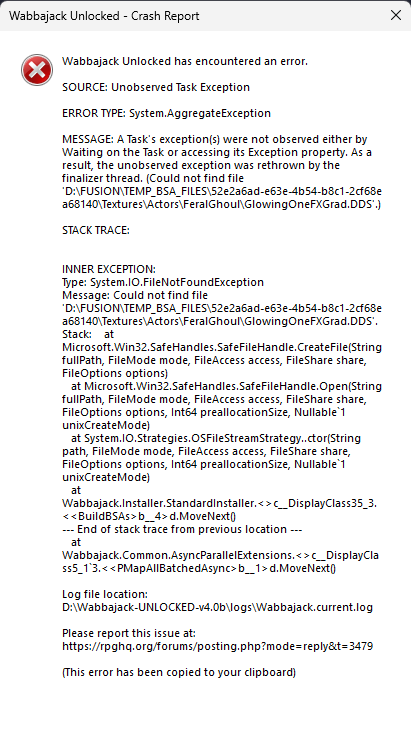
loregamer wrote: ↑ January 25th, 2026, 04:12I haven't tested it thoroughly (or at all really since I can't simulate actual errors) but give this version a try @TAP. I've implemented an experimental intervention system that should allow you to retry the BSA creations or manually resolve deleting the locked files
Code: Select all
00:02:17.395 [INFO] (Wabbajack.Installer.StandardInstaller) Building 8 bsa files
00:02:17.395 [INFO] (Wabbajack.Installer.StandardInstaller) Next Step: Building BSAs
00:02:17.400 [INFO] (Wabbajack.Installer.StandardInstaller) Building FUSION NPC Merge - Textures.ba2
00:04:56.198 [ERROR] (Wabbajack.Installer.StandardInstaller) Error during BuildBSAs: Building FUSION NPC Merge - Textures.ba2|System.IO.IOException: The process cannot access the file 'D:\FUSION\__temp__\eR8TXWBE' because it is being used by another process.
   at Wabbajack.Paths.IO.AbsolutePathExtensions.Delete(AbsolutePath file)
   at Wabbajack.Paths.IO.TemporaryPath.DisposeAsync()
   at Wabbajack.Compression.BSA.DiskSlabAllocator.DisposeAsync()
   at Wabbajack.Compression.BSA.BA2Archive.Builder.DisposeAsync()
   at Wabbajack.Installer.StandardInstaller.<>c__DisplayClass35_2.<<BuildBSAs>b__2>d.MoveNext()
--- End of stack trace from previous location ---
   at Wabbajack.Installer.StandardInstaller.ExecuteWithIntervention(String stepName, String operationDescription, Func`1 operation, Boolean canSkip, String filePath, CancellationToken token, Nullable`1 testStep)
00:04:56.217 [WARN] (Wabbajack.InstallationVM) Installation error occurred at step BuildBSAs: The process cannot access the file 'D:\FUSION\__temp__\eR8TXWBE' because it is being used by another process.
00:07:08.637 [INFO] (Wabbajack.InstallationInterventionVM) User chose to retry operation: Building FUSION NPC Merge - Textures.ba2
00:07:08.637 [INFO] (Wabbajack.InstallationVM) User responded to intervention with: Retry
00:07:08.637 [INFO] (Wabbajack.Installer.StandardInstaller) Retrying operation: Building FUSION NPC Merge - Textures.ba2
00:07:08.637 [INFO] (Wabbajack.Installer.StandardInstaller) Building FUSION NPC Merge - Textures.ba2
00:10:03.429 [ERROR] (Wabbajack.Installer.StandardInstaller) Error during BuildBSAs: Building FUSION NPC Merge - Textures.ba2|System.IO.IOException: The process cannot access the file 'D:\FUSION\__temp__\nob6PLDt' because it is being used by another process.
   at Wabbajack.Paths.IO.AbsolutePathExtensions.Delete(AbsolutePath file)
   at Wabbajack.Paths.IO.TemporaryPath.DisposeAsync()
   at Wabbajack.Compression.BSA.DiskSlabAllocator.DisposeAsync()
   at Wabbajack.Compression.BSA.BA2Archive.Builder.DisposeAsync()
   at Wabbajack.Installer.StandardInstaller.<>c__DisplayClass35_2.<<BuildBSAs>b__2>d.MoveNext()
--- End of stack trace from previous location ---
   at Wabbajack.Installer.StandardInstaller.ExecuteWithIntervention(String stepName, String operationDescription, Func`1 operation, Boolean canSkip, String filePath, CancellationToken token, Nullable`1 testStep)
00:10:03.435 [WARN] (Wabbajack.InstallationVM) Installation error occurred at step BuildBSAs: The process cannot access the file 'D:\FUSION\__temp__\nob6PLDt' because it is being used by another process.
The only place I know to ask is cs.rin.ru, but others have asked recently for the same files and there's been no response.dhia3 wrote: ↑ January 23rd, 2026, 23:38I'm trying to download the Mad God Overhaul for Skyrim VR, but can't seem to find the clean files anywhere.
Anyone has an idea?
They're gay *******MrFred0 wrote: ↑ February 3rd, 2026, 22:11Is there any reason for the Wabbajack admins to be this mad, like... at all? I don't really see what they're losing from this.